تعارف
This manual provides essential information for the proper setup, operation, maintenance, and troubleshooting of your AOC E2070Swn 19.5-inch LED Widescreen Monitor. Please read this manual thoroughly before using the product to ensure optimal performance and longevity.

شڪل 1: سامهون view of the AOC E2070Swn monitor, showcasing its 19.5-inch LED display and compact design.
سيٽ اپ جون هدايتون
1. Unpacking
پيڪنگ مان سڀني حصن کي احتياط سان هٽايو. پڪ ڪريو ته هيٺيون شيون موجود آهن:
- AOC E2070Swn Monitor
- مانيٽر اسٽينڊ (بنياد ۽ گردن)
- پاور ڪيبل
- ويگا ڪيبل
- استعمال ڪندڙ جو دستياب (ھي دستاويز)
- Driver CD (for software installation)
2. اسٽينڊ گڏ ڪرڻ
- اسٽينڊ نيڪ کي مانيٽر پينل سان ڳنڍيو. پڪ ڪريو ته اهو محفوظ طور تي جاءِ تي ڪلڪ ڪري.
- اسٽينڊ بيس کي اسٽينڊ جي گردن سان ڳنڍيو. جيڪڏهن ڪو به اسڪرو مهيا ڪيو وڃي ته ان کي سخت ڪريو، جيڪو عام طور تي بيس جي تري ۾ هوندو آهي.

شڪل 2: ريڙهه view of the AOC E2070Swn monitor, illustrating the stand's attachment area and ventilation.
3. ڪيبل ڳنڍڻ
- پاور ڪنيڪشن: Connect the power cable to the monitor's power input port and then to a power outlet.
- وڊيو ڪنيڪشن: Connect one end of the VGA cable to the VGA port on your computer's graphics card and the other end to the VGA input port on the monitor.
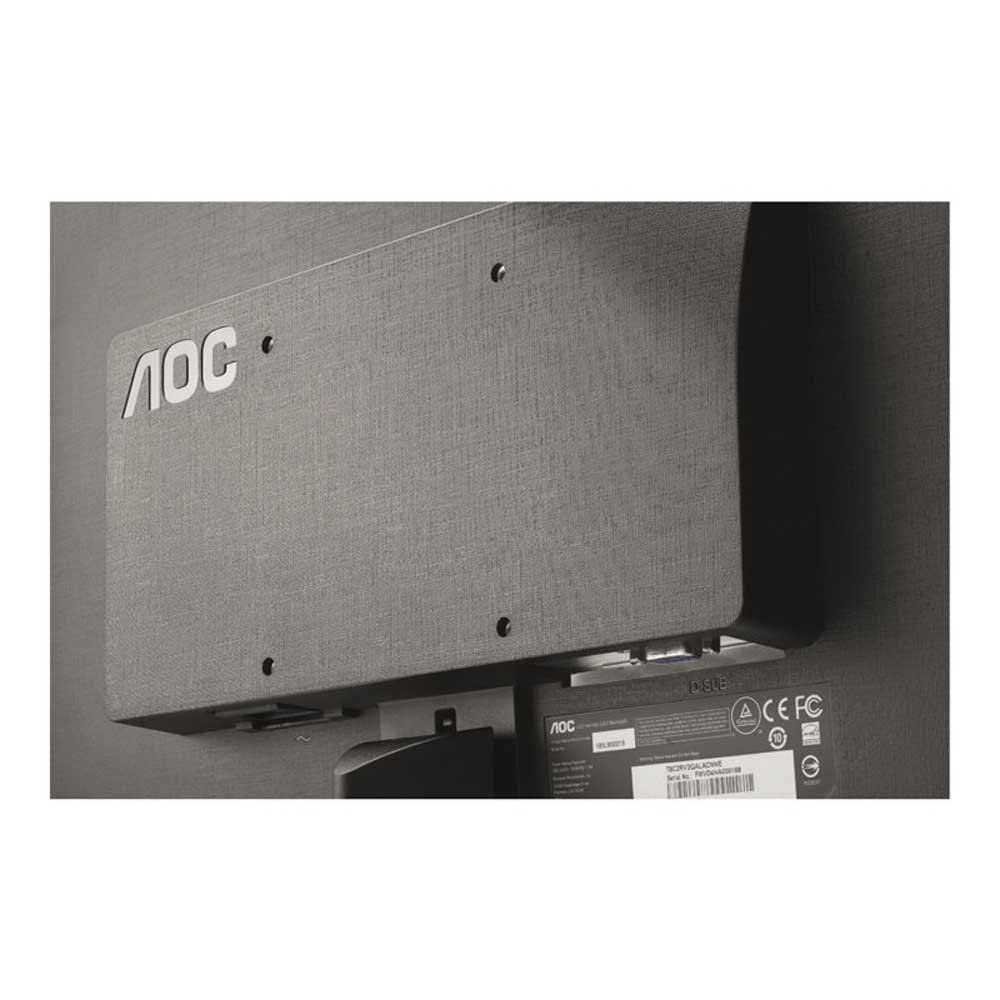
شڪل 3: تفصيلي view of the monitor's rear panel, highlighting the VGA input and power connector for cable attachment.
4. شروعاتي پاور آن
Press the power button located on the monitor. The monitor should power on and display an image from your connected computer. If no image appears, ensure all cables are securely connected and the computer is powered on.
آپريٽنگ هدايتون
1. پاور آن/آف
Press the power button on the front or bottom bezel of the monitor to turn it on or off.
2. آن-اسڪرين ڊسپلي (OSD) مينيو
The monitor features an On-Screen Display (OSD) menu for adjusting various settings. Use the physical buttons, typically located on the bottom right bezel, to navigate and select options within the OSD menu.
3. ڊسپلي سيٽنگون ترتيب ڏيڻ
Through the OSD menu, you can adjust settings such as:
- روشني: اسڪرين جي مجموعي روشني کي ڪنٽرول ڪري ٿو.
- تضاد: تصوير جي روشن ترين ۽ اونداهي علائقن جي وچ ۾ فرق کي ترتيب ڏئي ٿو.
- رنگ جي درجه حرارت: Modifies the color balance (e.g., Warm, Cool, sRGB).
- ان پٽ چونڊيو: Manually switch between available video inputs (if multiple are present).
For advanced display settings and optimal resolution configuration, it is recommended to install the drivers and software provided on the included CD. These tools allow for fine-tuning of display parameters directly from your computer's operating system.
سار سنڀال
1. مانيٽر جي صفائي
مانيٽر اسڪرين کي صاف ڪرڻ لاءِ ۽ سيasing:
- صاف ڪرڻ کان اڳ هميشه مانيٽر کي بند ڪريو ۽ پاور ڪنڊ کي ان پلگ ڪريو.
- نرم، لِنٽ کان خالي ڪپڙو استعمال ڪريو ٿورڙو ڊيampپاڻي يا غير رگڙيندڙ اسڪرين ڪلينر سان صاف ڪيو وڃي.
- Avoid using alcohol, ammonia, or abrasive cleaners, as these can damage the screen surface.
- نرميءَ سان صاف ڪريو؛ اسڪرين تي گهڻو دٻاءُ نه وجهو.
2. عام سنڀال
- مانيٽر کي سڌو سورج جي روشني ۾ يا گرمي جي ذريعن جي ويجهو رکڻ کان پاسو ڪريو.
- وڌيڪ گرم ٿيڻ کان بچڻ لاءِ مانيٽر جي چوڌاري مناسب وينٽيليشن کي يقيني بڻايو.
- مانيٽر يا ان جي ڪيبل تي ڳري شيون نه رکو.
مشڪلاتون
جيڪڏهن توهان کي پنهنجي مانيٽر سان مسئلا درپيش اچن ٿا، ته هيٺ ڏنل عام مسئلن ۽ حلن جو حوالو ڏيو:
- اسڪرين تي ڪا به تصوير ناهي:
- Ensure the monitor's power cable is securely connected to both the monitor and a working power outlet.
- Verify the video cable (VGA) is firmly connected to both the monitor and the computer.
- پڪ ڪريو ته ڪمپيوٽر آن آهي ۽ سليپ موڊ ۾ نه آهي.
- Press the monitor's power button to ensure it is turned on.
- Image is Distorted or Unclear:
- ڪنهن به نقصان يا لوز ڪنيڪشن لاءِ وڊيو ڪيبل چيڪ ڪريو.
- Adjust the monitor's resolution settings through your computer's display settings to match the monitor's native resolution (e.g., 640 x 480).
- Use the OSD menu to perform an auto-adjustment or manually adjust brightness, contrast, and phase settings.
- Monitor Power LED is Off:
- Ensure the power cable is properly connected and the power outlet is functional.
- مانيٽر تي پاور بٽڻ کي دٻايو.
If the problem persists after attempting these solutions, please contact AOC customer support for further assistance.
وضاحتون

شڪل 4: طول و عرضview of the AOC E2070Swn monitor, indicating height, width, and depth.
| خاصيت | تفصيل |
|---|---|
| برانڊ | AOC |
| ماڊل نمبر | E2070Swn |
| اسڪرين جي ماپ | 19.5 انچ |
| ڊسپلي جو قسم | ايل اي ڊي وائڊ اسڪرين |
| قرارداد | 640 x 480 |
| اسپيڪٽ ريشو | 16:9 |
| وڊيو ان پٽ | 1 x VGA پورٽ |
| جلدtage | 220 وولٽ |
| واتtage | 18 واٽ |
| پيداوار جي ماپ (LxWxH) | 52.07 x 10.67 x 11.43 سينٽي |
| شيءِ جو وزن | 3.18 ڪلو |
وارنٽي ۽ سپورٽ
وارنٽي ڄاڻ
This AOC E2070Swn monitor comes with a 3 سال وارنٽي from the date of purchase. This warranty covers manufacturing defects and ensures repair or replacement of the product under normal usage conditions. Please retain your proof of purchase for warranty claims.
ڪسٽمر سپورٽ
For technical assistance, warranty claims, or any other inquiries regarding your AOC monitor, please visit the official AOC support website or contact their customer service department. Refer to the contact information provided with your product packaging or on the AOC official webسائيٽ.


