تعارف
This manual provides comprehensive instructions for the installation, operation, and maintenance of your KitVision Observer 1080p Dashboard Camera. Please read this manual thoroughly before using the device to ensure proper functionality and safety. This device is designed to record your journeys, providing a reliable record of events on the road.
پيداوار ختمview
اجزاء
The KitVision Observer 1080p Dashboard Camera package includes the following items:
- KV Observer 1080p Dashboard Camera
- ڪار ۾ چارجر
- ميني USB ڪيبل
- سکشن جبل
- يوزر مينوئل (هي دستاويز)
اهم خاصيتون
The KitVision Observer 1080p Dashboard Camera offers a range of features to enhance your driving experience and provide security:
- مڪمل HD 1080P رڪارڊنگ: Captures video at 30 frames per second for clear footage.
- وائڊ اينگل لينس: A 170-degree ultra-wide angle lens covers a broad view رستي جو.
- 2.45 انچ LCD ڊسپلي: Allows for real-time viewing and playback of recorded footage.
- Built-in G-Sensor: Automatically detects collisions and saves the corresponding footage overwriting کي روڪڻ لاء.
- مسلسل لوپ رڪارڊنگ: Records continuously, overwriting the oldest unneeded files جڏهن ميموري ڪارڊ مڪمل آهي.
- 12 Megapixel Photo Mode: Enables capturing high-resolution still images.
- WDR (Wide Dynamic Range) Technology: Provides enhanced visibility and recording quality in varying light conditions, including low light.
- حرڪت جي چڪاس: Automatically starts recording when motion is detected in front of the camera.
- پارڪنگ موڊ: Provides surveillance even when the vehicle is parked and turned off.
پيداوار Views

شڪل 1: سامهون view of the KitVision Observer 1080p Dashboard Camera, highlighting the main lens and branding.
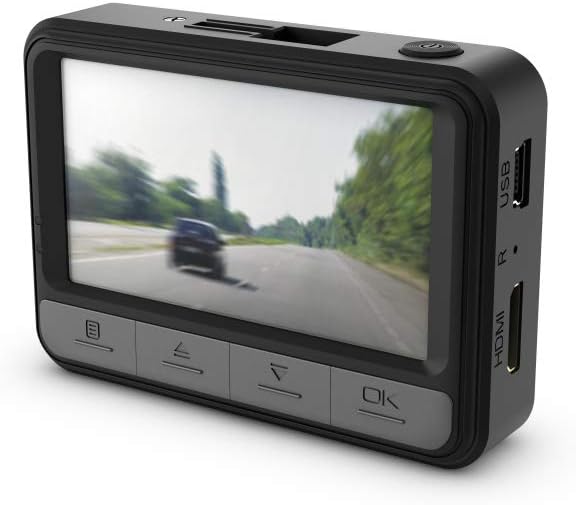
شڪل 2: ريڙهه view of the dashboard camera, showing the LCD screen and the navigation buttons for menu control.

شڪل 3: پاسي view of the camera, illustrating the USB and HDMI connectivity ports.

شڪل 4: The dashboard camera with its screen articulated upwards, providing a different viewڊوائيس جو زاويه.
سيٽ اپ ڪريو
1. ميموري ڪارڊ داخل ڪرڻ
Before first use, a compatible microSD card (not included) must be inserted into the camera. Ensure the camera is powered off before inserting or removing the card. Locate the microSD card slot on the side of the camera and gently push the card in until it clicks into place. To remove, push the card in again until it springs out.
2. ڪئميرا لڳائڻ
- Clean the desired area on your windshield where the camera will be mounted. Ensure it does not obstruct your view رستي جو.
- Attach the suction mount to the camera.
- Press the suction cup firmly against the windshield and engage the locking lever to secure it.
- Adjust the camera angle to ensure it captures the road ahead clearly.

شڪل 5: بند ڪرڻ view of the dashboard camera securely mounted on the vehicle's windshield.

شڪل 6: The dashboard camera installed in a vehicle, demonstrating its placement for optimal road recording.
3. پاور ڪنيڪشن
Connect the in-car charger to the camera's power input port and plug the other end into your vehicle's 12V power outlet (cigarette lighter socket). The camera will typically power on and begin recording automatically when the vehicle's ignition is turned on.
4. شروعاتي سيٽنگون
Upon first power-on, you may need to set the date, time, and language. Use the navigation buttons below the screen to adjust settings and the 'OK' button to confirm. Refer to the 'Operating Instructions' section for detailed menu navigation.
آپريٽنگ هدايتون
1. پاور آن/آف
- خودڪار: The camera powers on and off with your vehicle's ignition.
- دستياب: Press and hold the power button (usually located on the top or side) to manually turn the camera on or off.
2. رڪارڊنگ موڊس
- مسلسل لوپ رڪارڊنگ: The default mode. The camera records video in segments (e.g., 1, 3, or 5 minutes) and automatically overwrites the oldest unlocked files جڏهن ميموري ڪارڊ مڪمل آهي.
- G-Sensor (Collision Detection): When the built-in G-Sensor detects a sudden impact or collision, the current recording segment is automatically locked and saved to a protected folder, preventing it from being overwritten.
- حرڪت جي چڪاس: When enabled in the settings, the camera will start recording automatically if it detects movement in its field of view while parked. This feature requires a continuous power supply.
- پارڪنگ موڊ: Similar to motion detection, this mode provides surveillance when the vehicle is parked. It typically activates upon detecting impact or motion, recording for a short period. This also requires a continuous power supply or sufficient internal battery charge.
3. Menu Navigation and Settings
Use the buttons located below the LCD screen to navigate the camera's menu. Typically, there are buttons for Menu, Up, Down, and OK/Confirm. Press the 'Menu' button to access settings such as video resolution, loop recording duration, G-sensor sensitivity, date/time, and more.
4. پلے بیک
Toيهر ڪرڻview رڪارڊ ٿيل footage directly on the camera, enter playback mode via the menu. Use the navigation buttons to select and play video files. Alternatively, you can remove the microSD card and view files on a computer, or connect the camera directly to a computer using the Mini USB cable.
5. فوٽو موڊ
Switch to photo mode via the menu to capture still images. Press the 'OK' button to take a picture. The camera supports 12 Megapixel photos.
سار سنڀال
1. ڪئميرا صاف ڪرڻ
- ڪئميرا جي باڊي کي صاف ڪرڻ لاءِ نرم، سڪل ڪپڙو استعمال ڪريو.
- For the lens and screen, use a lens cleaning cloth specifically designed for optics to avoid scratches. Do not use abrasive cleaners or solvents.
2. ميموري ڪارڊ جو انتظام
- فارميٽنگ: It is recommended to format the microSD card periodically (e.g., once a month) using the camera's menu function. This helps maintain optimal recording performance and prevents data corruption. Formatting will erase all data on the card, so back up any important files پهريون.
- متبادل: Memory cards have a limited lifespan. If you experience frequent recording errors or data corruption, consider replacing the microSD card with a new, high-quality card.
3. بيٽري جي سنڀال
The camera contains a Lithium Ion battery. Avoid exposing the camera to extreme temperatures for prolonged periods, as this can affect battery life and performance. If the camera will not be used for an extended time, ensure it is stored in a cool, dry place with a partial charge.
مشڪلاتون
If you encounter issues with your KitVision Observer 1080p Dashboard Camera, refer to the following common solutions:
- ڪئميرا تي طاقت نه آهي: Ensure the in-car charger is securely connected to both the camera and the vehicle's power outlet. Check if the vehicle's power outlet is functioning.
- Camera not recording: Verify that a microSD card is inserted correctly and has sufficient free space. Format the memory card if necessary (after backing up important files). Check recording settings in the menu.
- خراب وڊيو معيار: Clean the camera lens. Ensure the windshield area in front of the camera is clean. Check the video resolution settings in the menu.
- G-Sensor not triggering: Adjust the G-sensor sensitivity in the camera's settings. If set too low, it may not detect minor impacts.
- بٽڻ غير جوابده: Try resetting the camera by pressing the reset button (if available, often a small pinhole) or by disconnecting and reconnecting the power.
- Date/Time incorrect: Re-enter the correct date and time in the camera's settings menu.
جيڪڏهن انهن حلن جي ڪوشش ڪرڻ کان پوءِ به مسئلو برقرار رهي، مهرباني ڪري ڪسٽمر سپورٽ سان رابطو ڪريو.
وضاحتون
| خاصيت | تفصيل |
|---|---|
| پيداوار جي ماپ | 9.25 x 2.16 x 4.52 انچ |
| شيءِ جو وزن | 5.3 آونس (0.33 پائونڊ) |
| ASIN | B00EUUD01C |
| شيون ماڊل نمبر | KVOBS108 |
| بيٽريون | 1 ليتيم آئن بيٽري گھربل (شامل) |
| تاريخ پهرين دستياب | آڪٽوبر 14، 2013 |
| ٺاهيندڙ | Kondor Limited |
| برانڊ | KitVision |
| ماڊل نالو | Kitvision Observer 1080p Dashboard Camera |
| گاڏين جي سروس جو قسم | ڪار |
| رابطي ٽيڪنالاجي | USB |
| خاص خصوصيت | موشن سينسنگ |
| وڊيو ڪيپچر ريزوليوشن | 1080 ص |
| شامل اجزاء | KV Observer 1080p Dashboard Camera, In-car charger, Mini USB cable, Suction mount, User manual |
| رنگ | ڪارو |
| ڪنٽرول جو طريقو | Touch (referring to buttons, not touch screen) |
وارنٽي ۽ سپورٽ
For warranty information, please refer to the documentation included with your product or visit the official KitVision website. If you require technical assistance or have questions not covered in this manual, please contact KitVision customer support through their official channels.


