1. تعارف
This user manual provides essential information for the proper setup, operation, and maintenance of your AOC i2269vw 22-Inch Class IPS Frameless/Extra Slim LED Monitor. Please read this manual thoroughly before using the product to ensure optimal performance and safety.

This image shows the front of the AOC i2269vw monitor, highlighting its slim bezel design and the AOC logo at the bottom center. The screen displays a vibrant green leaf.
2. حفاظت جي ڄاڻ
نقصان کي روڪڻ ۽ محفوظ آپريشن کي يقيني بڻائڻ لاءِ، هيٺ ڏنل احتياطي تدبيرن تي عمل ڪريو:
- مانيٽر کي مينهن يا نمي جي سامهون نه رکو.
- مانيٽر نه کوليو casing؛ اندر ڪو به استعمال ڪندڙ جي خدمت لائق پرزا نه آهن. سڀني سروسنگ کي قابل سروس اهلڪارن جي حوالي ڪريو.
- مانيٽر کي هڪ مستحڪم، فليٽ مٿاڇري تي رکو ته جيئن ان کي ڪري نه پوي.
- مانيٽر جي چوڌاري مناسب وينٽيليشن کي يقيني بڻايو. وينٽيليشن جي سوراخن کي بند نه ڪريو.
- صرف مانيٽر سان فراهم ڪيل پاور ڪنڊ ۽ اڊاپٽر استعمال ڪريو.
- جيڪڏهن مانيٽر ڊگهي عرصي تائين استعمال نه ٿيندو ته پاور پلگ کي آئوٽ ليٽ کان ڌار ڪريو.
3. پيڪيج مواد
پڪ ڪريو ته سڀئي شيون پيڪيج ۾ موجود آهن:
- AOC i2269vw 22-Inch Class IPS Frameless/Extra Slim LED Monitor
- مانيٽر اسٽينڊ بيس
- اسٽينڊ نيڪ مانيٽر ڪريو
- پاور ڪنڊ
- ويگا ڪيبل
- DVI-D ڪيبل
- استعمال ڪندڙ جو دستياب (ھي دستاويز)
4. سيٽ اپ
4.1 اسٽينڊ کي گڏ ڪرڻ
- ڇڪڻ کان بچڻ لاءِ مانيٽر جو مُنهن احتياط سان نرم، صاف ڪپڙي تي رکو.
- Attach the stand neck to the back of the monitor, aligning the mounting points.
- مهيا ڪيل اسڪرو استعمال ڪندي اسٽينڊ نيڪ کي مانيٽر سان محفوظ ڪريو.
- Attach the stand base to the bottom of the stand neck and tighten the thumb screw or screw from the bottom.
4.2 مانيٽر کي ڳنڍڻ
The AOC i2269vw monitor supports VGA and DVI-D connections.

The back of the AOC i2269vw monitor is shown, detailing the power input, DVI-D port, and VGA port. The monitor stand is also visible.

هڪ تفصيلي view of the monitor's rear connectivity, specifically highlighting the DVI-D and VGA input ports, essential for connecting the monitor to a computer.
- Connect one end of the VGA or DVI-D cable to the corresponding port on your computer's graphics card.
- Connect the other end of the cable to the VGA or DVI-D input port on the back of the AOC i2269vw monitor.
- پاور ڪنڊ کي مانيٽر جي پاور ان پٽ سان ڳنڍيو، پوءِ ٻئي ڇيڙي کي گرائونڊ ٿيل اليڪٽريڪل آئوٽليٽ ۾ لڳايو.
4.3 VESA Wall Mounting
The AOC i2269vw monitor is VESA 75mm compliant, allowing for wall mounting or use with compatible monitor arms. Ensure you use a VESA-compatible mounting bracket (not included) and follow its installation instructions.

This diagram provides a visual representation of the AOC i2269vw monitor's dimensions (21.0 inches or 53 cm wide) in context, showing it on a table next to a seated person for scale.
5. مانيٽر کي هلائڻ
5.1 پاور آن/آف
Press the power button located on the front bottom bezel of the monitor to turn it on or off.

This image focuses on the control buttons situated on the lower right bezel of the monitor, including the power button and navigation controls for accessing the On-Screen Display (OSD) menu.
5.2 آن اسڪرين ڊسپلي (OSD) مينيو
Use the control buttons on the front bezel to navigate and adjust settings within the OSD menu. Common adjustments include:
- چمڪ/ برعڪس: روشني ۽ اونداهي علائقن جي وچ ۾ مجموعي روشني ۽ فرق کي ترتيب ڏيو.
- ان پٽ چونڊيو: Manually switch between VGA and DVI-D input sources.
- رنگ سيٽنگون: Fine-tune color temperature, gamma, and individual RGB levels.
- تصويري سيٽ اپ: Auto-adjust for analog (VGA) input, or manually adjust clock, phase, and H/V position.
- او ايس ڊي سيٽ اپ: Change OSD language, position, and timeout.
5.3 IPS Panel Benefits
The AOC i2269vw features an IPS (In-Plane Switching) panel, which provides consistent image appearance and accurate colors from all viewing positions. This is particularly beneficial for tasks requiring color accuracy or when multiple people are viewاسڪرين تي.
6. سار سنڀال
6.1 مانيٽر جي صفائي
- هميشه صاف ڪرڻ کان اڳ مانيٽر کي انپلگ ڪريو.
- اسڪرين لاءِ، نرم، لِنٽ کان پاڪ ڪپڙو استعمال ڪريو هلڪو ڊampened with a non-abrasive, ammonia-free, and alcohol-free glass cleaner. Spray the cleaner onto the cloth, not directly onto the screen.
- لاء <casing، نرم، سڪل ڪپڙو استعمال ڪريو. سخت ڪيميڪلز يا رگڙيندڙ مواد استعمال ڪرڻ کان پاسو ڪريو.
6.2 اسٽوريج
When storing the monitor, keep it in a cool, dry place away from direct sunlight and extreme temperatures. If possible, use the original packaging for protection.
7. مسئلا حل ڪرڻ
جيڪڏهن توهان کي پنهنجي مانيٽر سان مسئلا درپيش اچن ٿا، ته هيٺ ڏنل عام مسئلن ۽ حلن جو حوالو ڏيو:
| مسئلو | ممڪن سبب | حل |
|---|---|---|
| اسڪرين تي ڪوبه تصوير نه آهي | Monitor not powered on; Incorrect input selected; Loose video cable. | Press the power button; Check OSD for correct input; Ensure video cable is securely connected. |
| تصوير ڌنڌلي يا بگڙيل آهي. | Incorrect resolution; Analog signal interference (VGA). | Set display resolution to 1920x1080; Use OSD to auto-adjust or manually adjust clock/phase for VGA. |
| ڪو به آواز ناهي (جيڪڏهن ٻاهرين اسپيڪر ڳنڍيل آهن) | No audio output from monitor; Speakers not connected or powered. | This monitor does not have built-in speakers. Ensure external speakers are properly connected to your computer and powered on. |
| پاور LED بند آهي | بجلي جي فراهمي ناهي. | Check if the power cord is securely connected to the monitor and the electrical outlet. Try a different outlet. |
If the problem persists after trying these solutions, please contact AOC customer support.
8. وضاحتون
Detailed technical specifications for the AOC i2269vw monitor:
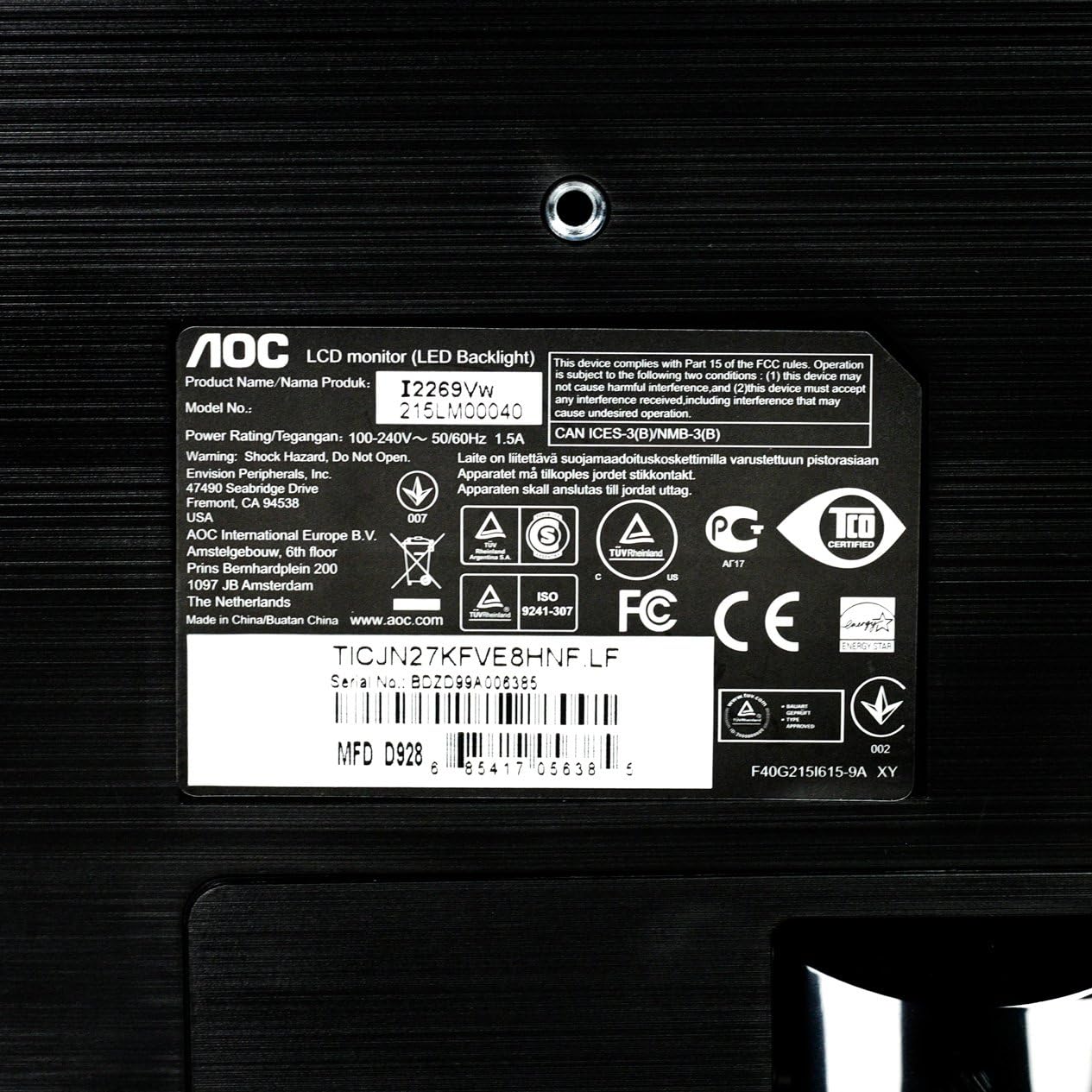
وڌايل view of the product label on the monitor's back, displaying important details such as the model number (i2269Vw), power rating, serial number, and various regulatory compliance logos.
| خاصيت | تفصيل |
|---|---|
| ماڊل نالو | i2269Vw |
| اسڪرين جي ماپ | 22 انچ (21.5") viewقابل) |
| پينل جو قسم | آئي پي ايس |
| قرارداد | 1920 x 1080 (مڪمل HD) |
| اسپيڪٽ ريشو | 16:9 |
| روشني | 250 cd/m² |
| جوابي وقت | 5ms |
| متحرڪ ڪنٽراسٽ ريشو | 50,000,000:1 (DCR) |
| ان پٽ پورٽس | VGA, DVI-D with HDCP |
| VESA جبل مطابقت | 75mm |
| رنگ | ڪارو |
| شيءِ جو وزن | 7.7 پائونڊ |
| پيداوار جي ماپ (LxWxH) | 19.6 x 7.4 x 14.9 انچ |
9. وارنٽي ۽ سپورٽ
For warranty information and technical support, please refer to the warranty card included with your product or visit the official AOC website. You can also contact AOC customer service for assistance with product inquiries, troubleshooting, or service requests.


