1. تعارف
The D-Link DIR-808L Wireless AC600 Dual-Band Cloud Router provides high-speed Wi-Fi connectivity with dual-band technology and Fast Ethernet ports. This device is designed to deliver a reliable networking experience for home use, supporting activities such as HD media streaming, online gaming, and web browsing. It includes security features and mydlink Cloud Services for remote network management.
The DIR-808L is backward compatible with existing Wi-Fi devices (802.11a/b/g/n) for seamless integration into your current network setup.
2. پيڪيج مواد
تصديق ڪريو ته توھان جي پيڪيج ۾ ھيٺيون شيون شامل آھن:
- Wireless AC600 Dual Band Cloud Router (DIR-808L)
- پاور اڊاپٽر
- Ethernet ڪيبل
- تڪڙو انسٽال ھدايت
If any of the above items are missing or damaged, please contact your local D-Link reseller.
3. گھٽ ۾ گھٽ سسٽم گهرجن
To set up and use the D-Link DIR-808L router, ensure your computer meets the following minimum requirements:
- آپريٽنگ سسٽم: Windows® 8, Windows® 7, Windows Vista®, Windows® XP SP3, or Mac OS® X (v10.4 or higher)
- Web برائوزر: Internet Explorer® v6, Mozilla® Firefox®, Google Chrome, or Safari 4 or higher
- هارڊويئر: نيٽ ورڪ انٽرفيس ڪارڊ (NIC)
For Internet access, you will also need:
- ڪيبل يا ڊي ايس ايل موڊيم
- انٽرنيٽ سروس فراهم ڪندڙ (ISP) سان سبسڪرپشن
4. ھارڊويئر ختمview
Familiarize yourself with the physical components and ports of your DIR-808L router.

شڪل 4.1: سامهون view of the DIR-808L router with power and internet status indicators.

شڪل 4.2: Rear panel of the DIR-808L router, detailing port layout.
ريئر پينل وضاحت:
- LAN بندرگاهن (1-4): Four Fast Ethernet ports for connecting wired devices such as computers, gaming consoles, or network storage.
- انٽرنيٽ پورٽ: انٽرنيٽ تائين رسائي لاءِ توهان جي موڊيم سان ڳنڍي ٿو.
- ري سيٽ بٽڻ: Press and hold for 10 seconds to restore the router to factory default settings.
- پاور ان پٽ: شامل ڪريو پاور اڊاپٽر ھتي.
- WPS بٽڻ: Use for easy, secure wireless connection to WPS-compatible devices.
5. سيٽ اپ ۽ تنصيب
Follow these steps to set up your D-Link DIR-808L router.
5.1 جسماني ڪنيڪشن
- بجلي بند: پنهنجي موڊيم ۽ روٽر کان بجلي ڌار ڪريو (جيڪڏهن قابل اطلاق هجي).
- موڊيم ڳنڍيو: پنهنجي موڊيم جي ايٿرنيٽ پورٽ مان هڪ ايٿرنيٽ ڪيبل ڳنڍيو انٽرنيٽ port on the back of your DIR-808L router.
- ڪمپيوٽر سان ڳنڍيو (اختياري): For initial setup, connect an Ethernet cable from your computer's Ethernet port to any of the LAN ports (1-4) on the back of your DIR-808L router. You can also connect wirelessly using the default Wi-Fi name and password found on the device label.
- پاور آن موڊيم: پاور اڊاپٽر کي پنهنجي موڊيم سان ڳنڍيو ۽ ان کي آن ڪريو. موڊيم جي انڊيڪيٽر لائيٽن جي مستحڪم ٿيڻ جو انتظار ڪريو، جيڪو هڪ فعال انٽرنيٽ ڪنيڪشن جي نشاندهي ڪري ٿو.
- پاور آن روٽر: شامل ٿيل پاور اڊاپٽر سان ڳنڍيو پاور ان پٽ on the back of your DIR-808L router and plug it into a power outlet. The power LED on the front of the router should illuminate.
5.2 شروعاتي ترتيب (Web برائوزر)
After physical connections are made, configure your router using a web برائوزر.
- کوليو a web روٽر سان ڳنڍيل ڪمپيوٽر تي برائوزر (مثال طور، ڪروم، فائر فاڪس، ايج).
- ايڊريس بار ۾، ٽائپ ڪريو
http://dlinkrouter.localor192.168.0.1۽ Enter کي دٻايو. - The D-Link Setup Wizard should appear. Follow the on-screen instructions to configure your Internet connection, wireless network name (SSID), and password.
- Create a unique password for your router's administration interface for security.
5.3 Quick Router Setup Mobile App
Alternatively, you can use the D-Link Quick Router Setup mobile app for convenient setup from your smartphone or tablet.
- Download the "D-Link QRS Mobile" app from the Apple App Store or Google Play Store.
- Connect your mobile device to the router's default Wi-Fi network (SSID and password are on the router's label).
- Launch the QRS Mobile app and follow the instructions to complete the setup.
6. آپريشن
This section covers the basic operation of your DIR-808L router.
6.1 Dual-Band Wireless Performance
DIR-808L ٻن فريڪوئنسي بينڊز تي ڪم ڪري ٿو: 2.4 GHz ۽ 5 GHz.
- 2.4 GHz بينڊ: عام انٽرنيٽ استعمال ۽ پراڻن ڊوائيسز لاءِ موزون، ڀتين ذريعي وسيع ڪوريج ۽ بهتر دخول فراهم ڪري ٿو.
- 5 GHz بينڊ: Offers faster speeds and less interference, ideal for high-bandwidth activities like HD video streaming and online gaming, but with a shorter range.
You can configure separate SSIDs (network names) for each band or use a single SSID for both, allowing the router to intelligently assign devices to the optimal band.
6.2 وائرڊ ڪنيڪشن
The four Fast Ethernet LAN ports allow you to connect up to four wired devices directly to the router for stable and fast connections.
6.3 mydlink Cloud Management
mydlink Cloud Services enable you to monitor and manage your network remotely from anywhere using the mydlink Lite app or the mydlink web پورٽل.
- ريموٽ رسائي: View connected devices, block unwanted users, and receive notifications.
- والدين ڪنٽرول: Manage internet access schedules and block specific webسائيٽون.
To use mydlink services, you will need to register your router with a mydlink account during or after the initial setup process.
6.4 وائرليس سيڪيورٽي
The DIR-808L supports WPA/WPA2 encryption to secure your wireless network. It is recommended to use WPA2-PSK (AES) for the strongest security.
- WPS (وائي فائي محفوظ سيٽ اپ): Provides a simple way to connect WPS-compatible devices to your wireless network by pressing the WPS button on the router and the device.
7. سار سنڀال
مناسب سار سنڀال توهان جي روٽر جي بهترين ڪارڪردگي ۽ ڊگهي عمر کي يقيني بڻائي ٿي.
- فرم ويئر اپڊيٽس: وقتي طور تي ڊي-لنڪ سپورٽ چيڪ ڪريو website for firmware updates. Updating firmware can improve performance, add new features, and fix security vulnerabilities. Instructions for updating firmware are typically provided with the update package.
- صفائي: Keep the router in a clean, dust-free environment. Use a soft, dry cloth to clean the exterior. Do not use liquid cleaners or aerosols.
- لڳائڻ: Place the router in a central location, away from obstructions and devices that may cause interference (e.g., cordless phones, microwaves).
8. مسئلا حل ڪرڻ
This section addresses common issues you might encounter with your DIR-808L router.
8.1 انٽرنيٽ ڪنيڪشن ناهي
- ڪيبل چيڪ ڪريو: پڪ ڪريو ته سڀئي ايٿرنيٽ ڪيبل محفوظ طور تي روٽر ۽ موڊيم تي صحيح پورٽن سان ڳنڍيل آهن.
- پاور سائيڪل: Power off your modem, then your router. Wait 30 seconds, then power on your modem first. Once the modem is fully online (indicator lights stable), power on your router.
- موڊيم جي حيثيت: Verify that your modem has an active internet connection. Check its indicator lights or consult your modem's manual.
- ISP سيٽنگون: Confirm your Internet Service Provider (ISP) settings are correctly entered in the router's web انٽرفيس.
8.2 Slow Wireless Speed or Poor Range
- روٽر جي جڳھ: Position the router in a central location, elevated, and away from large metal objects, concrete walls, and other electronic devices that may cause interference.
- مداخلت: Other wireless devices (cordless phones, microwaves, Bluetooth devices) can interfere with Wi-Fi signals. Try changing the wireless channel in the router's settings.
- Dual-Band Usage: Connect devices that require high bandwidth (e.g., streaming devices) to the 5 GHz band, and other devices to the 2.4 GHz band.
- فرم ویئر: پڪ ڪريو ته توهان جي روٽر جو فرم ويئر اپ ٽو ڊيٽ آهي.
8.3 روٽر تائين رسائي نه ٿي سگهي Web انٽرفيس
- IP پتو: پڪ ڪريو ته توهان جو ڪمپيوٽر خودڪار طريقي سان IP پتو (DHCP) حاصل ڪرڻ لاءِ سيٽ ٿيل آهي.
- صحيح پتو: Double-check that you are typing the correct address:
http://dlinkrouter.localor192.168.0.1. - Temporary Disable Firewall/Antivirus: پنهنجي ڪمپيوٽر تي ڪنهن به فائر وال يا اينٽي وائرس سافٽ ويئر کي عارضي طور تي غير فعال ڪريو جيڪو شايد رسائي کي روڪي رهيو هجي.
- روٽر ري سيٽ ڪريو: If all else fails, perform a factory reset by pressing and holding the Reset button on the back of the router for 10 seconds. نوٽ: هي توهان جون سڀئي ڪسٽم سيٽنگون ختم ڪري ڇڏيندو.
9. ٽيڪنيڪل وضاحتون
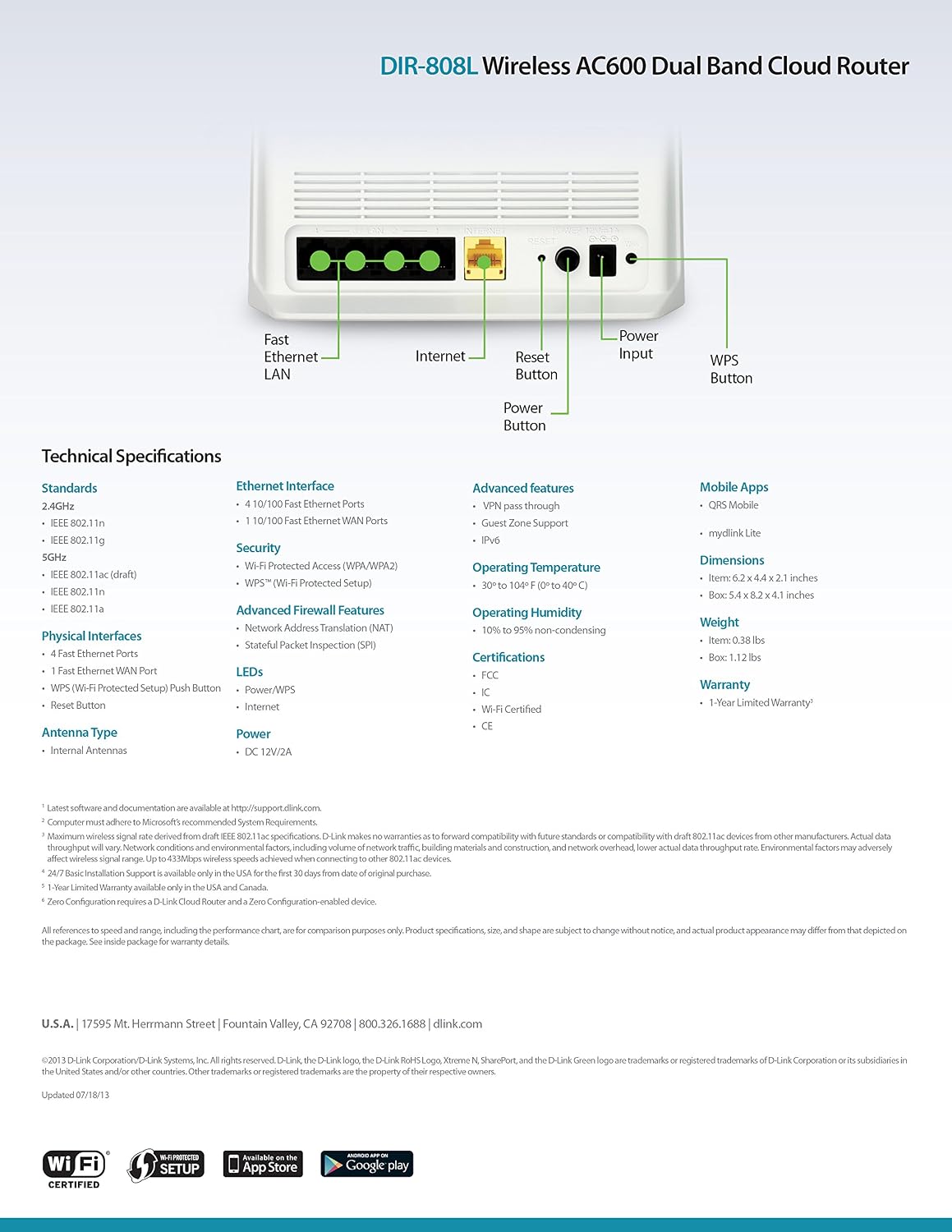
شڪل 9.1: Technical specifications and rear panel diagram of the DIR-808L router.
| خاصيت | وصف |
|---|---|
| ماڊل نالو | DIR-808L |
| وائرليس جو قسم | 802.11ac (AC600), 802.11a/b/g/n |
| فريڪوئنسي بينڊ ڪلاس | ڊوئل بينڊ (2.4 GHz ۽ 5 GHz) |
| وائرڊ ڪنيڪشن | 4 x Fast Ethernet LAN Ports, 1 x Fast Ethernet WAN Port |
| سيڪيورٽي | WPA/WPA2, WPS (Wi-Fi Protected Setup) |
| آپريٽنگ سسٽم مطابقت | ونڊوز، ميڪ، اينڊرائيڊ |
| طول و عرض (LxWxH) | 2.1 x 6.1 x 4.4 انچ |
| شيءِ جو وزن | 7.2 آونس (0.45 پائونڊ) |
| پاور ان پٽ | 12V ڊي سي، 1 اي |
| آپريٽنگ جي درجه حرارت | 0 کان 40 ° سي (32 کان 104 ° ف) |
| آپريٽنگ نمي | 10٪ کان 95٪ غير ڪنڊينسنگ |
| سرٽيفڪيشن | FCC, Wi-Fi Certified, CE |
10. وارنٽي ڄاڻ
The D-Link DIR-808L Wireless AC600 Dual-Band Cloud Router comes with a 1 سالن جي محدود وارنٽي خريداري جي تاريخ کان. هي وارنٽي عام استعمال هيٺ مواد ۽ ڪاريگري ۾ خرابين کي ڍڪيندي آهي.
For full warranty terms and conditions, please refer to the warranty card included with your product or visit the official D-Link webسائيٽ.
Legal Disclaimer: D-Link is not responsible for honoring warranty claims from unauthorized resellers. Please contact the manufacturer directly for official warranty service.
11. ٽيڪنيڪل سپورٽ
If you encounter problems that are not addressed in this manual, or require further assistance, please contact D-Link Technical Support.
- ڊي-لنڪ سپورٽ Webسائيٽ: گهمڻ support.dlink.com for FAQs, documentation, and firmware downloads.
- Phone Support (U.S.): You may contact D-Link customer support at 1-877-453-5465. Please have your product model number (DIR-808L) and serial number ready when calling.