1. تعارف
The Logitech Z150 Stereo PC Speakers are designed to deliver clear acoustic stereo sound for your computer, smartphone, tablet, or MP3 player. With 3 watts RMS power (6 watts peak), these compact speakers feature 5cm drivers, integrated controls for power and volume, a 3.5mm audio input for versatile connectivity, and a convenient headphone jack for private listening.

شڪل 1: سامهون view of the Logitech Z150 Stereo PC Speakers, showcasing انهن جي ڪمپيڪٽ ڊيزائن.
2. دٻي ۾ ڇا آهي
مھرباني ڪري پيڪيج جي مواد کي چيڪ ڪريو ته جيئن پڪ ڪري سگھجي ته سڀئي شيون موجود آھن:
- Two Logitech Z150 Speakers
- Power Adapter (UK plug)
- استعمال ڪندڙ دستاويز
3. سيٽ اپ گائيڊ
Follow these steps to set up your Logitech Z150 speakers:
- Unpack the Speakers: احتياط سان پيڪنگنگ مان سڀني اجزاء کي هٽايو.
- اسپيڪرز کي ڳنڍيو: The two speakers are connected by a fixed cable. Position them on your desk or desired surface.
- پاور اڊاپٽر کي ڳنڍيو: Plug the power adapter into the power input port on the back of the main speaker (the one with controls). Then, plug the power adapter into a wall outlet.

Figure 2: The power adapter with a UK plug.
- آڊيو ماخذ سان ڳنڍيو: Plug the 3.5mm audio jack from the speaker cable into the headphone jack or audio output port of your computer, smartphone, tablet, or MP3 player.

Figure 3: The 3.5mm audio jack for connecting to your device.

شڪل 4: پوئتي view of the speakers showing the audio input and power ports.
- پاور آن: Turn the volume knob on the front of the main speaker clockwise to power on the speakers. A green indicator light will illuminate.
4. آپريٽنگ هدايتون
Once set up, operating your Z150 speakers is straightforward:
- پاور آن / آف ۽ حجم ڪنٽرول: The large knob on the front of the right speaker controls both power and volume. Turn it clockwise to power on and increase volume, and counter-clockwise to decrease volume and power off.
- آڊيو ان پٽ: The speakers automatically play audio from the device connected via the 3.5mm audio jack. Ensure your audio source device's volume is also turned up.
- هيڊ فون جڪ For private listening, plug your headphones into the 3.5mm headphone jack located on the front of the main speaker. This will mute the speakers and redirect audio to your headphones.
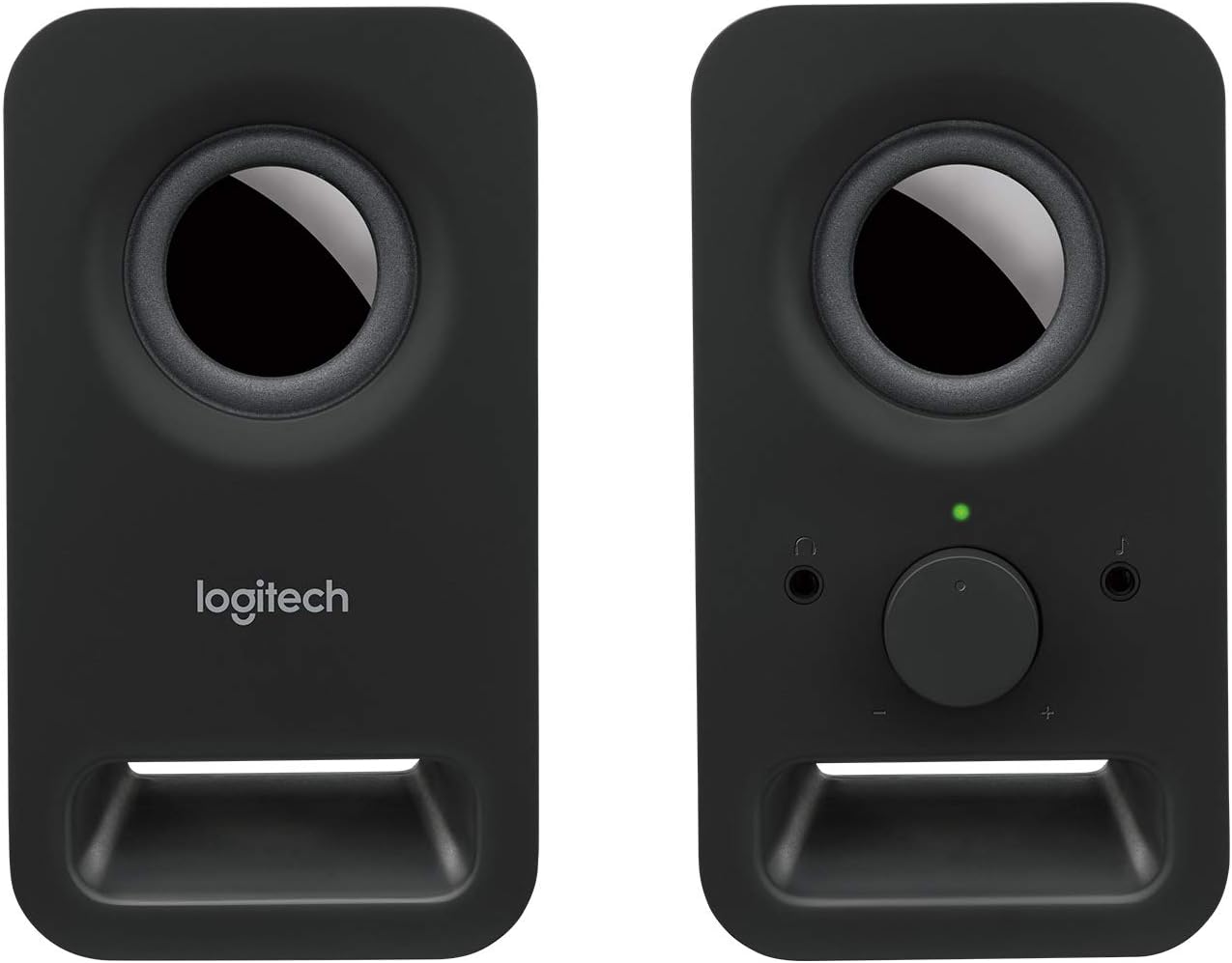
شڪل 5: سامهون view of the main speaker, highlighting the volume control and headphone jack.
5. سار سنڀال
To ensure the longevity and optimal performance of your Logitech Z150 speakers, follow these simple maintenance guidelines:
- صفائي: Use a soft, dry, lint-free cloth to clean the speaker surfaces. Do not use abrasive cleaners, waxes, or solvents.
- مائع کان بچاء: Do not expose the speakers to water or other liquids. If liquid spills on the speakers, immediately disconnect them from power and allow them to dry completely before reconnecting.
- لڳائڻ: Place the speakers on a stable, flat surface. Avoid placing them in direct sunlight, near heat sources, or in excessively humid environments.
- اسٽوريج: When not in use for extended periods, store the speakers in a cool, dry place.
6. مسئلا حل ڪرڻ
If you encounter issues with your Logitech Z150 speakers, refer to the following common problems and solutions:
| مسئلو | ممڪن سبب | حل |
|---|---|---|
| .الهائيندڙن مان آواز ڪونهي | Speakers are not powered on. | Turn the volume knob clockwise to power on the speakers. Check if the green indicator light is on. |
| آواز تمام گهٽ يا خاموش آهي. | Increase the volume using the knob on the speaker and on your audio source device. | |
| آڊيو ڪيبل صحيح طرح سان ڳنڍيل ناهي. | Ensure the 3.5mm audio jack is fully inserted into both the speaker and your audio source device. | |
| هيڊ فون ل plugل آهن. | Unplug headphones from the speaker's headphone jack. | |
| آواز خراب يا غير واضح آهي | حجم تمام گھڻو آھي. | Reduce the volume on both the speakers and your audio source device. |
| آڊيو سورس جو معيار خراب آهي. | ڪنهن ٻئي ذريعن کان آڊيو هلائڻ جي ڪوشش ڪريو يا file to determine if the issue is with the source. | |
| Only one speaker is working | Loose connection between speakers. | Ensure the fixed cable connecting the two speakers is not damaged. |
| آڊيو سورس آئوٽ پُٽ جو مسئلو. | Test with another audio source or check your device's audio settings for balance. |
7. وضاحتون
| خاصيت | تفصيل |
|---|---|
| ماڊل نالو | Z150 |
| شيون ماڊل نمبر | 980-000816 |
| اسپيڪر جو قسم | ملٽي ميڊيا |
| آڊيو آئوٽ پٽ موڊ | اسٽيريو (2.0 چينل) |
| وڌ ۾ وڌ اسپيڪر آئوٽ پُٽ پاور | 6 واٽ چوٽي / 3 واٽ RMS |
| اسپيڪر سائيز | 5 Centimeters (drivers) |
| رابطي ٽيڪنالاجي | AUX (3.5mm audio input) |
| ڪنٽرول جو طريقو | Rotary Knob (Power/Volume) |
| خاص خاصيتون | Plug and Play, Volume Control, Headphone Jack |
| مطابقت رکندڙ ڊوائيسز | Desktop computer, MP3 player, Mac, Smartphone, Tablet |
| پيداوار جا طول و عرض (ڊي x ڊبليو x ايڇ) | 7.6 x 8.5 x 15.2 سينٽي |
| شيءِ جو وزن | 583 گرام |
| رنگ | Black (Night) |
| شامل اجزاء | Two speakers, Power adapter (UK plug), User documentation |
| طاقت جو ذريعو | اي سي پاور ايڊاپٽر |
| چڙهڻ جو قسم | ٽيبل ٽاپ جبل |
8. وارنٽي ۽ سپورٽ
Your Logitech Z150 speakers come with a محدود وارنٽي. For specific details regarding the warranty period and terms, please refer to the user documentation included in the box or visit the official Logitech support webسائيٽ.
For technical support, troubleshooting beyond this manual, or warranty claims, please visit the Logitech support webسائيٽ تي support.logi.com. You may need your product model number (980-000816) when contacting support.
Please note that return policies may vary based on your point of purchase. For purchases made on Amazon, a 30-day return period typically applies if you change your mind, and specific assistance is available for defective or damaged products.


