تعارف
This manual provides essential information for the proper use and care of your Beats Studio Wireless Over-Ear Headphones. Please read these instructions carefully before using your headphones to ensure optimal performance and longevity. The Beats Studio Wireless headphones offer a premium audio experience with wireless connectivity and Adaptive Noise Canceling technology.
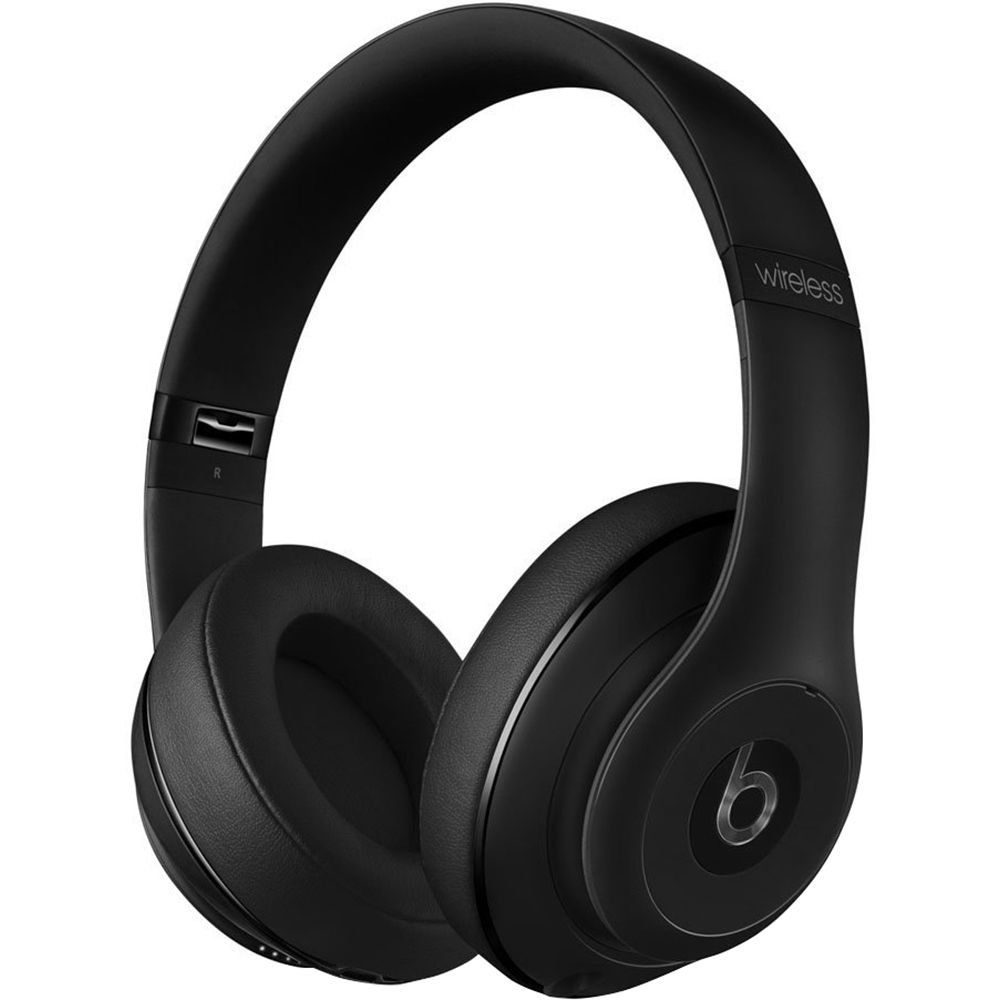
Image: Beats Studio Wireless Over-Ear Headphones in Matte Black, showcasinجي چمڪندڙ ڊيزائن.
دٻي ۾ ڇا آهي
پڪ ڪريو ته سڀئي شيون توهان جي پيڪيج ۾ موجود آهن:
- Beats Studio Wireless over-ear headphones
- 3.5mm audio cable with RemoteTalk (for wired connection and controls)
- Standard 3.5 mm audio cable (for wired connection without RemoteTalk features)
- USB 2.0 cable (USB-A to USB Micro-B) for charging
- Hard-shell carrying case with carabiner clip

Image: The Beats Studio Wireless headphones, hard-shell carrying case, and various cables laid out from the packaging.
سيٽ اپ ڪريو
1. هيڊفون چارج ڪرڻ
Before first use, fully charge your Beats Studio Wireless headphones. A full charge provides approximately 12 hours of wireless playback or 20 hours of wired playback with Adaptive Noise Canceling enabled.
- Connect the small end of the USB 2.0 cable (USB-A to USB Micro-B) to the Micro-USB port on the right earcup of the headphones.
- Connect the larger end of the USB cable to a USB power adapter (not included) or a powered USB port on a computer.
- The Fuel Gauge LEDs on the right earcup will indicate charging status. When all five LEDs are solid white, the headphones are fully charged.
نوٽ: The headphones cannot be used while charging.
2. بلوٽوٽ جوئر
وائرليس آڊيو لاءِ پنهنجا هيڊفون پنهنجي بلوٽوٿ-فعال ڊوائيس سان جوڙيو.
- پڪ ڪريو ته توهان جا هيڊفون چارج ٿيل ۽ بند آهن.
- Press and hold the power button on the right earcup for 3-5 seconds until the Fuel Gauge LEDs begin to pulse. This indicates pairing mode.
- پنهنجي ڊوائيس تي، بلوٽوٿ سيٽنگز ڏانهن وڃو ۽ بلوٽوٿ کي فعال ڪريو.
- Select "Beats Studio Wireless" from the list of available devices.
- Once paired, the Fuel Gauge LEDs will turn solid white.
The headphones have a Bluetooth range of up to 30 feet (9 meters).
3. وائرڊ ڪنيڪشن
For a wired connection, use the provided 3.5mm audio cables.
- Plug one end of the 3.5mm audio cable into the audio input port on the left earcup.
- ٻئي ڇيڙي کي پنهنجي ڊوائيس جي 3.5 ايم ايم آڊيو آئوٽ پُٽ جيڪ ۾ لڳايو.
The RemoteTalk cable allows for inline control of music and calls when connected to compatible devices.
آپريٽنگ هدايتون
1. پاور آن/آف
- پاور آن ڪرڻ: Press and hold the power button on the right earcup until the Fuel Gauge LEDs illuminate.
- پاور آف ڪرڻ: Press and hold the power button until the Fuel Gauge LEDs turn off.
2. Controls (Wireless Mode)
The "b" button on the left earcup and the volume buttons control playback and calls.
- راند/روڪ: Press the "b" button once.
- اڳيون ٽريڪ: Press the "b" button twice quickly.
- پويون ٽريڪ: Press the "b" button three times quickly.
- حجم مٿي Press the top volume button.
- حجم ھيٺ Press the bottom volume button.
- جواب/آخر ڪال: Press the "b" button once during an incoming call or active call.
- ڪال رد ڪريو: Press and hold the "b" button for 2 seconds during an incoming call.
- وائس اسسٽنٽ کي فعال ڪريو. Press and hold the "b" button for 2 seconds (functionality depends on device).
3. Adaptive Noise Canceling (ANC)
The Beats Studio Wireless headphones feature Dual-Mode Adaptive Noise Canceling. ANC is automatically active when the headphones are powered on. There are two modes:
- Full ANC: Engaged when listening to music or media, providing maximum noise reduction.
- ANC Only: When the audio cable is unplugged and the headphones are powered on, ANC will automatically switch to a more aggressive mode to reduce external noise without playing audio.
سار سنڀال
1. صفائي
To maintain the appearance and performance of your headphones:
- ڪنن جي ڪپن ۽ هيڊ بينڊ کي نرم، سڪل، لِنٽ فري ڪپڙي سان صاف ڪريو.
- گھڙڻ وارا صاف ڪندڙ، الڪوحل، يا ڪيميائي محلول استعمال نه ڪريو.
- ڪنهن به سوراخ ۾ نمي حاصل ڪرڻ کان پاسو ڪريو.
2. اسٽوريج
When not in use, store your headphones in the provided hard-shell carrying case to protect them from damage.
- Fold the headphones carefully to fit into the case.
- Keep headphones away from extreme temperatures and humidity.
3. بيٽري جي سنڀال
بيٽري جي زندگي کي وڌائڻ لاء:
- بيٽري کي بار بار مڪمل طور تي چارج ڪرڻ کان پاسو ڪريو.
- هيڊفونز کي باقاعدي چارج ڪريو، جيتوڻيڪ گهڻي عرصي تائين استعمال نه ڪيو وڃي.
- ٿڌي، سڪل جڳهه ۾ ذخيرو ڪريو.
مشڪلاتون
If you encounter issues with your Beats Studio Wireless headphones, try the following solutions:
بجلي ناهي / آن نه ٿي رهيو آهي
- پڪ ڪريو ته هيڊفون مڪمل طور تي چارج ٿيل آهن. USB ڪيبل استعمال ڪندي انهن کي پاور سورس سان ڳنڍيو.
- ڪنهن به نقصان لاء USB ڪيبل ۽ چارجنگ پورٽ چيڪ ڪريو.
ڪابه آواز / وقفي وقفي سان آڊيو ناهي
- وائرليس:
- Ensure headphones are paired and connected to your device.
- Check the volume levels on both the headphones and your device.
- Move closer to your device to avoid interference or exceeding Bluetooth range.
- پنهنجي ڊوائيس سان هيڊفونز کي ختم ڪرڻ ۽ ٻيهر جوڙڻ جي ڪوشش ڪريو.
- وائرس:
- Ensure the 3.5mm audio cable is securely plugged into both the headphones and your audio source.
- Try a different 3.5mm audio cable if available.
جوڙڻ جا مسئلا
- Ensure the headphones are in pairing mode (pulsing Fuel Gauge LEDs).
- بند ڪريو ۽ پوءِ پنهنجي ڊوائيس جي بلوٽوٿ کي آن ڪريو.
- Forget "Beats Studio Wireless" from your device's Bluetooth list and attempt to pair again.
- Ensure no other Bluetooth devices are interfering with the pairing process.
Adaptive Noise Canceling (ANC) Not Working
- Ensure the headphones are powered on. ANC requires power.
- Check for any obstructions around the external microphones on the earcups.
وضاحتون
Key technical specifications for the Beats Studio Wireless Over-Ear Headphones:
- ماڊل نالو: اسٽوڊيو
- رابطي ٽيڪنالاجي: Bluetooth (Wireless), 3.5 mm Jack (Wired)
- وائرليس ڪميونيڪيشن ٽيڪنالاجي: بلوٽوٿ
- بلوٽوٽ رينج: 30 فوٽ (9 ميٽر) تائين
- شور ڪنٽرول: Active Noise Cancellation (Dual-Mode Adaptive Noise Canceling)
- بيٽري جي زندگي: Approximately 12 hours (wireless), 20 hours (wired with ANC)
- بيٽري جو قسم: 1 Lithium Ion battery (rechargeable)
- ڪنٽرول قسم: Media Control (on-earcup "b" button, volume buttons)
- مائڪروفون: هينڊ فري ڪالن لاءِ بلٽ ان
- فارم فيڪٽر: ڪن مٿان
- ڪن جي جڳھ: ڪن مٿان
- مواد: پلاسٽڪ
- شيء جو وزن: تقريبن 9.2 آونس (0.26 ڪلوگرام)
- پيداوار جي ماپ: 9.6 x 7.3 x 4.5 انچ
- ٺاهيندڙ: بيٽ اليڪٽرانڪس ، ايل ايل
- تاريخ پهرين دستياب: ڊسمبر 1، 2013

تصوير: هڪ ويجهو تصوير view of the headphone's inner band, displaying the model number B0501.
وارنٽي ۽ سپورٽ
For warranty information and customer support, please refer to the official Beats webسائيٽ تي وڃو يا سڌو سنئون انهن جي ڪسٽمر سروس سان رابطو ڪريو. وارنٽي دعوائن لاءِ خريداري جو ثبوت رکو.
نوٽ: This product is an older model. Specific warranty terms may vary based on purchase date and region. Please consult the manufacturer's official resources for the most accurate and up-to-date information.
وڌيڪ مدد لاءِ، دورو ڪريو: بيٽس سپورٽ


