تعارف
Thank you for choosing the AULA Befire LED Backlit Gaming Keyboard. This manual provides essential information for setting up, operating, and maintaining your keyboard. Please read it thoroughly to ensure proper usage and to maximize your gaming and typing experience.
The AULA Befire keyboard is designed for comfort and performance, featuring a durable plastic construction, responsive keys, and vibrant LED backlighting.
سيٽ اپ ڪريو
- ڪي بورڊ کوليو: احتياط سان ڪيبورڊ کي ان جي پيڪنگ مان هٽايو.
- ڪمپيوٽر سان ڳنڍيو: Plug the USB connector of the keyboard into an available USB port on your computer. The keyboard is plug-and-play and should be recognized automatically by most operating systems.
- پوزيشن: Place the keyboard on a stable, flat surface. Adjust the support frame on the underside of the keyboard for your preferred typing angle.

آپريٽنگ هدايتون
LED Backlight ڪنٽرول
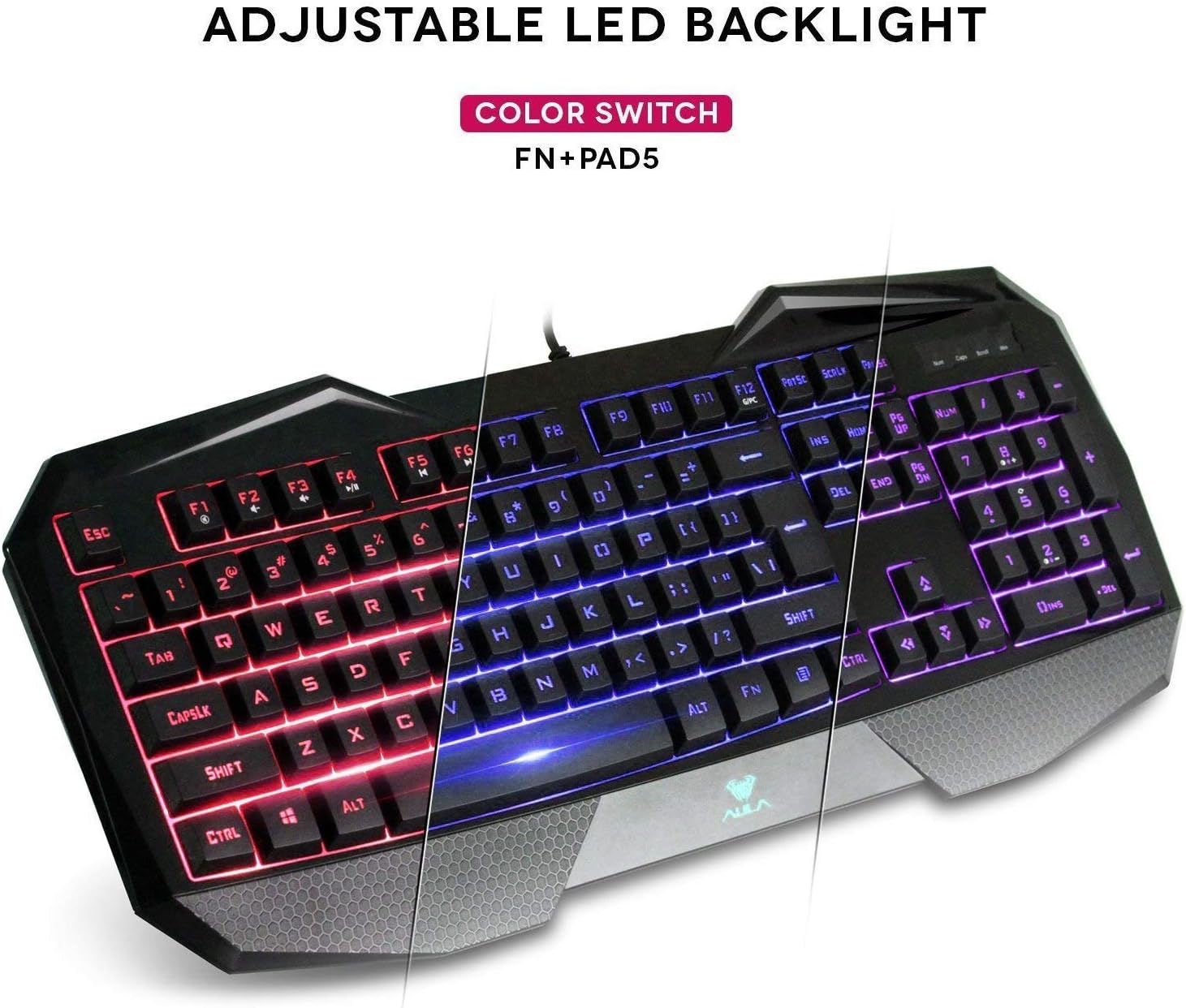
The AULA Befire keyboard features a special three-color LED backlight system (blue, red, and pink) with four adjustable brightness levels. This allows for comfortable usage in various lighting conditions and adds to the aesthetic appeal.

- رنگ تبديل ڪرڻ: To switch between the blue, red, and pink backlight colors, press and hold the Fn ڪي، پوء دٻايو '5' key on the numeric keypad (Fn+Pad5).
- روشني کي ترتيب ڏيڻ: The backlight has four gear (levels) to adjust its intensity. Use the dedicated brightness control keys (refer to keyboard layout for exact keys, often Fn + Page Up/Page Down or similar) to cycle through the brightness levels or turn the backlight off.
ونڊوز جي چاٻي
For an uninterrupted gaming experience, the keyboard features a lock/unlock function for the Windows key. This prevents accidental presses that could minimize your game.
- چالو ڪرڻ/غير فعال ڪرڻ: Press the dedicated Windows Lock key (often located near the right-top bezel or combined with an Fn function) to toggle the Windows key functionality.
- اشارو: A dedicated LED indicator on the right-top bezel will illuminate when the Windows key is locked.
ملٽي ميڊيا ۽ شارٽ ڪٽ ڪيز
The keyboard incorporates a series of shortcut function keys that work in conjunction with the Fn key. These keys provide quick access to multimedia controls and other common functions.

سار سنڀال
- صفائي: Use a soft, dry cloth to clean the keyboard surface. For deeper cleaning, a can of compressed air can be used to remove dust and debris from between the keys. Avoid using harsh chemicals or abrasive materials.
- وڌيڪ گرمائش جي روڪٿام: If the keyboard becomes less responsive due to prolonged use or high temperatures, disconnect it from the computer and allow it to cool down in a well-ventilated area before reconnecting.
- ڪي ڪيپ هٽائڻ: The keycaps are designed to be removable for cleaning or customization. Use a keycap puller (if provided) or gently pry them off from the edges. Be careful not to damage the key switches.
مشڪلاتون
- ڪي بورڊ جواب نه ڏئي رهيو آهي:
- پڪ ڪريو ته USB ڪيبل ڪيبورڊ ۽ ڪمپيوٽر ٻنهي ۾ محفوظ طور تي لڳل آهي.
- ڪيبورڊ کي ڪنهن ٻئي USB پورٽ ۾ لڳائڻ جي ڪوشش ڪريو.
- پنهنجي ڪمپيوٽر کي ٻيهر شروع ڪريو.
- ٻئي ڪمپيوٽر تي ڪيبورڊ ٽيسٽ ڪريو ته اهو طئي ڪيو وڃي ته مسئلو ڪيبورڊ سان آهي يا ڪمپيوٽر سان.
- بيڪ لائيٽ ڪم نه ڪري رهي آهي:
- Check if the backlight is simply turned off or set to the lowest brightness level. Use the brightness control keys (e.g., Fn + Page Up) to increase brightness.
- پڪ ڪريو ته ڪيبورڊ ڪمپيوٽر سان صحيح طرح سان ڳنڍيل آهي.
- Keys Not Registering or Sticking:
- Clean around and under the affected keys to remove any debris.
- If the issue persists, refer to the 'Overheating Prevention' section under Maintenance.
وضاحتون
| برانڊ | AULA |
| ماڊل | Befire |
| هارڊويئر پليٽ فارم | PC |
| شيءِ جو وزن | 2 پائونڊ |
| رابطي ٽيڪنالاجي | USB |
| ڪي بورڊ جي وضاحت | گيمنگ |
| تجويز ڪيل استعمال | گيمنگ |
| خاص خصوصيت | غير پرچي |
| Backlighting Colors | Blue, Red, Pink (RGB support mentioned in specs, but product description specifies 3 colors) |
| انداز | LED Backlit Gaming Keyboard |
| مواد | پلاسٽڪ |
| طول و عرض (L x W x H) | 458.5mm x 190mm x 30mm |

وارنٽي ۽ سپورٽ
وارنٽي جي معلومات ۽ ڪسٽمر سپورٽ لاءِ، مھرباني ڪري پنھنجي خريداري سان مهيا ڪيل دستاويزن جو حوالو ڏيو يا پرچون ڪندڙ/ٺاهيندڙ سان سڌو رابطو ڪريو. ڪنھن به وارنٽي دعوائن لاءِ پنھنجي خريداري جو ثبوت رکو.


