1. تعارف
This manual provides essential instructions for the safe and effective use of your Ricoh Compatible Toner Cartridge, Model 8541625508. This high-yield toner cartridge is designed to work seamlessly with Ricoh MP C4501 and MP C5501 series printers, delivering consistent print quality.
2. حفاظت جي ڄاڻ
- ٽونر ڪارٽريجز کي ٻارن جي پهچ کان پري رکو.
- Do not ingest toner. If toner is swallowed, seek medical attention immediately.
- Avoid direct contact with toner powder. If contact occurs, wash thoroughly with soap and water.
- Do not incinerate used toner cartridges, as this may cause toner to explode and release fine particles.
- Store cartridges in a cool, dry place away from direct sunlight and extreme temperatures.
3. پيڪيج مواد
توھان جي پيڪيج ۾ ھيٺيون شامل ٿيڻ گھرجي:
- One (1) Ricoh Compatible Toner Cartridge (Black, Cyan, Magenta, or Yellow, depending on your purchase).
4. تنصيب جون هدايتون
Follow these steps to install the toner cartridge into your Ricoh MP C4501 or MP C5501 series printer:
- پاور آف پرنٽر: Ensure your printer is turned off and unplugged from the power source before beginning the installation process.
- کليل سامهون وارو ڍڪ: ٽونر ڪارٽريج ڪمپارٽمينٽ تائين رسائي حاصل ڪرڻ لاءِ پنهنجي پرنٽر جي سامهون واري ڪَوَر کي ڳوليو ۽ کوليو.
- پراڻو ڪارٽريج هٽايو (جيڪڏهن قابل اطلاق هجي): Gently pull out the empty toner cartridge by its handle. Place it in a protective bag for recycling.
- نئون ڪارٽريج کوليو: Carefully remove the new compatible toner cartridge from its packaging.
- نرميءَ سان ڇڪيو: Hold the new cartridge horizontally and gently shake it 5-6 times to distribute the toner evenly inside.
- حفاظتي مهرون هٽايو: Remove any orange protective caps, seals, or pull-tabs from the cartridge. Be careful not to touch the green drum surface.
- نئون ڪارٽريج داخل ڪريو: Align the new toner cartridge with the corresponding slot in the printer and slide it in until it clicks firmly into place. Ensure it is fully seated.
- ڍڪ بند ڪريو: پرنٽر جي اڳيان ڪَوَر کي محفوظ طور تي بند ڪريو.
- پاور آن پرنٽر: Plug in and turn on your printer. The printer will typically perform a self-test and recognize the new cartridge.
- ٽيسٽ پيج پرنٽ ڪريو: Print a test page to confirm proper installation and print quality.
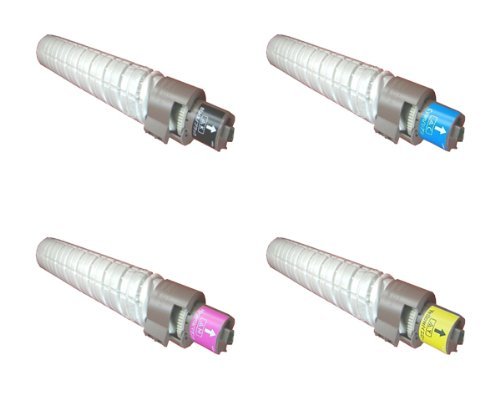
This image displays the compatible toner cartridge, similar to the one you have purchased. Note the packaging and the general shape of the cartridge before installation.
5. استعمال ۽ سنڀال
- ٽونر جي سطح جي نگراني ڪريو: Your printer's display or software will indicate current toner levels. Replace the cartridge when prompted or when print quality deteriorates significantly.
- سنڀال سان سنڀال: Avoid touching the green drum surface on the cartridge, as oils from your skin can affect print quality.
- ماحولياتي خيالات: Dispose of empty toner cartridges responsibly through recycling programs.
6. اسٽوريج
For optimal performance and longevity, store unused toner cartridges:
- In their original, unopened packaging.
- In a cool, dry environment (e.g., 10-30°C or 50-86°F).
- Away from direct sunlight, heat sources, and excessive humidity.
- Horizontally, not vertically.
7. مسئلا حل ڪرڻ
If you encounter issues with your toner cartridge, refer to the table below:
| مسئلو | ممڪن سبب | حل |
|---|---|---|
| Poor Print Quality (faded, streaks, spots) | Low toner, uneven toner distribution, dirty drum, incorrect printer settings. | Gently shake cartridge, check printer settings, perform a printer cleaning cycle, or replace cartridge if empty. |
| Cartridge Not Recognized | Improper installation, protective seals not removed, printer firmware issue. | Reinstall cartridge, ensure all protective seals are removed, check printer's display for error codes, consult printer manual for firmware updates. |
| Toner Leakage | Damaged cartridge, improper installation. | Carefully remove cartridge, inspect for damage. If damaged, replace. Ensure proper installation. Clean any spilled toner with a damp ڪپڙو. |
8. وضاحتون
- ماڊل نمبر: 8541625508
- مطابقت رکندڙ پرنٽر ماڊل: Ricoh MP C4501, Ricoh MP C5501
- قسم: مطابقت رکندڙ ٽونر ڪارٽريج
- خصوصيت: اعلي پيداوار
- شامل اجزاء: ٽونر ڪارٽريج
9. وارنٽي ۽ سپورٽ
For information regarding warranty coverage or technical support, please refer to the seller's policies or contact their customer service directly. Keep your purchase receipt as proof of purchase.


