1. تعارف
This manual provides essential instructions for the proper setup, operation, and maintenance of your AmazonBasics 10-Port USB 3.0 Hub. Please read this manual thoroughly before using the product to ensure optimal performance and safety. Keep this manual for future reference.
2. حفاظتي هدايتون
- ڊوائيس کي نمي، انتهائي گرمي پد، يا سڌي سج جي روشني ۾ نه لڳايو.
- Do not attempt to disassemble or modify the device. This may void the warranty and pose a safety risk.
- Use only the provided power adapter. Using an incompatible power adapter may damage the device or connected peripherals.
- ڊوائيس کي ٻارن کان پري رکو.
- Ensure proper ventilation around the hub during operation.
3. پيڪيج مواد
پڪ ڪريو ته هيٺ ڏنل سڀئي شيون توهان جي پيڪيج ۾ موجود آهن:
- AmazonBasics 10-Port USB 3.0 Hub
- پاور اڊاپٽر (DC 15V)
- USB 3.0 ڊيٽا ڪيبل
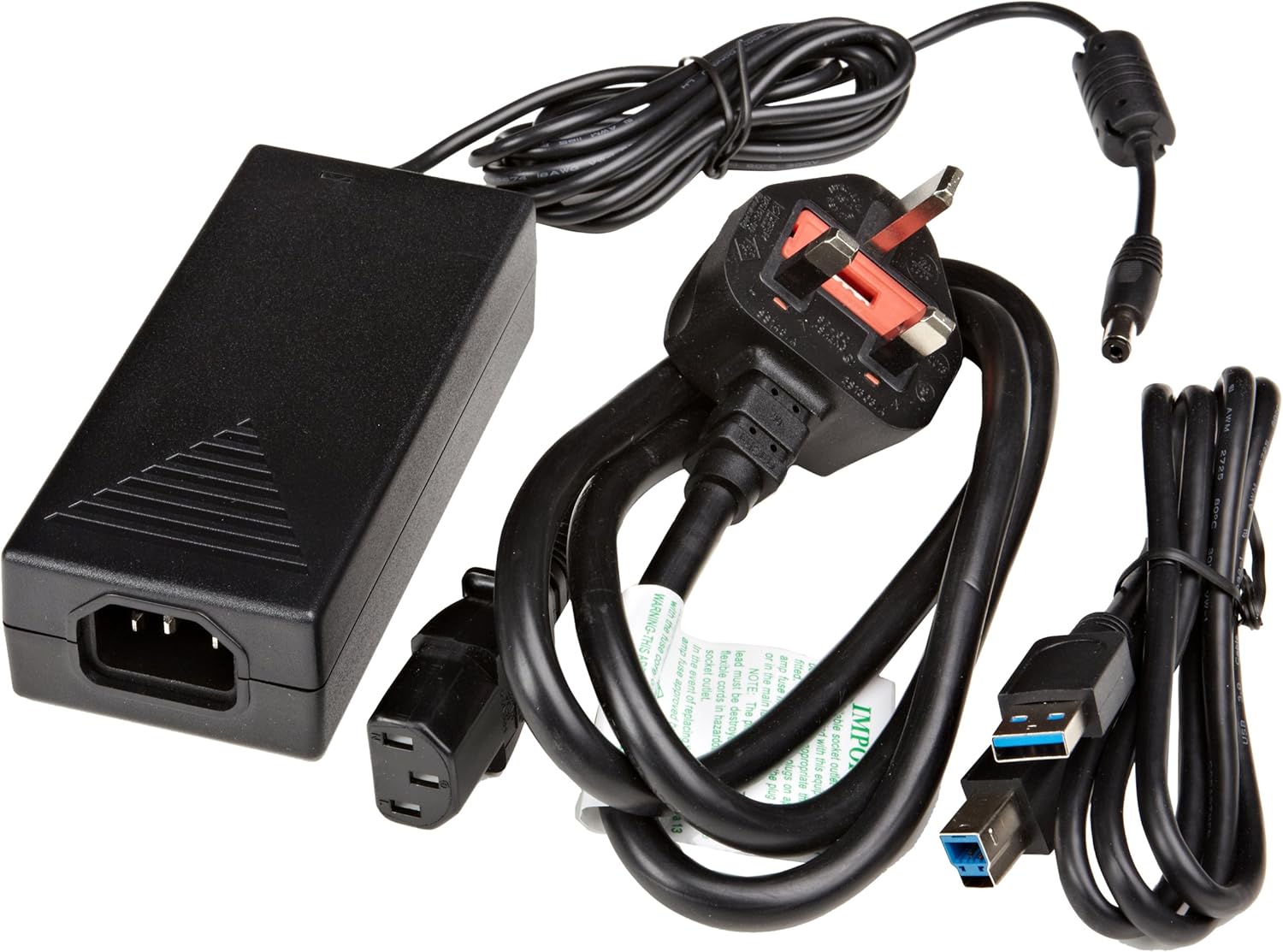
شڪل 3.1: The image displays the AmazonBasics 10-Port USB 3.0 Hub, its power adapter, and a USB 3.0 data cable, which are the typical contents found in the product packaging.
4. پراڊڪٽ ختمview
The AmazonBasics 10-Port USB 3.0 Hub expands your computer's connectivity, offering ten USB 3.0 ports for various peripherals. It supports high-speed data transfer and is backward compatible with USB 2.0 devices.
4.1 اڳيان ۽ پاسي View

شڪل 4.1: This image shows the front and left side of the USB hub. On the front, three USB 3.0 ports are visible, two of which are labeled 'Fast'. The left side features the upstream USB 3.0 port for connecting to a computer and the DC 15V power input.
4.2 Top and Rear View

شڪل 4.2: هي تصوير مٿي کان هيٺ تائين مهيا ڪري ٿي view of the USB hub, highlighting five additional USB 3.0 ports located on the rear panel. An 'ON/OFF' switch is also visible on the side, allowing users to power the hub on or off.
4.3 هيٺيون View

شڪل 4.3: هيٺيون view of the hub shows four rubber feet for stability and a product label containing regulatory information and the model number.
5. سيٽ اپ گائيڊ
Follow these steps to set up your USB 3.0 hub:
- پاور اڊاپٽر کي ڳنڍيو: Plug the provided power adapter into the DC 15V input port on the side of the USB hub. Then, plug the power adapter into a standard electrical outlet.
- ڪمپيوٽر سان ڳنڍيو: Use the supplied USB 3.0 data cable to connect the upstream USB 3.0 port on the hub (located on the side) to an available USB 3.0 port on your computer.
- پاور آن: If the hub has an ON/OFF switch (refer to Figure 4.2), ensure it is in the 'ON' position.
- پردي سان ڳنڍڻ: You can now connect your USB devices (e.g., external hard drives, keyboards, mice, flash drives) to any of the ten available USB 3.0 ports on the hub.
The hub supports automatic switching between self-power and bus-power mode. For optimal performance with multiple high-power devices, ensure the power adapter is connected.
6. آپريشن
Once connected, the AmazonBasics 10-Port USB 3.0 Hub operates automatically. Your computer should recognize connected devices without requiring additional drivers for most operating systems.
- USB 3.0 Speed: The hub supports SuperSpeed (5 Gbps), High Speed (480 Mbps), Full Speed (12 Mbps), and Low Speed (1.5 Mbps) data transfer rates, depending on the connected device and your computer's USB port capabilities.
- ڊوائيس مطابقت: The hub is compatible with both USB 3.0 and USB 2.0 specifications, allowing you to connect a wide range of USB devices.
- طاقت جو انتظام: The hub intelligently manages power distribution to connected devices. For devices requiring more power, ensure the external power adapter is connected.
7. مسئلا حل ڪرڻ
If you encounter issues with your USB hub, refer to the following common problems and solutions:
| مسئلو | ممڪن حل |
|---|---|
| Devices are not recognized. |
|
| سست ڊيٽا منتقلي جي رفتار. |
|
| Hub is not powering on. |
|
| Intermittent device connection. |
|
8. وضاحتون
- ماڊل نمبر: HU37A0V1-UK
- بندرگاهن: 10 x USB 3.0
- ڊيٽا جي منتقلي جي شرح: 5 Gbps تائين (USB 3.0 سپر اسپيڊ)
- پسمانده مطابقت: USB 2.0، USB 1.1
- پاور ان پٽ: ڊي سي 15V (شامل پاور اڊاپٽر ذريعي)
- طول و عرض (LxWxH): تقريبن 5.71 x 2.96 x 1.06 انچ (14.5 x 7.5 x 2.7 سينٽي)
- وزن: تقريبن 1.29 پائونڊ (0.58 ڪلوگرام)
- آپريٽنگ سسٽم مطابقت: Windows, macOS, Linux (driver-free for most systems)
9. سنڀال ۽ سار سنڀال
- Clean the hub with a soft, dry cloth. Do not use liquid cleaners or aerosols.
- وائنٽيليشن جي افتتاح کي روڪڻ کان بچاء.
- جڏهن استعمال ۾ نه هجي ته حب کي ٿڌي، سڪل جاءِ تي رکو.
10. ريسائيڪلنگ ڄاڻ
Dispose of this product according to local regulations. Do not dispose of it with general household waste. For more information on recycling electronic waste, contact your local authorities or the retailer where you purchased the product.
11. وارنٽي ۽ سپورٽ
For warranty information or technical support, please refer to the AmazonBasics support page or contact Amazon customer service directly. Details can typically be found on the Amazon web'مدد' يا 'ڪسٽمر سروس' سيڪشن هيٺ سائيٽ.


