1. تعارف
This manual provides detailed instructions for the safe and effective use of your Canon VIXIA HF-R52 HD Digital Camcorder. Please read this manual thoroughly before operating the camcorder and retain it for future reference.
اهم خاصيتون:
- 3.28 Megapixel Full HD CMOS Image Sensor: Captures true 1920 x 1080 resolution video with natural color, even in low light.
- 57x Advanced Zoom & SuperRange Optical Image Stabilizer: Provides stable video across a wide zoom range.
- DIGIC DV 4 Image Processor: Ensures exceptional imaging performance and enables simultaneous dual recording.
- 32GB Internal Flash Drive & SD Card Slot: آڇون ample storage for up to 12 hours of HD video, expandable with SD memory cards.
- بلٽ ان وائي فائي: Facilitates easy sharing, live streaming, and remote control via compatible mobile devices.
- 3.0-inch Capacitive Touch Panel LCD: Intuitive interface for easy operation and control.
- بيبي موڊ: Dedicated features for capturing and organizing a child's growth and development.
2. سيٽ اپ
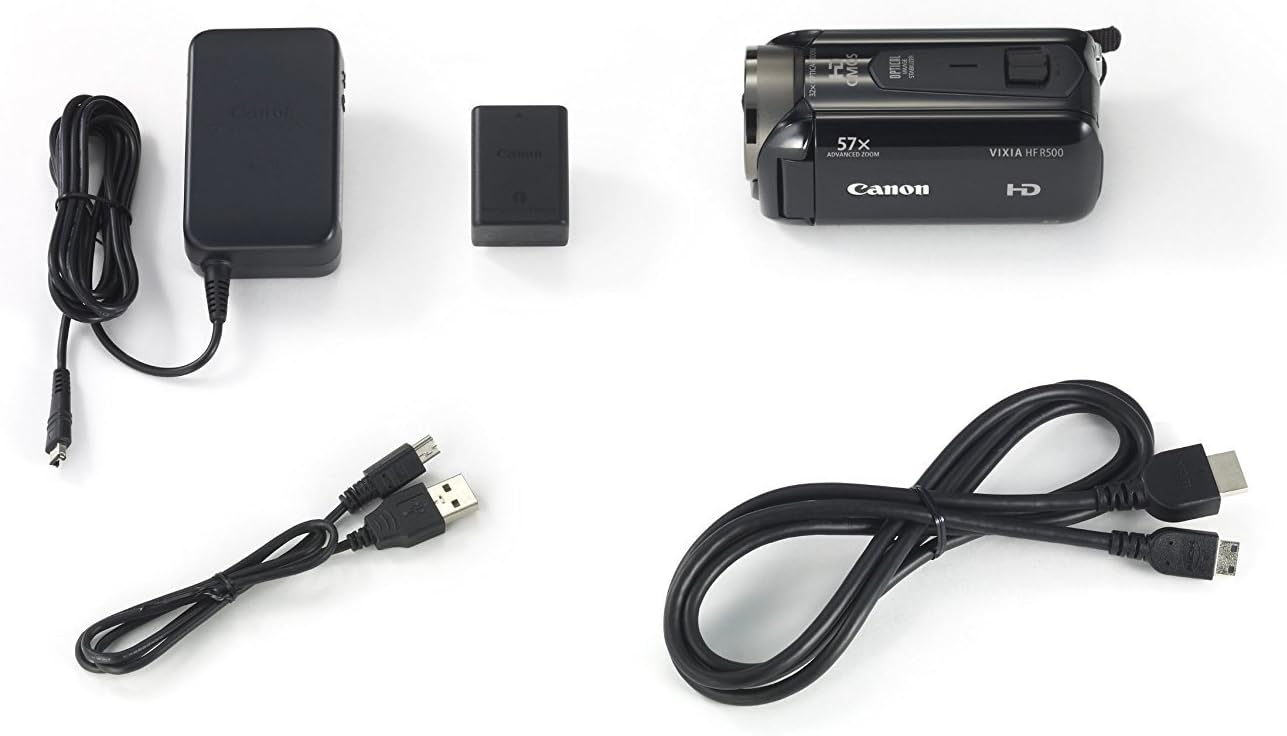
2.1. پيڪيج مواد
پڪ ڪريو ته سڀئي شيون پيڪيج ۾ موجود آهن:
- Canon VIXIA HF-R52 HD Digital Camcorder
- بيٽري پيڪ
- ڪمپيڪٽ پاور اڊاپٽر
- USB ڪيبل
- HDMI ڪيبل
- هدايت نامو (هي دستاويز)
2.2. بيٽري لڳائڻ ۽ چارج ڪرڻ
- بيٽري جي ڪمري واري ڍڪ کي کوليو.
- Insert the battery pack, ensuring it clicks into place.
- بيٽري جي ڪمري واري ڍڪ کي بند ڪريو.
- Connect the compact power adapter to the camcorder and a power outlet to charge the battery. The charging indicator will illuminate.
2.3. ميموري ڪارڊ داخل ڪرڻ
- ايس ڊي ڪارڊ سلاٽ جو ڍڪ کوليو.
- Insert an SD memory card with the label facing the front of the camcorder until it clicks.
- ايس ڊي ڪارڊ سلاٽ جو ڍڪ بند ڪريو.
2.4. Attaching the Hand Strap and Lens Cap
Securely attach the hand strap for comfortable and safe handling. Ensure the lens cap is attached to protect the lens when not in use.

3. ڪيمڪارڊر هلائڻ
3.1. پاور آن/آف
To power on the camcorder, open the LCD panel. To power off, close the LCD panel or press and hold the power button located inside the LCD panel area.
3.2. LCD Touch Panel Usage
The 3.0-inch capacitive touch panel LCD allows for intuitive control. Tap to select menu options, adjust settings, or focus on subjects. The display is clear and responsive.

3.3. وڊيو رڪارڊ ڪرڻ ۽ تصويرون ڪڍڻ
To start recording video, press the REC button. Press it again to stop. To take a still photo, press the PHOTO button.
3.4. زوم ڪارڪردگي
Use the zoom lever to zoom in (T) or out (W). The camcorder features a 57x Advanced Zoom for capturing distant subjects and a SuperRange Optical Image Stabilizer to minimize camera shake, even when shooting handheld or while walking.
3.5. Special Recording Modes
- بيبي موڊ: Activates optimal settings for recording children and automatically saves videos to a dedicated Baby Album. Includes features like Pre-Record and Touch Decoration.
- Audio Scene Select: Offers five modes (Standard, Music, Forest and Birds, Speech, Noise Suppression) to optimize audio recording based on the environment.
- سمارٽ آٽو: Automatically selects optimal settings from 38 shooting situations.
- Cinema-Look Filters: Apply one of seven cinematic styles (e.g., Cinema Standard, Dramatic B&W, Sepia) to your video.
- Video Snapshot: Records short video clips and allows for background music integration.
- 24p Cinema & 30p Progressive Modes: Provides film-like feel or optimized footage for online sharing.
3.6. Wireless Functions
- بلٽ ان وائي فائي: Connects to home networks or mobile devices via the Canon Movie Uploader app for sharing and live streaming.
- لائيو اسٽريمنگ: Stream video to iOS or Android devices, even remotely over the internet, using the CameraAccess plus app.
- ريموٽ مانيٽرنگ: Compatible with the optional Camera Pan Table CT-V1 for remote monitoring of a 200-degree area.
4. سار سنڀال
4.1. صفائي
- ڪيمڪارڊر جي جسم کي صاف ڪرڻ لاءِ نرم، سڪل ڪپڙو استعمال ڪريو.
- For the lens and LCD screen, use a lens cleaning cloth and specialized cleaning fluid if necessary. Avoid harsh chemicals.
4.2. بيٽري جي سنڀال
- هر استعمال کان پهريان بيٽري کي مڪمل طور تي چارج ڪريو.
- بيٽرين کي ٿڌي، سڪل جاءِ تي ذخيرو ڪريو جڏهن استعمال ۾ نه هجي.
- بيٽرين کي انتهائي گرمي پد تي بي نقاب ڪرڻ کان پاسو ڪريو.
4.3. اسٽوريج
When storing the camcorder for extended periods, remove the battery and memory card. Store the camcorder in a dry, dust-free environment, preferably in its carrying case.
5. مسئلا حل ڪرڻ
جيڪڏهن توهان کي پنهنجي ڪيمڪارڊر سان مسئلا درپيش اچن ٿا، ته هيٺ ڏنل عام حلن جو حوالو ڏيو:
- ڪيمڪارڊر آن نٿو ٿئي: پڪ ڪريو ته بيٽري مڪمل طور تي چارج ٿيل آهي ۽ صحيح طرح سان داخل ڪئي وئي آهي.
- Poor video quality in low light: Utilize the 3.28 Megapixel Full HD CMOS Image Sensor and DIGIC DV 4 Image Processor which are designed for improved low-light performance. Consider adding external lighting if available.
- Unresponsive touch screen: Ensure the screen is clean and dry. Apply gentle pressure as capacitive screens respond to touch, not force.
- آڊيو مسئلا: Check microphone connections and settings in the Audio Scene Select menu.
- Connectivity problems (Wi-Fi/USB): Ensure the camcorder is within range of the Wi-Fi network or that the USB cable is securely connected to a compatible device. Refer to the Canon Movie Uploader or CameraAccess plus app instructions for specific device compatibility.
- مختصر بيٽري جي زندگي: Ensure the battery is fully charged. High capacity battery packs are designed for extended use, but continuous recording or heavy Wi-Fi usage will consume power faster.
If problems persist, consult the Canon support webسائيٽ يا ڪسٽمر سروس سان رابطو ڪريو.
6. وضاحتون
| خاصيت | تفصيل |
|---|---|
| برانڊ | ڪينن |
| ماڊل نمبر | 9173B004 |
| پيداوار جي ماپ | 4.6 x 2.1 x 2.2 انچ |
| شيءِ جو وزن | 8.3 اونس |
| فوٽو سينسر ٽيڪنالاجي | CMOS |
| وڊيو ڪيپچر ريزوليوشن | 1080 ص |
| وڌ ۾ وڌ فوڪل ڊگھائي | 89.6 ملي ميٽر |
| فليش ميموري جو قسم | SD |
| وڊيو ڪيپچر فارميٽ | AVCHD; MPEG-4 |
| سپورٽ آڊيو فارميٽ | AAC |
| اسڪرين جي ماپ | 3 انچ |
| رابطي ٽيڪنالاجي | USB، وائي فائي |
| رنگ | ڪارو |
7. وارنٽي ۽ سپورٽ
7.1. قانوني اعلان
This product is covered under warranty by Canon. For specific warranty terms and conditions, please refer to the warranty card included with your product or visit the official Canon support webسائيٽ.
7.2. ڪسٽمر سپورٽ
وڌيڪ مدد، ٽيڪنيڪل سپورٽ، يا سروس جي پڇا ڳاڇا لاءِ، مھرباني ڪري دورو ڪريو Canon Store or the official Canon support webسائيٽ.


