1. تعارف
This manual provides detailed instructions for the installation, operation, and maintenance of the Multibrackets Public Wallmount Push HD. This wall mount is designed for LCD/Plasma panels ranging from 40 to 70 inches, specifically for video wall applications requiring precise alignment and easy service access.

شڪل 1: اڳيون پاسو view of the Multibrackets Public Wallmount Push HD. This image displays the robust iron construction and the integrated push-out mechanism, designed for easy access to the display for maintenance.
2. اهم خاصيتون
- ڊسپلي مطابقت: Supports LCD/Plasma panels with screen sizes from 40 to 70 inches.
- VESA Standards: Compatible with VESA patterns 200x200, 300x200, 300x300, 400x200, and 400x400. Adapter kits are available for 600x400 and 800x400 VESA standards.
- Push-Out Mechanism: Features a "pop-out" function that allows the display to extend forward from the wall with a simple press, providing convenient access for maintenance without disturbing adjacent screens.
- 8-Point Fine Adjustment: Equipped with eight adjustment knobs for precise post-installation alignment. These knobs allow for individual adjustments in depth, side-to-side, and height to ensure perfect screen alignment in video wall configurations.
- وڏي لوڊ گنجائش: Designed to support displays weighing up to 50 kg (110 lbs).
- پائيدار تعمير: Constructed from iron for strength and stability.
3. سيٽ اپ ۽ تنصيب
Proper installation is crucial for the safety and performance of your display. It is recommended that installation be performed by qualified personnel. Ensure the mounting surface can safely support the combined weight of the mount and the display.
3.1. گهربل اوزار (شامل نه آهن)
- سوراخ ڪرڻ
- سطح
- ماپڻ وارو ٽيپ
- Stud Finder (for wood stud walls)
- Socket Wrench / Spanner
- اسڪوائر
3.2. Mounting the Wall Plate
- چڙهڻ جي جڳھ جو تعين ڪريو: Carefully select the wall location, ensuring it is structurally sound and free from electrical wires or plumbing.
- سوراخن کي نشان لڳايو: Position the wall plate against the wall at the desired height and use a level to ensure it is straight. Mark the drilling points through the mounting holes on the wall plate.
- پائلٽ سوراخ ڪريو: Drill pilot holes at the marked locations using an appropriate drill bit size for your wall type (e.g., wood studs, concrete, brick).
- محفوظ ڀت پليٽ: Attach the wall plate to the wall using the provided mounting hardware. Ensure all bolts are tightened securely.
3.3. ڊسپلي بريڪٽس کي ڳنڍڻ
- Identify VESA Pattern: Locate the VESA mounting holes on the back of your display.
- بریکٹس ڳنڍيو: Secure the display brackets to the back of your display using the appropriate screws and spacers (if necessary) that match your display's VESA pattern. Ensure they are firmly attached.
3.4. Hanging the Display
- Lift and Hook: With assistance, carefully lift the display and hook the attached brackets onto the wall plate. Ensure the display is securely seated on the mount.
- انگيج لاڪ: Verify that the safety locking mechanism is engaged to prevent accidental dislodgement of the display.
3.5. Post-Installation Adjustment
After the display is mounted, use the 8 adjustment knobs to achieve perfect alignment, especially critical for video wall installations.
- کوٽائي جي ترتيب: Turn the appropriate knobs to adjust how far the display sits from the wall.
- پاسي کان پاسي واري ترتيب: Use the side adjustment knobs to shift the display horizontally.
- اونچائي جي ترتيب: Adjust the height knobs to fine-tune the vertical position of the display.
Make small, incremental adjustments and check alignment with adjacent screens (if applicable) until the desired position is achieved.
4. آپريشن
4.1. Using the Push-Out Mechanism
The unique "pop-out" feature allows for easy access to the rear of the display for cabling, maintenance, or replacement without removing other displays in a video wall setup.
- وڌائڻ لاءِ: Gently press the bottom edge of the display. The internal scissor arm structure will engage, causing the display to extend forward from the wall.
- واپس وٺڻ: Once maintenance is complete, gently push the display back towards the wall until it clicks into its original, flush position. Ensure it is fully retracted and locked.
Always exercise caution when extending or retracting the display to avoid damage to the display or the mount.
4.2. Fine-Tuning Adjustments
The 8 adjustment knobs provide granular control over the display's position. These can be used at any time to correct minor misalignments.
- کوٽائي: Adjusts the distance of the display from the wall.
- Horizontal (Side-to-Side): Adjusts the left or right position of the display.
- Vertical (Height): Adjusts the up or down position of the display.
Turn the knobs slowly and observe the display's movement. Adjustments should be made incrementally until the desired alignment is achieved.
5. سار سنڀال
Regular maintenance ensures the longevity and safe operation of your Multibrackets Public Wallmount Push HD.
- صفائي: Wipe the mount with a soft, dry cloth. Avoid abrasive cleaners or solvents that could damage the finish.
- وقتي معائنو: Periodically check all mounting bolts and screws to ensure they remain tight. Over time, vibrations or environmental factors can cause fasteners to loosen.
- ميڪانيزم جي چڪاس: Test the push-out mechanism occasionally to ensure smooth operation. If it feels stiff, ensure no debris is obstructing the moving parts. Do not lubricate unless specifically instructed by Multibrackets support.
6. مسئلا حل ڪرڻ
If you encounter issues with your wall mount, refer to the following common troubleshooting tips:
- Display Not Level: Use the height adjustment knobs (Section 4.2) to fine-tune the vertical alignment. Ensure the initial wall plate installation was level.
- وڌائڻ/واپس وٺڻ ۾ ڏکيائي:
- Ensure the display is not obstructed by adjacent screens or wall features.
- Check for any debris or foreign objects in the mechanism.
- Verify that the display weight does not exceed the maximum load capacity (50 kg).
- Display Feels Loose: Immediately check all mounting bolts and screws on both the wall plate and the display brackets. Tighten any loose fasteners. Do not use the mount if it feels unstable.
If problems persist, contact Multibrackets customer support for further assistance.
7. وضاحتون
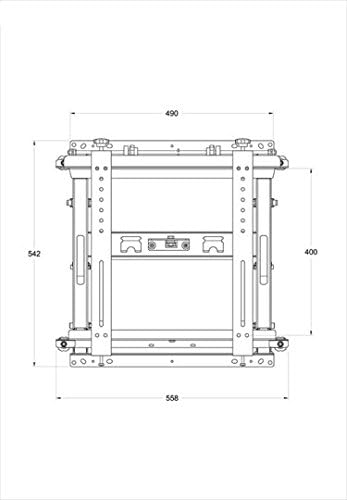
شڪل 2: Technical drawing illustrating the dimensions of the Multibrackets Public Wallmount Push HD. Dimensions are provided in millimeters.
| خاصيت | تفصيل |
|---|---|
| ماڊل نمبر | 7350073730568 |
| مطابقت واري اسڪرين سائيز | 40 - 70 انچ |
| VESA معيار | 200x200, 300x200, 300x300, 400x200, 400x400 (Adapter kits for 600x400 & 800x400) |
| وڌ ۾ وڌ لوڊ گنجائش | 50 ڪلوگرام (110 پائونڊ) |
| مواد | لوهه |
| رنگ | ڪارو |
| شيءِ جو وزن | 12 ڪلوگرام (24.3 پائونڊ) |
| پيڪيج جي ماپ | 60 x 60 x 10 سينٽي (23.62 x 23.62 x 3.94 انچ) |
| چڙهڻ جو قسم | ڀت جبل |
| حرڪت جو قسم | Fixed with Push-Out Mechanism |
8. وارنٽي ۽ سپورٽ
The Multibrackets Public Wallmount Push HD comes with a 2 سال وارنٽي خريداري جي تاريخ کان، پيداوار جي خرابين کي ڍڪيندي.
For technical support, warranty claims, or further assistance, please contact Multibrackets customer service. Refer to the official Multibrackets website or your purchase documentation for contact information.
مھرباني ڪري وارنٽي جي تصديق لاءِ خريداري جو ثبوت رکو.


