تعارف
خريد ڪرڻ لاءِ مهربانيasing the Soundbot SB510 HD Waterproof Bluetooth Shower Wireless Speaker. This manual provides essential information for setting up, operating, and maintaining your speaker to ensure optimal performance and longevity. Please read these instructions carefully before use.

Image: The Soundbot SB510 speaker, designed for use in wet environments, shown amidst water splashes.
حفاظت جي ڄاڻ
WARNING: THIS PRODUCT CONTAINS SMALL PARTS. Swallowed small parts can stick together across intestines causing serious infections and fatal injury. Seek immediate medical attention if small parts are swallowed or inhaled.
- اسپيڪر کي گهڻي عرصي تائين انتهائي گرمي پد يا سڌي سج جي روشنيءَ ۾ نه رکو.
- ڊپ کان پاسو ڪريو يا اسپيڪر کي مضبوط اثرن جي تابع ڪرڻ.
- Keep the charging port dry before connecting the USB cable.
- Do not attempt to disassemble or modify the speaker, as this will void the warranty and may cause damage.
پيڪيج مواد
مھرباني ڪري ھيٺ ڏنل شين لاءِ پيڪيج چيڪ ڪريو:
- 1 x Soundbot SB510 Water Resistant Bluetooth Shower Speaker
- 1 x USB چارجنگ ڪيبل
- 1 x يوزر گائيڊ

Image: Contents of the Soundbot SB510 package, including the speaker, USB charging cable, and user manual.
پيداوار جون خاصيتون
- پاڻي جي مزاحمتي ڊيزائن: IPX4 rated for protection against splashing water from any direction.
- بلوٽوت 4.0 ڪنيڪشن: High-definition wireless audio streaming with a range of up to 33 feet (10 meters).
- انٽيگريٽيڊ اسپيڪر فون: هينڊ فري ڪالنگ لاءِ بلٽ ان مائڪروفون.
- Easy Control Buttons: Dedicated buttons for power, play/pause, volume, track skipping, and call management.
- Rechargeable بيٽري: Provides up to 6 hours of playtime on a single charge.
- سکشن ڪپ جبل: Conveniently attachable to smooth surfaces.
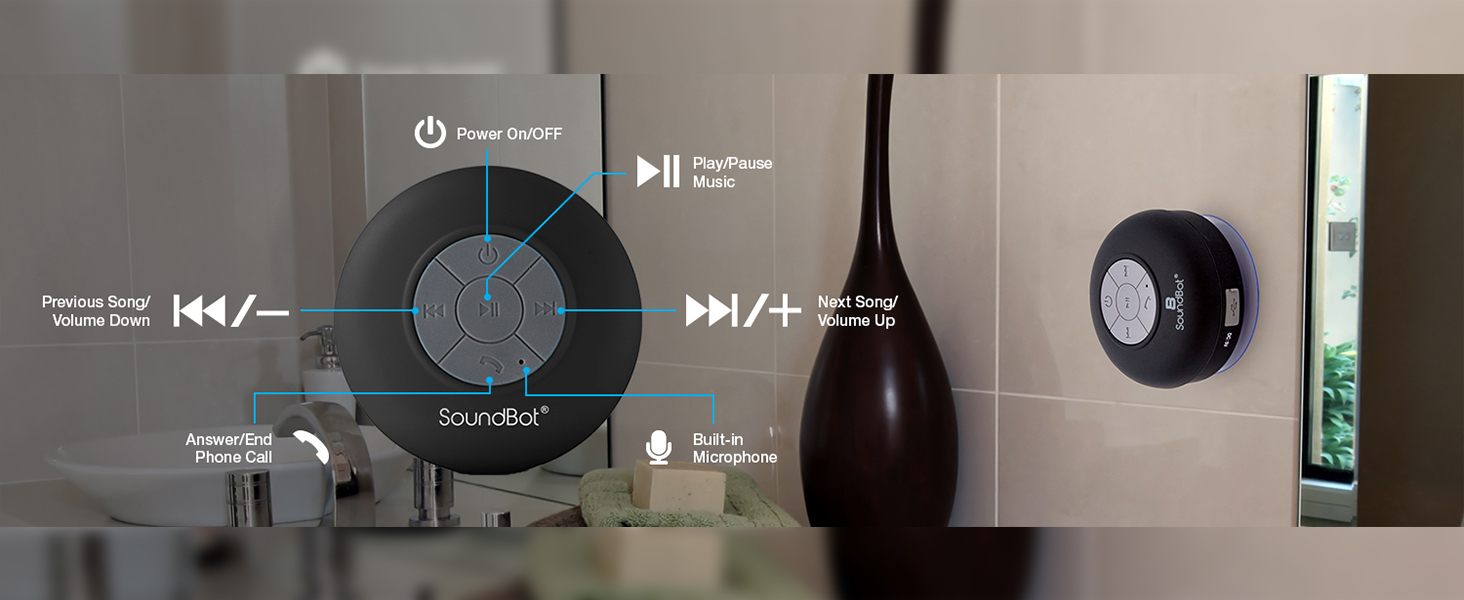
Image: A visual representation highlighting the main features of the Soundbot SB510 speaker.
ڪنٽرول ۽ افعال
The Soundbot SB510 features intuitive controls on its front panel:

Image: Detailed diagram of the speaker's control buttons and their functions.
- پاور بٽڻ (⏻): پاور آن / آف ڪرڻ لاءِ دٻايو ۽ رکو.
- هلائڻ/روڪڻ جو بٽڻ (⏸): موسيقي کي هلائڻ يا روڪڻ لاءِ دٻايو.
- Previous Track / Volume Down (⏪ / -): پوئين ٽريڪ لاءِ مختصر دٻايو. حجم گهٽائڻ لاءِ ڊگهو دٻايو.
- Next Track / Volume Up (⏩ / +): ايندڙ ٽريڪ لاءِ مختصر پريس. حجم وڌائڻ لاءِ ڊگهو پريس.
- Call Button (☎): Press to answer an incoming call or end an ongoing call.
- بلٽ ان مائڪروفون: For hands-free communication during calls.
سيٽ اپ ڪريو
1. اسپيڪر کي چارج ڏيڻ
- پڪ ڪريو ته اسپيڪر بند ٿيل آهي.
- Open the rubber flap covering the charging port on the side of the speaker.
- Connect the small end of the included USB charging cable to the speaker's Micro-USB port.
- USB ڪيبل جي وڏي پڇاڙي کي USB پاور سورس سان ڳنڍيو (مثال طور، ڪمپيوٽر USB پورٽ، USB وال اڊاپٽر).
- LED انڊيڪيٽر چارجنگ دوران روشن ٿيندو ۽ مڪمل چارج ٿيڻ تي بند ٿي ويندو. مڪمل چارج ۾ لڳ ڀڳ 6 ڪلاڪ لڳن ٿا.
- Close the rubber flap securely after charging to maintain water resistance.
2. اسپيڪر کي لڳائڻ
The SB510 features a suction cup for easy mounting on smooth, non-porous surfaces.
- Ensure the surface is clean, dry, and smooth (e.g., tile, glass, polished metal).
- Press the suction cup firmly against the desired surface.
- Verify that the speaker is securely attached before releasing اهو.

Image: The Soundbot SB510 speaker securely mounted on a smooth bathroom wall.
آپريٽنگ هدايتون
1. پاور آن/آف
- To power on, press and hold the Power button (⏻) for approximately 3 seconds until you hear an audible tone and the LED indicator flashes.
- To power off, press and hold the Power button (⏻) for approximately 3 seconds until you hear an audible tone and the LED indicator turns off.
2. بلوٽوٽ جوئر
- Ensure the speaker is powered on and in pairing mode (LED indicator will flash rapidly).
- On your Bluetooth-enabled device (smartphone, tablet, etc.), go to the Bluetooth settings menu.
- ڳولھيو available devices. You should see "SB510" in the list.
- Select "SB510" to connect. Once paired, you will hear a confirmation tone, and the LED indicator will flash slowly or remain solid blue.
- جيڪڏهن پاسورڊ لاءِ چيو وڃي ته، "0000" داخل ڪريو.
- اسپيڪر خودڪار طريقي سان آخري جوڙيل ڊوائيس سان ٻيهر ڳنڍڻ جي ڪوشش ڪندو جڏهن پاور آن ٿيندو.
3. ميوزڪ پلے بیک
- After successful pairing, open your music player application on your device.
- Use the Play/Pause button (⏸) on the speaker to control playback.
- Use the Previous Track (⏪) and Next Track (⏩) buttons for track navigation.
- Long press the Volume Down (-) or Volume Up (+) buttons to adjust the speaker's volume. You can also control volume from your connected device.
4. Answering/Ending Calls
- When an incoming call is received, the speaker will ring.
- Press the Call button (☎) once to answer the call.
- To end an ongoing call, press the Call button (☎) once.
- To reject an incoming call, press and hold the Call button (☎) for approximately 2 seconds.
سار سنڀال
- اسپيڪر کي نرم، ڊي سان صاف ڪريوamp ڪپڙو. استعمال نه ڪريو abrasive cleaners يا solvents.
- Ensure the charging port's rubber flap is always securely closed when not charging to maintain water resistance.
- If the suction cup loses adhesion, clean both the suction cup and the mounting surface with soap and water, then allow to air dry.
- اسپيڪر کي ٿڌي، سڪل جاءِ تي رکو جڏهن گهڻي عرصي تائين استعمال ۾ نه هجي.
مشڪلاتون
| مسئلو | ممڪن حل |
|---|---|
| اسپيڪر پاور آن نٿو ٿئي. | Ensure the speaker is fully charged. Connect to a power source and try again. |
| بلوٽوٿ ڊيوائس سان جوئر نه ٿو ڪري سگھجي. |
|
| ڪابه آواز يا گهٽ آواز ناهي. |
|
| Suction cup does not stick. |
|
وضاحتون
- ماڊل: ايس بي 510
- بلوٽوت ورزن: 4.0
- وائرليس رينج: 33 فوٽ (10 ميٽر) تائين
- پاڻي جي مزاحمت: IPX4 (اسپليش پروف)
- راند جو وقت: 6 ڪلاڪ تائين
- چارج ڪرڻ وقت: لڳ ڀڳ 6 ڪلاڪ
- اسپيڪر آئوٽ: 5 واٽ
- بلٽ ان مائڪروفون: ها
- طاقت جو ذريعو: بيٽري سان هلندڙ (1 ليتيم آئن بيٽري گھربل)
- پيداوار جي ماپ: 3.5"ڊي x 3.5"ڊي x 2.3"ايڇ
- شيء جو وزن: 5.6 اونس
- مواد: پلاسٽڪ
- چڙهڻ جو قسم: سکشن کپ مائونٽ
وارنٽي ۽ سپورٽ
The Soundbot SB510 speaker comes with a limited warranty. Please refer to the warranty card included in your package for specific terms and conditions.
For technical support or customer service inquiries, please visit the official Soundbot website or contact their customer support channels. Keep your purchase receipt as proof of purchase for warranty claims.
ٺاهيندڙ: سائونڊ بوٽ


