1. تعارف
Welcome to the user manual for your new Salora SM508 mobile phone. This guide provides essential information to help you set up, operate, maintain, and troubleshoot your device. Please read this manual carefully to ensure proper use and to maximize the performance and longevity of your phone.
2. پراڊڪٽ ختمview
The Salora SM508 is a compact and reliable basic mobile phone designed for essential communication. It features a color display, a comfortable keypad, and dual SIM support.
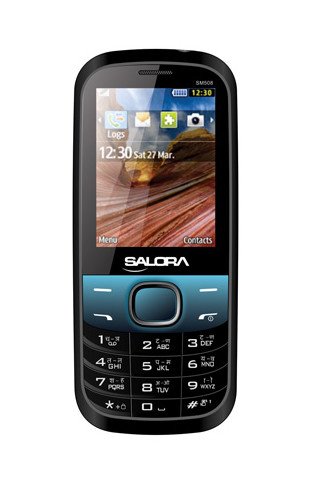
هي تصوير سامهون ڏيکاري ٿي view of the Salora SM508 mobile phone. It features a color display at the top, a central navigation button, and a standard alphanumeric keypad below. The phone has a black body with blue accents around the navigation cluster.
3. سيٽ اپ
3.1 سم ڪارڊ داخل ڪرڻ
- فون بند ڪريو ۽ پوئين ڪَوَر هٽايو.
- احتياط سان بيٽري کي هٽايو.
- Locate the SIM card slots. The Salora SM508 supports dual SIM cards.
- Insert your SIM card(s) into the designated slot(s) with the gold contacts facing down. Ensure they are securely seated.
3.2 Inserting Battery
- Align the battery contacts with the contacts in the phone's battery compartment.
- Gently press the 1800 mAh Li-Ion battery into place until it clicks.
- پوئين ڍڪ کي تبديل ڪريو، پڪ ڪريو ته اهو محفوظ طور تي مضبوط ٿيل آهي.
3.3 Inserting Memory Card (Optional)
- پوئين ڍڪ ۽ بيٽري هٽائڻ سان، ميموري ڪارڊ سلاٽ کي ڳولهيو.
- Insert a microSD card (up to 8GB) into the slot with the gold contacts facing down.
- بيٽري کي تبديل ڪريو ۽ پوئتي ڪپڙا.
3.4 ڊوائيس چارج ڪرڻ
- چارجر کي پنهنجي فون جي چارجنگ پورٽ سان ڳنڍيو.
- چارجر کي پاور آئوٽليٽ ۾ لڳايو.
- The battery indicator on the screen will show the charging status. Charge the phone fully before first use.
3.5 Initial Power On/Off
- پاور آن ڪرڻ: پاور/ڪال ختم ڪريو بٽڻ کي دٻايو ۽ رکو جيستائين اسڪرين روشن نه ٿئي.
- پاور آف ڪرڻ: Press and hold the Power/End Call button until the power-off options appear, then select 'Power off'.
4. آپريٽنگ هدايتون
4.1 بنيادي نيويگيشن
- Use the navigation keys (up, down, left, right) to move through menus and options.
- Press the central 'OK' or 'Select' button to confirm a selection.
- Use the 'Back' or 'Clear' button to return to the previous screen or delete characters.
4.2 ڪالون ڪرڻ ۽ وصول ڪرڻ
- ڪال ڪرڻ لاءِ: ڪي پيڊ استعمال ڪندي فون نمبر داخل ڪريو ۽ گرين ڪال بٽڻ کي دٻايو.
- ڪال وصول ڪرڻ لاءِ: جڏهن فون جي گھنٽي وڳي، جواب ڏيڻ لاءِ گرين ڪال بٽڻ کي دٻايو.
- ڪال ختم ڪرڻ لاءِ: ريڊ اينڊ ڪال بٽڻ دٻايو.
4.3 ايس ايم ايس موڪلڻ ۽ وصول ڪرڻ
- 'پيغام' مينيو ڏانهن وڃو.
- 'پيغام لکو' يا 'نئون ايس ايم ايس' چونڊيو.
- ڪي پيڊ استعمال ڪندي پنهنجو پيغام داخل ڪريو.
- Add the recipient's number or select from contacts.
- 'موڪليو' کي دٻايو.
4.4 ڪئميرا جو استعمال
- مکيه مينيو مان ڪئميرا ايپليڪيشن تائين رسائي حاصل ڪريو.
- The phone features a 1.3 MP primary (rear) camera.
- ڊسپلي استعمال ڪندي پنهنجو شاٽ فريم ڪريو.
- فوٽو ڪڍڻ لاءِ 'OK' يا 'ڪيپچر' بٽڻ دٻايو.
4.5 ملٽي ميڊيا ۽ ڪنيڪٽوٽي
- آڊيو جيڪ: The phone includes a 3.5 mm audio jack for connecting headphones or external speakers.
- بلوٽوٿ: Enable Bluetooth from the settings menu to connect to compatible devices for file transfer or hands-free communication.
- جي پي آر ايس: The phone supports GPRS for basic internet connectivity. Consult your network provider for data plan details.
5. سار سنڀال
5.1 توهان جي ڊوائيس کي صاف ڪرڻ
- Use a soft, dry, lint-free cloth to clean the phone's screen and body.
- سخت ڪيميائي استعمال ڪرڻ کان پاسو ڪريو، صفائي جي سولوينٽس، يا مضبوط صابن.
- Do not allow water or liquids to enter the phone.
5.2 بيٽري جي سنڀال
- بيٽري کي انتهائي گرمي پد (گرم يا ٿڌو) ۾ بي نقاب ڪرڻ کان پاسو ڪريو.
- بيٽري کي پنڪچر، ڌار ڪرڻ، يا شارٽ سرڪٽ نه ڪريو.
- If the battery is damaged or swollen, discontinue use immediately and replace it with an authorized Salora battery.
5.3 اسٽوريج
- فون کي سڌي سج جي روشني ۽ نمي کان پري ٿڌي، سڪل جاءِ تي رکو.
- جيڪڏهن گهڻي عرصي تائين ذخيرو ڪري رهيا آهيو، ته پڪ ڪريو ته بيٽري جزوي طور تي چارج ٿيل آهي (تقريبن 50٪) ته جيئن ان جي عمر محفوظ رهي.
6. مسئلا حل ڪرڻ
If you encounter issues with your Salora SM508, please refer to the following common solutions:
- فون آن نه ٿي رهيو آهي:
Ensure the battery is charged. Connect the charger and wait a few minutes before attempting to power on. Check if the battery is properly inserted. - ڪوبه نيٽ ورڪ سگنل ناهي:
Check if your SIM card is correctly inserted. Ensure you are in an area with network coverage. Try restarting the phone. - ڪالون نه ٿو ڪري سگھجي/ وصول نٿو ڪري سگھجي:
Verify that your SIM card is active and has sufficient balance/plan. Check network signal strength. Ensure call barring or flight mode is not enabled. - چارج ڪرڻ جا مسئلا:
Ensure the charger is properly connected to both the phone and the power outlet. Try using a different compatible charger. Check the charging port for any debris. - ڪي پيڊ غير جوابده:
Restart the phone. If the issue persists, ensure no physical damage to the keypad.
If the problem persists after trying these steps, please contact Salora customer support.
7. وضاحتون
Below are the detailed technical specifications for the Salora SM508 mobile phone:
| خاصيت | تفصيل |
|---|---|
| برانڊ | سلورا |
| ماڊل | SM508 |
| آپريٽنگ سسٽم | Android 5.1, Android v5 1 OS (Note: This specification appears to be an error in the source data for a basic phone with a keypad interface. The phone operates on a proprietary feature phone OS.) |
| اسڪرين جي ماپ | 6.1 Centimetres (2.4" TFT Screen) |
| قرارداد | 320 x 240 پکسلز |
| پرائمري ڪئميرا | 1.3 ايم پي (پوئتي) |
| بيٽري | 1800 ايم ايڇ، لي آئن |
| ميموري رکڻ جي صلاحيت | 8GB تائين ڪارآمد |
| سم سپورٽ | ڊبل سم |
| ڪنيڪشن ٽيڪنالاجيز | Bluetooth, GPRS |
| آڊيو جيڪ | 3.5 ملي ميٽر |
| ڊوائيس انٽرفيس - پرائمري | ڪي پيڊ |
| فارم فيڪٽر | بار |
| رنگ | ڪارو ، نيرو |
| شيءِ جو وزن | 140 جي |
| پيڪيج جي ماپ | 14 x 9.4 x 6.2 سينٽي |
| تاريخ پهرين دستياب | 18 فيبروري 2014 |
8. وارنٽي ۽ سپورٽ
8.1 وارنٽي ڄاڻ
The Salora SM508 comes with a 1 سالن جي ڪاريگر وارنٽي خريداري جي تاريخ کان ڊوائيس لاءِ. ان-باڪس لوازمات، بشمول بيٽريون، هڪ سان ڍڪيل آهن 6-مهيني ڪاريگر وارنٽي خريداري جي تاريخ کان. هي وارنٽي پيداوار جي خرابين ۽ عام استعمال مان پيدا ٿيندڙ مسئلن کي ڍڪيندي آهي.
مھرباني ڪري وارنٽي دعوائن لاءِ خريداري جي ثبوت طور پنھنجي خريداري جي رسيد کي برقرار رکو.
8.2 ڪسٽمر سپورٽ
For any technical assistance, warranty claims, or further inquiries regarding your Salora SM508 mobile phone, please contact Salora customer support directly. Refer to the packaging or the official Salora webجديد ترين رابطي جي معلومات لاءِ سائيٽ.


