تعارف
This manual provides comprehensive instructions for the setup, operation, and maintenance of your InFocus IN126x WXGA Network Projector. Designed for both business presentations and home cinema, this projector delivers 4200 lumens and excellent image quality with high contrast and BrilliantColor technology. Its compact and lightweight design ensures portability while maintaining powerful performance.

Figure 1: InFocus IN126x Projector Front View
This image displays the InFocus IN126x projector from a front-right angle, highlighting its main lens and the sleek black casing. The top panel features control buttons and the InFocus logo.
اهم حفاظتي ڄاڻ
Please read all safety instructions carefully before operating the projector. Failure to follow these instructions may result in fire, electric shock, or other injuries.
- طاقت جو ذريعو: صرف پروجيڪٽر سان فراهم ڪيل پاور اڊاپٽر استعمال ڪريو. پڪ ڪريو ته پاور آئوٽليٽ وولٽ سان ملي ٿو.tage گهرجون.
- وينٽيليشن: وينٽيليشن جي سوراخن کي نه روڪيو. گهڻي گرميءَ کي روڪڻ لاءِ مناسب هوا جي وهڪري ضروري آهي.
- گرمي: پروجيڪٽر ايلamp and surrounding areas can become very hot during operation. Avoid touching these areas.
- Lamp خبردار: آيلamp contains mercury. Dispose of lamps according to local regulations. Do not open the lamp compartment until the projector has cooled down.
- مائع جي نمائش: پروجيڪٽر کي مينهن، نمي، يا ڪنهن به مائع جي سامهون نه رکو.
- خدمت ڪرڻ: ھن پراڊڪٽ کي پنھنجي خدمت ڪرڻ جي ڪوشش نه ڪريو. س servني خدمتن جو حوالو ڏيو قابل سروس اهلڪارن کي.

Figure 2: Projector Bottom Panel with Warning Labels
This image shows the underside of the InFocus IN126x projector, displaying various regulatory and safety labels. Notable warnings include information about mercury in the lamp and instructions for lamp replacement, emphasizing the need to allow the unit to cool down before servicing.
سيٽ اپ گائيڊ
1. Unpacking ۽ لڳائڻ
Carefully remove the projector and all accessories from the packaging. Place the projector on a stable, flat surface or mount it securely. Ensure there is adequate space around the projector for proper ventilation.

Figure 3: Projector Dimensions
This image illustrates the physical dimensions of the InFocus IN126x projector. The measurements are approximately 29.2 cm (length), 22.1 cm (width), and 9.8 cm (height), providing a clear understanding of its compact size for placement considerations.
2. ڳنڍڻ واري طاقت
Connect the power cord to the projector's power inlet and then plug the other end into a grounded electrical outlet.
3. ان پٽ ذريعن کي ڳنڍڻ
The InFocus IN126x projector supports various input sources. Connect your device (e.g., laptop, Blu-ray player) to the appropriate port on the projector's rear panel.
- HDMI: هاءِ ڊيفينيشن ڊجيٽل وڊيو ۽ آڊيو لاءِ.
- وي جي اي (ڪمپيوٽر 1/2): اينالاگ ڪمپيوٽر وڊيو ان پٽ لاءِ.
- S-Video/Video: معياري تعريف واري وڊيو لاءِ.
- Audio In (Audio 1/2): اينالاگ آڊيو ان پٽ لاءِ.
- USB-A/USB-B: For service or specific data transfer.
- LAN: نيٽ ورڪ ڪنيڪشن لاءِ.
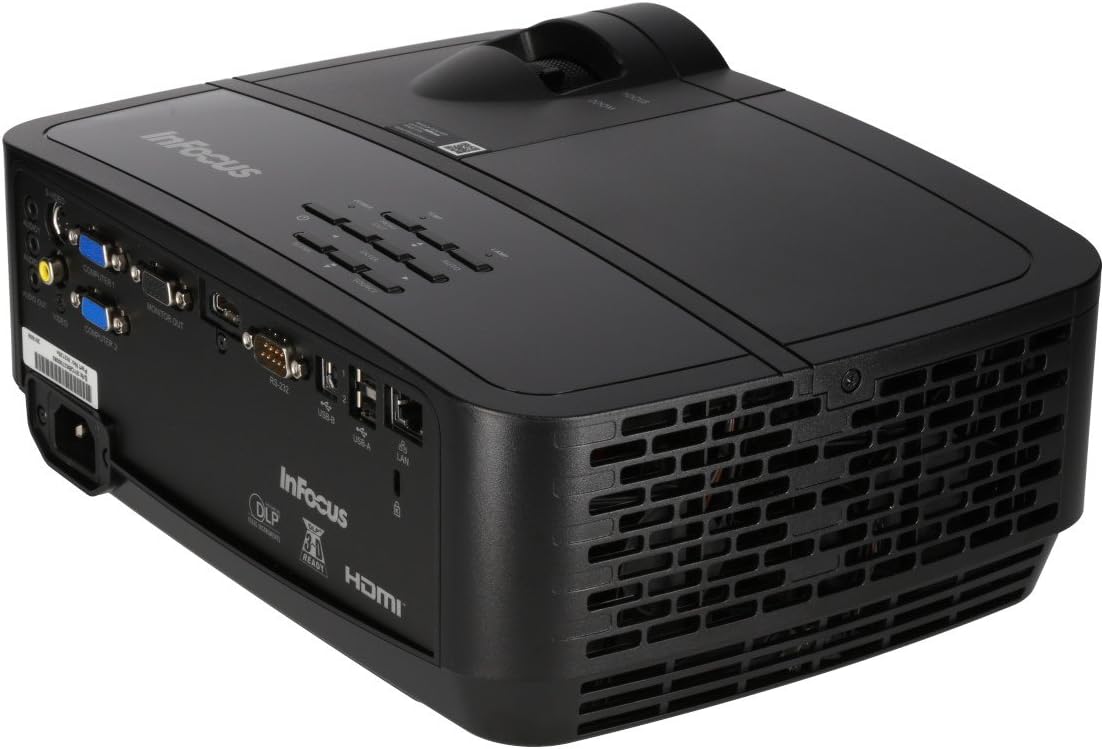
Figure 4: Projector Rear Panel Connectivity
هي تصوير هڪ تفصيلي وضاحت فراهم ڪري ٿي view of the rear panel of the InFocus IN126x projector, clearly showing all available input and output ports. These include HDMI, VGA (Computer 1 and 2), S-Video, Video, Audio In (Audio 1 and 2), Monitor Out, RS-232, USB-B, USB-A, and LAN ports, facilitating diverse connectivity options.
4. Initial Power On and Adjustment
Press the power button on the projector or remote control. The projector will power on and display the input source. Use the focus and zoom rings on the lens to adjust the image clarity and size to your desired projection area.

Figure 5: Projector Top Panel Controls
This image shows the top surface of the InFocus IN126x projector, highlighting the control panel with various buttons for navigation and settings adjustment. The focus and zoom rings on the lens are also visible, used for fine-tuning the projected image.
آپريٽنگ هدايتون
بنيادي ڪنٽرول
پروجيڪٽر کي يونٽ جي چوٽي تي ڪنٽرول پينل يا شامل ريموٽ ڪنٽرول استعمال ڪندي هلائي سگهجي ٿو.
- پاور بٽڻ: پروجيڪٽر کي آن يا آف ڪري ٿو.
- ذريعو بٽن: Cycles through available input sources (HDMI, VGA, etc.).
- مينيو بٽڻ: آن اسڪرين ڊسپلي (OSD) مينيو کوليندو آهي.
- نيويگيشن بٽڻ: Used to navigate through menu options and adjust settings.
- داخل ڪريو بٽڻ: مينيو ۾ چونڊن جي تصديق ڪري ٿو.
مينيو نيويگيشن ۽ سيٽنگون
Press the Menu button to access the OSD. Use the navigation buttons to select categories such as Picture, Display, Setup, and Advanced. Within each category, you can adjust settings like:
- روشني ۽ تضاد: Optimize image visibility.
- رنگ ۽ رنگت: Fine-tune color accuracy.
- تناسب تناسب: Select between 4:3, 16:9, or other ratios to match your content.
- ڪيسٽون جي اصلاح: Adjust image shape if the projector is not perfectly perpendicular to the screen.
- BrilliantColor Technology: Enhance color vibrancy and detail.
ترقي يافته خاصيتون
The IN126x supports a superior viewing experience, including 3D home cinema (3D Glasses sold separately). For enhanced connectivity, the projector can easily connect to your phone or iPad with a LightCast Key (sold separately).
سار سنڀال
Lamp بدلائڻ
پروجيڪٽر ايلamp has a lifespan of over 5,000 hours. When the lamp reaches the end of its life, a warning message may appear, or the lamp indicator light may illuminate. Always allow the projector to cool down completely (at least 60 minutes) before attempting to replace the lamp. Refer to the safety information on the bottom of the projector for specific warnings regarding mercury content and replacement procedures.
صفائي
- لينس: خاص طور تي آپٽيڪل لينس لاءِ ٺهيل نرم، لِنٽ فري ڪپڙو استعمال ڪريو. رگڙيندڙ صاف ڪندڙ استعمال نه ڪريو.
- پروجيڪٽر سيasing: نرم سان مسح ڪريو، ڊيamp ڪپڙو. سخت ڪيميائي کان بچاء.
- هوائي وينٽس: هوا جي وهڪري کي يقيني بڻائڻ ۽ وڌيڪ گرم ٿيڻ کان روڪڻ لاءِ باقاعدي طور تي هوائي وينٽس کي چيڪ ڪريو ۽ صاف ڪريو. مٽي هٽائڻ لاءِ نرم برش يا دٻيل هوا استعمال ڪريو.

Figure 6: Projector Side Ventilation
This image displays the side of the InFocus IN126x projector, prominently featuring the ventilation grilles. These grilles are crucial for dissipating heat generated during operation, and keeping them clear of obstructions is vital for the projector's longevity and performance.
مشڪلاتون
| مسئلو | ممڪن سبب | حل |
|---|---|---|
| اسڪرين تي ڪوبه تصوير نه آهي |
|
|
| Image is dim or poor quality |
|
|
| آواز ڪونهي |
|
|
وضاحتون
| خاصيت | تفصيل |
|---|---|
| برانڊ | InFocus |
| ماڊل نمبر | F321717 (IN126x) |
| پيداوار جي ماپ | 18.58 x 20.67 x 7.44 انچ |
| شيءِ جو وزن | 5.5 پائونڊ |
| ڊسپلي قرارداد | 1280 x 800 (ڊبليو ايڪس جي اي) |
| رابطي ٽيڪنالاجي | HDMI, VGA, S-Video, USB, LAN |
| Lamp زندگي | 5,000 ڪلاڪن کان وڌيڪ |
| خاص خصوصيت | پورٽبل |
| پهرين دستياب تاريخ | آگسٽ 7، 2016 |
وارنٽي ڄاڻ
The InFocus IN126x Projector comes with a 2 سال وارنٽي. InFocus stands behind its products and provides customer service for any issues you may encounter. Please retain your proof of purchase for warranty claims.
ڪسٽمر سپورٽ
For technical assistance, troubleshooting beyond this manual, or warranty inquiries, please contact InFocus customer support. Visit the official InFocus webسڀ کان وڌيڪ تازه ترين رابطي جي معلومات لاءِ سائيٽ، جنهن ۾ فون نمبر ۽ آن لائن سپورٽ وسيلا شامل آهن.
You can also refer to the official InFocus webاضافي وسيلن ۽ سوالن جي جوابن لاءِ سائيٽ: www.infocus.com


