1. کانview
The Sony STR-DN1050 is a 7.2 Channel Hi-Res 4K AV Receiver designed to deliver superior audio and video performance for your home entertainment system. It features built-in Wi-Fi, Bluetooth, and AirPlay for seamless music streaming. With 165 watts of power across 7.2 channels, high-resolution audio compatibility, 4K resolution pass-through and upscaling, and 10 HD inputs, this receiver provides a robust foundation for music, Blu-ray movies, and games.
اهم خاصيتون:
- 7.2 Channel A/V Receiver with 165W x 7 (at 6 ohms, 1 kHz, THD 0.9%)
- Optimized chassis and internal circuitry for enhanced audio performance
- Built-in Wi-Fi with DLNA and AirPlay compatibility for wireless streaming
- بلوٽيوٽ ڪنيڪشن آساني سان جوڙڻ لاءِ مطابقت رکندڙ ڊوائيسز سان
- 4K resolution pass-through and upscaling for high-quality video
- High-Resolution Audio support for superior sound reproduction
- Multiple HD inputs and support for 2 separate powered zones
2. سيٽ اپ
2.1 Unpacking ۽ لڳائڻ
رسيور کي احتياط سان ان جي پيڪنگ مان هٽايو. رسيور کي هڪ مستحڪم، هموار مٿاڇري تي رکو جتي مناسب وينٽيليشن هجي ته جيئن وڌيڪ گرم ٿيڻ کان بچي سگهجي. پڪ ڪريو ته يونٽ جي چوڌاري هوا جي وهڪري لاءِ ڪافي جاءِ هجي.
2.2 ڳنڍڻ وارا اسپيڪر
The STR-DN1050 supports a 7.2 channel speaker configuration. Connect your speakers to the corresponding terminals on the rear panel. Ensure correct polarity (+ to + and - to -) for optimal sound. Refer to the impedance guidelines printed on the rear panel for compatible speaker setups (6-16 ohms).

Figure 1: Rear panel connections of the Sony STR-DN1050, highlighting speaker terminals and various inputs.
For speaker connections, use appropriate speaker wire. For a 7.2 channel setup, connect front left/right, center, surround left/right, and surround back left/right speakers. Subwoofers connect via RCA cables to the dedicated SUBWOOFER PRE OUT ports.
2.3 آڊيو/وڊيو ڊوائيسز کي ڳنڍڻ
Connect your audio and video sources (e.g., Blu-ray player, game console, cable box) to the HDMI inputs on the rear panel. Connect your TV to the HDMI OUT (TV ARC) port for audio return channel functionality. The receiver also provides optical, coaxial, and analog audio inputs for other devices.
2.4 شروعاتي پاور آن ۽ نيٽ ورڪ سيٽ اپ
After connecting all devices and speakers, plug the receiver into a power outlet. Follow the on-screen instructions on your TV for initial setup, including network configuration for Wi-Fi and AirPlay. This process typically involves connecting to your home network and performing any available software updates.
3. آپريٽنگ هدايتون
3.1 پاور آن/آف
کي دٻايو I/O button on the front panel or the POWER button on the remote control to turn the receiver on or off. The receiver supports smart turn-on technology, automatically activating when a connected HDMI device is powered on.
3.2 ان پٽ چونڊ
استعمال ڪريو چونڊيندڙ dial on the front panel or the input buttons on the remote control (e.g., BD/DVD, GAME, SAT/CATV) to switch between connected audio/video sources.
3.3 حجم ڪنٽرول
Adjust the audio level using the ماسٽر حجم dial on the front panel or the VOLUME +/- buttons on the remote control.
3.4 بلوٽوٽ جوڙي
بلوٽوٿ ڊيوائس جوڙڻ لاءِ، دٻايو بليوٽو گئرنگ button on the remote or navigate to the Bluetooth pairing option via the receiver's menu. Select the receiver from your device's Bluetooth settings to establish a connection.
3.5 Pure Direct Mode
چالو ڪريو سڌو ڊائريڪٽ mode by pressing the corresponding button on the front panel or remote. This mode switches off unnecessary processing circuitry to provide the cleanest possible signal path with minimized electronic interference, enhancing audio clarity and detail.
3.6 Speaker Zone Control
The receiver supports multiple speaker zones. Use the زون ڪنٽرول button to manage audio output to different areas. You can select between Speaker A, Speaker B, or both (A+B) depending on your setup and listening preferences.
4. ڪنيڪشن
The Sony STR-DN1050 offers a variety of input and output options to integrate with your home theater system.
4.1 HDMI Inputs/Outputs
- HDMI اندر: Connect up to 9 HDMI source devices (e.g., Blu-ray player, game console, streaming device).
- HDMI UTاهر (ٽي وي ARC): Connect to your television for video output and Audio Return Channel (ARC) functionality.
4.2 آڊيو ان پٽ
- بصري: Digital audio input for devices like CD players or older TVs.
- محوري: Digital audio input for compatible devices.
- Analog Audio IN: Multiple RCA stereo inputs for analog audio sources.
- USB: Front-panel USB port for media playback from USB storage devices.
- MHL: Mobile High-Definition Link input for connecting compatible smartphones.
- فونو: Dedicated input for turntables (requires a built-in phono pre-amp or external pre-amp).
4.3 Speaker Terminals
Screw-type terminals for connecting up to 7 speakers (Front L/R, Center, Surround L/R, Surround Back L/R). Ensure proper impedance matching (6-16 ohms) as indicated on the rear panel.
4.4 نيٽ ورڪ ڪنيڪشن
- Ethernet: Wired network connection for stable internet access and firmware updates.
- وائي فائي: Built-in wireless connectivity for network features and streaming.
4.5 Other Ports
- هيڊ فون: Front-panel 6.3mm jack for private listening.
- Pre-out (Subwoofer): RCA outputs for connecting external powered subwoofers.
- Auto Calibration Mic: Port for connecting the supplied calibration microphone for automatic speaker setup.
5. ميڊيا انٽيگريشن
5.1 پراڊڪٽ تصويرون
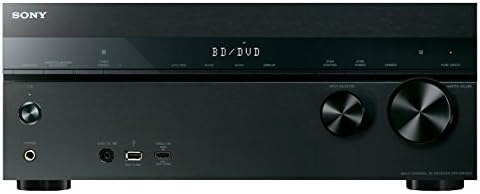
Below are images of the Sony STR-DN1050 receiver, showcasing its design and connectivity options.

شڪل 2: سامهون view of the Sony STR-DN1050 AV Receiver.
شڪل 3: ڪنڊ وارو اڳيون view of the Sony STR-DN1050.
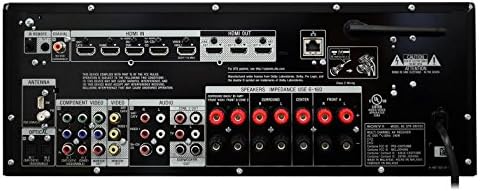
Figure 4: Close-up of the front panel.
5.2 سرڪاري پراڊڪٽ وڊيوز
Watch these official videos from Sony for more information on the STR-DN1050's features and sound quality.
Video 1: Demonstrating the sound quality of the Sony STR-DN1050.
وڊيو 2: ختمview of the Sony STR-DN1050 7.2 Channel Hi-Res 4K AV Receiver.
6. سار سنڀال
To ensure the longevity and optimal performance of your Sony STR-DN1050 receiver, follow these maintenance guidelines:
- صفائي: ٻاهرين حصي کي صاف ڪرڻ لاءِ نرم، سڪل ڪپڙو استعمال ڪريو. رگڙيندڙ صاف ڪندڙ يا محلولن کان پاسو ڪريو.
- وينٽيليشن: Ensure the receiver has adequate ventilation. Do not block the ventilation holes on the top, sides, or rear of the unit.
- طاقت: جيڪڏهن يونٽ گهڻي عرصي تائين استعمال نه ٿيندو ته بجلي جي تار کي وال آئوٽليٽ کان ڌار ڪريو.
- ماحول: رسيور کي انتهائي گرمي پد، نمي، مٽي، يا سڌي سج جي روشني ۾ بي نقاب ڪرڻ کان پاسو ڪريو.
7. مسئلا حل ڪرڻ
If you encounter issues with your receiver, try the following basic troubleshooting steps:
- طاقت ناهي: Check if the power cord is securely connected and the power outlet is functional.
- آواز ناهي: Verify all speaker connections are secure and correctly polarized. Ensure the correct input source is selected and the volume is turned up. Check the TV ARC connection if using your TV as a source.
- ڪابه تصوير: Confirm HDMI cables are securely connected to both the source device and the TV. Ensure the correct HDMI input is selected on the receiver and the TV.
- بلوٽوٿ ڪنيڪشن جا مسئلا: Ensure the receiver is in pairing mode and your device's Bluetooth is enabled and discoverable. Try restarting both the receiver and your Bluetooth device.
- System Freeze/Unresponsive: Disconnect the receiver from the power outlet for a few minutes, then reconnect and power on. This can resolve temporary software glitches.
For more detailed troubleshooting, refer to the comprehensive online instruction manual or contact Sony customer support.
8. وضاحتون
| خاصيت | قدر |
|---|---|
| پيداوار جي ماپ | 19.61 x 15.67 x 9.53 انچ |
| شيءِ جو وزن | 21 پائونڊ |
| ٺاهيندڙ | سوني |
| شيون ماڊل نمبر | STRDN1050 |
| تاريخ پهرين دستياب | اپريل 14، 2014 |
| رابطي ٽيڪنالاجي | HDMI, Component Video input, Composite input, Optical, Coaxial, Analogue Audio in, USB, MHL, Ethernet, Composite Monitor Out, Component Monitor Out, Headphone, Pre-out (subwoofer) |
| ڪنٽرولر جو قسم | iOS يا Android |
| خاص خصوصيت | پاڻمرادو ٺھيل |
| مطابقت رکندڙ ڊوائيسز | اسمارٽ فون ، اسپيڪر |
| ڪل HDMI بندرگاهن | 9 |
| ڪنيڪٽر جو قسم | HDMI, USB, Composite input, Optical, Coaxial, Headphone, Pre-out (subwoofer) |
| آڊيو آئوٽ پٽ موڊ | اسٽيريو |
| چوڌاري آواز چينل جي جوڙجڪ | 7.2 چينل |
| ويڊيو انڪوڊنگ | ايڇ.264 |
9. وارنٽي ۽ سپورٽ
وارنٽي جي معلومات ۽ ٽيڪنيڪل سپورٽ لاءِ، مھرباني ڪري پنھنجي پراڊڪٽ سان شامل دستاويزن جو حوالو ڏيو يا سرڪاري سوني سپورٽ جو دورو ڪريو. website. You can find detailed guides, FAQs, and contact information for customer service.


