1. تعارف
The NICE P1S Hand Transmitter is a compact and efficient remote control designed for various applications, primarily for door or gate systems. Operating at a frequency of 433.92 MHz, this transmitter features 5 distinct keys for versatile control. It is supplied with batteries and comprehensive instructions, ensuring a straightforward setup and programming process without the need for specialized equipment.
2. سيٽ اپ ۽ بيٽري جي انسٽاليشن
The NICE P1S Hand Transmitter comes with batteries included, making it ready for use after initial setup. Follow these steps for battery installation or replacement:
- Locate the battery compartment on the back of the transmitter.
- ڪمري جو ڍڪ کوليو.
- Insert two 1.5V AAA (LR03) alkaline batteries, ensuring correct polarity (+/-).
- بيٽري جي ڪمري واري ڍڪ کي محفوظ طور تي بند ڪريو.
نوٽ: The transmitter requires 2 AA batteries, which are included. Ensure to use alkaline batteries for optimal performance.
3. آپريٽنگ هدايتون
The NICE P1S Hand Transmitter is designed for simple operation with its 5-button interface. Its radio frequency connectivity allows for a maximum range of 10 meters under optimal conditions.
3.1 Programming the Transmitter
The programming type for this device is a one-time registration with the receiver. Refer to your receiver's manual for specific instructions on how to put it into programming mode and register the new transmitter.
3.2 بٽڻ جا ڪم
The transmitter features 5 buttons. The specific function of each button (e.g., open, close, stop) will depend on how it is programmed with your door or gate system. Typically, the larger buttons control primary functions, while smaller buttons may control auxiliary features or specific modes.
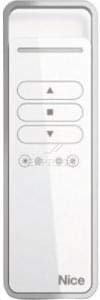
Image of the NICE P1S Hand Transmitter, a white rectangular remote control with five grey buttons. The top button has an upward arrow, the middle button has a square, and the third button has a downward arrow. Below these are two smaller rows of circular buttons. The 'Nice' logo is visible at the bottom right.
4. سار سنڀال
The NICE P1S Hand Transmitter requires minimal maintenance. The primary maintenance task is battery replacement when the transmitter's performance diminishes or it stops responding.
- بيٽري مٽائڻ: Replace batteries as described in Section 2 when the indicator light (if present) signals low battery, or the range decreases significantly.
- صفائي: Use a soft, dry cloth to clean the exterior of the transmitter. Avoid using abrasive cleaners or solvents.
- اسٽوريج: Store the transmitter in a dry place, away from extreme temperatures and direct sunlight.
5. مسئلا حل ڪرڻ
If you experience issues with your NICE P1S Hand Transmitter, consider the following common solutions:
- Transmitter not responding:
- Check if the batteries are correctly inserted and not depleted. Replace if necessary.
- Ensure you are within the maximum operating range (10 meters) of the receiver.
- Verify that the transmitter is properly programmed with the receiver. Re-program if needed.
- Reduced operating range:
- بيٽرين کي تبديل ڪريو.
- Check for obstructions between the transmitter and the receiver (e.g., thick walls, metal objects).
- Ensure there is no strong radio interference in the area.
If problems persist, consult a qualified technician or contact NICE customer support.
6. وضاحتون
| خاصيت | تفصيل |
|---|---|
| برانڊ | ڀلو |
| ماڊل | P1S |
| تعدد | 433.92 MHz |
| بٽڻ جو تعداد | 5 |
| بيٽري جو قسم | 2 x 1.5V AAA (LR03) Alkaline |
| طول و عرض (L x W x H) | 1.7 x 0.6 x 0.2 سينٽي |
| شيءِ جو وزن | 140 گرام |
| رابطي ٽيڪنالاجي | ريڊيو فريڪوئنسي |
| وڌ ۾ وڌ رينج | 10 ميٽر |
| ڪنٽرولر جو قسم | بٽڻ ڪنٽرول |
7. وارنٽي ۽ سپورٽ
The NICE P1S Hand Transmitter comes with a 1-year warranty, which includes the battery and instructions. For technical support, warranty claims, or further assistance, please refer to the contact information provided with your product packaging or visit the official NICE webسائيٽ.
For more information, you may visit the product page: NICE P1S on Amazon.se


