1. تعارف
This manual provides instructions for the setup, operation, and maintenance of your Logitech M557 Bluetooth Mouse. The Logitech M557 is designed for seamless wireless connectivity with Bluetooth-enabled computers, laptops, and tablets, supporting various operating systems including Windows, macOS, Chrome OS, and Android.
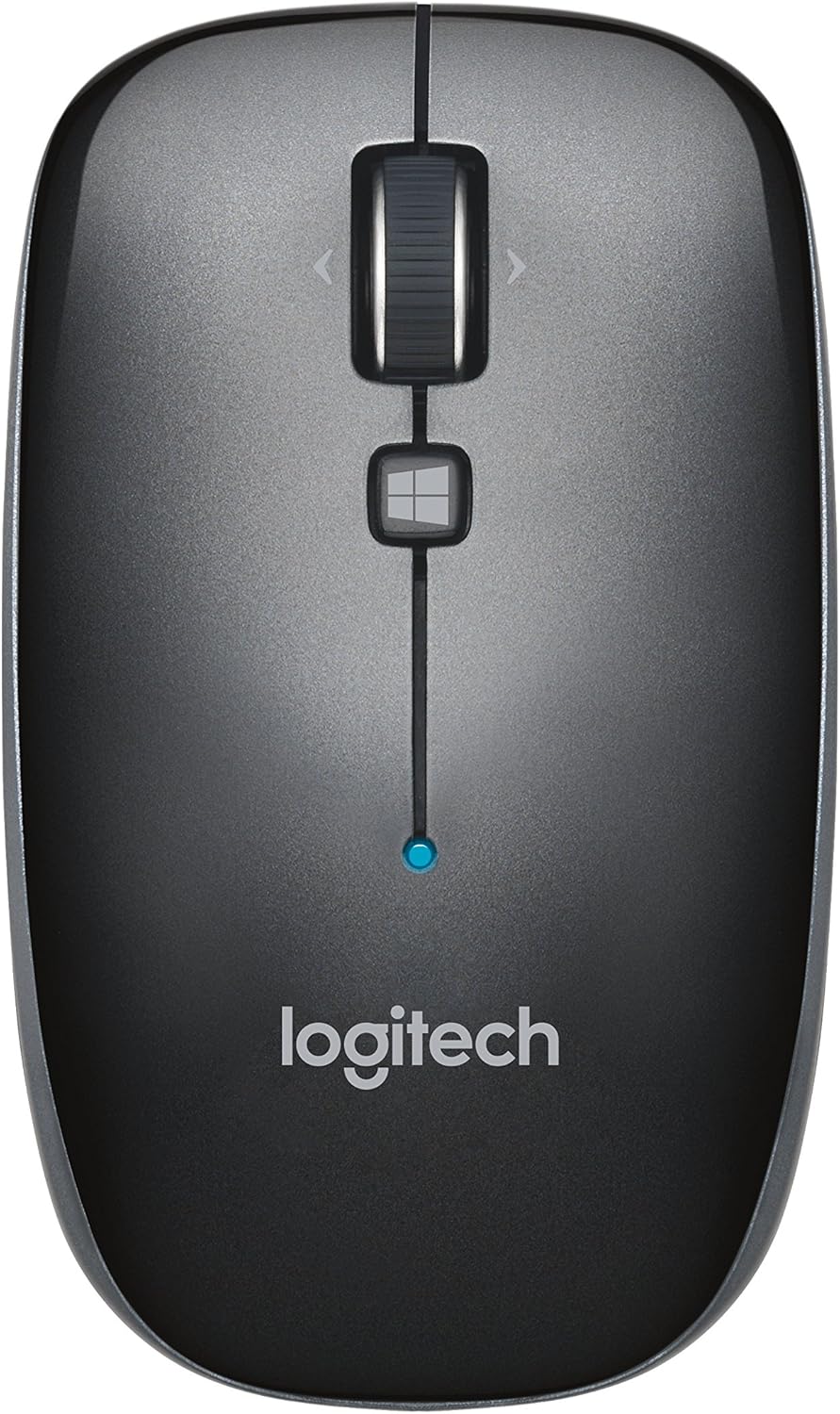
شڪل 1: مٿو view of the Logitech M557 Bluetooth Mouse, showing the scroll wheel, Windows button, and Logitech logo.
2. پيڪيج مواد
تصديق ڪريو ته توھان جي پيڪيج ۾ ھيٺيون شيون شامل آھن:
- Logitech M557 بلوٽوت ماؤس
- 1 AAA Battery (pre-installed or included separately)
- تڪڙي شروعات جي ھدايت (هي دستور العمل تفصيلي ھدايت طور ڪم ڪري ٿو)
3. سيٽ اپ
3.1. بيٽري لڳائڻ
- مائوس جي هيٺئين پاسي واري بيٽري جي ڪمري کي ڳولھيو.
- بيٽري جي ڪمري واري ڍڪ کي سلائيڊ ڪريو کليل.
- Insert the included AAA battery, ensuring correct polarity (+/-).
- بيٽري جي ڪمري واري ڍڪ کي بند ڪريو.

شڪل 2: Underside of the Logitech M557 mouse, showing the ON/OFF switch, Connect button, and optical sensor. The battery compartment is typically located here.
3.2. بلوٽوت ذريعي ڳنڍڻ
The Logitech M557 connects wirelessly via Bluetooth, requiring no USB receiver.
- پاور آن: Slide the ON/OFF switch on the bottom of the mouse to the "ON" position. A small LED indicator on the top of the mouse may light up briefly.
- جوڙيو موڊ کي فعال ڪريو: کي دٻايو ۽ رکو ڳنڍڻ button on the bottom of the mouse for a few seconds until the LED indicator on the top of the mouse begins to blink rapidly. This indicates the mouse is in pairing mode.
- پنهنجي ڊوائيس تي بلوٽوٿ کي فعال ڪريو:
- ونڊوز: ڏانهن وڃو سيٽنگون > ڊوائيسز > بلوٽوٿ ۽ ٻيا ڊوائيسز. Ensure Bluetooth is turned on.
- macOS: ڏانهن وڃو System Settings > Bluetooth. Ensure Bluetooth is turned on.
- Chrome OS/Android: ڏانهن وڃو سيٽنگون > ڳنڍيل ڊوائيسز > بلوٽوٿ. Ensure Bluetooth is turned on.
- ماؤس جوڙيو: In your device's Bluetooth settings, look for "Logitech M557" in the list of available devices. Select it to initiate the pairing process.
- تصديق: Once paired, the LED indicator on the mouse will stop blinking and remain solid for a few seconds, then turn off. Your mouse is now ready for use.
Note: If the connection is lost or you wish to pair with a different device, repeat steps 2-5.
4. پنهنجي مائوس کي هلائڻ
4.1. بنيادي ڪم
- کاٻي ڪلڪ بٽڻ: بنيادي چونڊ ۽ چالو ڪرڻ.
- ساڄي ڪلڪ ڪريو بٽڻ: لاڳاپيل مينيو تائين رسائي حاصل ڪري ٿو.
- اسڪرول ويل: دستاويزن ذريعي عمودي طور تي اسڪرول ڪري ٿو ۽ web صفحا.
- ٽِلٽ ويل: The scroll wheel can also be tilted left or right for horizontal scrolling (if supported by your operating system/application).
- اسڪرول ويل بٽڻ: Pressing the scroll wheel acts as a middle-click button, often used for opening links in new tabs or activating specific application functions.
- Windows Button: Located below the scroll wheel. By default, this button opens the Start Menu or Search function on Windows. Its function may be customizable using Logitech Options software (if available for your OS).

شڪل 3: زاويه view of the Logitech M557 mouse, highlighting its ergonomic design and button placement.
4.2. Customizing Your Mouse (Optional)
For advanced customization of button functions and scroll behavior, Logitech may offer software such as Logitech Options. Visit the official Logitech support website for your product model to check for compatible software downloads.
5. سار سنڀال
5.1. صفائي
To maintain optimal performance, clean your mouse periodically:
- نرم، لِنٽ کان خالي ڪپڙو استعمال ڪريو ٿورڙو ڊيampened with water or an electronics-safe cleaning solution.
- سخت ڪيميڪلز يا رگڙيندڙ مواد کان پاسو ڪريو.
- Clean the optical sensor area on the bottom of the mouse to ensure accurate tracking.
5.2. بيٽري مٽائڻ
The Logitech M557 uses one AAA battery. The average battery life is approximately 12 months, but actual life may vary based on usage.
- When the battery is low, the LED indicator on the mouse may flash red.
- Turn off the mouse using the ON/OFF switch on the bottom.
- بيٽري جي ڪمري کي کوليو.
- Remove the old AAA battery and dispose of it according to local regulations.
- صحيح پولارٽي کي ڏسندي، هڪ نئين AAA بيٽري داخل ڪريو.
- Close the battery compartment and turn the mouse back on.
6. مسئلا حل ڪرڻ
6.1. Mouse Not Connecting or Disconnecting
- بيٽري چيڪ ڪريو: پڪ ڪريو ته بيٽري صحيح طرح سان نصب ٿيل آهي ۽ ڪافي چارج آهي. جيڪڏهن ضروري هجي ته تبديل ڪريو.
- پاور سائيڪل: مائوس کي بند ڪريو ۽ پوءِ وري آن ڪريو.
- ٻيهر جوڙيو: Remove "Logitech M557" from your device's Bluetooth list and repeat the pairing process (Section 3.2).
- ڊوائيس بلوٽوٿ: پڪ ڪريو ته توهان جي ڪمپيوٽر يا ٽيبليٽ تي بلوٽوٿ فعال آهي.
- مداخلت: Bluetooth can be affected by other wireless devices (e.g., Wi-Fi routers, other Bluetooth devices). Try moving closer to your device or away from potential sources of interference.
- آپريٽنگ سسٽم اپڊيٽ: Ensure your device's operating system and Bluetooth drivers are up to date.
6.2. Cursor Movement is Erratic or Non-Responsive
- صاف سينسر: مائوس جي تري ۾ موجود آپٽيڪل سينسر کي صاف ڪريو.
- سطح: پڪ ڪريو ته توهان مائوس کي مناسب مٿاڇري تي استعمال ڪري رهيا آهيو. تمام گهڻي عڪاسي ڪندڙ يا شفاف سطحون ٽريڪنگ کي متاثر ڪري سگهن ٿيون. مائوس پيڊ جي سفارش ڪئي وئي آهي.
- بيٽري: Low battery can affect performance. Replace the battery.
6.3. Buttons or Scroll Wheel Not Functioning
- ٻيهر جوڙيو: Try re-pairing the mouse with your device.
- سافٽ ويئر: If using customization software, ensure it is correctly installed and configured. Temporarily uninstalling and reinstalling the software might resolve issues.
- ٻئي ڊوائيس تي ٽيسٽ: If possible, test the mouse on another Bluetooth-enabled device to determine if the issue is with the mouse or the original device.
7. وضاحتون
| خاصيت | تفصيل |
|---|---|
| برانڊ | Logitech |
| ماڊل | M557 (P/N: 910-003971) |
| رابطي ٽيڪنالاجي | بلوٽوٿ |
| حرڪت جي چڪاس | بصري |
| آپريٽنگ سسٽم مطابقت | Windows 10, 11 or later, macOS, Chrome OS, Android |
| طاقت جو ذريعو | بيٽري سان هلندڙ |
| بيٽري جو قسم | 1 AAA بيٽري (شامل) |
| سراسري بيٽري جي زندگي | 12 مهينا |
| رنگ | ڀورو |
| شيءِ جو وزن | 2.16 آونس (تقريبن 61 گرام) |
| پيداوار جي ماپ (LxWxH) | 3.93 x 2.28 x 1.34 انچ (تقريبن 10 x 5.8 x 3.4 سينٽي ميٽر) |

شڪل 4: Logitech M557 mouse displaying its physical dimensions.
8. وارنٽي ۽ سپورٽ
وارنٽي جي معلومات ۽ ٽيڪنيڪل سپورٽ لاءِ، مھرباني ڪري سرڪاري Logitech جو حوالو ڏيو website. You can find detailed support resources, FAQs, and contact information by visiting support.logi.com and searching for "Logitech M557".
Note: Product specifications and warranty terms are subject to change without notice. Please consult the official Logitech webسائيٽ س current کان و currentيڪ معلومات لاءِ.


