1. تعارف
The CyberPower BRG1500AVRLCD Intelligent LCD UPS System is designed to provide reliable battery backup and surge protection for desktop computers, workstations, networking devices, and home entertainment systems. This Uninterruptible Power Supply (UPS) system utilizes line interactive topology and simulated sine wave output to safeguard your valuable electronics from power interruptions and fluctuations.
اهم خصوصيتن ۾ خودڪار وول شامل آهنtage Regulation (AVR) to correct minor power fluctuations without switching to battery power, thereby extending battery life. It also offers two USB charge ports (2.1 Amps shared) for portable devices.

Figure 1: CyberPower BRG1500AVRLCD UPS System in a typical office environment, providing power protection to connected devices.
2. حفاظتي احتياط
Please read and follow all safety instructions carefully before installing or operating the UPS. Failure to do so may result in damage to the unit, connected equipment, or personal injury.
- Do not install the UPS in direct sunlight, near heat-emitting appliances, or in areas with excessive humidity.
- Ensure the UPS is connected to a grounded outlet.
- يو پي ايس سي نه کوليوasing. اندر ڪو به استعمال ڪندڙ جي خدمت لائق پرزا نه آهن. سروسنگ کي قابل سروس اهلڪارن ڏانهن رجوع ڪريو.
- طبي يا زندگي جي مدد جي سامان لاءِ UPS استعمال نه ڪريو.
- Ensure proper ventilation around the UPS. Do not block any ventilation openings.
- In case of fire, use a powder fire extinguisher. Do not use water.
3. پيڪيج مواد
پڪ ڪريو ته سڀئي شيون پيڪيج ۾ موجود آهن:
- يو پي ايس يونٽ
- استعمال ڪندڙ دستي
4. پراڊڪٽ ختمview
4.1 فرنٽ پينل

شڪل 2: سامهون view of the CyberPower BRG1500AVRLCD UPS, highlighting the Intelligent LCD panel and USB charging ports.
The front panel features the Intelligent LCD display, control buttons (Display, Mute, Enter, Setup), and two USB charge ports (USB-A and USB-C) for convenient charging of portable devices.
4.2 ريئر پينل
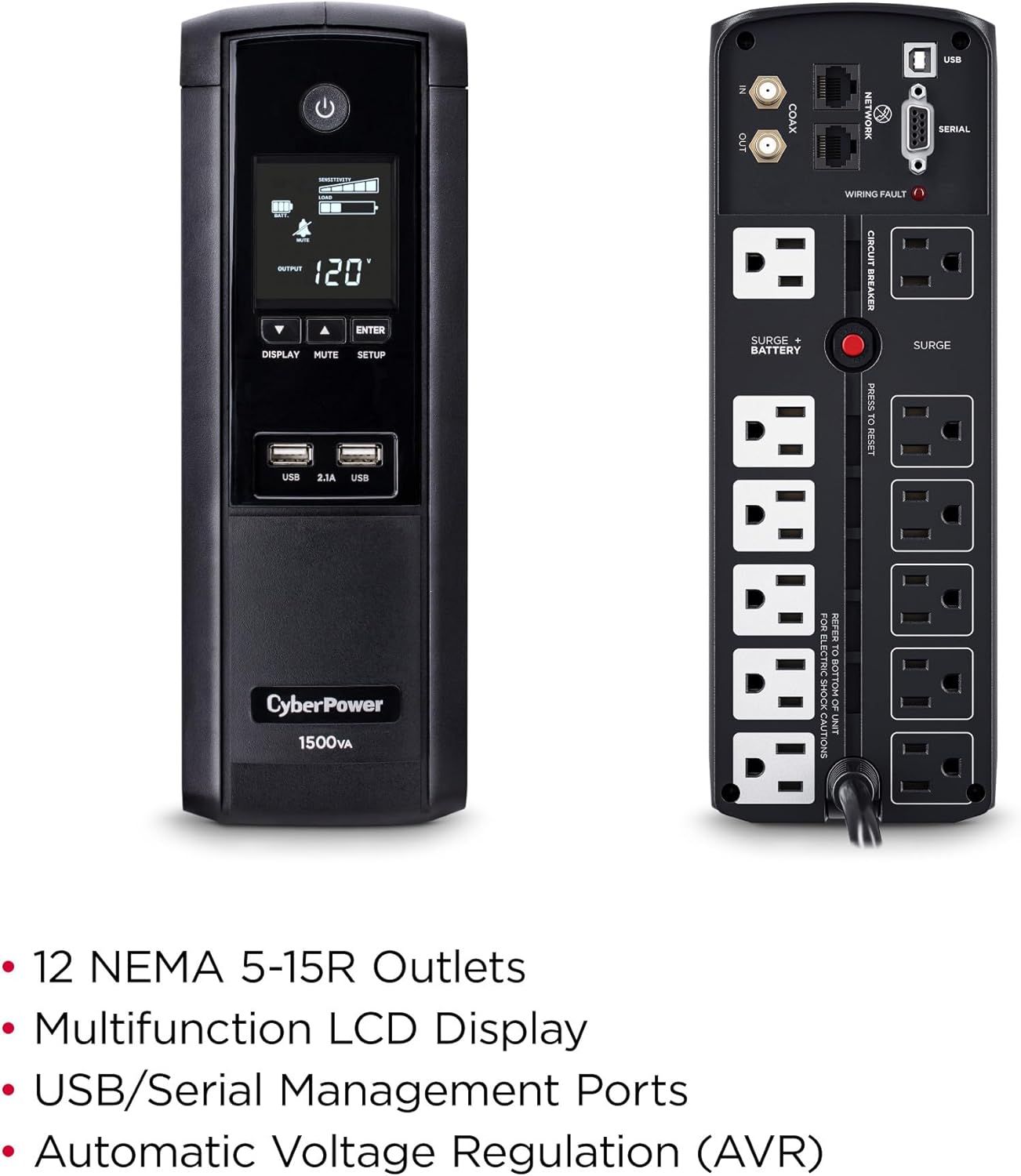
شڪل 3: پوئتي view of the CyberPower BRG1500AVRLCD UPS, detailing the NEMA 5-15R outlets, network, cable, and serial ports.
The rear panel includes 12 NEMA 5-15R outlets: six battery backup & surge protected outlets and six surge protected outlets. It also features network (RJ45) and cable (Coax) surge protection ports, a serial port, and a USB port for management software connectivity. A circuit breaker reset button is also located on the rear panel.
5. سيٽ اپ
5.1 شروعاتي چارجنگ
Before initial use, plug the UPS into a grounded wall outlet and allow it to charge for at least 8 hours to ensure maximum battery runtime. The unit will automatically turn on when connected to mains power.
5.2 ڳنڍڻ جو سامان
- بيٽري بيڪ اپ ۽ سرج کان محفوظ آئوٽليٽ: Connect critical equipment such as your computer, monitor, and external hard drives to these outlets. These devices will receive power from the UPS battery during an outage.
- Surge Protected Outlets: Connect non-critical equipment that still requires surge protection, such as printers or scanners, to these outlets. These devices will not receive battery backup power.
- USB Charge Ports: Use the front USB-A and USB-C ports to charge mobile phones, MP3 players, and cameras.
- ڊيٽا لائين تحفظ: Connect your network cable (RJ45) and coaxial cable (Coax) through the designated IN/OUT ports on the rear panel to protect against surges.
6. آپريٽنگ هدايتون
6.1 Turning On/Off the UPS
- چالو ڪرڻ لاء: Press and hold the Power button on the front panel for approximately 2 seconds. The LCD display will light up.
- بند ڪرڻ: Press and hold the Power button for approximately 2 seconds. The LCD display will turn off.
6.2 LCD ڊسپلي افعال
The multifunction LCD panel displays immediate, detailed information on battery and power conditions. Use the 'Display' button to cycle through various screens:

شڪل 4: مثالamples of information displayed on the Intelligent LCD panel, including input/output voltage, load, and battery status.
- انٽ واليمtage: موجوده واليم ڏيکاري ٿوtage from the utility power.
- اوٽ وولٽtage: جلد ڏيکاري ٿوtage supplied by the UPS to connected equipment.
- بيٽري جي گنجائش: اندروني بيٽرين جي موجوده چارج ليول کي ظاهر ڪري ٿو.
- لوڊ گنجائش: فيصد ڏيکاري ٿوtagڳنڍيل سامان پاران استعمال ٿيندڙ يو پي ايس جي گنجائش جو اي.
- Estimated Runtime: Provides an estimate of how long the UPS can supply power during an outage based on the current load.
- ايونٽ لاگ: پاور واقعن کي رڪارڊ ڪري ٿو جهڙوڪ outages، surges، ۽ voltage fluctuations.
6.3 خودڪار Voltagاي ريگيوليشن (AVR)
يو پي ايس ۾ خودڪار وولٽ شامل آهيtage Regulation (AVR), which automatically corrects minor power fluctuations (sags and overvoltages) without switching to battery power. This extends the life of the battery by reducing the number of times it needs to discharge and recharge.
6.4 PowerPanel Personal Edition Management Software
The UPS comes with FREE PowerPanel Personal Edition Management Software (Download). This software allows for advanced power management features, including scheduled shutdowns, remote monitoring, and customizable alerts. Refer to the software's documentation for installation and usage instructions.
7. سار سنڀال
7.1 بيٽري مٽائڻ
The CyberPower BRG1500AVRLCD uses two 12V batteries. The batteries are designed to last approximately 3-5 years under normal operating conditions. When the batteries reach the end of their service life, they should be replaced by qualified personnel. For battery replacement, contact CyberPower Systems customer support or a certified technician.
7.2 صفائي
Regularly clean the exterior of the UPS with a dry cloth. Ensure ventilation openings are free from dust and debris to maintain proper airflow and prevent overheating.
8. مسئلا حل ڪرڻ
If the UPS is not functioning correctly, refer to the following common issues:
- يو پي ايس آن نٿو ٿئي: Ensure the power cord is securely plugged into a grounded wall outlet and the UPS. Check the circuit breaker on the rear panel and reset if tripped.
- يو پي ايس مسلسل بيپ ڪري رهيو آهي: This usually indicates the UPS is operating on battery power during an outage or a low battery condition. Save your work and shut down connected equipment if the outagاي ڊگهو آهي.
-
لاڳاپيل دستاويز - BRG1500AVRLCD

سائبر پاور يو پي ايس فنڪشن سيٽ اپ گائيڊ
Detailed guide for setting up functions and configurations on CyberPower Intelligent LCD UPS Systems, including voltage settings, sensitivity, alarms, and display options.
سائبر پاور BRG1500AVRLCD2 UPS يوزر مينوئل: خاصيتون، تنصيب، ۽ آپريشن
سائبر پاور BRG1500AVRLCD2 انٽيليجنٽ LCD UPS لاءِ جامع يوزر مينوئل. ان جي خاصيتن، انسٽاليشن، بنيادي آپريشن، بيٽري جي متبادل، مسئلو حل ڪرڻ، ۽ ٽيڪنيڪل وضاحتن بابت سکو.
CyberPower PR750LCD3C Intelligent UPS Series User Manual
User manual for the CyberPower PR750LCD3C Intelligent UPS Series, providing detailed information on installation, operation, safety warnings, troubleshooting, and technical specifications for this Uninterruptible Power Supply.
سائبر پاور انٽيليجنٽ UPS سيريز OR1000LCDRM1U/OR1500LCDRM1U يوزر مينوئل | پاور پروٽيڪشن گائيڊ
سائبر پاور انٽيليجنٽ يو پي ايس سيريز (OR1000LCDRM1U، OR1500LCDRM1U) لاءِ جامع يوزر مينوئل. قابل اعتماد پاور تحفظ لاءِ انسٽاليشن، خاصيتون، آپريشن، بيٽري جي متبادل، مسئلو حل ڪرڻ، ٽيڪنيڪل وضاحتون، ۽ حفاظت بابت سکو.
CyberPower Intelligent UPS Series User Manual - CP850/1000/1350/1500AVRLCD
User manual for CyberPower Intelligent UPS Series models CP850AVRLCD, CP1000AVRLCD, CP1350AVRLCD, and CP1500AVRLCD. Covers features, safety, installation, operation, battery replacement, troubleshooting, technical specifications, and GreenPower UPS technology.
CyberPower PR5000RTXL2UC Smart App Sinewave UPS Series User Manual
Comprehensive user manual for the CyberPower PR5000RTXL2UC Smart App Sinewave UPS Series. Covers installation, basic and network operation, LCD settings, EPO/ROO configuration, dry contact monitoring, battery replacement, technical specifications, troubleshooting, and warranty information.