1. تعارف
The Behringer EUROPORT PPA200 is an ultra-compact 2 x 100-Watt, 5-channel portable PA system designed for various audio applications. This system combines a powered mixer with two speakers in a briefcase format, offering portability and ease of setup.
اهم خاصيتون:
- Ultra-compact 2 x 100-Watt, 5-channel portable PA system in a briefcase format.
- Enormous power, incredible sonic performance and super-light weight.
- "Wireless ready" for high-quality BEHRINGER digital wireless microphone system (not included).
- Integrated Klark Teknik Multi-FX Processor for enhanced sound.
- FBQ Feedback Detection system to prevent audio feedback.

Figure 1: Behringer EUROPORT PPA200 Portable PA System, showing the mixer and two speakers integrated into a compact, briefcase-style unit.
2. دٻي ۾ ڇا آهي
Your Behringer EUROPORT PPA200 package includes the following components:
- Compact ALL in One Portable PA System (includes powered mixer and two speakers)
- پاور ڪيبل
- Speaker Cables (for connecting speakers to the mixer)
- مائڪروفون
- مائڪروفون ڪيبل
- مائڪروفون ڪلپ
- رسائي واري پائوچ
- 1/8" Mini-Plug-to-Stereo RCA Adapter
- استعمال ڪندڙ جو دستياب (ھي دستاويز)
3. سيٽ اپ جون هدايتون
Follow these steps to set up your EUROPORT PPA200 system:
سسٽم کوليو:
Carefully open the briefcase-style unit. Release the latches on the sides to separate the two speaker cabinets from the central mixer unit. Place the mixer unit on a stable, flat surface.

Figure 2: The PPA200 system disassembled, showing the central mixer unit and the two detachable speakers.
اسپيڪرن کي جڳهه ڏيو:
Place the two speaker cabinets in your desired listening area. For optimal sound dispersion, position them to the left and right of the mixer, facing the audience. Ensure they are on stable surfaces or speaker stands (not included).
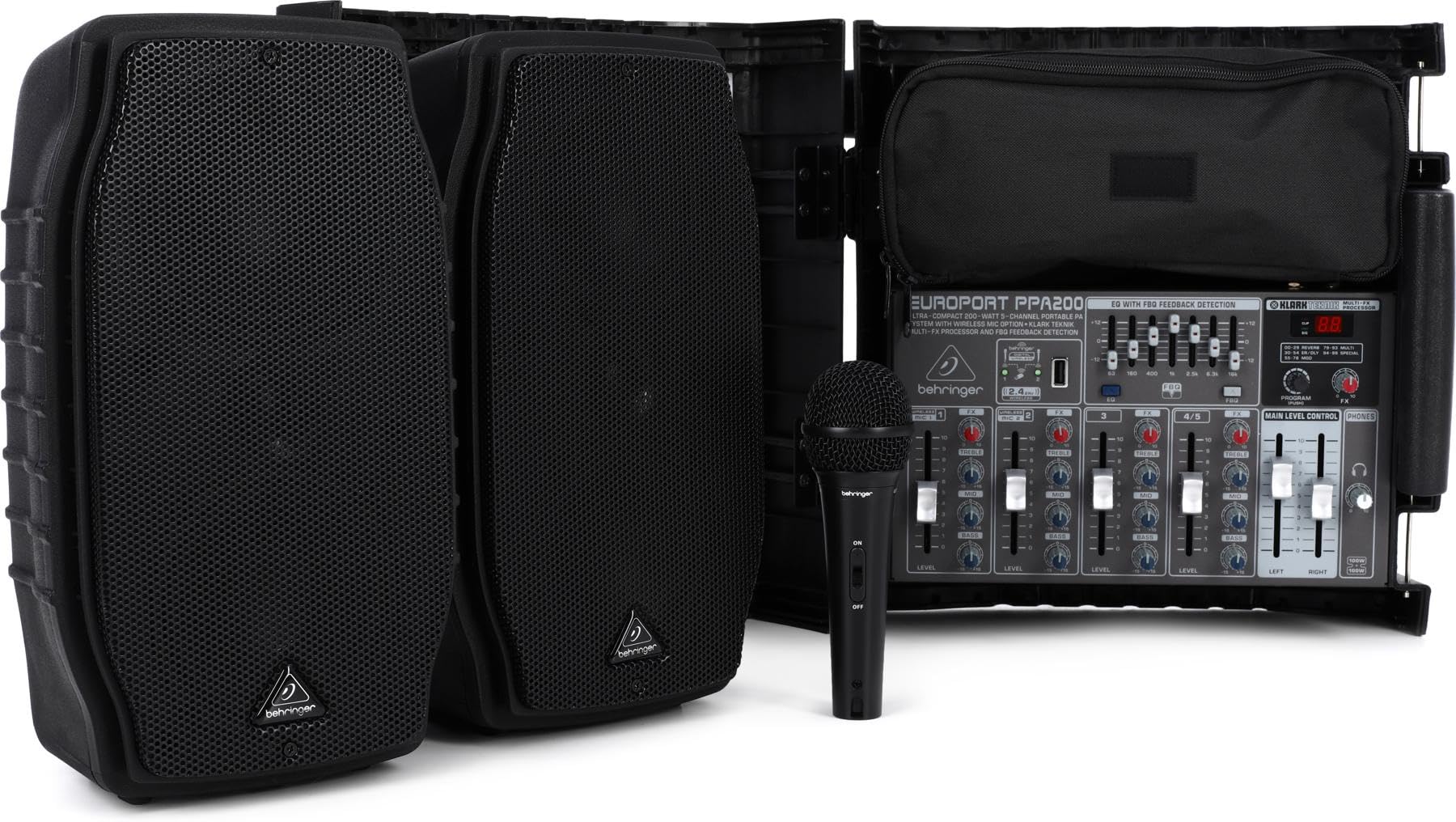
Figure 3: The PPA200 mixer and speakers arranged for use.
Connect Speaker Cables:
Locate the speaker output jacks on the rear of the mixer unit and the input jacks on the rear of each speaker. Use the provided speaker cables to connect the "LEFT" output from the mixer to one speaker and the "RIGHT" output to the other. Ensure connections are secure.
پاور Connectنيو:
Ensure the mixer's power switch is in the "OFF" position. Connect the supplied AC power cable to the power inlet on the rear of the mixer, then plug the other end into a suitable electrical outlet.
ان پٽ ڊوائيسز ڳنڍيو:
Connect your microphones, instruments, or other audio sources to the appropriate input channels on the mixer. The PPA200 features 5 channels, including XLR/TRS combo jacks for microphones and line-level inputs, and stereo RCA/1/8" mini-jack inputs for devices like MP3 players.

شڪل 4: تفصيلي view of the mixer's input channels and controls.
پاور آن:
Once all connections are made, switch the power button on the mixer to the "ON" position. The system is now ready for operation.
مظاهري جي وڊيو سيٽ اپ ڪريو:
Video 1: A seller's demonstration of setting up a portable PA system, including unpacking, connecting speakers, and powering on. (Note: This video features a related product, EXOTON S-1202, but illustrates general setup principles applicable to the PPA200).
4. آپريٽنگ هدايتون
The EUROPORT PPA200 mixer provides comprehensive controls for managing your audio. Familiarize yourself with the following:
چينل ڪنٽرول:
Each of the 5 input channels features dedicated controls:
- حجم: Adjusts the input level of the specific channel.
- ٽربل: Controls the high-frequency content of the channel.
- باس: Controls the low-frequency content of the channel.
- FX (Effects): Sends the channel's signal to the internal effects processor.
- Pan/Balance: Adjusts the stereo position of the channel's signal between the left and right speakers.
ماسٽر ڪنٽرول:
- ماسٽر حجم: PA سسٽم جي مجموعي آئوٽ پُٽ حجم کي ڪنٽرول ڪري ٿو.
- EQ with FBQ Feedback Detection: This graphic equalizer allows you to fine-tune the overall frequency response of the system. The FBQ system helps identify and eliminate feedback frequencies by illuminating the corresponding fader LED.
- Klark Teknik Multi-FX Processor: Select from 100 high-quality effects (reverbs, delays, chorus, etc.) to enhance your sound. Adjust the FX level and depth using dedicated controls.
- Wireless Microphone Option: The system is "wireless ready" for Behringer ULM series digital wireless microphones (sold separately).
- بلوٽوت ڪنيڪشن: Channels 5/6 support Bluetooth audio streaming from compatible devices.

Figure 5: Close-up of the mixer's EQ, FX, and master volume controls.
Operating Demonstration Video:
Video 2: A seller's demonstration of a portable PA system's mixer controls, including individual channel adjustments and master effects. (Note: This video features a related product, EXOTON 10-inch PA System, but illustrates general mixer operation principles applicable to the PPA200).
5. سار سنڀال
- صفائي: يونٽ جي ٻاهرين حصي کي صاف ڪرڻ لاءِ نرم، سڪل ڪپڙو استعمال ڪريو. رگڙيندڙ ڪلينر يا سالوينٽس استعمال ڪرڻ کان پاسو ڪريو.
- اسٽوريج: When not in use, ensure the system is powered off and disconnected from the mains. Reassemble the speakers and mixer into the briefcase format for compact storage and protection. Store in a cool, dry place away from direct sunlight and extreme temperatures.
- ڪيبل جي سنڀال: Regularly inspect all cables for damage. Replace any frayed or damaged cables immediately to prevent electrical hazards or signal loss.
6. مسئلا حل ڪرڻ
If you encounter issues with your EUROPORT PPA200, refer to the following common troubleshooting steps:
- آواز ناهي:
- Ensure the power cable is securely connected and the unit is switched ON.
- Check that the Master Volume is turned up.
- Verify individual channel volumes are turned up and not muted.
- Confirm speaker cables are correctly connected to both the mixer and speakers.
- Test input sources (microphones, instruments) with another device to ensure they are functioning.
- Feedback (High-pitched squeal):
- Reduce the volume of the microphone or the overall Master Volume.
- Move microphones further away from the speakers.
- Use the FBQ Feedback Detection system on the graphic equalizer to identify and cut problematic frequencies.
- Avoid pointing microphones directly at speakers.
- مسخ ٿيل آواز:
- Reduce the input volume of the problematic channel. The "PEAK" LED on the channel should not be constantly lit.
- Lower the Master Volume.
- Check that speaker cables are not damaged.
- بلوٽوٿ ڪنيڪشن جا مسئلا:
- Ensure Bluetooth is enabled on your device and the PPA200 is in Bluetooth pairing mode.
- Move your Bluetooth device closer to the mixer.
- بلوٽوٿ ڪنيڪشن کي ختم ڪريو ۽ ٻيهر ڳنڍيو.
7. وضاحتون
| خاصيت | تفصيل |
|---|---|
| برانڊ | بيرنگر |
| ماڊل نمبر | پي پي اي 200 |
| آئوٽ پٽ واٽtage | 200 Watts (2 x 100-Watt) |
| چينلن جو تعداد | 5 |
| آڊيو ان پٽ | Mic/Line, Stereo Line |
| رابطي ٽيڪنالاجي | وائرڊ ، بلوٽوٿ |
| چڙهڻ جو قسم | ٽيبل ٽاپ |
| طاقت جو ذريعو | تار ٿيل برقي |
| مواد | ڌاتو، پلاسٽڪ |
| شيءِ جو وزن | 26.5 پائونڊ |
| پيداوار جي ماپ | 24.13 x 7.32 x 13.35 انچ |
| رنگ | ڳاڙهو ڳاڙهو |
| مطابقت رکندڙ ڊوائيسز | MP3 پليئر |
8. وارنٽي ۽ سپورٽ
For detailed warranty information and technical support, please refer to the warranty card included with your product or visit the official Behringer website. You can also find additional support resources and FAQs on their webسائيٽ.
بهرنگر سرڪاري Webسائيٽ: www.behringer.com


