تعارف
This manual provides comprehensive instructions for the installation, programming, operation, and maintenance of your Skylink KN-318 Keyless Entry System. Please read this manual thoroughly before attempting to install or operate the device to ensure proper function and safety.
The Skylink KN-318 is designed to provide convenient keyless access to your garage. It is compatible with all Skylink Garage Door Openers. For universal compatibility with most national brand garage door openers, the KN-318 keypad requires the Skylink GB-318 Smart Button Receiver (sold separately).

Image: The Skylink KN-318 Keyless Entry System with its protective cover lifted, revealing the numeric keypad.
حفاظت جي ڄاڻ
- Always keep the garage door area clear of obstructions when operating the opener.
- Ensure children and pets are away from the garage door when it is in motion.
- Do not allow children to play with the keypad or remote controls.
- Regularly inspect the garage door and opener for any signs of wear or damage.
- The keypad is designed for outdoor use and includes a weather-proof cover. Ensure the cover is closed when not in use to protect against environmental elements.
سيٽ اپ ڪريو
1. جزا
پيڪيج ۾ شامل آهن:
- Skylink KN-318 Keyless Entry System Keypad
- Weather-proof cover
- 1 AAA Alkaline Battery (included)
- هارڊويئر لڳائڻ
2. بيٽري لڳائڻ
- Carefully remove the back cover of the keypad. You may need a small screwdriver to loosen the screw at the bottom.
- Insert the included AAA Alkaline battery, ensuring correct polarity.
- پوئتي ڍڪ کي تبديل ڪريو ۽ اسڪرو کي مضبوط ڪريو.

تصوير: پاسي view of the Skylink KN-318 Keyless Entry System, illustrating its compact design with the protective cover closed.
3. ڪي پيڊ تي چڙهڻ
Choose a convenient location near your garage door, out of reach of small children, but easily accessible. Use the provided mounting hardware to securely attach the keypad to a wall or door frame. Ensure the keypad is mounted vertically.
4. Changing the Passcode
The default passcode is typically 0000. It is highly recommended to change this to a personal, secure 4-digit code immediately after installation.
- Enter the current passcode (e.g., 0000) followed by the asterisk (*) button.
- Enter your new 4-digit passcode followed by the asterisk (*) button.
- Re-enter your new 4-digit passcode followed by the asterisk (*) button to confirm.
Three beeps will confirm that the passcode has been successfully changed.
Video: Instructions on how to change the passcode on the Skylink KN-318 Keyless Entry System from the default 0000 to a new code (1234 shown as an exampلي).
5. Programming with your Garage Door Opener
Follow the specific programming instructions provided with your Skylink Garage Door Opener to link the KN-318 keypad. If you are using a non-Skylink garage door opener, you must first install the Skylink GB-318 Smart Button Receiver (sold separately) and then follow its instructions to program the keypad.
Typically, this involves pressing a learn button on your garage door opener or receiver, then entering the default passcode (0000) on the KN-318 keypad.
Video: A brief segment demonstrating the final step of programming the keypad with the default passcode 0000 to a garage door opener.
آپريٽنگ هدايتون
1. بنيادي آپريشن
To operate your garage door, simply enter your 4-digit passcode followed by the hash (#) button. The garage door will activate (open or close).
The keypad features a back-lit display for easy visibility in low-light conditions.
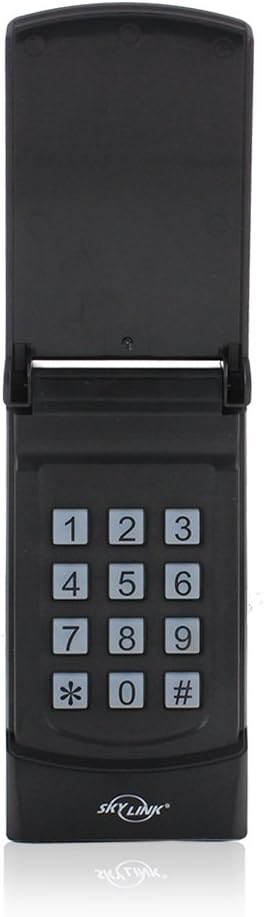
تصوير: سامهون view of the Skylink KN-318 Keyless Entry System with its cover open, clearly displaying the numeric keypad for operation.
2. Single Door Operation Mode
In single door operation mode, the keypad is configured to control one garage door. To activate the door, enter your PIN followed by the hash (#) button. The keypad will emit three beeps to confirm activation.
Video: Demonstrates how to operate the garage door in single door mode by entering the PIN followed by the hash (#) button.
3. Multiple Doors Operation Mode
The KN-318 can operate up to four Skylink garage door openers. To switch to Multiple Doors Operation Mode:
- Enter your current PIN, then press the asterisk (*) button, then the number 9, then the hash (#) button.
- Two beeps will indicate that the keypad has successfully changed to Multiple Doors Operating Mode.
To operate a specific door in this mode, enter your PIN, then the hash (#) button, followed by the door number (1, 2, or 3). For example, PIN [#] [1] for door 1.
Video: Demonstrates how to change the keypad setting from Single Door Operation to Multiple Doors Operation and how to operate individual doors.
To change back to Single Door Operation Mode:
- Enter your current PIN, then press the asterisk (*) button, then the number 0, then the hash (#) button.
- Two beeps will indicate that the keypad has successfully changed to Single Doors Operating Mode.
Video: Demonstrates how to change the keypad setting from Multiple Doors Operation back to Single Door Operation.
سار سنڀال
1. بيٽري مٽائڻ
The keypad is powered by one AAA Alkaline battery. When the battery is low, the keypad's performance may degrade. Replace the battery by following the steps in the "Battery Installation" section. Ensure to use a fresh AAA Alkaline battery for optimal performance and battery life (approximately 4350 hours).
2. صفائي
ڪي پيڊ ۽ ان جي ڪَوَر کي نرم، ڊي سان صاف ڪريوamp ڪپڙو. گھڙڻ وارا صاف ڪندڙ يا محلول استعمال ڪرڻ کان پاسو ڪريو، ڇاڪاڻ ته اهي ختم يا اليڪٽرانڪ حصن کي نقصان پهچائي سگهن ٿا.
3. موسم جي حفاظت
Always ensure the weather-proof cover is closed when the keypad is not in use. This protects the internal components from rain, snow, dust, and direct sunlight, extending the lifespan of the device.
مشڪلاتون
1. Keypad Not Responding
- Check the battery: Ensure the AAA battery is correctly installed and not depleted. Replace if necessary.
- Verify programming: Confirm the keypad is correctly programmed to your garage door opener or the GB-318 receiver. Refer to the "Programming with your Garage Door Opener" section.
- Range: Ensure you are within the operating range of the garage door opener (up to 100 feet).
2. Incorrect Passcode Attempts
The keypad features a Passcode Lock Timeout. If ten incorrect passcode attempts are made, the keypad will automatically lock for 10 minutes to prevent unauthorized access. Wait for the lockout period to expire before attempting to enter the passcode again.
3. Resetting the Passcode to Factory Default (0000)
If you forget your passcode or wish to reset it to the factory default (0000), follow these steps:
- Remove the back cover and take out the AAA battery.
- Press and hold both the hash (#) and asterisk (*) buttons simultaneously.
- While holding these buttons, reinsert the AAA battery.
- Continue holding both buttons until you hear three beeps. This indicates the passcode has been reset to 0000.
- پوئتي ڍڪ کي تبديل ڪريو ۽ اسڪرو کي مضبوط ڪريو.
After resetting, you will need to reprogram the keypad with your garage door opener using the default passcode 0000, and then change the passcode to a new personal code.
Video: Detailed instructions on how to reset the passcode of the Skylink KN-318 Keyless Entry System to its factory default of 0000.
وضاحتون
| خاصيت | تفصيل |
|---|---|
| برانڊ | SKYLINK |
| ماڊل نالو | KN-318 |
| تالا جو قسم | ڪي پيڊ |
| مواد | ڌاتو |
| رنگ | ڪارو |
| شيون طول و عرض (L x W x H) | 7 x 5 x 1 انچ |
| شيءِ جو وزن | 8 اونس |
| طاقت جو ذريعو | بيٽري (1 AAA الڪلائن، شامل) |
| سراسري بيٽري جي زندگي | 4350 ڪلاڪ |
| ڪنيڪشن پروٽوڪول | اسڪائي لنڪ |
| ڪوريج | 100 فوٽ |
| خاص خصوصيت | Universal (with GB-318 receiver) |
| شامل اجزاء | Weather-proof cover |
وارنٽي ڄاڻ
The Skylink KN-318 Keyless Entry System comes with a 1-year limited warranty from the date of purchase. Please retain your proof of purchase for warranty claims. This warranty covers defects in materials and workmanship under normal use. It does not cover damage resulting from misuse, accident, modification, or unauthorized repair.
ڪسٽمر سپورٽ
For further assistance, technical support, or to inquire about replacement parts, please contact Skylink customer service. Refer to the product packaging or the official Skylink webجديد ترين رابطي جي معلومات لاءِ سائيٽ.


