1. تعارف
This user manual provides comprehensive instructions for the safe and efficient use of your Sharp LC-60LE660 60-Inch Aquos 1080p 120Hz Smart LED TV. Please read this manual thoroughly before operating the television and retain it for future reference. This television combines a 60-inch full HD display with Smart TV capabilities, offering a high-quality viewing experience and access to various online services.
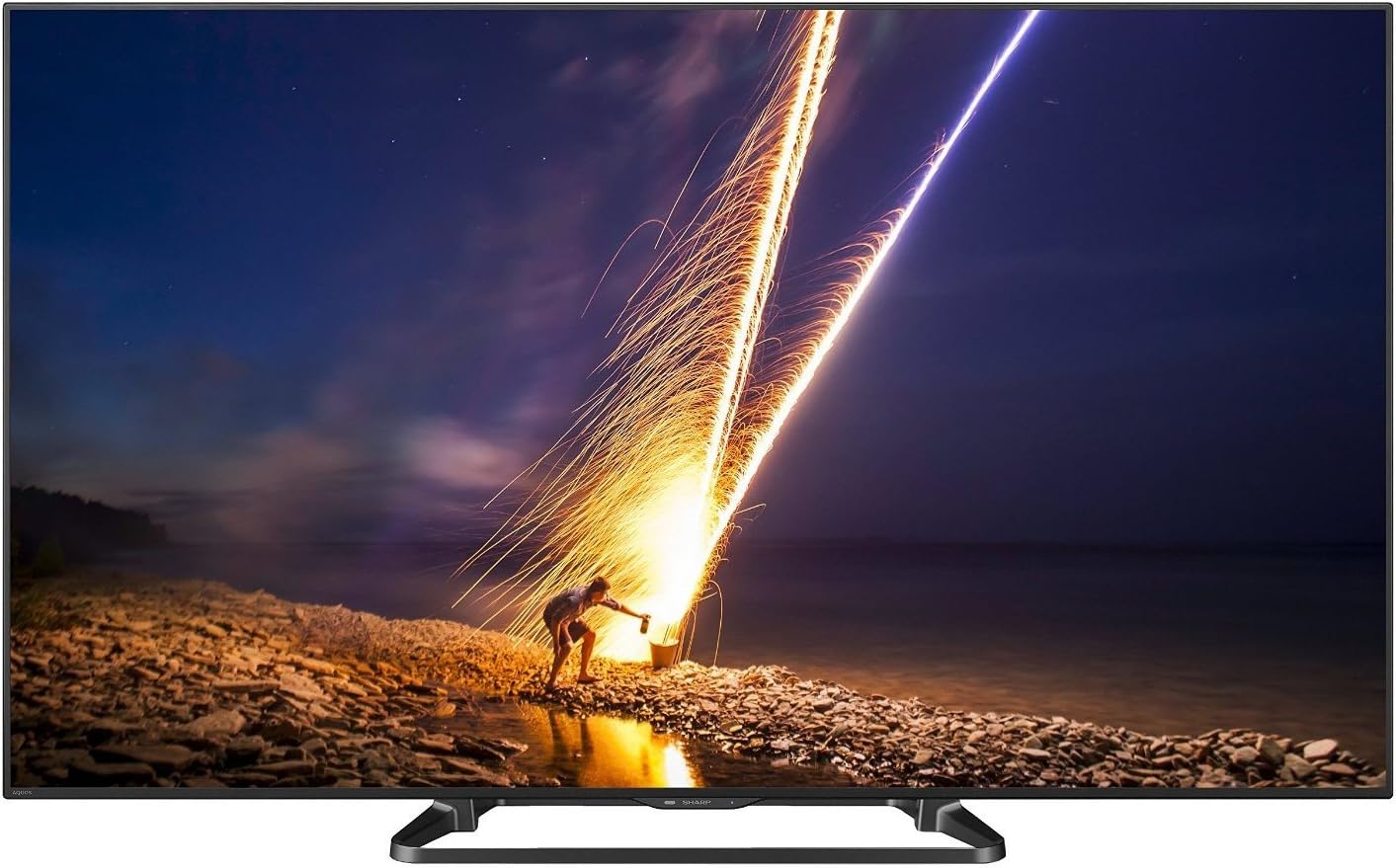
شڪل 1: سامهون view of the Sharp LC-60LE660 Smart LED TV.
2. اهم حفاظتي ڄاڻ
Please observe the following safety precautions to prevent damage to the television and ensure personal safety.
- لڳائڻ: Ensure the television is placed on a stable, level surface or securely mounted to a wall according to manufacturer's instructions. Avoid placing it in direct sunlight or near heat sources.
- وينٽيليشن: وينٽيليشن جي سوراخن کي بند نه ڪريو. ٽيليويزن جي چوڌاري مناسب هوا جي وهڪري لاءِ مناسب جاءِ ڏيو ته جيئن وڌيڪ گرم ٿيڻ کان بچي سگهجي.
- بجلي جي فراهمي: Connect the power cord to an appropriate AC outlet. Do not overload power outlets.
- مائع جي نمائش: Keep the television away from water and moisture. Do not expose it to rain or splashes.
- صفائي: Unplug the television before cleaning. Use a soft, dry cloth. Do not use liquid cleaners or aerosol cleaners.
- خدمت ڪرڻ: ھن پراڊڪٽ کي پنھنجي خدمت ڪرڻ جي ڪوشش نه ڪريو. س servني خدمتن جو حوالو ڏيو قابل سروس اهلڪارن کي.
Legal Disclaimer: Must be at least 18 & over to purchase. Purchased items will require a direct signature at the time of delivery.
3. دٻي ۾ ڇا آهي
Verify that all items are present upon unpacking your Sharp LC-60LE660 TV:
- Sharp LC-60LE660 60-Inch Aquos 1080p 120Hz Smart LED TV
- يونيورسل ريموٽ ڪنٽرول
- پاور ڪنڊ
- استعمال ڪندڙ جو دستياب (ھي دستاويز)
- Stand Assembly (if applicable)
4. سيٽ اپ
4.1. جسماني جڳهه ۽ طول و عرض
Before setting up your television, consider its dimensions and ensure adequate space for ventilation and viewing. The television weighs approximately 54.2 pounds.
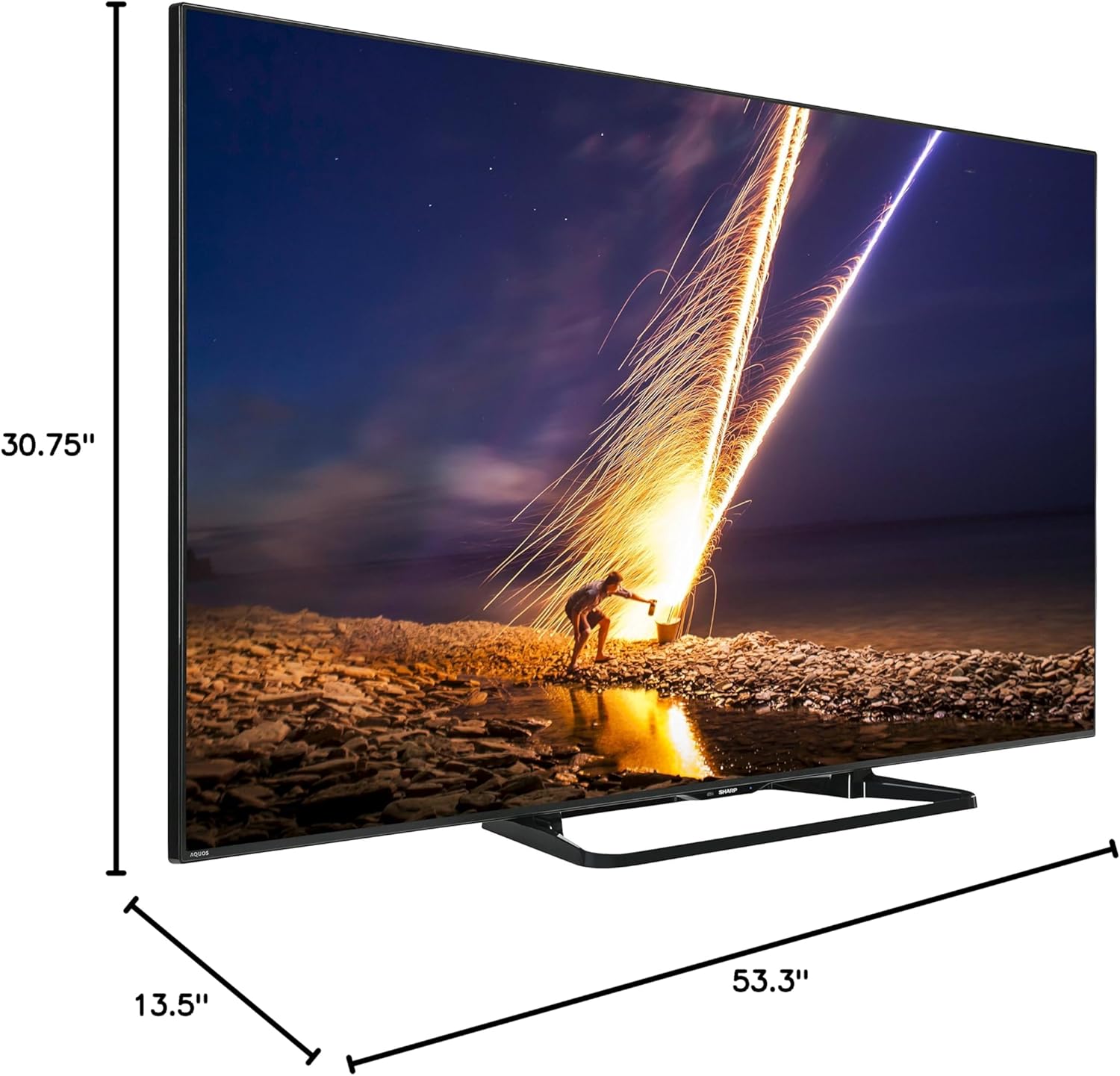
Figure 2: Dimensions of the Sharp LC-60LE660 TV with stand. Width: 53.3 inches, Height: 30.75 inches, Depth: 13.5 inches.
Ensure the TV is placed on a sturdy surface or mounted securely. Leave sufficient space around the TV for heat dissipation.
4.2. ٻاهرين ڊوائيسز کي ڳنڍڻ
The Sharp LC-60LE660 TV offers various ports for connecting external devices such as Blu-ray players, gaming consoles, and sound systems. Refer to the diagram below for port locations.
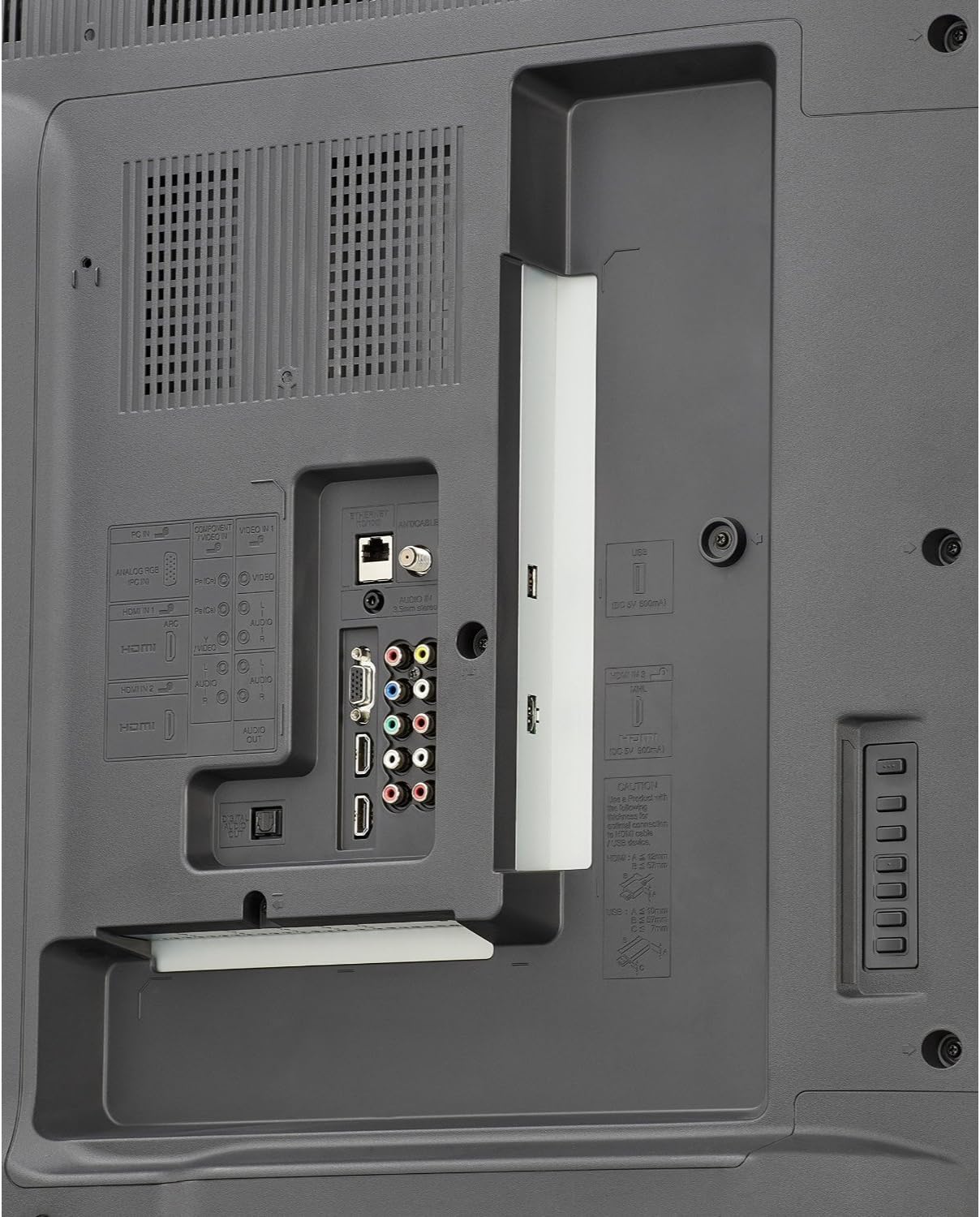
Figure 3: Rear panel connections. Includes multiple HDMI inputs, USB ports, component video input, composite video input, and audio output options.
- HDMI: Connect high-definition devices using HDMI cables. This model features multiple HDMI ports.
- USB: Use USB ports for media playback from USB storage devices or for firmware updates.
- Component/Composite: For older devices, use the component or composite video inputs.
- آڊيو آئوٽ: Connect to external audio systems via optical digital audio out or analog audio out.
- Ethernet/Wi-Fi: Connect to your home network via an Ethernet cable or the built-in Wi-Fi for Smart TV features.
4.3. شروعاتي پاور آن ۽ نيٽ ورڪ سيٽ اپ
- پاور ڪنڊ کي ٽي وي ۾ ۽ پوءِ وال آئوٽليٽ ۾ لڳايو.
- ريموٽ ڪنٽرول يا ٽي وي تي پاور بٽڻ دٻايو.
- Follow the on-screen instructions to select your language, country, and perform an initial channel scan.
- For Smart TV features, connect to your home network. Select your Wi-Fi network from the list and enter the password, or connect an Ethernet cable.
5. آپريٽنگ هدايتون
5.1. بنيادي ٽي وي فنڪشن
- پاور آن / آف: ريموٽ يا ٽي وي تي پاور بٽڻ استعمال ڪريو.
- چينل چونڊ: ريموٽ تي CH+/- بٽڻ يا نمبر پيڊ استعمال ڪريو.
- حجم ڪنٽرول: ريموٽ تي VOL+/- بٽڻ استعمال ڪريو.
- ان پٽ چونڊ: Press the INPUT button on the remote to switch between connected devices (HDMI, Component, etc.).
5.2. Smart Central Apps
Your Sharp LC-60LE660 TV features Smart Central Apps, providing quick access to popular streaming services and applications via built-in Wi-Fi.

Figure 4: Smart Central Apps interface with icons for Netflix, YouTube, Pandora, and other services.
To access Smart Central Apps:
- پڪ ڪريو ته توهان جو ٽي وي انٽرنيٽ سان ڳنڍيل آهي.
- Press the "Smart Central" button on your remote control.
- Navigate through the available applications using the arrow keys and select your desired app (e.g., Netflix, YouTube, Pandora, Flickr, Picasa, Facebook).
5.3. تصوير ۽ آواز سيٽنگون
- تصوير جا طريقا: Access the picture settings menu to adjust brightness, contrast, color, sharpness, and select preset picture modes (e.g., Standard, Movie, Game).
- AquoMotion240: This technology enhances clarity during fast-motion scenes. Adjust its settings in the picture menu to suit your preference.
- آواز جا طريقا: Adjust audio settings, including bass, treble, and select sound modes (e.g., Standard, Music, Cinema).
5.4. Wallpaper Mode
The Wallpaper mode allows the TV to display art, photos, or a clock when powered off, integrating the television seamlessly into your living space.
- Access the Wallpaper mode settings through the TV's main menu.
- Select your preferred display option (e.g., pre-loaded art, personal photos via USB, or a clock).
6. سار سنڀال
- اسڪرين جي صفائي: نرم، لِنٽ کان پاڪ ڪپڙي سان اسڪرين کي نرميءَ سان صاف ڪريو. ضدي نشانن لاءِ، ٿورو ڊيampen the cloth with water or a specialized screen cleaner, then wipe dry immediately. Do not apply pressure.
- ڪابينا جي صفائي: ٽي وي ڪيبنٽ کي نرم، سڪل ڪپڙي سان صاف ڪريو. رگڙيندڙ ڪلينر يا سالوينٽس استعمال ڪرڻ کان پاسو ڪريو.
- وينٽيليشن: Periodically check that the ventilation slots on the back of the TV are not obstructed by dust or debris.
7. مسئلا حل ڪرڻ
If you encounter issues with your Sharp LC-60LE660 TV, refer to the following common solutions:
| مسئلو | ممڪن سبب / حل |
|---|---|
| بجلي ناهي / ٽي وي آن نٿو ٿئي | پڪ ڪريو ته بجلي جي تار ٽي وي ۽ ڪم ڪندڙ بجلي جي آئوٽليٽ ٻنهي ۾ محفوظ طور تي لڳل آهي. هڪ مختلف آئوٽليٽ آزمايو. |
| تصوير ناهي، پر آواز موجود آهي. | ان پٽ سورس چيڪ ڪريو. پڪ ڪريو ته ٻاهرين ڊوائيسز آن آهن ۽ صحيح طرح سان ڳنڍيل آهن. چمڪ/ڪنٽراسٽ سيٽنگون ترتيب ڏيو. |
| آواز ڪونهي، پر تصوير موجود آهي. | Check volume level and mute status. Ensure external audio systems are connected and configured correctly. |
| Picture is distorted or unclear | Check cable connections. Adjust picture settings. If using an antenna, check signal strength. |
| TV freezes or reboots unexpectedly | This can sometimes be resolved by a firmware update. Check Sharp's support website for the latest firmware for model LC-60LE660U and follow update instructions. A hard reset (unplugging the TV for a few minutes and plugging it back in) may also resolve temporary issues. |
| Smart features not working / No internet connection | Verify your Wi-Fi or Ethernet connection. Restart your router. Check network settings on the TV. |
If the problem persists after trying these solutions, please contact Sharp customer support.
8. وضاحتون
| خاصيت | تفصيل |
|---|---|
| برانڊ | تيز |
| ماڊل نمبر | LC-60LE660U |
| اسڪرين جي ماپ | 60 Inches (60 3/32" diagonal) |
| ڊسپلي ٽيڪنالاجي | ايل اي ڊي |
| قرارداد | 1080p (مڪمل HD) |
| ريفريش جي شرح | 120 Hz (AquoMotion240) |
| متحرڪ ڪنٽراسٽ ريشو | 4 million : 1 |
| سمارٽ ٽي وي خاصيتون | Smart Central Apps (Netflix, YouTube, Pandora, Flickr, Picasa, Facebook), Built-in Wi-Fi, Browser |
| رابطي | Wi-Fi, Multiple HDMI, USB, Component, Composite, Ethernet |
| اسپيڪر جو قسم | تعمير ٿيل |
| پيداوار جا طول و عرض (اسٽينڊ سان) | 53.3"W x 30.75"H x 13.5"D |
| شيءِ جو وزن | 54.2 پائونڊ |
| توانائي جي ڪارڪردگي | انرجي اسٽار تصديق ٿيل |
9. وارنٽي ۽ سپورٽ
For warranty information and technical assistance, please refer to the documentation included with your television or visit the official Sharp support webسائيٽ. توھان پڻ دورو ڪري سگھو ٿا ايميزون تي شارپ اسٽور for additional product information and customer support options.

Figure 5: Customer Support information is available for assistance.


