تعارف
The TC Electronic T2 Reverb effects pedal provides a diverse range of reverb effects for guitar and other instruments. This manual details the pedal's features, setup procedures, operational guidelines, maintenance tips, troubleshooting steps, and technical specifications to ensure optimal performance.
پيداوار ختمview
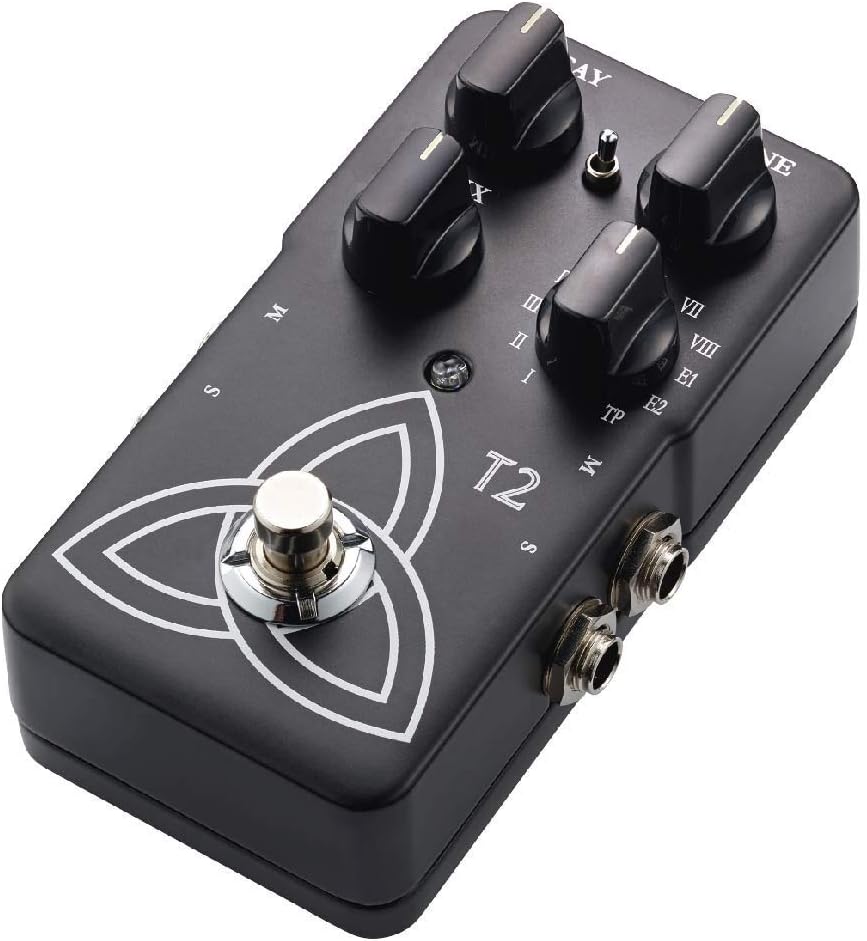
The T2 Reverb pedal features intuitive controls for shaping your sound and a robust design for reliable use. Familiarize yourself with the pedal's components:
- سڙڻ وارو ڳنڍ: ريورب ٽيل جي ڊيگهه کي ڪنٽرول ڪري ٿو.
- ٽون نوب: Adjusts the brightness or darkness of the reverb.
- ميڪس ڪوب: Balances the ratio between the dry (unaffected) signal and the wet (effected) signal.
- Reverb Type Selector: A rotary switch to select from various reverb algorithms (I-VIII, E1, E2, TP).
- فوٽ سوئچ: اثر کي مشغول يا نظرانداز ڪري ٿو.
- انپٽ / آئوٽڊ جڪس For connecting your instrument and ampوierيڪ زنده
- پاور ان پٽ: For connecting a 9V DC power supply.

سيٽ اپ ڪريو
- پاور ڪنيڪشن: Connect a 9V DC power adapter (center negative, not included) to the power input jack. Alternatively, the pedal can be powered by a 9V battery (not included) by opening the battery compartment.
- اوزار جو ڪنيڪشن: Connect your instrument (e.g., guitar) to the input jack on the right side of the pedal using a standard 1/4-inch instrument cable.
- Ampلائفيئر ڪنيڪشن: پيڊل جي کاٻي پاسي واري آئوٽ جيڪ کي ڳنڍيو توھان جي amplifier's input using a standard 1/4-inch instrument cable.
- Stereo Operation (Optional): For stereo output, connect the second output jack to a second amplifier or stereo input device.
پڪ ڪريو ته سڀئي ڪنيڪشن محفوظ آهن توهان جي پاور آن ڪرڻ کان اڳ ampلائفائر ۽ پيڊل.
آپريٽنگ هدايتون
بنيادي آپريشن
- پاور آن: Once connected, press the footswitch to engage the effect. The LED indicator will illuminate. Press again to bypass the effect.
- Selecting Reverb Type: Rotate the Reverb Type Selector knob to choose from the available reverb algorithms (I through VIII, E1, E2). Each setting offers a distinct reverb character.
- Adjusting Reverb Parameters:
- استعمال ڪريو ڊڪي knob to control the duration of the reverb.
- استعمال ڪريو ٽون knob to adjust the frequency content of the reverb, making it brighter or darker.
- استعمال ڪريو ميڪس knob to blend the dry signal with the reverb effect. A higher setting increases the effect's prominence.
TonePrint Feature
The "TP" setting on the Reverb Type Selector activates the TonePrint feature. TonePrint allows you to upload custom-tuned reverb sounds created by artists or design your own using the TC Electronic TonePrint app. Connect your pedal to a computer via USB (cable not included) or beam TonePrints wirelessly from your smartphone to the pedal's pickup.
سار سنڀال
- صفائي: پيڊل جي ٻاهرين حصي کي صاف ڪرڻ لاءِ نرم، سڪل ڪپڙو استعمال ڪريو. رگڙيندڙ صاف ڪندڙ يا محلولن کان پاسو ڪريو.
- بيٽري مٽائڻ: If using battery power, replace the 9V battery when the LED indicator dims or the effect performance degrades. To replace, open the battery compartment on the underside of the pedal.
- اسٽوريج: Store the pedal in a dry environment, away from extreme temperatures and direct sunlight, when not in use. Disconnect power and remove the battery if storing for extended periods.
مشڪلاتون
| مسئلو | ممڪن سبب | حل |
|---|---|---|
| ڪوبه آواز يا ڪمزور سگنل | Incorrect cable connections, dead battery, faulty power supply, volume knobs on instrument/amp رد ڪيو. | Check all cable connections. Replace battery or verify power supply. Ensure instrument and amplifier volumes are set appropriately. |
| ناپسنديده شور يا گونج | Ground loop, faulty cables, interference from other electronics, improper power supply. | Use shielded cables. Try a different power outlet or isolated power supply. Move pedal away from other electronic devices. |
| Effect not engaging (LED off) | No power, faulty footswitch. | Verify power connection and battery status. If problem persists, contact support. |
| TonePrint not loading | Incorrect app usage, connection issues. | Ensure the TonePrint app is updated and the pedal is correctly connected (USB or beaming). Refer to the TonePrint app's instructions for detailed guidance. |
وضاحتون
- ماڊل: T2
- شيء جو وزن: 1 پائونڊ (تقريبن 454 گرام)
- پيداوار جي ماپ: 4.61 x 2.48 x 2.91 انچ (11.7 x 6.3 x 7.4 سينٽي)
- طاقت جو ذريعو: 9V DC (center negative) power adapter or 9V battery
- جلدtage: 9 وولٽ
- سگنل فارميٽ: اينالاگ
- هارڊويئر انٽرفيس: ايڇ پي-ايڇ ايس سي
وارنٽي ۽ سپورٽ
TC Electronic products are covered by a limited warranty. For detailed warranty information, product support, or service inquiries, please visit the official TC Electronic webسائيٽ تي وڃو يا سڌو سنئون انهن جي گراهڪ سپورٽ سان رابطو ڪريو. وارنٽي دعوائن لاءِ خريداري جو ثبوت رکو.
سرڪاري Webسائيٽ: www.tcelectronic.com


