1. تعارف
This manual provides essential instructions for the Fastrack Digital Watch, Model 68004PP02J. This watch features an LCD display for time-keeping, including hour, minute, second, year, month, and day. It is designed with a black dial, rectangular case, and a purple silicone band, offering a blend of functionality and style.
Key features include a Quartz movement, digital display, and a case diameter of 35.9 millimeters. The watch is also water-resistant up to 30 meters.
2. پراڊڪٽ ختمview
2.1 واچ اجزاء
- ڏيکاريو: Digital LCD screen showing time, date, and other functions.
- ADJ بٽڻ: Used for adjusting values during setting modes.
- موڊ بٽڻ: مختلف ڊسپلي موڊس (وقت، تاريخ، الارم، اسٽاپ واچ) ذريعي چڪر ڪرڻ لاءِ استعمال ڪيو ويندو آهي.
- پٽي: Durable purple silicone band.
- ڪيس واپس: Houses the watch movement and battery compartment.

شڪل 2.1: سامهون view of the Fastrack Digital Watch, showing the digital display and the 'ADJ' and 'MODE' buttons on the side of the case.
3. سيٽ اپ
3.1 مقرر وقت ۽ تاريخ
To ensure accurate timekeeping, follow these steps to set the time and date on your Fastrack Digital Watch:
- عام وقت جي ڊسپلي مان، دٻايو موڊ button repeatedly until the desired setting mode (e.g., Time Setting) is displayed. The seconds display may start flashing.
- Once in the setting mode, press the اي ڊي جي button to select the value you wish to adjust (e.g., hours, minutes, year, month, day). The selected value will flash.
- While a value is flashing, press the موڊ قدر وڌائڻ لاءِ بٽڻ دٻايو. دٻايو موڊ button to rapidly advance the value.
- Repeat steps 2 and 3 for all values you need to set (hours, minutes, AM/PM, year, month, day).
- سڀ گهربل قدر مقرر ڪرڻ کان پوءِ، دٻايو اي ڊي جي button again to exit the setting mode and return to the normal time display.
Note: If the buttons do not respond, ensure they are not stuck and the watch battery has sufficient power.
4. واچ هلائڻ
4.1 ڊسپلي موڊس
Your Fastrack Digital Watch offers various display modes accessible via the موڊ بٽڻ:
- وقت ڏيکاري: Shows current hour, minute, and second.
- تاريخ ڏيکاريو: Shows year, month, and day.
- الارم موڊ: الارم سيٽ ڪرڻ ۽ چالو ڪرڻ جي اجازت ڏئي ٿو.
- اسٽاپ واچ موڊ وقت جي واقعن لاءِ.
کي دٻايو موڊ button repeatedly to cycle through these functions. The display will change accordingly.
5. سار سنڀال
5.1 پاڻي جي مزاحمت
This watch is water-resistant up to 30 meters (3 ATM). This rating means the watch is suitable for everyday use and can withstand splashes, rain, or brief immersion in water. It is نه suitable for swimming, diving, or showering, as prolonged water exposure or high-pressure water jets can compromise the seals.
5.2 صفائي ۽ سنال
- Wipe the watch case and strap regularly with a soft, dry cloth to remove dirt and moisture.
- ضدي مٽيءَ لاءِ، ٿورو ڊيamp ڪپڙو استعمال ڪري سگهجي ٿو، جنهن کان پوءِ فوري طور تي سڪايو وڃي.
- Avoid exposing the watch to extreme temperatures, direct sunlight for extended periods, or strong magnetic fields.
- Keep the watch away from harsh chemicals, solvents, and detergents, as these can damage the case and strap materials.
5.3 بيٽري مٽائڻ
The watch is powered by a button-cell battery. If the display becomes dim or the watch stops functioning, the battery may need replacement. Battery replacement should be performed by a qualified watch technician to ensure proper sealing and prevent damage to the internal components.
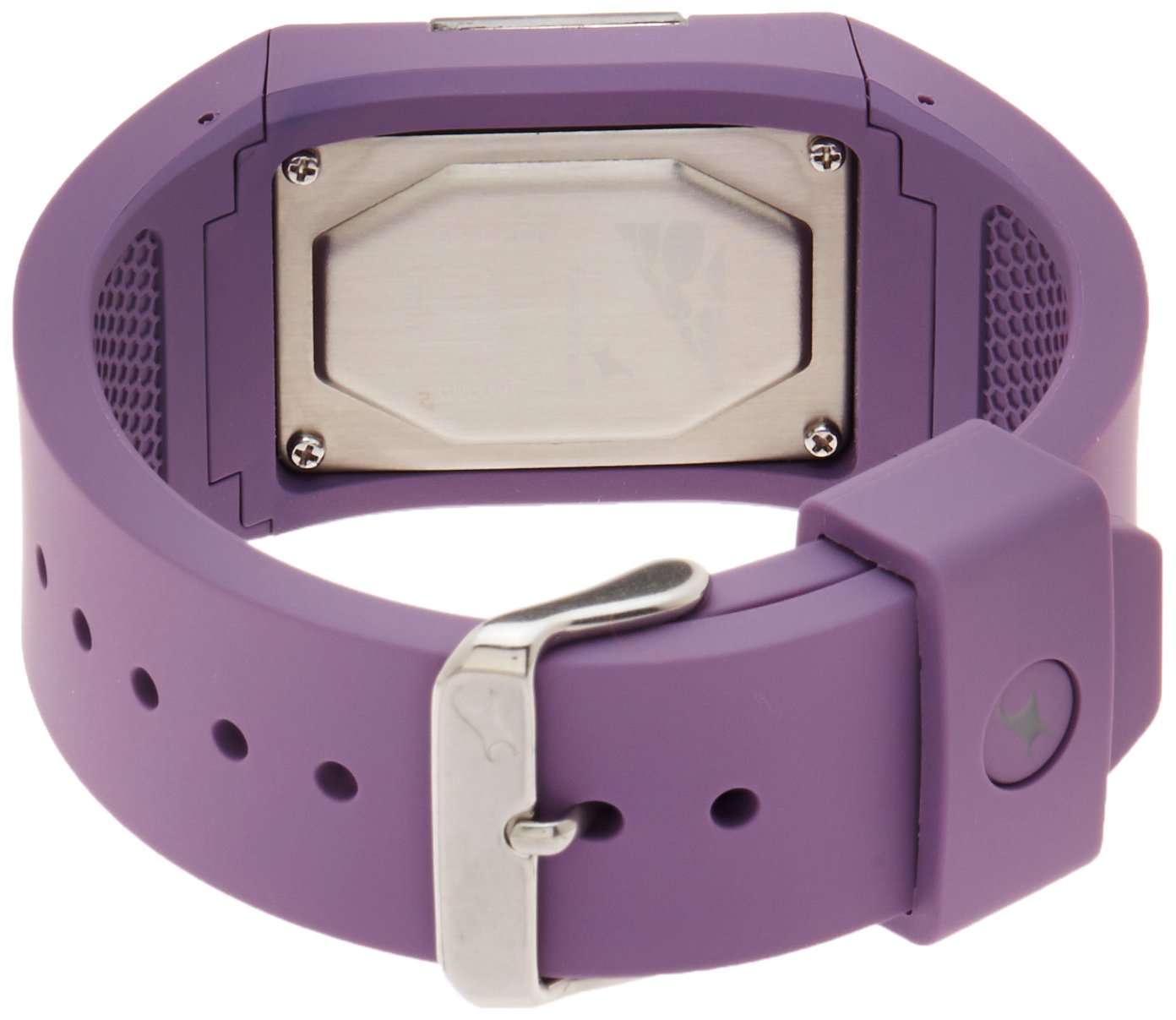
شڪل 5.1: پوئتي view of the Fastrack Digital Watch, showing the stainless steel case back secured by screws, indicating the battery compartment location.
6. مسئلا حل ڪرڻ
If you encounter issues with your Fastrack Digital Watch, refer to the table below for common problems and their solutions:
| مسئلو | ممڪن سبب | حل |
|---|---|---|
| Watch not working / Display blank | مئل يا گهٽ بيٽري. | بيٽري تبديل ڪريو. ڪنهن پيشيور واچ ٽيڪنيشن سان صلاح ڪريو. |
| وقت/تاريخ مقرر نه ٿو ڪري سگھجي | Buttons not responding or incorrect procedure. | Ensure buttons are not stuck. Refer to Section 3.1 for correct setting procedure. If buttons are faulty, seek professional repair. |
| ڊسپلي مدھم يا ٽمٽار آهي | Low battery or internal circuit issue. | Replace the battery. If the problem persists, contact customer support. |
| Water ingress after exposure | Exceeded water resistance limits or damaged seals. | Immediately stop using the watch. Take it to a professional for inspection and repair. Avoid further water exposure. |
7. وضاحتون
| خاصيت | تفصيل |
|---|---|
| شيون ماڊل نمبر | 68004PP02J |
| ٺاهيندڙ | فاسٽرڪ |
| حرڪت جو قسم | کوارٽز |
| Watch Display Type | ڊجيٽل |
| ڊائل رنگ | ڪارو |
| ڪيس جي شڪل | مستطيل |
| ڪيس قطر | 35.9 ملي ميٽر |
| بينڊ رنگ | واڱڻائي |
| بينڊ مواد جو قسم | سليڪون |
| پاڻي جي مزاحمت جي کوٽائي | 30 ميٽر |
| شيءِ جو وزن | 110 جي |
8. وارنٽي ۽ سپورٽ
8.1 ٺاهيندڙ وارنٽي
Your Fastrack Digital Watch Model 68004PP02J comes with a 12 مهينن جي ٺاهيندڙ وارنٽي from the date of purchase. This warranty covers manufacturing defects under normal use. It does not cover damage resulting from accidents, improper use, unauthorized repairs, or normal wear and tear.
8.2 ڪسٽمر سپورٽ
For warranty claims, technical assistance, or any other inquiries regarding your Fastrack watch, please contact Fastrack customer service. Refer to the official Fastrack webرابطي جي تفصيل لاءِ سائيٽ يا توهان جي خريداري دستاويز.


