1. تعارف
This manual provides detailed instructions for the Sharp EL1750V EL-1750V Two-Color Printing Calculator. This device is designed for efficient financial and general calculations, featuring a two-color printing mechanism for clear record-keeping. It includes functions such as automatic tax keys, a change calculation feature, and a large display for enhanced usability.
اهم خاصيتون شامل آهن:
- Two-color printing (positive numbers in black, negative in red) at 2.2 lines per second.
- 12-digit LCD display for large calculations.
- Built-in antimicrobial protection.
- Change calculation feature.
- Automatic Tax Keys (TAX+, TAX-).
- Rounding and Decimal Switches.
- Grand Total (GT) function.
- 4-key memory.
- Cost, Sell, Margin (CSM) keys.
2. پراڊڪٽ ختمview
Familiarize yourself with the components and key features of your Sharp EL1750V calculator.

شڪل 1: سامهون view of the Sharp EL1750V calculator, showing the display, keypad, and paper roll.

شڪل 2: ختمview of key functions including Automatic Tax Keys, Rounding Switch, Decimal Switch, Grand Total Function, 4 Key Memory, Backspace Key, and Percent Key.
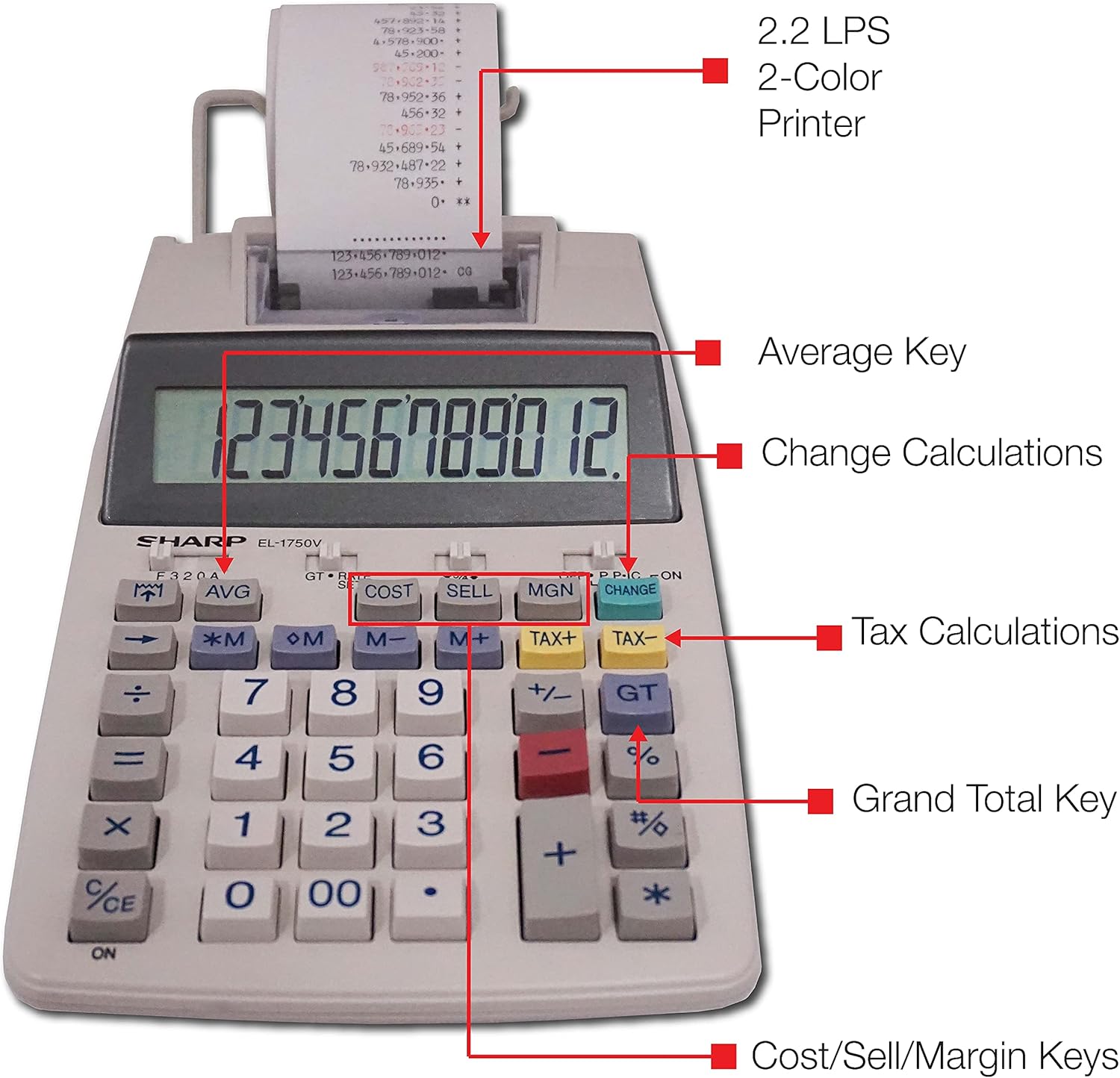
شڪل 3: تفصيلي view highlighting the 2.2 LPS 2-Color Printer, Average Key, Change Calculations, Tax Calculations, Grand Total Key, and Cost/Sell/Margin Keys.

Figure 4: Dimensions of the Sharp EL1750V calculator, showing a width of 5.9 inches, depth of 9.1 inches, and height of 2 inches, with a 0.75 inch 12-digit LCD display.
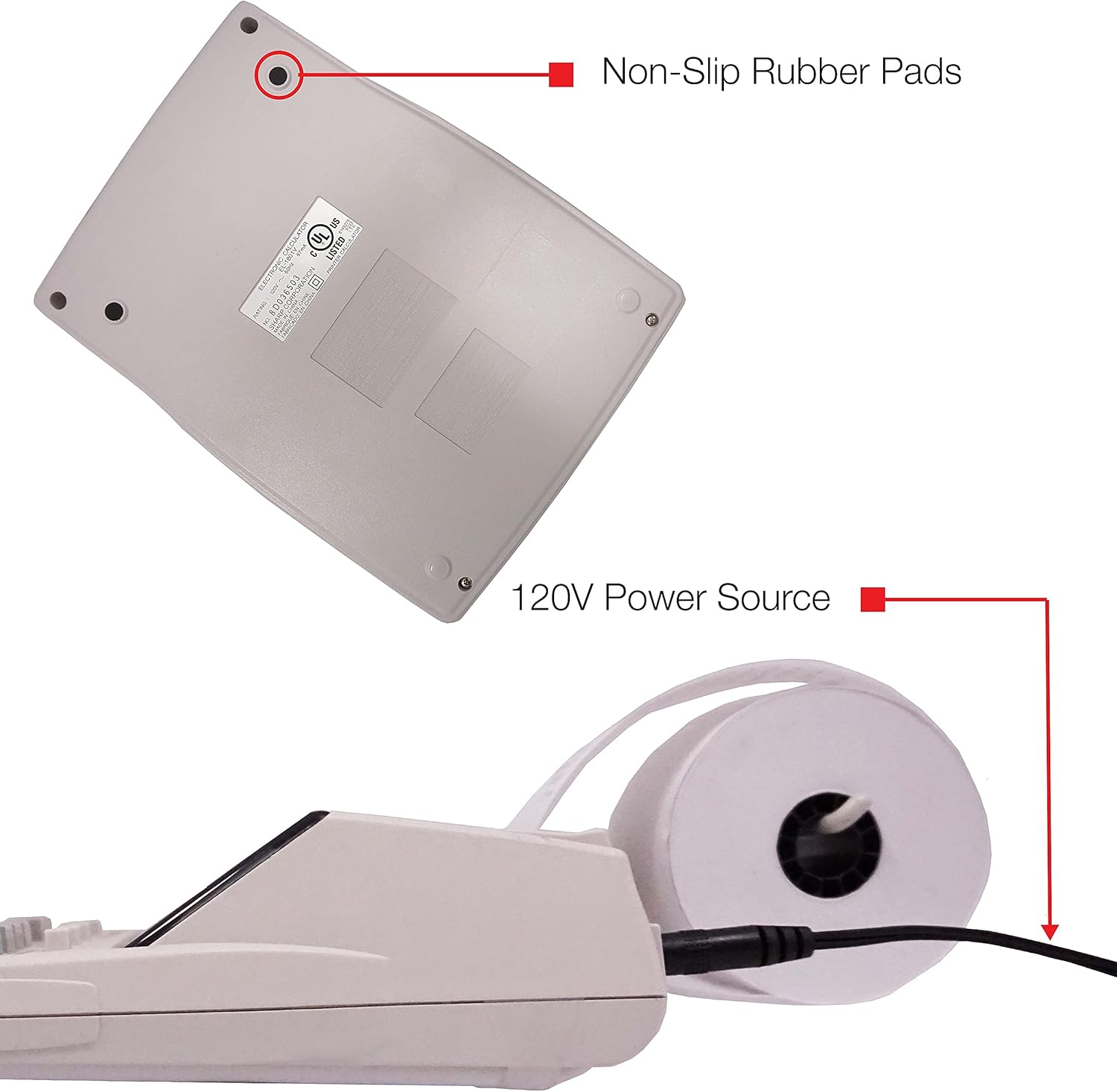
شڪل 5: هيٺيون view of the calculator, illustrating the non-slip rubber pads and the 120V power source input.
3. سيٽ اپ
3.1 طاقت جو ذريعو
The Sharp EL1750V can be powered by an AC adapter (120V) or batteries. Ensure the correct power source is connected before operation.
- اي سي ايڊاپٽر: Connect the provided AC adapter to the power input port on the side of the calculator (refer to Figure 5) and plug it into a standard 120V electrical outlet.
- بيٽريون: If using batteries, open the battery compartment (typically on the underside) and insert the required batteries, observing correct polarity.
3.2 Installing the Paper Roll
- Lift the printer cover to expose the paper roll compartment.
- Place a new paper roll into the compartment, ensuring the paper feeds from the bottom of the roll.
- ڪاغذ جي اڳئين ڪنڊ کي پرنٽر ميڪانيزم سلاٽ ۾ داخل ڪريو جيستائين اهو مٿي کان ٻاهر نه اچي.
- پرنٽر ڪپڙا بند ڪريو.
- Press the paper feed key (often marked with an arrow pointing up) to advance the paper and ensure it is properly aligned.
4. آپريٽنگ هدايتون
4.1 بنيادي حساب
Perform standard arithmetic operations:
- اضافو (+): پهريون نمبر داخل ڪريو، دٻايو +، ٻيو نمبر داخل ڪريو، دٻايو =.
- گھٽائڻ (-): پهريون نمبر داخل ڪريو، دٻايو -، ٻيو نمبر داخل ڪريو، دٻايو =.
- ضرب (x): پهريون نمبر داخل ڪريو، دٻايو x، ٻيو نمبر داخل ڪريو، دٻايو =.
- ڊويزن (÷): پهريون نمبر داخل ڪريو، دٻايو ÷، ٻيو نمبر داخل ڪريو، دٻايو =.
- صاف داخلا (CE/C): آخري داخل ٿيل نمبر صاف ڪري ٿو.
- سڀ صاف (AC): Clears all entries and calculations.
4.2 خاص ڪم
- Tax Calculation (TAX+, TAX-):
- Set the tax rate using the appropriate function (refer to the calculator's specific tax rate setting procedure, usually involving a dedicated key or mode).
- Enter the amount, then press TAX+ to add tax or ٽيڪس- ٽيڪس گهٽائڻ لاءِ.
- Change Calculation (CHANGE):
- Enter the total amount of the sale.
- کي دٻايو تبديل ڪريو چاٻي
- گراهڪ کان وصول ڪيل رقم داخل ڪريو.
- دٻايو = to display the change due.
- گرانڊ ٽوٽل (GT): دٻايو GT to recall the grand total of all previous calculations.
- Memory Functions (M+, M-, RM/CM):
- M+: ڏيکاريل قدر ياداشت ۾ شامل ڪري ٿو.
- M-: ياداشت مان ڏيکاريل قدر گھٽائي ٿو.
- RM/CM: Recalls memory content (first press) or clears memory (second press).
- Cost, Sell, Margin (COST, SELL, MGN): These keys are used for profit margin calculations.
- Enter two of the three values (Cost, Selling Price, Margin Percentage) and press the key for the unknown value to calculate it.
- Rounding and Decimal Switches: Adjust these switches (typically located above the keypad) to control the number of decimal places and rounding method for calculations.
5. سار سنڀال
5.1 صفائي
To maintain the calculator's performance and appearance:
- ٻاھرين کي نرم، سڪل ڪپڙي سان صاف ڪريو.
- ضدي مٽيءَ لاءِ، ٿورو ڊيampur پاڻيءَ سان ڪپڙو يا نرم، غير ابريندڙ صاف ڪندڙ.
- Do not use strong solvents or abrasive cleaners, as these can damage the surface or display.
- Avoid spraying liquids directly onto the calculator.
5.2 پيپر رول جي متبادل
Replace the paper roll when it runs out or the print becomes faint. Refer to Section 3.2 for installation instructions.
5.3 Ink Roller Replacement
When the print becomes faint or incomplete, the ink roller needs to be replaced. Consult your calculator's specific instructions for ink roller replacement, as the procedure may vary slightly.
6. مسئلا حل ڪرڻ
| مسئلو | ممڪن سبب | حل |
|---|---|---|
| ڪيلڪوليٽر آن نٿو ٿئي. | No power, AC adapter not connected, or batteries depleted/incorrectly installed. | Ensure AC adapter is securely plugged in. If using batteries, check battery installation and replace if necessary. |
| No print or faint print. | Paper roll empty or incorrectly installed; ink roller needs replacement. | Replace paper roll (Section 3.2). Replace ink roller (Section 5.3). |
| Display shows "E" or error message. | Calculation overflow, division by zero, or incorrect operation sequence. | دٻايو AC to clear the error. Re-enter the calculation carefully. |
| ڪاغذ جام. | Paper roll not installed correctly or paper is creased. | Open printer cover, remove jammed paper, and re-install paper roll correctly (Section 3.2). |
7. وضاحتون
- ماڊل: Sharp EL1750V
- ڏيکاريو: 12 عدد LCD
- ڇپائيء جي رفتار: 2.2 لائين في سيڪنڊ
- Printing Colors: 2 (Black for positive, Red for negative)
- طاقت جو ذريعو: AC Adapter (120V) or Battery Powered
- طول و عرض (تقريبن): 5.9 ان (W) x 9.1 ان (D) x 2 ان (H)
- وزن (تقريبن): 0.16 ounces (Note: This weight seems unusually low for a printing calculator, likely an error in source data. User should refer to product packaging for accurate weight.)
- مواد: پلاسٽڪ
- خاص خاصيتون: Antimicrobial protection, Change calculation, Tax functions, Cost/Sell/Margin functions, Grand Total, 4-key memory.
8. وارنٽي ۽ سپورٽ
For warranty information and technical support, please refer to the documentation included with your purchase or visit the official Sharp webسائيٽ. وارنٽي دعوائن لاءِ خريداري جي ثبوت طور پنهنجي خريداري جي رسيد رکو.
ٺاهيندڙ: تيز
Webسائيٽ: www.sharpusa.com


