1. تعارف ۽ اوورview
The MITSUBISHI QX40-S1 is a high-performance 16-point DC input module designed for use with MITSUBISHI MELSEC-Q series Programmable Logic Controllers (PLCs). This module provides reliable digital input capabilities for industrial automation applications, converting external 24 VDC signals into internal PLC logic. It features a sink DC input configuration, making it suitable for various sensor and switch interfaces.
2. مصنوعات جون خاصيتون
- 16 Digital Input Points
- 24 VDC Nominal Input Voltage
- 4 mA Input Current
- Sink DC Input Type
- Designed for MELSEC-Q Series PLCs
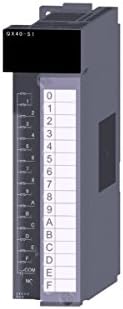
شڪل 2.1: سامهون view of the MITSUBISHI QX40-S1 Input Module, showing the terminal block and model designation.
3. سيٽ اپ ۽ تنصيب
3.1 حفاظتي احتياط
Before installation, ensure that all power to the PLC system is disconnected. Follow all local electrical codes and safety regulations. Only qualified personnel should perform installation and wiring.
3.2 چڙهڻ
The QX40-S1 module is designed to be mounted on the MELSEC-Q series base unit. Align the module with an available slot on the base unit and firmly press it into place until it clicks, ensuring the connectors are fully engaged.
3.3 وائرنگ
Connect external 24 VDC input devices to the module's terminal block. The QX40-S1 is a sink type input module, meaning the external device provides a positive voltage to the input terminal, and the module sinks the current to its common (COM) terminal. Refer to the wiring diagram in the detailed product manual for specific terminal assignments. Ensure proper polarity and secure all wire connections.

Figure 3.1: Dimensional drawing of the MITSUBISHI QX40-S1 Input Module, showing measurements in millimeters for installation planning.
4. آپريٽنگ هدايتون
4.1 پاور اپ
After installation and wiring are complete, apply power to the PLC system. Observe the status indicators on the QX40-S1 module and the base unit to confirm proper power-up.
4.2 Input Signal Monitoring
When an external 24 VDC signal is applied to an input point, the corresponding LED indicator on the QX40-S1 module will illuminate, signifying an active input. The PLC program can then read the status of these input points to execute control logic.
4.3 پروگرامنگ
Refer to the MITSUBISHI MELSEC-Q series programming manual for detailed instructions on how to configure and read input data from the QX40-S1 module within your PLC program. Each input point corresponds to a specific address in the PLC's input image memory.
5. سار سنڀال
5.1 عام معائنو
Periodically inspect the module for any signs of physical damage, loose connections, or excessive dust accumulation. Ensure that the module is securely seated in the base unit.
5.2 صفائي
If cleaning is necessary, disconnect power to the system. Use a soft, dry cloth to gently wipe the module's exterior. Avoid using solvents or abrasive cleaners. Ensure no dust or debris obstructs ventilation openings.
5.3 ماحولياتي حالتون
Ensure the operating environment adheres to the specified temperature, humidity, and vibration limits to prevent premature failure of the module.
6. مسئلا حل ڪرڻ
6.1 Input LED Not Illuminating
- Verify that 24 VDC is correctly applied to the input terminal.
- Check the wiring for continuity and proper connection.
- Ensure the external input device (sensor/switch) is functioning correctly.
- Confirm the common (COM) terminal is properly connected.
6.2 Module Not Recognized by PLC
- Ensure the module is fully seated in the base unit slot.
- Verify the base unit and PLC CPU are powered on.
- Check the PLC configuration settings to ensure the module is correctly registered.
6.3 System Error
If a system error occurs, consult the PLC CPU manual for error codes and diagnostic procedures. A faulty module may require replacement.
7. وضاحتون
| تفصيل | قدر |
|---|---|
| ماڊل نمبر | QX40-S1 |
| ان پٽ پوائنٽس | 16 پوائنٽون |
| انٽ واليمtage | 24 وي ڊي سي |
| ان پٽ ڪرنٽ | 4 ايم اي |
| ان پٽ جو قسم | Sink DC In |
| پيداوار جي ماپ | 4 x 1 x 4 انچ (تقريبن 105 x 27.4 x 90 ملي ميٽر) |
| شيءِ جو وزن | 1 پائونڊ |
| ٺاهيندڙ | مٽسبيشي |
| تاريخ پهرين دستياب | اپريل 15، 2015 |
8. وارنٽي ۽ سپورٽ
For warranty information and technical support regarding the MITSUBISHI QX40-S1 Input Module, please refer to the documentation provided with your purchase or contact your authorized MITSUBISHI distributor. You may also visit the official MITSUBISHI Electric webسپورٽ وسيلن ۽ رابطي جي تفصيلن لاءِ سائيٽ.


