1. تعارف
خريد ڪرڻ لاءِ مهربانيasing the Blow KidsTab7 Tablet. This device is designed to provide an engaging and safe digital experience for children, featuring a 7-inch display, Android 9.0 Go operating system, and a durable protective shell. This manual provides essential information on how to set up, operate, and maintain your tablet to ensure optimal performance and longevity.
2. حفاظت جي ڄاڻ
Please read all safety instructions carefully before using the tablet. Failure to follow these instructions may result in electric shock, fire, or damage to the device.
- ڇڪڻ جو خطرو: ننڍن حصن کي ننڍن ٻارن کان پري رکو.
- پاڻي جي نمائش: ٽيبليٽ کي پاڻي يا گهڻي نمي جي سامهون نه رکو.
- گرمي پد: Avoid extreme temperatures. Do not leave the tablet in direct sunlight or in very cold environments.
- چارج ڪرڻ: Use only the provided charger or a certified compatible charger. Supervise children during charging.
- بيٽري: Do not attempt to replace the battery yourself. Contact support if battery issues arise.
- صفائي: Disconnect the tablet from power before cleaning. Use a soft, dry cloth.
- ٻڌڻ جي حفاظت: Prolonged use at high volume may cause hearing damage.
3. پيڪيج مواد
پڪ ڪريو ته سڀئي شيون پيڪيج ۾ موجود آهن:
- Blow KidsTab7 Tablet
- Protective Silicone Shell (pre-installed or separate)
- USB چارجنگ ڪيبل
- پاور اڊاپٽر
- استعمال ڪندڙ جو دستياب (ھي دستاويز)

This image displays the retail packaging box for the Blow KidsTab7 Multimedia Tablet. The box features the 'BLOW' brand logo, 'KIDS TAB 7' model name, and an image of the tablet. Icons for HD, Wi-Fi, and 7-inch screen are visible, along with various app icons and award seals.
4. ڊوائيس اوورview
Familiarize yourself with the physical components of your Blow KidsTab7 Tablet.
4.1 اڳيان ۽ پوئتي View

This image displays the Blow KidsTab7 Tablet. On the left, the back of the tablet is visible, featuring the 'Multimedia tablet KIDS TAB 7 BLOW' branding, a rear camera, and a speaker grille. On the right, the tablet is shown from the front, encased in its pink protective shell, with the screen displaying colorful graphics.
4.2 Side and Top Views
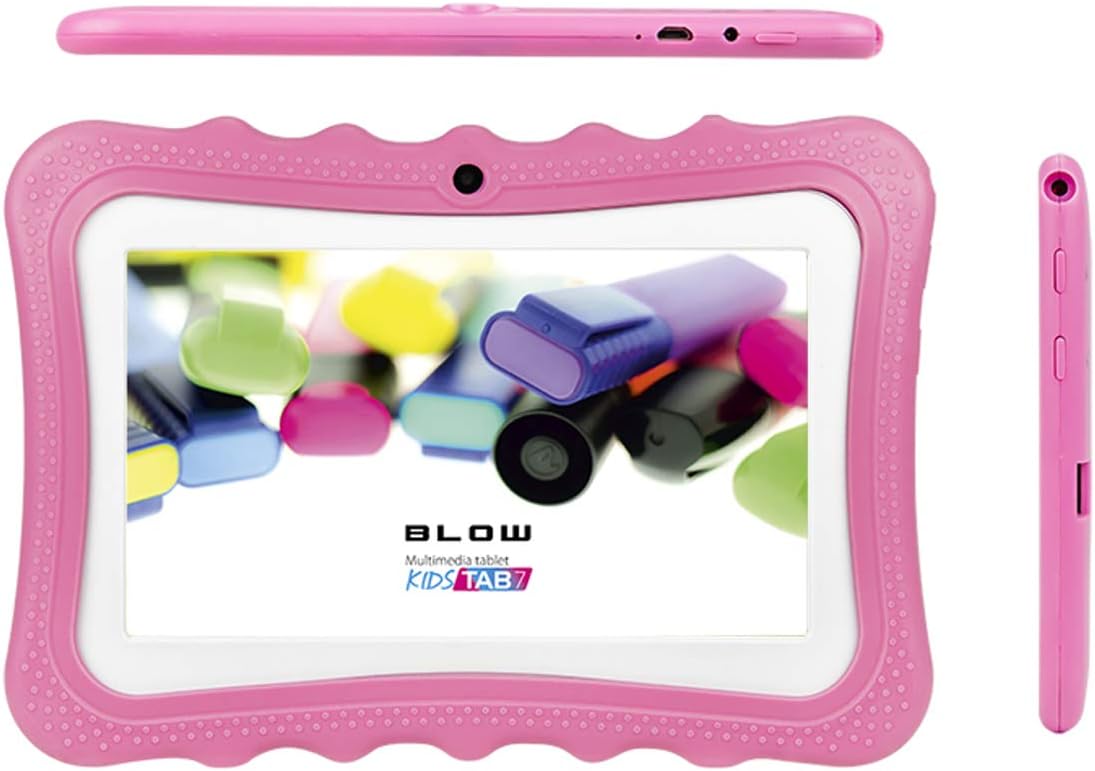
This image provides multiple perspectives of the Blow KidsTab7 Tablet. The top view shows the power button and charging port. The main view presents the tablet from the front, within its pink protective case, displaying the screen. A side view on the right highlights the volume buttons and headphone jack.
4.3 Protective Shell and Kickstand

This image illustrates the Blow KidsTab7 Tablet separated from its pink protective shell. The shell is shown on the left, highlighting its textured design and cutouts. The tablet itself is on the right, displaying its screen with colorful content.

The image shows the back of the Blow KidsTab7 Tablet, still in its pink protective case. A pink, dog-shaped kickstand is attached, allowing the tablet to stand upright. The rear camera and speaker grille are also visible.
5. سيٽ اپ
5.1 شروعاتي چارجنگ
Before first use, fully charge the tablet for approximately 3-4 hours.
- Connect the USB charging cable to the tablet's charging port.
- USB ڪيبل جي ٻئي پڇاڙي کي پاور اڊاپٽر سان ڳنڍيو.
- پاور اڊاپٽر کي وال آئوٽليٽ ۾ لڳايو.
- اسڪرين تي بيٽري آئڪن کي چارج ڪرڻ جي حالت ظاهر ڪندو.
5.2 پاور آن/آف
- پاور آن ڪرڻ: Press and hold the Power button (located on the top edge) for a few seconds until the screen lights up.
- پاور آف ڪرڻ: Press and hold the Power button until a menu appears. Select 'Power off' and confirm.
- ٻيهر شروع ڪرڻ لاء: Press and hold the Power button until a menu appears. Select 'Restart' and confirm.
5.3 وائي فائي سان ڳنڍڻ
To access the internet and download apps, connect your tablet to a Wi-Fi network.
- From the home screen, swipe down from the top to open the Quick Settings panel.
- وائي فائي سيٽنگون کولڻ لاءِ وائي فائي آئڪن کي ٽيپ ڪريو ۽ رکو.
- Ensure Wi-Fi is toggled 'On'.
- فهرست مان پنھنجو مطلوب وائي فائي نيٽ ورڪ چونڊيو.
- جيڪڏهن اشارو ڪيو وڃي ته نيٽ ورڪ پاسورڊ داخل ڪريو، پوءِ 'ڪنيڪٽ ڪريو' تي ٽيپ ڪريو.
5.4 شروعاتي ڊوائيس سيٽ اپ
Follow the on-screen prompts for initial setup, which typically includes:
- ٻولي جي چونڊ
- Time zone and date settings
- Google account sign-in (required for Play Store access)
- شرطن ۽ ضابطن کي قبول ڪرڻ
6. آپريٽنگ هدايتون
6.1 بنيادي نيويگيشن
- ڇڪڻ: ايپ کولڻ لاءِ آئڪن تي ٽيپ ڪريو يا ڪا شيءِ چونڊيو.
- سوائپ Drag your finger across the screen to scroll through pages or lists.
- زوم ڪرڻ لاءِ پنچ: تصويرن کي زوم ان يا آئوٽ ڪرڻ لاءِ ٻه آڱريون استعمال ڪريو ۽ web صفحا.
- هوم بٽڻ: Tap the circle icon at the bottom of the screen to return to the home screen.
- پوئتي بٽڻ: پوئين اسڪرين تي واپس وڃڻ لاءِ ٽڪنڊي آئڪن تي ٽيپ ڪريو.
- تازو ائپس: Tap the square icon to view ۽ تازو استعمال ٿيل ايپليڪيشنن جي وچ ۾ سوئچ ڪريو.
6.2 ايپ مئنيجمينٽ
- ايپس ڊائون لوڊ ڪرڻ: Open the Google Play Store app, search for desired apps, and tap 'Install'.
- ايپس کي انسٽال ڪرڻ: ڏانهن وڃو سيٽنگون > ايپس ۽ اطلاع > سڀ ايپس ڏسو. Select the app and tap 'Uninstall'.
- Organizing Apps: Drag and drop app icons on the home screen to rearrange them or create folders.
6.3 والدين سنڀال
The Android operating system offers built-in parental control features to manage content and screen time.
- گوگل فيملي لنڪ: Download the Google Family Link app on your own device and the child's tablet to set up comprehensive controls, including app approvals, screen time limits, and location tracking.
- Google Play Store Controls: In the Play Store app, go to سيٽنگون > والدين ڪنٽرول to restrict content based on age ratings for apps, games, movies, and music.
- ڊجيٽل ڀلائي: پهچ سيٽنگون> ڊجيٽل ڀلائي ۽ والدين ڪنٽرول to monitor usage and set app timers.
7. سار سنڀال
7.1 ٽيبليٽ صاف ڪرڻ
- صفائي ڪرڻ کان اڳ هميشه ٽيبليٽ کي بند ڪريو ۽ چارجر کان ڌار ڪريو.
- اسڪرين ۽ جسم کي نرميءَ سان صاف ڪرڻ لاءِ نرم، لِنٽ فري ڪپڙو استعمال ڪريو.
- ضدي نشانن لاءِ، ٿورو ڊيampڪپڙي کي پاڻي يا اسڪرين محفوظ ڪلينر سان ڌوئڻ ڏيو. سخت ڪيميڪلز کان پاسو ڪريو.
- Clean the protective shell separately with mild soap and water if necessary, ensuring it is completely dry before reattaching.
7.2 بيٽري جي سنڀال
- Avoid fully discharging the battery frequently. Charge it before it drops below 20%.
- Do not leave the tablet charging for extended periods after it reaches 100%.
- Store the tablet in a cool, dry place if not used for a long time, with the battery charged to about 50%.
7.3 سافٽ ويئر اپڊيٽ
Periodically check for software updates to ensure your tablet has the latest features and security patches. Go to سيٽنگون > سسٽم > ايڊوانسڊ > سسٽم اپڊيٽ.
8. مسئلا حل ڪرڻ
جيڪڏهن توهان کي پنهنجي ٽيبليٽ سان مسئلا درپيش اچن ٿا، ته هيٺ ڏنل عام حلن جو حوالو ڏيو:
| مسئلو | حل |
|---|---|
| Tablet will not power on | Ensure the battery is charged. Connect to the charger for at least 30 minutes, then try powering on again. |
| وائي فائي سان ڳنڍجي نٿو سگھي | Check if Wi-Fi is enabled in settings. Verify the Wi-Fi password. Restart your router and the tablet. |
| ايپس ڪريش ٿي رهيون آهن يا منجمد ٿي رهيون آهن | ايپ کي بند ڪريو ۽ ٻيهر کوليو. ايپ جي ڪيش صاف ڪريو (سيٽنگون > ايپس ۽ نوٽيفڪيشن > ايپ جي معلومات > اسٽوريج ۽ ڪيش > ڪيش صاف ڪريو). ٽيبليٽ ٻيهر شروع ڪريو. |
| سست ڪارڪردگي | غير استعمال ٿيل ايپس بند ڪريو. اڪثر استعمال ٿيندڙ ايپس لاءِ ڪيش صاف ڪريو. غير ضروري کي حذف ڪندي اسٽوريج جي جاءِ خالي ڪريو. files. |
| اسڪرين غير جوابدار آهي | Perform a forced restart by holding the Power button for about 10-15 seconds until the tablet restarts. |
9. وضاحتون
Key technical specifications for the Blow KidsTab7 Tablet (Model 79-006#):
| خاصيت | تفصيل |
|---|---|
| برانڊ | ڦوٽو |
| ماڊل نمبر | 79-006 # |
| آپريٽنگ سسٽم | Android 9.0 Go |
| اسڪرين جي ماپ | 7 انچ |
| ڊسپلي قرارداد | 1024 x 600 |
| ميموري رکڻ جي صلاحيت | 8 جي بي |
| وائرليس ڪميونيڪيشن | Bluetooth, Wi-Fi (802.11a) |
| ريڙهه Webڪئميرا جي قرارداد | 2 ايم پي |
| وڊيو ڪيپچر ريزوليوشن | HD 720p |
| بيٽريون | 1 ليتيم آئن بيٽري (شامل) |
| ليتيم بيٽري انرجي مواد | 29.02 واٽ ڪلاڪ |
| شيءِ جو وزن | 800 گرام |
| ھارڊويئر انٽرفيس | USB |
| رنگ | گلابي |
10. وارنٽي ۽ سپورٽ
The Blow KidsTab7 Tablet comes with a standard manufacturer's warranty. Please refer to the warranty card included in your package for specific terms and conditions, including warranty period and coverage details.
For technical support, troubleshooting assistance beyond this manual, or warranty claims, please contact Blow customer service. Contact information can typically be found on the product packaging or the official Blow webسائيٽ.
- آن لائن سپورٽ: Visit the official Blow webاڪثر پڇيا ويندڙ سوالن، سپورٽ آرٽيڪلز، ۽ رابطي جي فارمن لاءِ سائيٽ.
- اي ميل سپورٽ: Refer to your warranty documentation for a support email address.
- فون سپورٽ: Refer to your warranty documentation for a customer service phone number.


