تعارف
The Apple Watch Series 1 is designed to be an essential part of your daily life, providing immediate notifications and convenient access to information directly from your wrist. It measures your workouts, tracks your activity, and encourages healthy routines. This manual provides essential information for setting up, operating, and maintaining your Apple Watch.

Figure 1: Apple Watch Series 1 with activity rings on display.
شروع ٿيڻ
انباڪسنگ ۽ شروعاتي سيٽ اپ
Your Apple Watch package includes the watch unit, a Sport Band, and a magnetic charging cable with a USB power adapter. Carefully remove all components from the packaging.
Attaching the Sport Band
To attach the band, slide it into the watch case until you hear a click. Ensure both ends of the band are securely fastened. The Sport Band features a stainless steel pin for secure closure.

شڪل 2: بند اپ view of the Sport Band.
توهان جي ايپل واچ کي چارج ڪرڻ
Connect the magnetic charging cable to the USB power adapter, then plug the adapter into a power outlet. Place the back of your Apple Watch on the magnetic charger. The watch will align itself and begin charging. A charging indicator will appear on the screen.
آئي فون سان جوڙيو
The Apple Watch Series 1 is designed to work with iOS operating system devices. To pair, ensure your iPhone is running the latest iOS version and has Bluetooth enabled. Open the Apple Watch app on your iPhone and follow the on-screen instructions to pair your devices.
Operating Your Apple Watch
ڊسپلي ۽ رابطي
The Apple Watch features a Retina display with Force Touch, allowing for different responses based on pressure. Navigation is primarily done using the touchscreen and the Digital Crown located on the side of the watch.
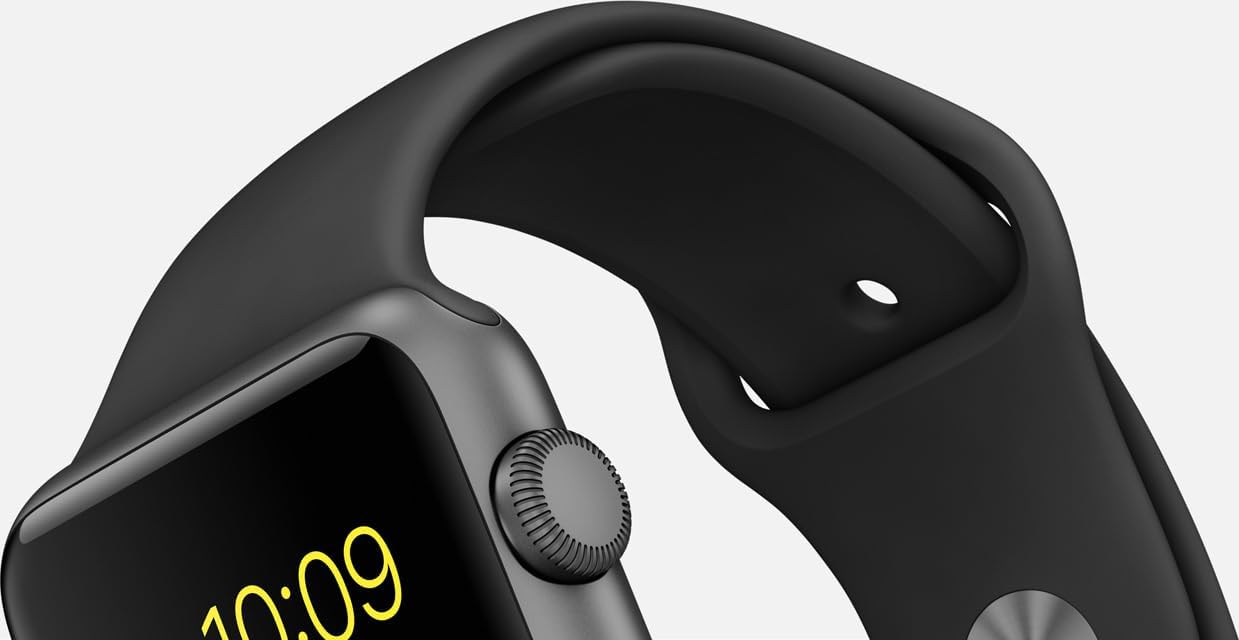
Figure 3: Digital Crown and side button for interaction.
صحت ۽ فٽنيس ٽريڪنگ
Your Apple Watch is equipped with a heart rate sensor, accelerometer, and gyroscope to track your physical activity and monitor your well-being. It measures workouts, tracks daily activity, and encourages healthy routines.
ڪميونيڪيشن جون خاصيتون
Receive notifications immediately and conveniently with a gentle tap. The built-in microphone and stereo capabilities allow for communication directly from your wrist.
حسب ضرورت
Personalize your Apple Watch by switching bands and changing watch faces. This allows you to adapt its appearance to your preferences and style.
ٻيا افعال
The watch supports Bluetooth and 802.11b/g/n Wi-Fi connectivity for seamless integration with your devices and network.
وڊيو 1: ختمview of Apple Watch Series 1 features.
سنڀال ۽ سار سنڀال
پاڻي جي مزاحمت
The Apple Watch Series 1 is splash and water resistant, making it suitable for activities like exercising in the rain. However, it is not waterproof and should not be submerged in water.
صفائي
To clean your Apple Watch, wipe it with a soft, lint-free cloth. If necessary, dampen the cloth with fresh water. Do not use soaps, cleaning products, abrasive materials, or compressed air.
بينڊ ڪيئر
Regularly clean your Sport Band with a soft, damp cloth. Allow it to air dry completely before reattaching it to your watch. Avoid exposing the band to harsh chemicals or extreme temperatures.
مشڪلاتون
If you experience issues with your Apple Watch, try the following:
- واچ ٻيهر شروع ڪريو: Press and hold the side button until the Power Off slider appears, then drag the slider. To turn it back on, press and hold the side button until you see the Apple logo.
- ڪنيڪشن چيڪ ڪريو: Ensure your Apple Watch is properly paired with your iPhone and that Bluetooth and Wi-Fi are enabled.
- اپڊيٽ سافٽ ويئر: Make sure both your Apple Watch and iPhone are running the latest software versions.
- سيٽنگون بحال ڪريو: If issues persist, you may need to reset your Apple Watch settings via the Apple Watch app on your iPhone.
وضاحتون
| خاصيت | تفصيل |
|---|---|
| ماڊل نالو | ايپل واچ سيريز 1 |
| برانڊ | ايپل |
| اسڪرين جي ماپ | 1.5 انچ |
| آپريٽنگ سسٽم | iOS |
| رابطي ٽيڪنالاجي | Bluetooth, 802.11b/g/n Wi-Fi |
| خاص خاصيتون | Microphone, Stereo, Heart Rate Sensor, Accelerometer, Gyroscope, Ambient Light Sensor, Retina Display with Force Touch |
| ميموري رکڻ جي صلاحيت | 8 جي بي |
| پيداوار جي ماپ | 12 x 3 x 2.5 انچ |
| شيءِ جو وزن | 1.12 اونس |
| بيٽري سيل جي جوڙجڪ | ليتيم آئن |
| رنگ | Space Gray Aluminum Case/Black Band |
وارنٽي ۽ سپورٽ
Your Apple Watch Series 1 is covered by a limited manufacturer's warranty. For detailed warranty information, service options, and technical support, please refer to the official Apple support website or contact Apple customer service directly. Proof of purchase may be required for warranty claims.


