1. پراڊڪٽ ختمview
The Virutex PF700 Router Template is a precision tool designed for woodworking enthusiasts and professionals. It facilitates accurate routing operations, ensuring consistent results for various applications.
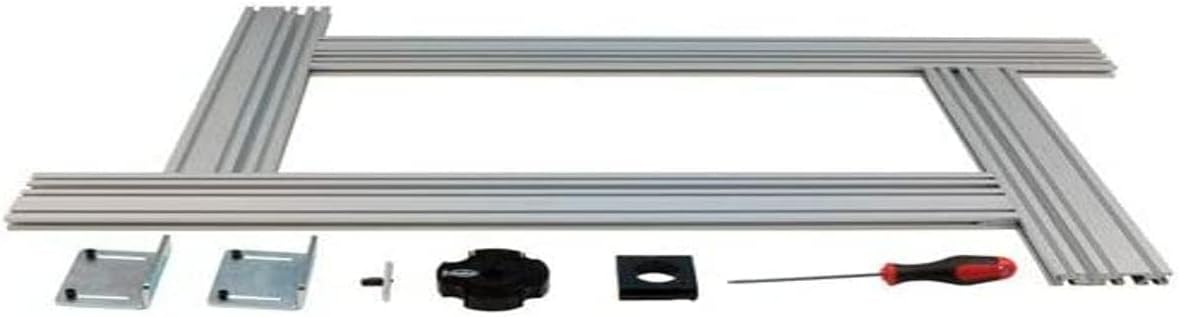
This image displays all the components of the Virutex PF700 Router Template. It includes several long, silver aluminum profiles that form the main frame, two metal mounting brackets, a black adjustment knob, a black square insert, and a small screwdriver with a red and black handle. These parts are laid out on a white background, indicating the complete set for assembly.
اهم خاصيتون:
- پائيداري لاءِ اعليٰ معيار جي تعمير.
- Easy to use design for efficient operation.
- Durable material ensures long-lasting performance.
- Suitable for both amateur and professional use.
2. حفاظت جي ڄاڻ
Always observe basic safety precautions when using power tools and accessories. Failure to do so may result in serious injury or damage to the product.
- استعمال ڪرڻ کان پهريان سڀ هدايتون پڙهو ۽ سمجھو.
- Wear appropriate personal protective equipment (PPE), including eye protection and hearing protection.
- پڪ ڪريو ته workpiece محفوظ طور تي cl آهيampروٽنگ کان اڳ ايڊ.
- Keep hands and fingers away from the router bit during operation.
- ڪنهن به قسم جي ترميم ڪرڻ يا بِٽس تبديل ڪرڻ کان اڳ روٽر کي بجلي بند ڪريو.
- Store the template in a safe, dry place when not in use.
3. پيڪيج مواد
Verify that all items are present and undamaged upon opening the package. If any parts are missing or damaged, contact customer support.
- Virutex PF700 Router Template Frame Components (Aluminum Profiles)
- Mounting Brackets (2x)
- ترتيب ڏيڻ وارو نوب
- Square Insert
- Assembly Screwdriver
- استعمال ڪندڙ جو دستياب (ھي دستاويز)
4. سيٽ اپ
Follow these steps to assemble and set up your Virutex PF700 Router Template:
- انپيڪ اجزاء: احتياط سان پيڪنگ مان سڀئي جزا ڪڍو ۽ انهن کي صاف، هموار مٿاڇري تي رکو.
- فريم گڏ ڪرڻ: Connect the aluminum profiles to form the desired template shape. Ensure all connections are secure and aligned.
- ڳنڍڻ واري بریکٹس: Securely fasten the mounting brackets to the template frame using the provided hardware. These brackets will be used to attach the template to your workpiece or workbench.
- Insert Adjustment Knob and Square Insert: Place the square insert into its designated slot on the template. Then, thread the adjustment knob into place, ensuring it can freely move and lock the insert as needed.
- Inspect Assembly: Before use, double-check all connections and ensure the template is stable and rigid.
5. آپريٽنگ هدايتون
The PF700 Router Template is designed to guide your router for precise cuts. Here are general operating guidelines:
- محفوظ ورڪ پيس: مضبوط طور تي clamp your workpiece to a stable surface.
- Attach Template: Securely attach the PF700 template to your workpiece using the mounting brackets. Ensure it is positioned correctly for your desired cut.
- روٽر سيٽ اپ: Install the appropriate router bit and guide bushing (if required by your router) into your router. Ensure the guide bushing fits snugly within the template's guide channels.
- Adjust Depth: Set the routing depth on your router according to your project requirements.
- ڪٽ ڪريو: With the router powered on and the bit spinning, carefully guide the router along the template's edges. Maintain steady pressure and a consistent feed rate.
- صاف ڪريو: After routing, turn off the router and allow the bit to stop completely before removing it. Clean any dust and debris from the workpiece and template.
6. سار سنڀال
Proper maintenance will extend the life of your Virutex PF700 Router Template:
- صفائي: After each use, wipe down the template with a dry cloth to remove sawdust and debris. For stubborn residue, use a mild cleaner and dry thoroughly.
- چڪاس: Periodically inspect the aluminum profiles, brackets, and adjustment mechanisms for any signs of wear, damage, or bending. Ensure all fasteners are tight.
- اسٽوريج: Store the template in a clean, dry environment, away from direct sunlight and extreme temperatures. Protect it from impacts that could deform the frame.
- لوڻ: Lightly lubricate moving parts, such as the adjustment knob mechanism, with a dry lubricant if they become stiff.
7. مسئلا حل ڪرڻ
If you encounter issues with your PF700 Router Template, refer to the following common problems and solutions:
| مسئلو | ممڪن سبب | حل |
|---|---|---|
| Inaccurate Cuts | Template not securely fastened; Router guide bushing loose or incorrect size; Template deformed. | Ensure template is clamped tightly; Check guide bushing for proper fit; Inspect template for damage and replace if necessary. |
| Template Movement During Routing | ڪافي clamping force; Workpiece not stable. | cl وڌايوamping pressure on the template and workpiece; Use additional clamps جيڪڏهن ضرورت هجي. |
| Difficulty Adjusting Knob | Dust or debris in mechanism; Lack of lubrication. | Clean the adjustment mechanism; Apply a small amount of dry lubricant. |
8. وضاحتون
| تفصيل | تفصيل |
|---|---|
| برانڊ | Virutex |
| ماڊل نمبر | PF700 |
| رنگ | ڪارو |
| پيداوار جي ماپ (L x W x H) | 1 x 1 x 1 سينٽي |
| شيءِ جو وزن | 3 ڪلوگرام |
| ASIN | B01085VSKW |
| ٺاهيندڙ | Virutex |
9. وارنٽي ڄاڻ
Specific warranty details for the Virutex PF700 Router Template are not provided in this manual. Please refer to the product packaging, the manufacturer's official website, or contact your point of purchase for comprehensive warranty terms and conditions.
10. ڪسٽمر سپورٽ
For technical assistance, spare parts, or any inquiries regarding your Virutex PF700 Router Template, please contact Virutex customer support directly. Contact information can typically be found on the product packaging or the official Virutex webسائيٽ.
Virutex Official Webسائيٽ: www.virutex.com (Please note: This link is provided as a general reference and may not be specific to your region.)


