تعارف
خريد ڪرڻ لاءِ مهربانيasing the Audioengine A2+ Powered Desktop Speakers. These speakers are designed to provide clear, full audio and can easily connect to various devices. This manual provides essential information for setting up, operating, and maintaining your speakers.

Image: A pair of red Audioengine A2+ powered desktop speakers, showcasing انهن جي ڪمپيڪٽ ڊيزائن.
ڇا شامل آهي
Your Audioengine A2+ package includes the following components:
- Pair of Audioengine A2+ Powered Speakers (one active, one passive)
- 2m Speaker Wire for connecting the active and passive speakers
- پاور سپلائي ۽ ڪنڊ
- USB cable for digital audio input
- 1.5m Mini-Jack Audio Cable for analog audio input
- Microfiber Speaker bags and Cable Bags for protection
- Setup Guide and Brochure

Image: All cables and the power supply unit included with the Audioengine A2+ speakers.
سيٽ اپ ڪريو
Follow these steps to set up your Audioengine A2+ speakers:
- لڳائڻ: Position the active (left) speaker and passive (right) speaker on your desktop or desired location. Ensure adequate space for ventilation.
- اسپيڪر ڳنڍيو: Use the included speaker wire to connect the active speaker's "Out to Right" terminals to the passive speaker's input terminals. Match the positive (+) and negative (-) terminals.
- پاور Connectنيو: Connect the power supply to the active speaker's "Power" input, then plug the power cord into a wall outlet.
- آڊيو ان پٽ: Choose your preferred audio input method:
- USB آڊيو: Connect the USB cable from your computer to the "USB Input" on the active speaker.
- Mini-Jack Audio: Use the 1.5m mini-jack cable to connect your device's headphone output to the "Input" mini-jack on the active speaker.
- RCA Audio: Use RCA cables (not included) to connect your device's RCA outputs to the "Input" RCA jacks on the active speaker.
- پاور آن: Turn the volume knob on the active speaker clockwise to power on the unit.
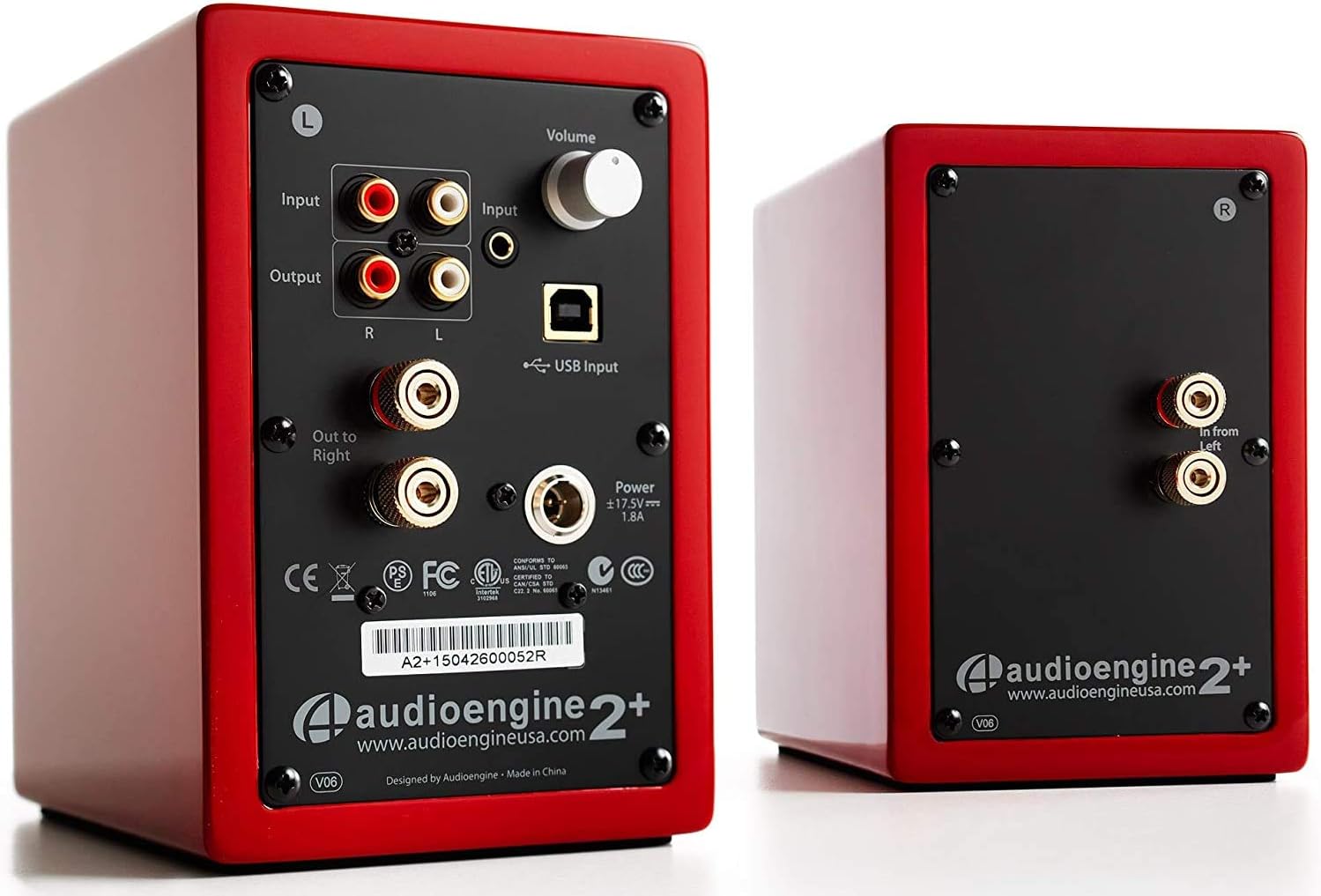
Image: Rear panel of the active speaker, highlighting various input and output connections.

Image: A detailed diagram of the A2+ speaker connections, including volume, inputs, and outputs.
وڊيو: هڪ اوورview of the Audioengine A2+ speakers, demonstrating setup and features.
پنهنجا اسپيڪر هلائڻ
Once set up, operating your A2+ speakers is straightforward:
- حجم ڪنٽرول: Adjust the volume using the knob on the active speaker. You can also control volume from your connected device.
- ان پٽ چونڊ: The A2+ automatically detects and prioritizes active inputs. If multiple inputs are connected, ensure only one is playing audio at a time for optimal performance.
- بلوٽوت ڪنيڪشن: The A2+ features Bluetooth for wireless audio streaming. Refer to your device's Bluetooth pairing instructions and select "Audioengine A2+" from the available devices.
- Subwoofer اوٽ: The variable audio output allows for easy connection to a subwoofer (e.g., Audioengine S8) for enhanced bass.

Image: Versatile playback options for the A2+ speakers, illustrating connections for phone, USB, and turntable.
Video: Demonstrates various ways to play music through Audioengine speakers, highlighting different connectivity options.
سار سنڀال
To ensure the longevity and optimal performance of your Audioengine A2+ speakers, follow these maintenance guidelines:
- صفائي: Use a soft, dry cloth to clean the speaker cabinets. Avoid using harsh chemicals or abrasive cleaners.
- مٽي جي حفاظت: When not in use, consider covering the speakers with the included microfiber bags to protect them from dust.
- وينٽيليشن: Ensure the speakers have adequate airflow around them to prevent overheating. Do not block the rear panel.
- نمي کان بچڻ: Keep the speakers away from water and excessive humidity.
مشڪلاتون
If you encounter issues with your A2+ speakers, try the following common troubleshooting steps:
- آواز ناهي:
- Check all cable connections (power, speaker wire, audio input).
- Ensure the volume knob on the active speaker is turned up.
- Verify the volume on your connected device is not muted or too low.
- If using USB, ensure your computer's audio output is set to the A2+ speakers.
- مسخ ٿيل آواز:
- Reduce the volume on both the speakers and your source device.
- لوز ڪنيڪشن يا خراب ٿيل ڪيبل لاء چيڪ ڪريو.
- Ensure the audio source is not overdriven.
- بلوٽوٿ جوڙڻ جا مسئلا:
- Ensure the speakers are in pairing mode (refer to your device's Bluetooth settings).
- Move your device closer to the speakers.
- Forget the device on your source and re-pair.
وڌيڪ تفصيلي مسئلو حل ڪرڻ لاءِ، سرڪاري ويب سائيٽ ڏانهن رجوع ڪريو يوزر مينوئل (PDF).
وضاحتون
| خاصيت | تفصيل |
|---|---|
| ماڊل نالو | A2+ Red |
| اسپيڪر جو قسم | ڪتابن جي الماري |
| خاص خصوصيت | وائرليس |
| تجويز ڪيل استعمال | موسيقي |
| مطابقت رکندڙ ڊوائيسز | Smartphone, Tablet, MP3 Player, Desktop, Television, Laptop |
| اسپيڪر وڌ ۾ وڌ آئوٽ پاور | 60 واٽ |
| رابطي ٽيڪنالاجي | Bluetooth - Wired |
| آڊيو آئوٽ پٽ موڊ | اسٽيريو |
| پيداوار جي ماپ | 5.25"ڊي x 4"ڊي x 6"ايڇ |
| شيءِ جو وزن | 3.6 پائونڊ |
| ووفر قطر | 2 انچ |
| سگنل کان شور جي نسبت | 95 ڊي بي |
وارنٽي ۽ سپورٽ
Audioengine stands behind the quality of their products. All Audioengine products come with a 3 سالن جي منتقلي وارنٽي. For warranty claims or technical support, please refer to the official Audioengine webسائيٽ يا توهان جي پراڊڪٽ پيڪنگنگ ۾ ڏنل رابطي جي معلومات.
Additional resources can be found in the comprehensive يوزر مينوئل (PDF).


