1. تعارف
The Alpine IVA-W520E is a full-featured 2DIN DVD player solution designed for in-car entertainment and media. It integrates advanced video and audio technologies, including a 7-inch LED touchscreen and a Burr-Brown 24-bit DAC, to deliver high-quality sound and clear images. This manual provides essential information for the proper installation, operation, and maintenance of your IVA-W520E unit.
2. حفاظت جي ڄاڻ
Please read all safety instructions carefully before installing or operating the unit. Failure to follow these instructions may result in injury or damage to the unit or vehicle.
- پيشه ورانه تنصيب جي سفارش ڪئي وئي آهي: Due to the complexity of car audio-visual systems, professional installation is highly recommended to ensure proper wiring and functionality.
- طاقت جو ذريعو: يونٽ کي صرف 12V DC منفي گرائونڊ پاور سپلائي سان ڳنڍيو.
- خلل کان بچو: Do not operate the unit's controls or view video content while driving, as this can lead to accidents. Always pull over to a safe location before making adjustments.
- وينٽيليشن: يونٽ جي چوڌاري مناسب وينٽيليشن کي يقيني بڻايو وڃي ته جيئن وڌيڪ گرم ٿيڻ کان بچي سگهجي. وينٽيليشن جي سوراخن کي بند نه ڪريو.
- نمي ۽ مائع: Keep the unit away from moisture and liquids. Do not expose it to rain or water.
- صفائي: صفائي لاءِ نرم، سڪل ڪپڙو استعمال ڪريو. رگڙيندڙ صاف ڪندڙ يا محلولن کان پاسو ڪريو.
3. پيڪيج مواد
انسٽاليشن سان اڳتي وڌڻ کان اڳ پڪ ڪريو ته سڀئي شيون پيڪيج ۾ موجود آهن:
- Alpine IVA-W520E Head Unit
- پاور / اسپيڪر هارنس
- ماؤنٽنگ هارڊويئر (اسڪرو، بریکٹس)
- ٽرم جي انگ
- استعمال ڪندڙ جو دستياب (ھي دستاويز)
- وارنٽي ڄاڻ
4. سيٽ اپ ۽ تنصيب
4.1. انسٽاليشن ھدايتون
بهترين ڪارڪردگي ۽ حفاظت لاءِ صحيح انسٽاليشن تمام ضروري آهي. اهو انتهائي صلاح ڏني وئي آهي ته يونٽ کي ڪنهن قابل پيشيور طرفان نصب ڪيو وڃي.
- بيٽري ختم ڪريو: ڪو به بجلي جو ڪم شروع ڪرڻ کان اڳ، شارٽ سرڪٽ کان بچڻ لاءِ گاڏي جي منفي بيٽري ٽرمينل کي ڊسڪنيڪٽ ڪريو.
- چڙهڻ: Securely mount the unit in the vehicle's double-DIN opening using the provided mounting brackets and screws. Ensure it is stable and does not obstruct any vehicle controls.
- وائرنگ: Connect the power harness, speaker wires, and other input/output cables according to the wiring diagram provided in the separate installation guide. Pay close attention to ground connections.
- Antenna and External Devices: Connect the radio antenna and any external devices such as a reverse camera or external ampجان بچائيندڙ.
4.2. شروعاتي سيٽ اپ
After installation, reconnect the battery and power on the unit for the first time.
- ٻولي جي چونڊ: پنهنجي پسنديده ٻولي چونڊڻ لاءِ اسڪرين تي ڏنل هدايتن تي عمل ڪريو.
- وقت ۽ تاريخ: Set the correct time and date for accurate display.
- آڊيو سيٽنگون: Adjust basic audio settings such as volume, balance, and fader.
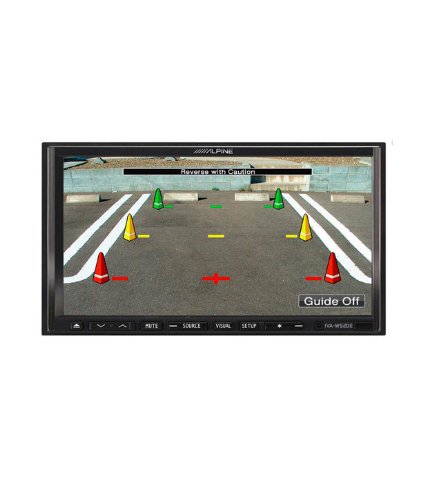
شڪل 4.1: مثالample of the IVA-W520E displaying a reverse camera feed, showing parking guidelines. This feature aids in safe vehicle maneuvering.
5. يونٽ هلائڻ
5.1. Touchscreen and Button Controls
The IVA-W520E features a responsive 7-inch LED touchscreen for primary control, supplemented by physical buttons for quick access to common functions.
- ٽچ اسڪرين: Navigate menus, select sources, and control playback by touching the screen.
- حجم ڪنٽرول: Use the dedicated volume buttons or on-screen controls to adjust audio levels.
- ذريعو بٽن: Press to cycle through available audio/video sources (Radio, DVD, USB, iPod, AUX, Bluetooth).
- گونگا بٽڻ: عارضي طور تي آڊيو آئوٽ پُٽ کي خاموش ڪري ٿو.
- سيٽ اپ بٽڻ: سسٽم سيٽنگون مينيو تائين رسائي ڪريو.
5.2. آڊيو پلے بیک
The unit supports various audio formats and sources, enhanced by its Burr-Brown 24-bit DAC for superior sound quality.
- USB آڊيو: Connect a USB device containing audio files. The unit will display track information and allow navigation through folders.
- iPod/iPhone Connectivity: Connect your iPod or iPhone for direct audio playback and control.
- ڊي وي ڊي / سي ڊي پلے بیک: Insert a DVD or CD into the disc slot for audio or video playback.
- ريڊيو ٽيونر: Access AM/FM radio stations.
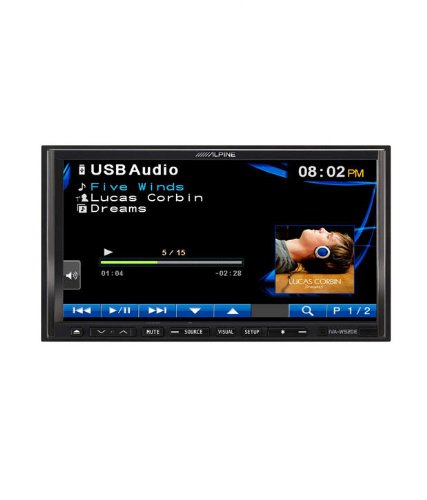
Figure 5.1: The IVA-W520E displaying the USB Audio interface, showing current track, artist, and playback controls. This allows for easy navigation of digital music files.
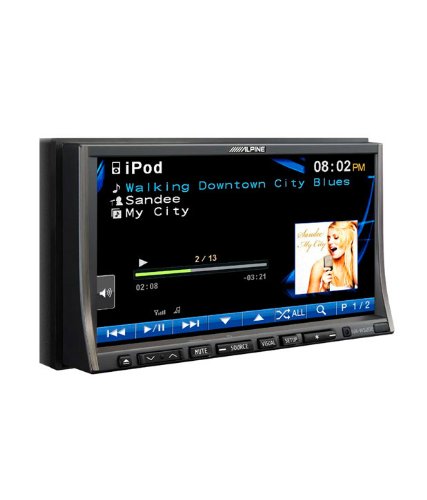
Figure 5.2: The IVA-W520E displaying the iPod interface, showing a list of songs and album art. This demonstrates seamless integration with Apple devices for music playback.
5.3. وڊيو پلے بیک
The 7-inch LED screen provides enhanced image quality with higher resolution, better contrast, and improved color reproduction compared to standard LCD screens.
- DVD Video: Insert a video DVD for playback. Ensure the parking brake safety wire is correctly connected for video to display while the vehicle is stationary.
- External Video Input: The unit supports external video sources, such as a reverse camera or other video devices.
5.4. بلوٽوت ڪنيڪشن
The IVA-W520E is upgradable for Bluetooth hands-free system functionality, allowing for safe and convenient communication while driving.
- جوڙڻ: Refer to the separate Bluetooth module manual (if applicable) for pairing instructions with your mobile phone.
- هينڊ فري ڪالنگ: Make and receive calls directly through the unit.
- آڊيو وهڪرو: Stream audio from your Bluetooth-enabled device.
5.5. Navigation System (Upgradable)
The unit is designed to be upgradable with a navigation system. Consult your Alpine dealer for compatible navigation modules and installation.
6. سار سنڀال
Regular maintenance helps ensure the longevity and optimal performance of your Alpine IVA-W520E.
- اسڪرين جي صفائي: Gently wipe the touchscreen with a soft, lint-free cloth. For stubborn smudges, slightly dampen the cloth with water or a screen-specific cleaner. Do not spray cleaner directly onto the screen.
- ڊسڪ سلاٽ: Keep the disc slot free of dust and debris. Avoid inserting bent, scratched, or irregular discs.
- عام صفائي: Use a soft, dry cloth to wipe the unit's exterior. Avoid harsh chemicals or abrasive materials.
7. مسئلا حل ڪرڻ
If you encounter issues with your IVA-W520E, refer to the following common problems and solutions:
| مسئلو | ممڪن سبب | حل |
|---|---|---|
| ڪابه طاقت | ڦاٽل فيوز، غلط وائرنگ، ڍلو ڪنيڪشن. | Check vehicle fuses and unit's fuse. Verify power and ground wiring connections. Ensure battery is connected. |
| ڪو آواز | Volume too low, mute activated, speaker wiring issue, incorrect source selected. | Increase volume. Deactivate mute. Check speaker connections. Select correct audio source. |
| ڊسڪ جي غلطي | گندي، ڇڪيل، يا غير مطابقت رکندڙ ڊسڪ. | ڊسڪ صاف ڪريو. هڪ مختلف، سڃاتل سٺي ڊسڪ آزمايو. پڪ ڪريو ته ڊسڪ فارميٽ سپورٽ ٿيل آهي. |
| وڊيو نه ڏيکاريندي (ڊرائيونگ دوران) | Parking brake safety wire not connected or incorrectly connected. | This is a safety feature. Video playback is disabled while the vehicle is in motion. Ensure the parking brake wire is correctly connected to the vehicle's parking brake circuit. |
| بلوٽوٿ جوڙڻ جا مسئلا | Bluetooth module not connected, phone not in pairing mode, interference. | Ensure optional Bluetooth module is correctly installed. Put phone in pairing mode. Move closer to the unit. |
If the problem persists after trying these solutions, please contact your authorized Alpine dealer or customer support.
8. وضاحتون
Key technical specifications for the Alpine IVA-W520E:
- ماڊل: IVA-W520E
- ڊسپلي سائيز: 7 انچ (18 سينٽي)
- ڊسپلي جو قسم: LED LCD Touchscreen
- قرارداد: 480 x 272 پکسلز
- آڊيو DAC: Burr-Brown 24-bit
- مطابقت رکندڙ ڊوائيسز: Smartphone (via USB/iPod, Bluetooth upgradable)
- خاص خاصيتون: Touchscreen, Bluetooth (upgradable)
- آڊيو آئوٽ موڊ: اسپيڪر
- ٺاهيندڙ: الپائن
- پهريون دستياب: 20 آگسٽ 2015
9. وارنٽي ۽ سپورٽ
For detailed warranty information, please refer to the warranty card included with your product package or visit the official Alpine webسائيٽ. خريداري جي ثبوت طور پنهنجي خريداري جي رسيد رکو.
For technical support, service, or inquiries about compatible accessories and upgrades (such as navigation modules or Bluetooth kits), please contact your authorized Alpine dealer or visit the Alpine customer support portal online.
الپائن آفيشل Webسائيٽ: www.alpine.com


