1. تعارف
This manual provides comprehensive instructions for the setup, operation, maintenance, and troubleshooting of your Avaya 9508 Digital Deskphone. Designed for small and medium-sized businesses, this deskphone offers reliable and high-quality communication solutions.
The Avaya 9508 Digital Deskphone features an intuitive design and functionality, making it an ideal choice for various user types in mixed digital/IP telephony environments.
2. سيٽ اپ
Follow these steps to set up your Avaya 9508 Digital Deskphone:
- هينڊ سيٽ ڳنڍيو: ڪوئل ٿيل ڪنڊ جي هڪ ڇيڙي کي هينڊ سيٽ ۾ ۽ ٻئي ڇيڙي کي فون بيس جي پاسي تي هينڊ سيٽ جيڪ ۾ لڳايو.
- نيٽ ورڪ ڪيبل ڳنڍيو: Connect a digital line cable from your wall jack to the port labeled "Digital Line" on the back of the phone.
- پاور ڳنڍيو (جيڪڏهن قابل اطلاق هجي): If your system requires external power, connect the power adapter to the phone and a power outlet.
- فون کي جاءِ ڏيو: Place the phone on a stable surface. The integrated stand allows for an angled viewپوزيشن.
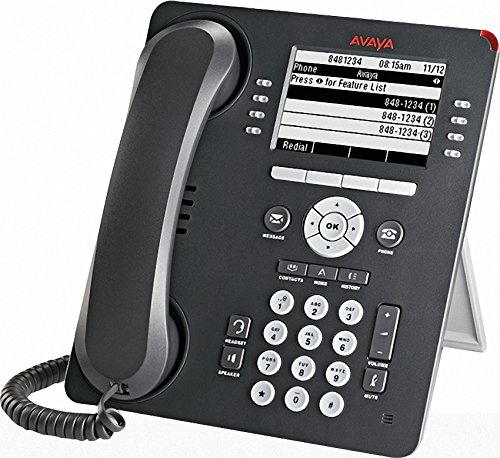
Figure 1: Avaya 9508 Digital Deskphone. This image shows the complete phone unit, including the handset, display screen, and the full keypad with various function buttons.
3. آپريٽنگ هدايتون
3.1 بنيادي ڪال فنڪشن
- ڪال ڪرڻ: هينڊ سيٽ کڻڻ يا دٻايو اسپيڪر button. Dial the desired number.
- ڪال جو جواب ڏيڻ هينڊ سيٽ کڻڻ يا دٻايو اسپيڪر جڏهن فون جي گھنٽي وڄي ته بٽڻ دٻايو.
- ڪال ختم ڪرڻ: هينڊ سيٽ تبديل ڪريو يا دٻايو Phone/Exit بٽڻ
3.2 ڪي پيڊ ۽ ڊسپلي
The phone features a clear display and a standard 12-button dial pad. Soft keys below the display provide context-sensitive options.
- نيويگيشن ڪلسٽر: استعمال ڪريو OK button and surrounding arrow keys to navigate menus and select options on the display.
- نرم چاٻيون: The buttons adjacent to the display (as seen in Figure 1) change function based on the current menu or call state. The OCR shows "Press for Feature List" as a display option, indicating dynamic soft key functionality.
3.3 فنڪشن بٽڻ
- نياپو: Access your voicemail messages. A red indicator light next to this button signals new messages.
- رابطا: Access your stored contact directory.
- مينيو: Access the phone's main menu for settings and features.
- ڪال لاگ: View a list of recent incoming, outgoing, and missed calls. A red indicator light next to this button signals new missed calls.
- ٻيهر سڏائڻ: ڪال ٿيل آخري نمبر ٻيهر ڊائل ڪريو.
- اسپيڪر: Toggle speakerphone mode on or off.
- گونگا: Mute your microphone during a call.
- حجم: Adjust the volume for the handset, speaker, or ringer.
- هيڊ سيٽ: Activate or deactivate the headset port.
- رکو: ھولڊ تي ھڪڙو فعال ڪال رکو.
- ڪانفرنس: هڪ ڪانفرنس ڪال شروع ڪريو.
- منتقلي: Transfer an active call to another extension or external number.
- ٻوٽو: Disconnect an active call.
4. سار سنڀال
To ensure the longevity and proper functioning of your Avaya 9508 Digital Deskphone, follow these simple maintenance guidelines:
- صفائي: نرم استعمال ڪريو، ڊيamp cloth to clean the phone's surface. Avoid abrasive cleaners or solvents. Do not spray liquids directly onto the phone.
- ماحول: Keep the phone away from excessive heat, direct sunlight, and moisture. Ensure proper ventilation.
- ڪنڊ جو انتظام: Avoid tangling or excessive pulling on the handset and network cords to prevent damage.
5. مسئلا حل ڪرڻ
If you encounter issues with your Avaya 9508 Digital Deskphone, refer to the following common problems and solutions:
- ڪابه ڊائل ٽون:
- Check that the network cable is securely connected to both the phone and the wall jack.
- Ensure the phone has power (if using an external adapter).
- ڊسپلي خالي يا غير جوابده آهي:
- پاور ڪنيڪشن جي تصديق ڪريو.
- Try restarting the phone by disconnecting and reconnecting the power/network cable.
- Cannot Hear or Be Heard:
- حجم کي استعمال ڪندي ترتيب ڏيو حجم بٽڻ
- کي يقيني بڻايو گونگا button is not active.
- هينڊ سيٽ ۽ هيڊ سيٽ ڪنيڪشن چيڪ ڪريو.
- جواب نه ڏيڻ وارا بٽڻ:
- فون ٻيهر شروع ڪريو.
- پڪ ڪريو ته ڪو به ملبو بٽڻن کي روڪي نه رهيو آهي.
For persistent issues, contact your system administrator or Avaya support.
6. وضاحتون
| برانڊ | اويا |
| ماڊل نمبر | 9508 |
| ٺاهيندڙ | اويا |
| رنگ | ڪارو |
| جوابي نظام جو قسم | ڊجيٽل |
| سڏيندڙ جي سڃاڻپ | نه |
| يو پي سي | 712155447561، 033587515940 |
| ASIN | B014FHW9WA |
| تاريخ پهرين دستياب | فيبروري 6، 2016 |
7. وارنٽي ۽ سپورٽ
For detailed warranty information, please refer to the documentation provided with your purchase or contact your Avaya reseller. Warranty terms and conditions may vary.
For technical support, contact your IT department or the official Avaya support channels. You can typically find support contact information on the Avaya webسائيٽ يا توهان جي سروس فراهم ڪندڙ ذريعي.


