1. تعارف
Thank you for choosing the Utilitech White Doorbell. This manual provides essential information for the safe and efficient installation, operation, and maintenance of your new doorbell unit. Please read these instructions thoroughly before beginning installation and retain this manual for future reference.
2. حفاظت جي ڄاڻ
Always follow basic safety precautions when installing or servicing electrical equipment to reduce the risk of fire, electric shock, and personal injury.
- خبردار: Turn off power at the circuit breaker or fuse box before installing or servicing the doorbell. Failure to do so may result in serious injury or death.
- پڪ ڪريو ته سڀئي وائرنگ ڪنيڪشن محفوظ آهن ۽ مقامي برقي ڪوڊن جي تعميل ڪن ٿا.
- Do not install the doorbell in wet or damp locations unless specifically rated for such environments.
- جيڪڏهن توهان کي انسٽاليشن جي عمل جي ڪنهن به حصي بابت پڪ ناهي، ته هڪ قابل اليڪٽريشن سان صلاح ڪريو.
3. پيڪيج مواد
انسٽاليشن شروع ڪرڻ کان اڳ پڪ ڪريو ته سڀئي جزا موجود آهن.
- Utilitech White Doorbell Unit (Model: 108174)
- ھدايت وارو دستور
- Note: Mounting hardware and transformer are typically sold separately and are not included with the doorbell unit.
4. سيٽ اپ ۽ تنصيب
Follow these steps to properly install your Utilitech White Doorbell.
- پاور بند ڪريو: Locate your home's circuit breaker or fuse box and turn off the power to the circuit that supplies electricity to your doorbell wiring. Verify power is off using a voltagاي جاچ ڪندڙ.
- ڊور بيل يونٽ لڳايو:
Position the doorbell unit in the desired location. Mark the mounting holes. Drill pilot holes if necessary and secure the doorbell unit to the wall using appropriate screws (not included).
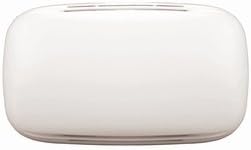
شڪل 4.1: سامهون view of the Utilitech White Doorbell unit. This image displays the compact, white rectangular housing of the Utilitech doorbell unit, featuring a smooth, minimalist design suitable for various home aesthetics.
- وائر ڪنيڪشن:
گھٽ-وول سان ڳنڍيوtage wires from your doorbell transformer and push button to the appropriate terminals on the Utilitech doorbell unit. Typically, there are terminals for "TRANS" (transformer), "FRONT" (front door push button), and "REAR" (rear door push button, if applicable). Ensure all connections are tight and secure.
- Connect the transformer wire to the "TRANS" terminal.
- Connect the front door push button wire to the "FRONT" terminal.
- If using a rear door push button, connect its wire to the "REAR" terminal.
- پاور بحال ڪريو: Once all connections are made and the unit is securely mounted, return to your circuit breaker or fuse box and turn the power back on.
- ٽيسٽ آپريشن: Press the doorbell push button(s) to ensure the chime sounds correctly.
5. آپريٽنگ هدايتون
The Utilitech White Doorbell operates by producing an audible chime when the connected push button is pressed. The sound output is designed to alert occupants to visitors at the door.
- To activate the doorbell, a visitor simply presses the corresponding push button located outside your door.
- The doorbell unit will then emit its chime sound.
6. سار سنڀال
The Utilitech White Doorbell requires minimal maintenance to ensure long-lasting performance.
- صفائي: Periodically wipe the exterior of the doorbell unit with a soft, dry cloth to remove dust and dirt. Do not use abrasive cleaners or solvents, as these may damage the finish.
- ڪنيڪشن چيڪ: If you experience issues, ensure all wiring connections remain secure. Always turn off power at the circuit breaker before inspecting connections.
7. مسئلا حل ڪرڻ
If your Utilitech White Doorbell is not functioning as expected, refer to the following common issues and solutions:
| مسئلو | ممڪن سبب | حل |
|---|---|---|
| Doorbell does not chime or chimes weakly. |
|
|
| Doorbell chimes continuously. |
|
|
8. وضاحتون
Key technical specifications for the Utilitech White Doorbell (Model 108174).
- ماڊل نمبر: 108174
- حصو نمبر: 108174
- ASIN: B014FWTJLE
- شيء جو وزن: 16 اونس
- پيڪيج جي ماپ: 9.2 x 5.7 x 2 انچ
- بيٽرين جي ضرورت آهي: نه
- تاريخ پهرين دستياب: آگسٽ 25، 2015
- رنگ: اڇو
9. وارنٽي ۽ سپورٽ
Specific warranty details and customer support contact information for the Utilitech White Doorbell are not provided within this manual. Please refer to the product packaging or the retailer's website for information regarding warranty coverage and how to obtain technical support.


