1. تعارف
This manual provides detailed instructions for the setup, operation, and maintenance of your Akuvox SP-R50P IP Phone. The SP-R50P is a high-definition voice IP phone designed for clear communication and efficient call management.
اهم خاصيتون شامل آهن:
- HD Voice capability for superior audio quality.
- 2.6" 132x64 Graphical LCD with backlight for clear display.
- 31 Keys, including 4 soft keys and 10 programmable keys, for versatile control.
- Multiple connectivity options: 1 RJ9 Handset jack, 1 RJ9 Headset Jack, 2 RJ45 10/100m Ethernet Jacks.
- Power over Ethernet (PoE) support (IEEE 802.3af) for simplified installation.
- Support for 1 SIP account, call waiting, call forward, call transfer, call on hold, mute, auto-answer, redial, DND, local 3-way conference, volume adjustment, selectable ringtones, speed dial, hotline, and more.
2. باڪس جا حصا
Carefully unpack your Akuvox SP-R50P IP Phone and verify that all items listed below are present and in good condition. If any items are missing or damaged, please contact your reseller immediately.
- Akuvox SP-R50P Base Unit
- هينڊ سيٽ
- Handset Connector Cable
- فون اسٽينڊ
- تڪڙي شروعات جي ھدايت (مڪمل تفصيل لاءِ ھن دستورالعمل جو حوالو ڏيو)
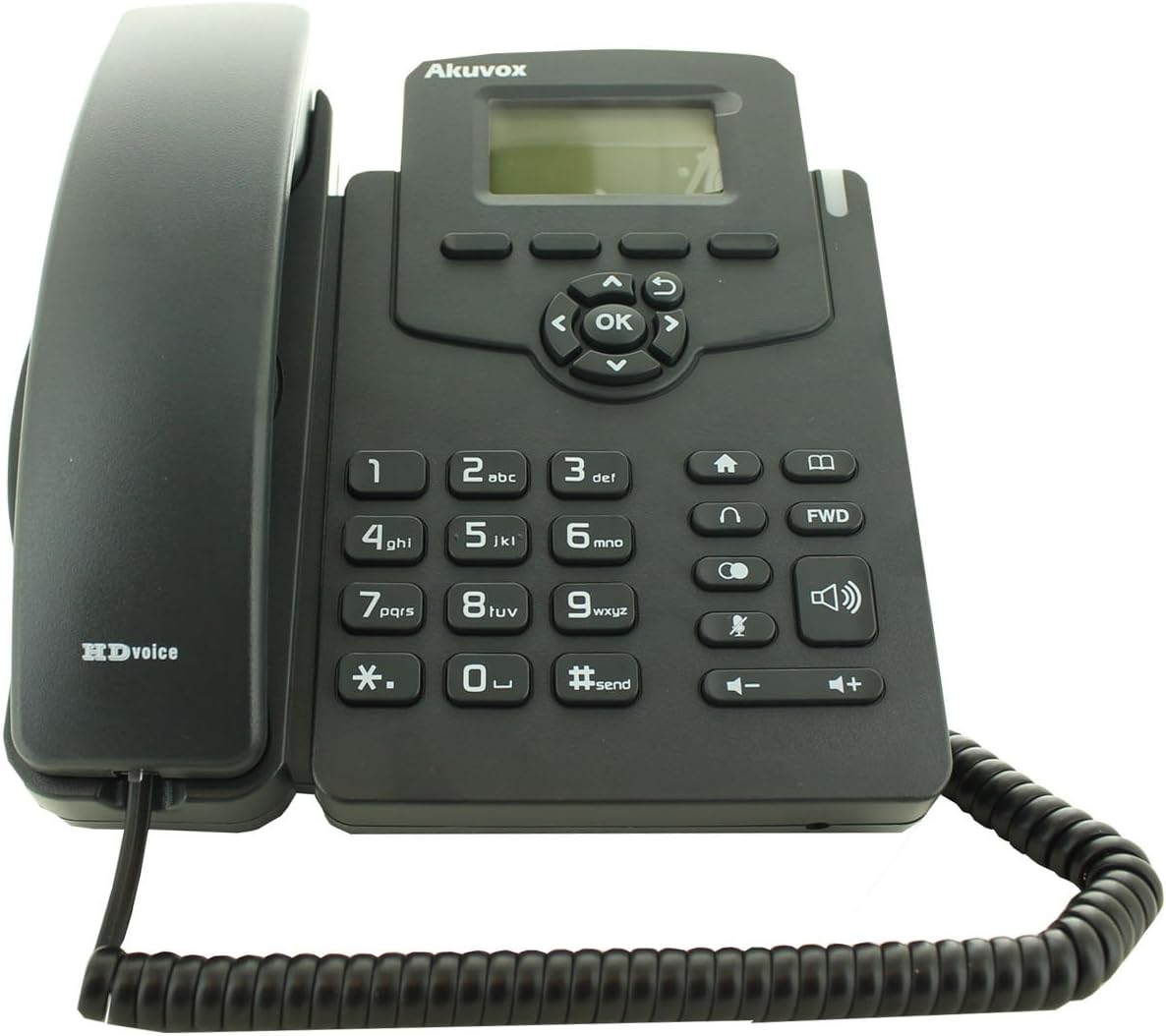
Figure 2.1: Akuvox SP-R50P IP Phone components. The image displays the main phone unit, the handset resting on its cradle, and the coiled handset cable. The phone features a display screen, navigation keys, a numeric keypad, and function buttons.
3. سيٽ اپ
Follow these steps to set up your Akuvox SP-R50P IP Phone for first-time use.
- فون اسٽينڊ ڳنڍيو: Align the tabs on the phone stand with the slots on the back of the phone base unit. Slide the stand into place until it clicks securely.
- هينڊ سيٽ ڳنڍيو: Plug one end of the coiled handset cable into the handset jack on the side of the phone base unit and the other end into the handset.
- نيٽ ورڪ ۽ پاور سان ڳنڍيو:
- PoE (پاور اوور ايٿرنيٽ) استعمال ڪندي: If your network switch supports PoE, connect an Ethernet cable from the LAN port on the back of the phone to a PoE-enabled port on your network switch. The phone will power on automatically.
- Using a Power Adapter (Optional, not included): If PoE is not available, connect a compatible 5V DC power adapter (not included) to the power jack on the back of the phone, then plug the adapter into a power outlet. Connect an Ethernet cable from the LAN port on the back of the phone to your network router or switch.
- شروعاتي بوٽ اپ: The phone will power on and begin its boot-up sequence. The LCD screen will display the Akuvox logo and then proceed to load the operating system. This may take a few moments.
- نيٽ ورڪ ٺاھ جوڙ: Once booted, the phone will attempt to obtain an IP address via DHCP. If your network requires static IP configuration or specific SIP server settings, these can be configured via the phone's web interface or directly on the phone's menu (refer to Section 4.2 for menu navigation).
4. آپريٽنگ هدايتون
This section details the basic and advanced functions of your Akuvox SP-R50P IP Phone.
4.1 بنيادي ڪال فنڪشن
- ڪال ڪرڻ:
- هٿ کي کڻي يا پريس کي اسپيڪر بٽڻ
- ڪي پيڊ استعمال ڪندي گهربل فون نمبر ڊائل ڪريو.
- کي دٻايو #send button or wait a few seconds for the call to connect automatically.
- ڪال جو جواب ڏيڻ جڏهن فون جي گھنٽي وڄي، هينڊ سيٽ کڻو يا دٻايو اسپيڪر بٽڻ
- ڪال ختم ڪرڻ: هينڊ سيٽ کي رکو يا دٻايو اسپيڪر ٻيهر بٽڻ.
- ٻيهر ورجائڻ کي دٻايو ٻيهر سڏائڻ button (often represented by a curved arrow or a dedicated key) to redial the last dialed number.
- خاموش: ڪال دوران ، پريس کي گونگا button (microphone icon) to mute your microphone. Press it again to unmute.
- حجم جي ترتيب: استعمال ڪريو حجم +/- buttons during a call to adjust the handset, headset, or speaker volume. When idle, use them to adjust the ringer volume.
4.2 اعليٰ ڪال خاصيتون
- ڪال هولڊ: فعال ڪال دوران، دٻايو رکو button (often represented by a pause icon or two vertical lines). The call will be placed on hold. Press the رکو button again or the flashing line key to resume the call.
- ڪال جي منتقلي:
- انindي منتقلي: فعال ڪال دوران، دٻايو منتقلي soft key or button. Dial the number to transfer to, then press the منتقلي نرم چاٻي ٻيهر.
- شرڪت ڪئي منتقلي: فعال ڪال دوران، دٻايو منتقلي soft key or button. Dial the number to transfer to and wait for the party to answer. Announce the call, then press the منتقلي منتقلي کي مڪمل ڪرڻ لاءِ ٻيهر نرم ڪنجي.
- 3-Way Conference:
- فعال ڪال دوران، دٻايو conf soft key or button. The first call will be placed on hold.
- Dial the number of the third party and wait for them to answer.
- کي دٻايو conf soft key again to join all three parties in a conference call.
- پريشان نه ڪريو (DND): کي دٻايو ڊي اين ڊي button (often represented by a crossed-out bell or similar icon) to activate or deactivate Do Not Disturb mode. When active, incoming calls will be redirected or sent to voicemail without ringing your phone.
- ڪال فارورڊ: Access the phone's menu (usually via a مينيو or سيٽنگون soft key) to configure call forwarding options (Always, Busy, No Answer).
- فون بڪ: The phone supports a local phonebook of up to 500 groups. Access it via the فون بڪ soft key or menu option. You can add, edit, and delete contacts.
- پروگرام قابل چاٻيون: The 10 programmable keys can be configured for various functions such as speed dial, busy lamp field (BLF), or line keys. Refer to your system administrator or the phone's web interface for configuration details.
4.3 LCD ڊسپلي ۽ نيويگيشن
The 2.6" graphical LCD displays call information, menu options, and status indicators. Use the navigation cluster (Up, Down, Left, Right arrows, and OK button) to navigate through menus and select options. The soft keys below the display change their function based on the current context.
5. سار سنڀال
Proper care and maintenance will ensure the longevity of your Akuvox SP-R50P IP Phone.
- صفائي: فون جي مٿاڇري کي صاف ڪرڻ لاءِ نرم، سڪل ڪپڙو استعمال ڪريو. ضدي نشانن لاءِ، ٿورو ڊيampen the cloth with water. Do not use harsh chemicals, abrasive cleaners, or solvents, as these can damage the phone's finish and internal components.
- ماحول: Keep the phone away from direct sunlight, excessive heat sources, and moisture. Ensure it is placed on a stable, flat surface to prevent accidental falls.
- ڪيبل: Periodically check all connected cables (handset, Ethernet) for any signs of wear or damage. Replace damaged cables immediately.
- وينٽيليشن: Ensure the ventilation slots on the phone are not blocked to prevent overheating.
6. مسئلا حل ڪرڻ
If you encounter issues with your Akuvox SP-R50P IP Phone, refer to the following common problems and solutions.
| مسئلو | ممڪن سبب | حل |
|---|---|---|
| فون آن نٿو ٿئي. | No power supply; PoE not active or faulty; power adapter faulty. |
|
| ڪوبه ڊائل ٽون. | Network connection issue; SIP registration failure; handset cable loose. |
|
| ڪالون نه ٿو ڪري سگھجي ۽ نه ئي وصول ڪري سگھجي ٿو. | SIP registration failure; network firewall blocking VoIP traffic; DND active. |
|
| خراب آڊيو معيار (گونج، جامد). | نيٽ ورڪ جي کوٽ؛ ناقص ڪيبل؛ مائڪروفون/اسپيڪر جو مسئلو. |
|
If the problem persists after trying these solutions, please contact your system administrator or Akuvox technical support.
7. وضاحتون
Detailed technical specifications for the Akuvox SP-R50P IP Phone.
| خاصيت | وضاحت/ قدر |
|---|---|
| ماڊل نمبر | SP-R50P |
| برانڊ | اڪيواڪس |
| ڏيکاريو | 2.6" 132x64 Graphical LCD with backlight |
| چاٻيون | 31 Keys (4 Soft Keys, 10 Programmable keys) |
| آواز جي معيار | HD آواز |
| SIP اڪائونٽس | 1 لائين (1 SIP اڪائونٽ جي حمايت ڪريو) |
| Ethernet بندرگاهن | 2 RJ45 10/100m Ethernet Jacks |
| هيڊ سيٽ جيڪ | 1 RJ9 Headset Jack |
| هينڊ سيٽ جيڪ | 1 RJ9 Handset jack |
| پو | آئي اي اي 802.3af |
| ڪانفرنس ڪال | Local 3-Way Conference |
| فون بڪ ظرفيت | 500 گروپ |
| ڪال لاگز | 100 داخلائون |
| مواد | پلاسٽڪ |
| رنگ | ڪارو |
| پيڪيج جي ماپ | 20.8 x 19.8 x 9 سينٽي |
| وزن | 859.99 جي |
| پهرين دستياب تاريخ | 26 جون 2015 |
8. وارنٽي ۽ سپورٽ
For warranty information, please refer to the warranty card included with your product or contact your point of purchase. Akuvox provides technical support for its products. For further assistance, please visit the official Akuvox webسائيٽ يا انهن جي ڪسٽمر سروس کاتي سان رابطو ڪريو.
وارنٽي جي دعوائن لاءِ خريداري جي ثبوت طور پنهنجي خريداري جي رسيد رکڻ جي صلاح ڏني وئي آهي.


