تعارف
This manual provides instructions for the HAVIT HV-KB366L RGB Backlit Mechanical Gaming Keyboard. This keyboard features blue mechanical switches, full anti-ghosting, and customizable RGB backlighting, designed for reliable performance.
سيٽ اپ جون هدايتون
ڪيبورڊ کي ڳنڍڻ
- توھان جي ڪمپيوٽر تي موجود يو ايس بي پورٽ ڳولھيو.
- Connect the USB cable from the HAVIT HV-KB366L keyboard to the USB port on your computer.
- ڪيبورڊ پلگ اينڊ پلي آهي ۽ توهان جي آپريٽنگ سسٽم طرفان خودڪار طريقي سان سڃاڻي سگهجي ٿو.
سسٽم مطابقت
- Compatible with Windows 10 and other Windows operating systems.
- Mac OS supports 6-key rollover only.
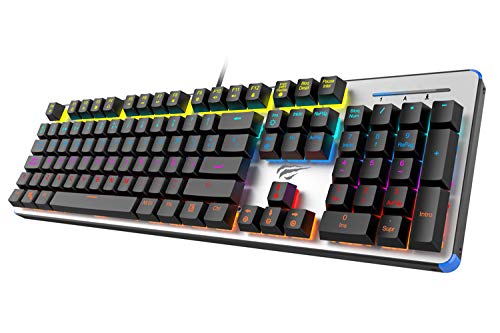
Figure 1: HAVIT HV-KB366L RGB Backlit Mechanical Gaming Keyboard. An overhead view of the keyboard, showcasing its full layout with RGB lighting on the keys and a white frame.
آپريٽنگ هدايتون
مشيني چاٻي سوئچ
The keyboard is equipped with blue mechanical switches, providing tactile feedback and an audible click with each keystroke. This design is intended for precise input during typing and gaming.
اينٽي گھوسٽنگ فيچر
The full key anti-ghosting mechanism ensures that all key presses are registered accurately, even when multiple keys are pressed simultaneously. This feature is beneficial for fast-paced gaming.
پٺڀرائي جي ترتيب
- To change the backlight color or mode, press the Fn چاٻي هڪ ئي وقت سان پٺاڻ key. Repeated presses will cycle through available modes and colors.
- Marquee Mode: In 7-color backlit mode (non-breathing), press the پٺاڻ key once to activate marquee mode. Press the پٺاڻ key again to deactivate marquee mode and return to 7-color backlit mode.
- روشني جي سطح: The backlight offers 4 levels of brightness adjustment.
- Breathing Rate: The breathing effect has 10 adjustable levels.
سار سنڀال
ڪي بورڊ جي صفائي
- صفائي ڪرڻ کان اڳ ڪيبورڊ کي ڪمپيوٽر کان ڌار ڪريو.
- ڪيبورڊ جي مٿاڇري کي صاف ڪرڻ لاءِ نرم، سڪل ڪپڙو استعمال ڪريو.
- چاٻين جي وچ ۾ مٽي ۽ ملبي لاءِ، دٻيل هوا استعمال ڪريو.
- سخت ڪيميڪلز يا رگڙيندڙ مواد استعمال ڪرڻ کان پاسو ڪريو، ڇاڪاڻ ته اهي فنش يا ڪي ڪيپس کي نقصان پهچائي سگهن ٿا.
پائيداري
The keyboard features an aluminum top housing with a sanded finish and a metal base, contributing to its overall durability and stable performance.
مشڪلاتون
ڪي بورڊ جواب نه ڏئي رهيو آهي
- پڪ ڪريو ته USB ڪيبل ڪيبورڊ ۽ ڪمپيوٽر ٻنهي سان محفوظ طور تي ڳنڍيل آهي.
- ڪيبورڊ کي پنهنجي ڪمپيوٽر تي ڪنهن ٻئي USB پورٽ سان ڳنڍڻ جي ڪوشش ڪريو.
- Test the keyboard on another computer to determine if the issue is with the keyboard or the computer's USB port.
بيڪ لائيٽ ڪم نه ڪري رهي آهي يا غلط آهي
- Verify that the keyboard is properly connected and receiving power.
- دٻايو Fn + Backlit key to cycle through backlight modes and ensure it is not turned off or set to a very low brightness.
- Refer to the "Backlight Adjustment" section for detailed instructions on changing modes and brightness.
وضاحتون
| برانڊ | حيات |
| ماڊل نمبر | HV-KB366L |
| ٺاهيندڙ | حيات |
| پيداوار جي ماپ | 50.5 x 17.6 x 6 سينٽي ميٽر |
| شيءِ جو وزن | 1.33 ڪلو |
| رابطي ٽيڪنالاجي | وائرڊ (USB) |
| ڪي بورڊ جي وضاحت | گيمنگ ميڪيڪل ڪيبورڊ |
| خاص خصوصيت | RGB Backlit, Anti-Ghosting |
| هارڊويئر پليٽ فارم | ليپ ٽاپ، پي سي |
| آپريٽنگ سسٽم | Windows 10 (and compatible), Mac OS (6-key rollover) |
| جلدtage | 5 وولٽ |
| شامل اجزاء | USB ڪيبل |
وارنٽي ۽ سپورٽ
وارنٽي ڄاڻ
Specific warranty details for the HAVIT HV-KB366L keyboard are not provided in the product data. Please refer to the product packaging or contact HAVIT directly for warranty terms and conditions.
ڪسٽمر سپورٽ
For technical assistance, troubleshooting, or further inquiries, please contact HAVIT customer support through their official webسائيٽ يا توهان جي خريداري سان مهيا ڪيل رابطي جي معلومات.


