تعارف
The Master Lock No. X055ML large digital combination safe is designed for protecting valuable items such as laptops, jewelry, documents, money, and other electronics within a home environment. Its internal dimensions are suitable for A4-sized documents. This safe features a programmable electronic lock, allowing users to set their own combination, and includes an override key for access in case of a forgotten code. The interior is carpeted to prevent scratching of stored items. For enhanced security, the safe can be bolted down using the included hardware, preventing unauthorized removal. The robust steel construction and pry-resistant door with two live-locking bolts provide a high level of security for your belongings.
حفاظت جي ڄاڻ
- Always keep the override keys in a secure location away from the safe. Do not store them inside the safe.
- Ensure the safe is securely bolted down to a floor or wall to prevent unauthorized removal, if applicable.
- Do not store flammable materials or open containers of liquids inside the safe.
- Keep the keypad clean and dry to ensure proper operation.
- جڏهن گهٽ بيٽري جو اشارو ظاهر ٿئي ته فوري طور تي بيٽريون تبديل ڪريو ته جيئن بند ٿيڻ کان بچي سگهجي.
پيڪيج مواد
- 1 x Master Lock Security Safe (Model X055ML)
- 2 x Override Keys
- 1 x Bolt Down Kit (for securing the safe)
- استعمال ڪندڙ جو دستياب (ھي دستاويز)
سيٽ اپ ڪريو
1. بيٽري لڳائڻ
The safe requires 4 AA batteries (not included) for the electronic lock to function. The battery compartment is located on the inside of the safe door. Open the safe using the override key if it is currently locked.
- Locate the battery compartment cover on the inside of the safe door.
- Remove the cover by sliding it or unscrewing it, depending on the design.
- 4 نيون AA بيٽريون داخل ڪريو، صحيح پولارٽي کي يقيني بڻائي (+/-).
- بيٽري جي ڪمري واري ڍڪ کي محفوظ طور تي تبديل ڪريو.
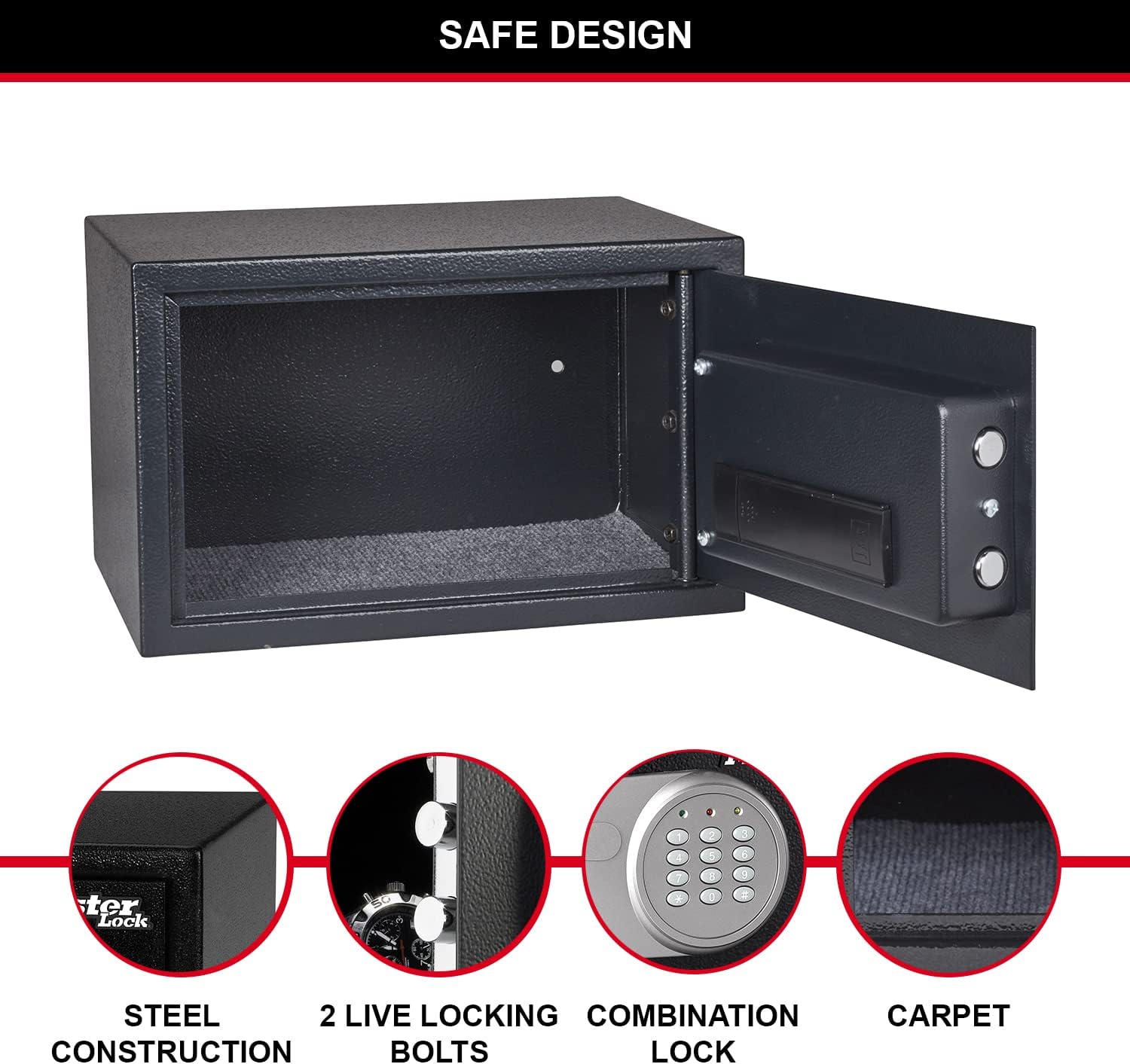
Figure 1: Inside of the safe door, highlighting the battery compartment and live-locking bolts.
2. Setting Your Personal Combination
Upon first use, or after battery replacement, you will need to set your personal combination. The factory default code is typically 1-2-3-4, but it is highly recommended to change it immediately.
- With the safe door open, locate the red reset button on the inside of the door, near the battery compartment.
- Press the red reset button. The yellow light on the keypad will illuminate.
- Enter your new 3 to 8 digit combination on the keypad.
- Press the "A" or "B" button (or "#" or "*" depending on model) to confirm. The yellow light will turn off, indicating the new code is set.
- Test your new combination with the door open to ensure it works correctly before closing the safe.
3. Securing the Safe (Optional)
For maximum security, the safe can be bolted to a floor or wall using the included bolt-down kit. This prevents unauthorized removal of the safe.
- Choose a suitable location for the safe, such as inside a wardrobe or cabinet.
- Mark the drilling points through the pre-drilled holes at the bottom or back of the safe.
- Drill pilot holes into the mounting surface using an appropriate drill bit.
- Align the safe with the drilled holes and secure it using the provided bolts and washers.

شڪل 2: مثالample of safe placement within a cabinet for secure storage.
آپريٽنگ هدايتون
1. Opening the Safe with Digital Combination
- Enter your personal 3 to 8 digit combination on the keypad.
- Press the "A" or "B" button (or "#" or "*" depending on model) to confirm.
- If the code is correct, the green light will illuminate. Within 5 seconds, turn the knob clockwise to open the safe door.
- If an incorrect code is entered, the yellow light will flash. After three incorrect attempts, the safe will enter a lockout period.

شڪل 3: سامهون view of the safe with the digital combination lock.
2. Opening the Safe with Override Key
The override key provides emergency access to the safe, useful if batteries are depleted or the combination is forgotten.
- Locate the keyhole, usually hidden behind a small cover on the keypad panel.
- Insert one of the provided override keys into the keyhole.
- Turn the key clockwise while simultaneously turning the knob clockwise to open the safe door.
- Remove the key once the safe is open.
3. سيف کي بند ڪرڻ ۽ تالا لڳائڻ
To lock the safe, simply close the door and turn the knob counter-clockwise until the bolts engage. The electronic lock will automatically secure the safe.
سار سنڀال
1. بيٽري مٽائڻ
When the batteries are low, the red light on the keypad may flash or the safe may not respond to combination entries. Replace all 4 AA batteries as described in the "Battery Installation" section under Setup.
2. صفائي
سيف جي ٻاهرين حصي کي نرم، ڊي سان صاف ڪريوamp cloth. Do not use abrasive cleaners or solvents. Keep the keypad and internal components dry.
مشڪلاتون
| مسئلو | ممڪن سبب | حل |
|---|---|---|
| سيف ميلاپ سان نه کُليندو آهي. | Incorrect combination entered; low batteries. | Re-enter combination carefully. Replace batteries. Use override key. |
| Keypad lights do not illuminate. | مئل يا غلط طور تي نصب ٿيل بيٽريون. | Replace all 4 AA batteries, ensuring correct polarity. |
| محفوظ دروازو صحيح طرح بند نٿو ٿئي. | Obstruction in the door frame; bolts not fully retracted. | Check for obstructions. Ensure the knob is fully turned to retract bolts before closing. |
| وساريل ميلاپ. | Combination lost or forgotten. | Use the override key to open the safe, then reset the combination. |
وضاحتون
| خاصيت | تفصيل |
|---|---|
| ماڊل نمبر | X055ML |
| ٻاهرين ماپون (HxWxD) | 13.78" H x 8.66" W x 10.63" D (22 x 35 x 27 cm) |
| اندروني طول و عرض (HxWxD) | 21.6 سينٽي H x 34.6 سينٽ W x 22 سينٽي ميٽر ڊي |
| ظرف | 16 ليٽر |
| وزن | 14.11 پائونڊ (6400 گرام) |
| تالا جو قسم | Digital Combination with Key Override |
| مواد | مصر جو اسٽيل |
| طاقت جو ذريعو | بيٽري تي هلندڙ (4 AA بيٽريون گهربل، شامل نه آهن) |
| خاص خاصيتون | Pry-resistant door, two live-locking bolts, carpeted floor, bolt-down hardware included. |

Figure 4: Detailed dimensions of the safe.
وارنٽي ۽ سپورٽ
This Master Lock product is covered by a 1-year spare part availability duration in the EU. For specific warranty details, technical support, or to inquire about replacement parts, please refer to the official Master Lock webسائيٽ تي وڃو يا سڌو سنئون انهن جي ڪسٽمر سروس سان رابطو ڪريو. وارنٽي دعوائن لاءِ پنهنجي خريداري جي رسيد رکو.
وڌيڪ مدد لاء، دورو ڪريو جي ايميزون تي ماسٽر لاڪ اسٽور.


