1. اهم حفاظتي ڄاڻ
Please read all instructions carefully before using the STIM-PRO Comfort TENS Unit. Failure to follow these instructions could result in injury or device malfunction.
- Do not use if you have a pacemaker, implanted defibrillator, or other implanted metallic or electronic device.
- Do not use on open wounds, rashes, swollen, red, infected, or inflamed skin areas.
- Consult your physician before use if you have epilepsy, heart disease, or are pregnant.
- ٻارن جي پهچ کان پري رکو.
- غذائي سپليمنٽس جي حوالي سان بيانن جو FDA پاران جائزو نه ورتو ويو آهي ۽ ڪنهن به بيماري يا صحت جي حالت جي تشخيص، علاج، علاج، يا روڪڻ جو ارادو نه آهي.
2. پراڊڪٽ ختمview
The axion STIM-PRO Comfort is a 2-channel Transcutaneous Electrical Nerve Stimulation (TENS) device designed for drug-free pain relief. It features 8 pre-installed programs and adjustable intensity for personalized treatment.


اهم خاصيتون:
- 2-Channel Device: Allows for the use of up to 4 electrodes simultaneously.
- 8 Pre-installed Programs: Designed for various pain types, offering simple and intuitive operation.
- Adjustable شدت: Continuous intensity adjustment up to 80mA for comfortable and effective treatment.
- ٽائمر فنڪشن: Selectable treatment durations of 15, 30, 60 minutes, or continuous operation.
- پورٽبل ڊيزائن: Compact and lightweight with a belt clip for use at home, work, or on the go.
3. سيٽ اپ
پيڪيج مواد:
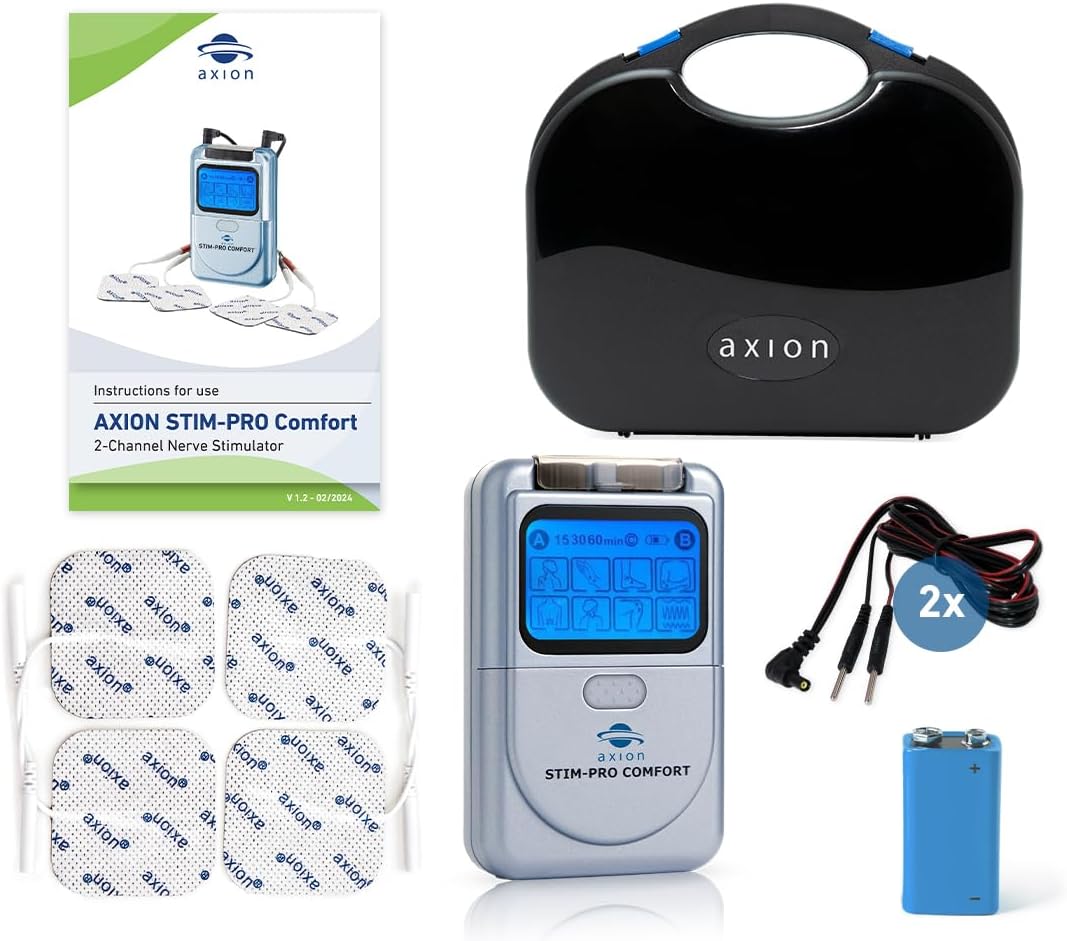
- بيٽري انسٽال ڪريو. Open the battery compartment on the back of the device. Insert the included 9V battery, ensuring correct polarity. Close the compartment securely.
- ڪيبل ڳنڍڻ: Plug the connection cables into the output jacks (A and B) on the top of the TENS unit.
- اليڪٽرروڊس ڳنڍيو: Connect the electrode pads to the pin connectors on the end of the cables. Ensure a secure connection.
4. آپريٽنگ هدايتون
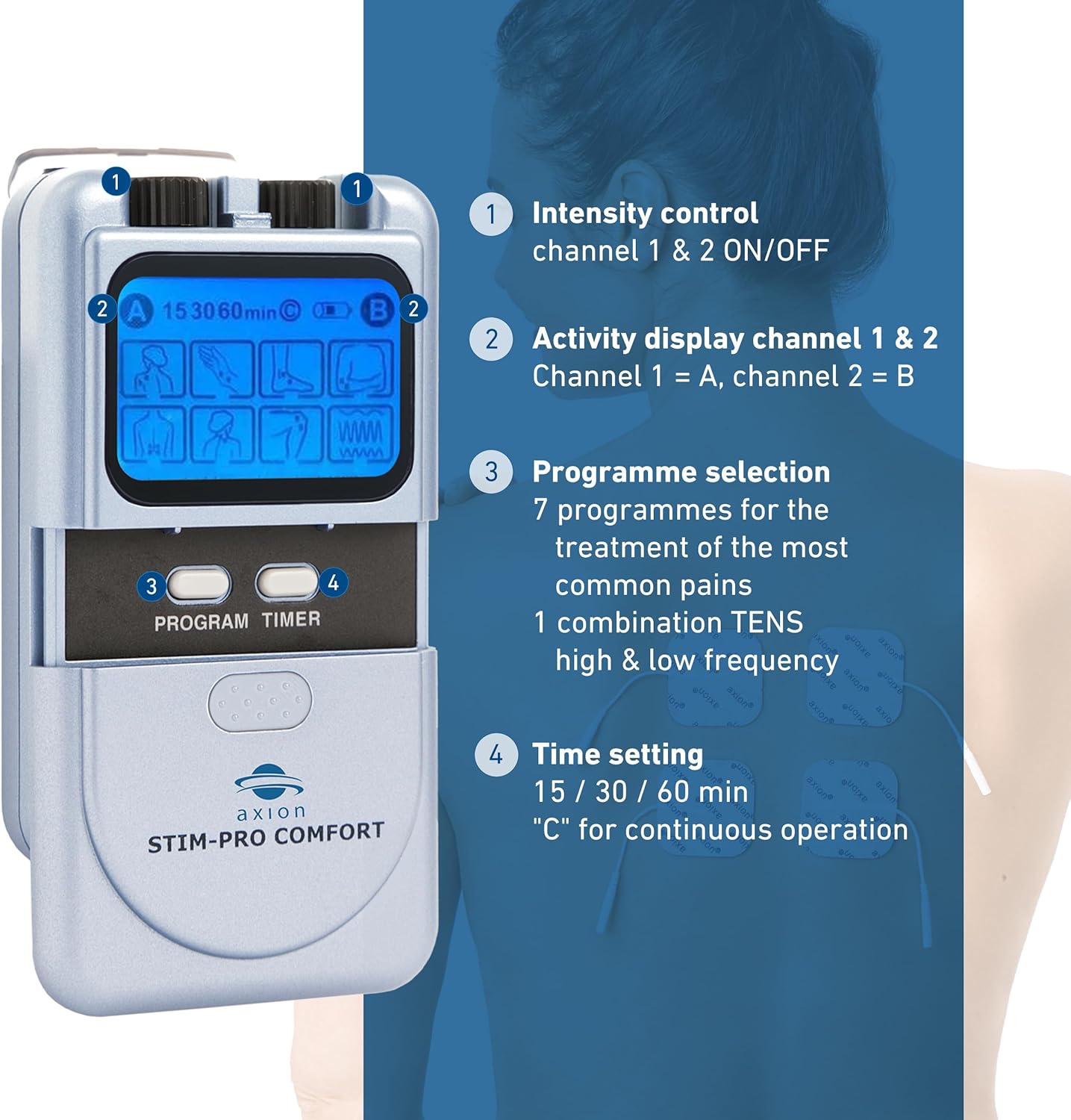
ڪنٽرول ختمview:
- چمڙي تيار ڪريو: Ensure the skin where electrodes will be placed is clean, dry, and free of oils or lotions.
- اليڪٽروڊ جي جاءِ: Apply the electrode pads firmly to the desired treatment area. Refer to the diagram below for common placement suggestions. Ensure electrodes are not touching each other.
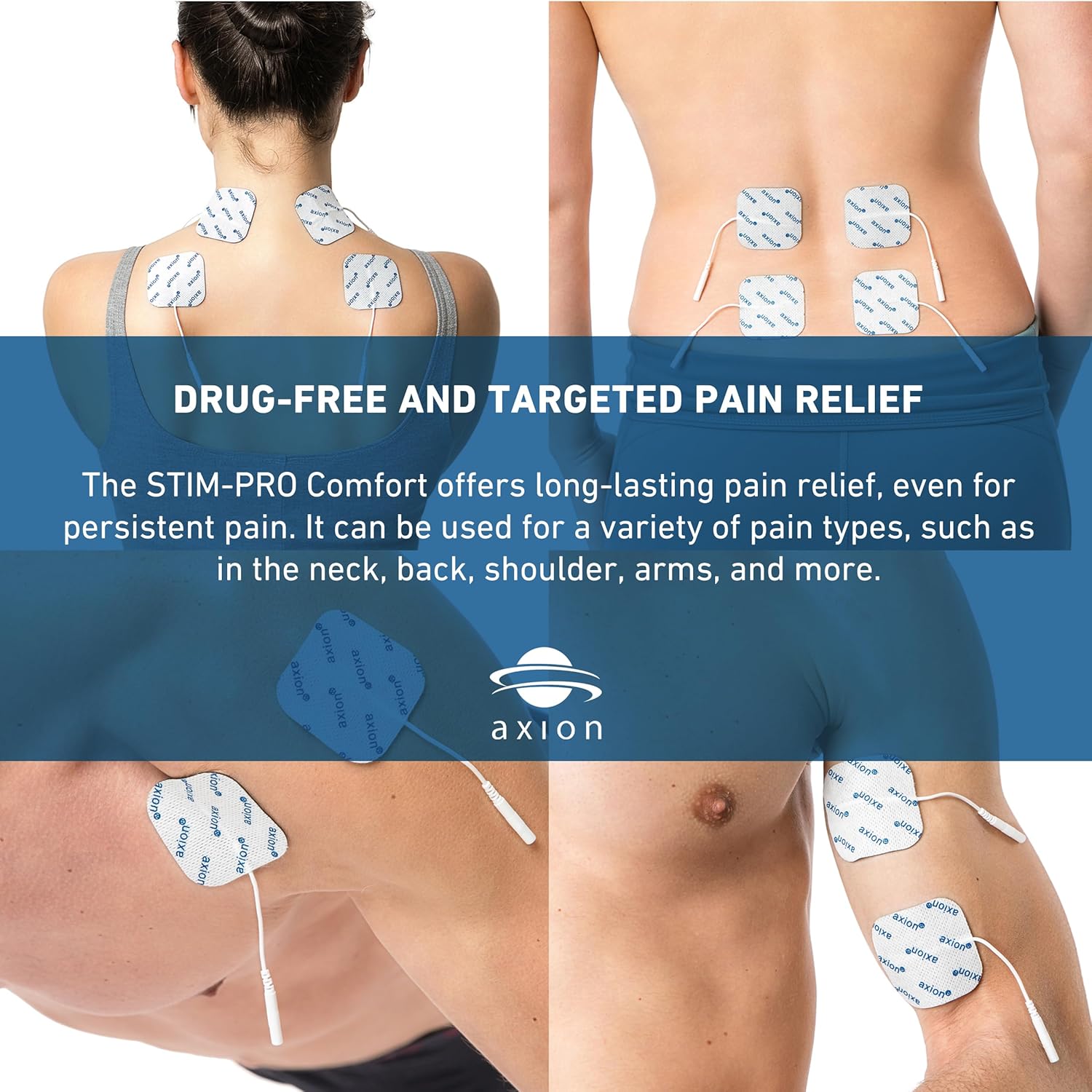
Electrode placement for various body areas for drug-free and targeted pain relief. - ڊوائيس آن ڪريو: Rotate the intensity control knob (1) clockwise to turn on the device.
- پروگرام چونڊيو: Press the 'PROGRAM' button (3) to cycle through the 8 pre-installed programs. The selected program will be indicated on the display (2).
- ٽائمر سيٽ ڪريو. Press the 'TIMER' button (4) to select the desired treatment duration: 15 minutes, 30 minutes, 60 minutes, or continuous ('C').
- شدت کي ترتيب ڏيو: Slowly rotate the intensity control knob (1) clockwise to increase the intensity to a comfortable level. You should feel a strong, but comfortable, tingling sensation. Do not increase intensity to a painful level.
- علاج ختم ڪريو: Once the treatment time is complete, the device will automatically turn off. To manually stop treatment, rotate the intensity control knob (1) counter-clockwise until the device turns off. Carefully remove the electrodes from your skin.
5. سار سنڀال
ڊوائيس جي سنڀال:
- ڊوائيس کي نرم سان صاف ڪريو، ڊيamp ڪپڙو. گھڻائي صاف ڪندڙ استعمال نه ڪريو يا ڊوائيس کي پاڻي ۾ وجھو.
- Store the device and accessories in the provided case when not in use.
اليڪٽروڊ جي سنڀال:
Proper care extends the life of your electrode pads.
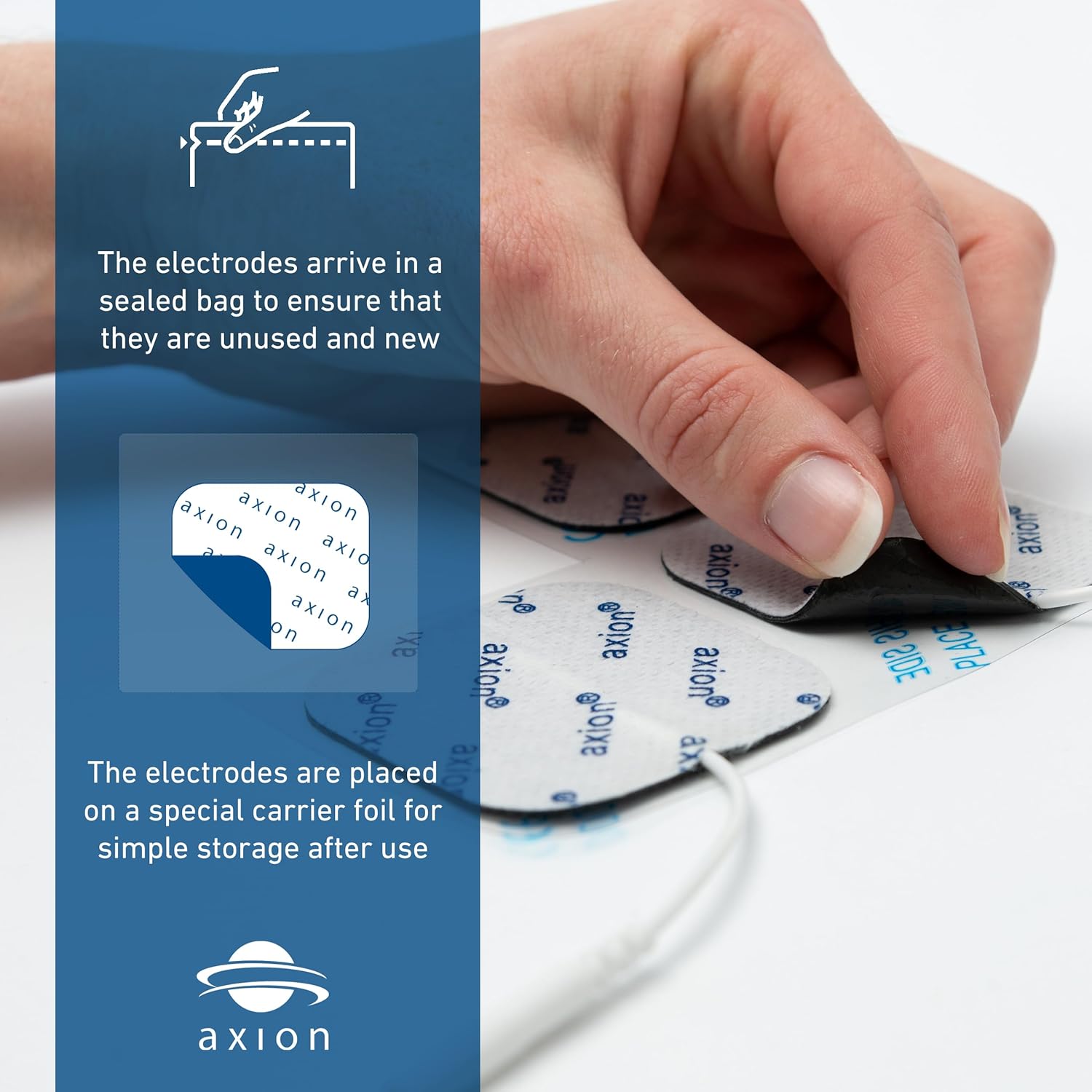
- After each use, place the electrodes back onto the clear plastic film or carrier foil they came with.
- If electrodes lose their stickiness, gently wipe the adhesive side with a damp cloth (water only) and let them air dry. Do not rub vigorously.
- Replace electrodes when they no longer adhere well to the skin or if they cause discomfort.
بيٽري مٽائڻ:
When the display dims or the device does not power on, it's time to replace the 9V battery. Follow the steps in Section 3. Setup to replace the battery.
6. مسئلا حل ڪرڻ
| مسئلو | ممڪن سبب | حل |
|---|---|---|
| ڊوائيس آن نٿو ٿي. | بيٽري ختم ٿي وئي آهي يا غلط طور تي نصب ٿيل آهي. | Replace the 9V battery or check its polarity. |
| ڪو به احساس يا ڪمزور احساس نه. | Electrodes not properly attached, electrodes are worn out, or intensity is too low. | Ensure electrodes are firmly attached to clean skin. Replace electrodes if worn. Slowly increase intensity. |
| Sensation is uncomfortable or painful. | شدت تمام گهڻي آهي. | Slowly decrease intensity until comfortable. |
| Electrodes do not stick. | Skin is oily/dirty, or electrodes are worn out. | Clean and dry skin thoroughly before application. Replace electrodes if they have lost adhesion. |
7. وضاحتون
- ماڊل نمبر: 1023
- پيداوار جي ماپ: 8.98 x 2.13 x 7.64 انچ؛ 1.06 پائونڊ
- طاقت جو ذريعو: 1 x 9V بيٽري (شامل)
- چينل: 2 آزاد چينل
- پروگرام: 8 pre-installed TENS programs
- شدت: Continuously adjustable, 0 - 80 mA
- ٽائمر: 15, 30, 60 minutes, and continuous operation
- ٺاهيندڙ: Axion USA LLC
8. وارنٽي ۽ سپورٽ
For warranty information, please refer to the documentation included with your purchase or visit the official axion website. For technical support or further assistance, please contact axion customer service directly.
رابطي جي ڄاڻ: Please refer to the contact details provided on the product packaging or the official axion webسڀ کان وڌيڪ تازه ترين سپورٽ معلومات لاءِ سائيٽ.


