1. تعارف
This manual provides comprehensive instructions for the setup, operation, maintenance, and troubleshooting of your AOC E2270SWDN monitor. Designed for optimal viewing with a 1920x1080 resolution on a 21.5-inch TN panel, this monitor offers both VGA and DVI connectivity for versatile use.
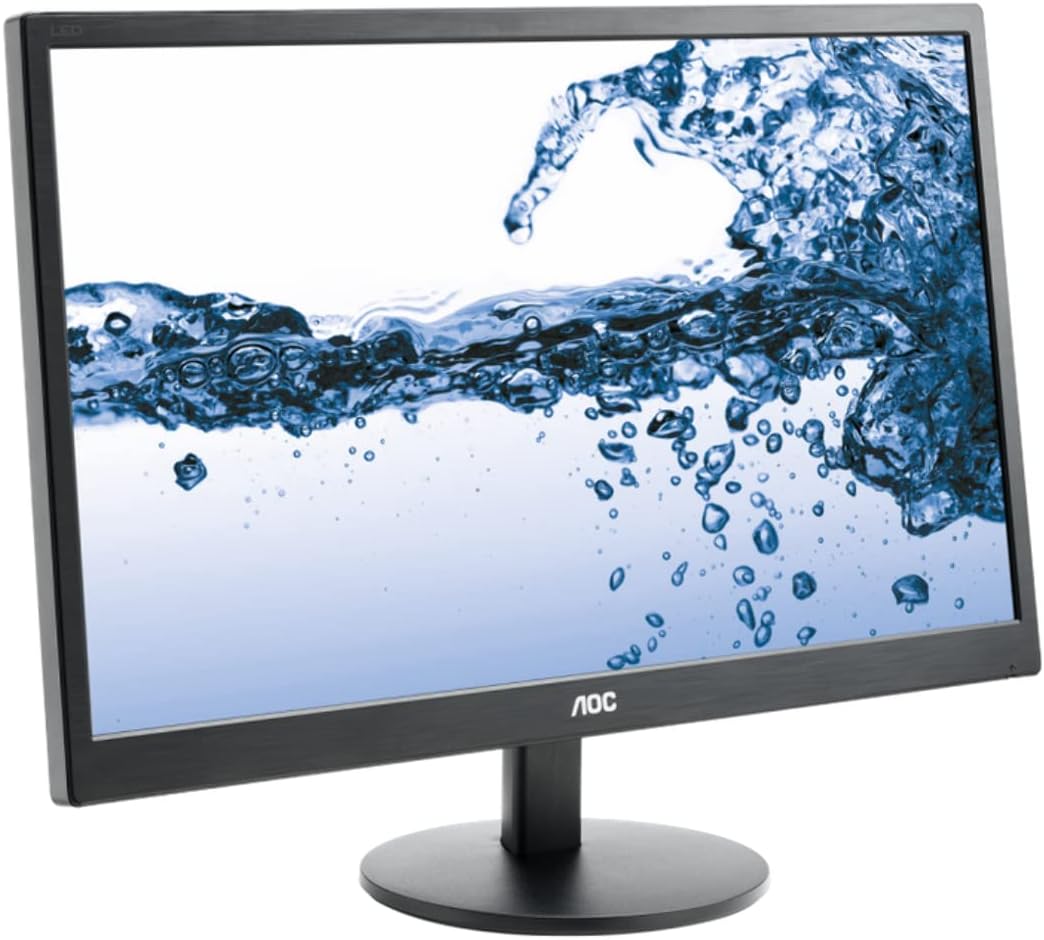
شڪل 1: AOC E2270SWDN 21.5-inch monitor. This image shows the AOC E2270SWDN 21.5-inch monitor from a slight angle, highlighting its slim bezel and the stand. The screen displays a vibrant image of water splashing, demonstrating its display capabilities.
2. سيٽ اپ گائيڊ
2.1 کولڻ
پيڪنگ مان سڀني حصن کي احتياط سان هٽايو. پڪ ڪريو ته هيٺيون شيون موجود آهن:
- AOC E2270SWDN Monitor
- پاور ڪنڊ
- ويگا ڪيبل
- DVI ڪيبل
- مانيٽر اسٽينڊ (بنياد ۽ گردن)
- استعمال ڪندڙ جو دستياب (ھي دستاويز)
2.2 اسٽينڊ کي گڏ ڪرڻ
- Attach the stand neck to the monitor panel by aligning the tabs and pushing firmly until it clicks into place.
- Secure the stand base to the neck using the captive screw located on the underside of the base. Tighten clockwise until firm.
- گڏ ٿيل مانيٽر کي هڪ مستحڪم، هموار مٿاڇري تي رکو.
2.3 مانيٽر کي ڳنڍڻ
Before connecting, ensure your computer and the monitor are powered off.
- پاور ڪنيڪشن: Connect one end of the power cord to the monitor's power input and the other end to a grounded electrical outlet.
- Video Connection (Choose One):
- VGA: Connect the VGA cable from the monitor's VGA port to the VGA port on your computer's graphics card. Tighten the screws on the connector.
- DVI: Connect the DVI cable from the monitor's DVI port to the DVI port on your computer's graphics card. Tighten the screws on the connector.
After connecting, power on your computer, then power on the monitor using the power button.
3. آپريٽنگ هدايتون
3.1 پاور آن/آف
Press the power button located on the front or bottom bezel of the monitor to turn it on or off. The power indicator light will illuminate when the monitor is on.
3.2 آن اسڪرين ڊسپلي (OSD) مينيو
The OSD menu allows you to adjust various monitor settings. Use the control buttons (usually located on the bottom right bezel) to navigate and select options.
- مينيو بٽڻ: او ايس ڊي مينيو کوليو.
- Arrow Buttons (Up/Down or Left/Right): مينيو اختيارن جي ذريعي وڃو.
- داخل ڪريو/چونڊو بٽڻ: چونڊ جي تصديق ڪري ٿو يا ذيلي مينيو ۾ داخل ٿئي ٿو.
- نڪرڻ جو بٽڻ: موجوده مينيو يا او ايس ڊي مان نڪرندو آهي.
3.3 ڊسپلي سيٽنگز کي ترتيب ڏيڻ
عام طور تي ترتيب ڏنل سيٽنگون شامل آهن:
- چمڪ/ برعڪس: روشني ۽ اونداهي علائقن جي وچ ۾ مجموعي روشني ۽ فرق کي ترتيب ڏيو.
- رنگ جي درجه حرارت: Change the color warmth (e.g., Cool, Normal, Warm, User).
- ان پٽ چونڊيو: Manually switch between VGA and DVI inputs if auto-detection fails.
- Image Setup (VGA only): Auto Adjust, H. Position, V. Position, Clock, Phase for analog signal optimization.
4. سار سنڀال
4.1 مانيٽر جي صفائي
To ensure a clear display and prolong the life of your monitor, follow these cleaning guidelines:
- صاف ڪرڻ کان اڳ هميشه مانيٽر کي بند ڪريو ۽ پاور ڪنڊ کي ان پلگ ڪريو.
- نرم، لِنٽ کان خالي ڪپڙو استعمال ڪريو ٿورڙو ڊيampپاڻي يا غير رگڙيندڙ، امونيا کان پاڪ، ۽ الڪوحل کان پاڪ گلاس ڪلينر سان صاف ڪيو وڃي.
- صاف ڪندڙ کي سڌو سنئون اسڪرين تي نه اسپري ڪريو. پهرين ان کي ڪپڙي تي لڳايو.
- گھڙڻ وارا صاف ڪندڙ، موم، يا سالوينٽس استعمال ڪرڻ کان پاسو ڪريو ڇو ته اهي اسڪرين جي مٿاڇري کي نقصان پهچائي سگهن ٿا.
- مٽي ۽ داغ هٽائڻ لاءِ اسڪرين کي نرميءَ سان صاف ڪريو.
- مانيٽر صاف ڪريو جasing نرم، سڪل ڪپڙي سان.
4.2 اسٽوريج
If storing the monitor for an extended period, ensure it is kept in a cool, dry place, away from direct sunlight and extreme temperatures. Use the original packaging if available to protect it from dust and physical damage.
5. مسئلا حل ڪرڻ
This section addresses common issues you might encounter with your AOC E2270SWDN monitor.
| مسئلو | ممڪن سبب | حل |
|---|---|---|
| اسڪرين تي ڪوبه تصوير نه آهي | Monitor not powered on; video cable loose or disconnected; incorrect input selected. | Ensure power cord is securely connected and monitor is on. Check video cable connection at both monitor and computer. Use OSD to select correct input (VGA/DVI). |
| تصوير تمام گهڻي اونداهي/روشن آهي | چمڪ/ڪنٽراسٽ سيٽنگون غلط آهن. | Adjust Brightness and Contrast settings via the OSD menu. |
| چمڪندڙ يا غير مستحڪم تصوير | Loose video cable; interference; incorrect resolution/refresh rate. | Check video cable connection. Ensure computer's display resolution and refresh rate are compatible with the monitor (1920x1080). |
| رنگ غلط نظر اچن ٿا | Color settings are off; faulty video cable. | Adjust color settings in the OSD menu. Try a different video cable if available. |
6. وضاحتون
Detailed technical specifications for the AOC E2270SWDN monitor:
| خاصيت | تفصيل |
|---|---|
| برانڊ | AOC |
| ماڊل نمبر | E2270SWDN (also 215LM00041) |
| اسڪرين جي ماپ | 21.5 انچ |
| پينل جو قسم | ٽي اين (ٽوسٽڊ نيميٽڪ) |
| وڌ ۾ وڌ اسڪرين ريزوليوشن | 1920 x 1080 (مڪمل HD 1080p) |
| اسپيڪٽ ريشو | 16:9 |
| روشني | 200 cd/m² (عام) |
| رابطي | VGA، DVI |
| رنگ | ڪارو |
| شيءِ جو وزن | 5.95 پائونڊ |
| پيداوار جي ماپ (LxWxH) | 0.74 x 7.8 x 4.82 inches (without stand, approximate) |
| جلدtage | 240 وولٽ (ان پٽ) |
| ٺاهيندڙ | AOC |
| تاريخ پهرين دستياب | اپريل 22، 2014 |
7. وارنٽي ۽ سپورٽ
For specific warranty details and the most up-to-date support information, please refer to the warranty card included with your product or visit the official AOC website. You can typically find drivers, FAQs, and contact information for technical support there.
AOC Official Webسائيٽ: https://us.aoc.com/


