تعارف
This manual provides detailed instructions for setting up, operating, and maintaining your Logitech M275 Wireless USB Mouse. Please read this guide thoroughly to ensure optimal performance and longevity of your device. The Logitech M275 mouse is designed for comfortable use with its contoured shape and offers reliable wireless connectivity.

تصوير: مٿي کان هيٺ تائين view of the Logitech M275 Wireless Mouse, showcasing its black finish and central scroll wheel.
سيٽ اپ ڪريو
Follow these steps to set up your Logitech M275 Wireless USB Mouse:
- بيٽري انسٽال ڪريو:
- مائوس جي هيٺئين پاسي واري بيٽري جي ڪمري کي ڳولھيو.
- بيٽري جي ڪمري واري ڍڪ کي کوليو.
- Insert one AA battery, ensuring correct polarity (+/-). The mouse includes one AA battery.
- بيٽري جي ڪمري واري ڍڪ کي محفوظ طور تي بند ڪريو.
تصوير: هيٺيون view of the Logitech M275 Wireless Mouse, showing the ON/OFF switch, battery compartment, and optical sensor.
- USB وصول ڪندڙ کي ڳنڍيو:
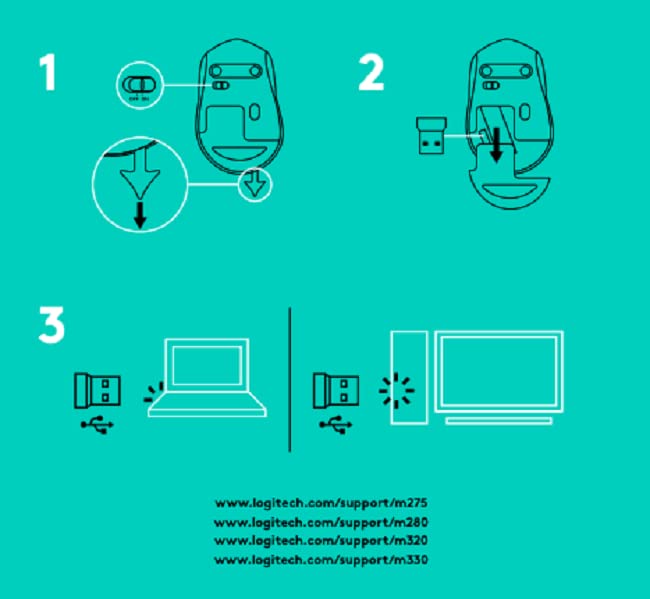
- Locate the tiny USB Nano Receiver, typically stored inside the battery compartment or packaged separately.
- USB نانو رسيور کي پنهنجي ڪمپيوٽر تي موجود USB پورٽ ۾ لڳايو.
- توهان جي ڪمپيوٽر کي خودڪار طريقي سان ضروري ڊرائيور ڳولڻ ۽ انسٽال ڪرڻ گهرجي.

Image: Close-up of the Logitech Nano Receiver plugged into a laptop's USB port, indicating successful connection.
- مائوس تي پاور:
- Slide the ON/OFF switch on the underside of the mouse to the 'ON' position.
- مائوس هاڻي استعمال لاءِ تيار آهي.

Image: A diagram showing the three steps for setting up the mouse: 1) Insert battery, 2) Insert receiver into mouse for storage, 3) Plug receiver into computer's USB port.
آپريٽنگ هدايتون
The Logitech M275 Wireless USB Mouse offers intuitive control for your computer:
- بنيادي ڪم:
- کاٻي ڪلڪ ڪريو: شيون چونڊڻ، لنڪ کولڻ، وغيره لاءِ پرائمري بٽڻ.
- ساڄي ڪلڪ ڪريو: حوالي جي مينيو ۽ اضافي اختيارن لاءِ ثانوي بٽڻ.
- اسڪرول ويل: دستاويزن کي نيويگيٽ ڪرڻ لاءِ مٿي يا هيٺ ڪريو ۽ web pages. The scroll wheel also functions as a clickable middle button.
- ترقي يافته بصري سينسر: The mouse utilizes a Logitech Advanced Optical Sensor for smooth and precise cursor control on various surfaces.
- بيٽري جي زندگي اشارو: A small LED light on the mouse indicates battery status. It typically glows green briefly when powered on if the battery is good. A red light indicates that the battery is low and needs replacement. The mouse is designed for an 18-month battery life, which may vary based on usage.

تصوير: مٿي view of the Logitech M275 Wireless Mouse, highlighting its ergonomic design and indicating an 18-month battery life.
سار سنڀال
مناسب سار سنڀال توهان جي مائوس جي ڊگهي عمر ۽ ڪارڪردگي کي يقيني بڻائي ٿي:
- بيٽري مٽائڻ: When the battery indicator light turns red, replace the AA battery. Follow the steps outlined in the 'Install the Battery' section under Setup.
- مائوس جي صفائي:
- صفائي ڪرڻ کان اڳ مائوس کي بند ڪريو.
- نرم، لِنٽ کان خالي ڪپڙو استعمال ڪريو ٿورڙو ڊيampمائوس جي مٿاڇري کي صاف ڪرڻ لاءِ پاڻي يا هلڪي صفائي واري محلول سان ٻوڙيو وڃي.
- سخت ڪيميائي يا ٻرندڙ مواد استعمال ڪرڻ کان پاسو ڪريو.
- مائوس جي اندروني حصن ۾ مائع کي داخل ٿيڻ نه ڏيو.
مشڪلاتون
If you encounter issues with your Logitech M275 mouse, refer to the following common solutions:
- No Cursor Movement or Intermittent Connection:
- پڪ ڪريو ته مائوس آن آهي.
- Check the battery. Replace it if the indicator light is red or if the mouse is unresponsive.
- Ensure the USB Nano Receiver is securely plugged into a working USB port on your computer. Try a different USB port.
- رينج جي مسئلن کي رد ڪرڻ لاءِ ماؤس کي USB رسيور جي ويجهو منتقل ڪريو.
- Avoid using the mouse on highly reflective or transparent surfaces. A mouse pad is recommended for optimal tracking.
- Lagging or Unresponsive Cursor:
- Interference from other wireless devices can affect performance. Try moving other wireless devices away from the mouse and receiver.
- پڪ ڪريو ته توهان جي ڪمپيوٽر جو آپريٽنگ سسٽم جديد آهي.
- Mouse Not Detected by Computer:
- پنهنجي ڪمپيوٽر کي ٻيهر شروع ڪريو.
- Try plugging the USB Nano Receiver into a different USB port.
- If you have other Logitech devices, ensure the M275 receiver is the correct one for this mouse, as it is not a Unifying receiver.
وضاحتون
| خاصيت | تفصيل |
|---|---|
| برانڊ | Logitech |
| ماڊل نمبر | M275 |
| رابطي ٽيڪنالاجي | USB وائرليس |
| تحريڪ جي سڃاڻپ ٽيڪنالاجي | بصري |
| رنگ | ڪارو |
| طاقت جو ذريعو | بيٽري سان هلندڙ (1 AA بيٽري) |
| سراسري بيٽري جي زندگي | 18 مهينا |
| هارڊويئر پليٽ فارم | PC |
| آپريٽنگ سسٽم مطابقت | لينڪس، ونڊوز 7، ونڊوز ايڪس پي |
| شيءِ جو وزن | 100 جي |
| پيداوار جي ماپ | 21 x 7.6 x 15.2 سينٽي |
| شامل اجزاء | Wireless Mouse, Nano Receiver, 1 AA battery, User Documentation |
وارنٽي ۽ سپورٽ
- وارنٽي: The Logitech M275 Wireless USB Mouse comes with a 1-year warranty. Please retain your proof of purchase for warranty claims.
- ڪسٽمر سپورٽ: For technical assistance or warranty inquiries, please contact Logitech Customer Care.
- Logitech India Customer Care:
- ٽول فري نمبر: 1800 572 4730
- Opening Time: 9:00 AM to 6:00 PM (Monday to Friday)
- Note: Weekends & National Holidays closed.


