1. تعارف
This manual provides comprehensive instructions for the installation, operation, and maintenance of your Lorex LNR1141TC4 4-Channel 1TB Network Video Recorder (NVR) system with four 1080p HD cameras. This system is designed to provide high-definition surveillance for your property, offering real-time recording and remote access capabilities.
Please read this manual thoroughly before setting up and operating your system to ensure proper functionality and to maximize its features.
2. پيڪيج مواد
Verify that all components listed below are included in your package. If any items are missing or damaged, please contact Lorex support.
- 1 x NVR with Pre-Installed 1TB HDD
- 1 x HDMI ڪيبل
- NVR لاءِ 1 x پاور اڊاپٽر
- 1 x USB ماؤس
- 1 ايڪسٽنيٽ ڪيبل
- تڪڙي شروعات جون هدايتون
- 4 x IP Bullet Cameras (1080p HD)
- 4 x Mounting Kits for Cameras
- 4 x 60ft (18m) Cat5e Ethernet Cables
3. سسٽم اوورview
The Lorex LNR1141TC4 system consists of a Network Video Recorder (NVR) and four 1080p HD IP cameras. The NVR manages video recording, storage, and network connectivity, while the cameras capture high-definition video footage.
3.1 اين وي آر ۽ ڪئميرا جا جزا

شڪل 3.1: Lorex LNR1141TC4 NVR system with four 1080p HD bullet cameras. This image displays the main components of the surveillance system, including the central NVR unit and the four included bullet-style IP cameras.
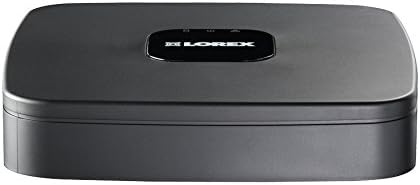
شڪل 3.2: مٿو view of the Lorex LNR1141TC4 NVR. The NVR unit features a sleek black design with the Lorex logo prominently displayed on the top surface.

شڪل 3.3: Rear panel of the Lorex LNR1141TC4 NVR. This view shows the various input and output ports, including HDMI, VGA, USB, Ethernet, and the four Power over Ethernet (PoE) ports for camera connections.

شڪل 3.4: Close-up of a Lorex 1080p HD bullet camera lens. This image highlights the camera's lens, infrared LEDs for night vision, and light sensor.
4. سيٽ اپ
Follow these steps to set up your Lorex LNR1141TC4 NVR system.
4.1 NVR کي ڳنڍڻ
- مانيٽر ڳنڍيو: Connect the NVR to a monitor using the supplied HDMI cable or a VGA cable (not included).
- ماؤس کي ڳنڍيو: Plug the USB mouse into one of the USB ports on the NVR's rear panel.
- نيٽ ورڪ ڪنيڪشن (اختياري پر سفارش ٿيل): Connect the NVR to your router using the supplied Ethernet cable for remote access and system updates.
- پاور آن: NVR پاور اڊاپٽر کي NVR سان ۽ پوءِ پاور آئوٽليٽ سان ڳنڍيو. NVR پاڻمرادو آن ٿيندو.
4.2 ڪئميرا ڳنڍڻ
The Lorex LNR1141TC4 NVR features Power over Ethernet (PoE) ports, simplifying camera installation.
- ماؤنٽ ڪيمرا: Securely mount each camera in your desired location using the provided mounting kits. Ensure the camera's field of view ان علائقي کي ڍڪي ٿو جيڪو توهان نگراني ڪرڻ چاهيو ٿا.
- Ethernet ڪيبل ڳنڍيو: Connect one end of the supplied 60ft Cat5e Ethernet cable to the camera's Ethernet port and the other end to one of the PoE ports on the NVR's rear panel. The NVR will automatically detect and power the cameras.
- ڪئميرا زاويه کي ترتيب ڏيو: Once connected, adjust each camera's angle to optimize surveillance coverage.
5. آپريشن
This section covers the basic operation of your Lorex NVR system.
5.1 شروعاتي سيٽ اپ مددگار
Upon first power-up, the NVR will guide you through an initial setup wizard to configure basic settings such as language, date/time, network settings, and password creation. Follow the on-screen prompts.
5.2 رڪارڊنگ
- مسلسل رڪارڊنگ The NVR is configured for continuous recording by default, utilizing the pre-installed 1TB hard drive.
- مقرر ڪيل رڪارڊنگ. You can customize recording schedules for each camera through the NVR's menu. This allows you to set specific times for recording.
- موشن رڪارڊنگ: Configure motion detection zones and sensitivity to trigger recording only when movement is detected. This helps conserve storage space.
- High Definition 1080p: The system records in 1080p resolution at 30/25 frames per second (fps) per channel, ensuring clear and detailed footage.
5.3 پلے بیک
رسائي رڪارڊ ٿيل footage through the NVR's playback menu. You can search by date, time, and event type (e.g., motion detection). The system supports selectable area digital zoom during live view and playback for detailed examination.
5.4 Remote Access (FLIR Cloud)
The FLIR Cloud connectivity solution enables remote viewing of your surveillance system.
- ايپ ڊائون لوڊ ڪريو Download the free Lorex FLIR Cloud app on your iOS or Android smartphone or tablet.
- QR ڪوڊ اسڪين ڪريو: Use the app to scan the QR code located on your NVR or in the quick start guide.
- ڳنڍڻ: Follow the app's instructions to connect to your NVR. This allows you to view live feeds, playback recordings, and receive push notifications for motion events and instant email alerts with snapshot attachments from anywhere with an internet connection.
6. سار سنڀال
Regular maintenance ensures the longevity and optimal performance of your surveillance system.
- صفائي: وقتي طور تي ڪئميرا لينس کي نرم، ڊي سان صاف ڪريوamp cloth to remove dust and smudges. Ensure the NVR's ventilation openings are clear of obstructions.
- هارڊ ڊرائيو جي صحت: The NVR's hard drive is crucial for recording. Monitor its health through the NVR's system settings. Consider backing up important footagاي باقاعدي طور تي.
- فرم ويئر اپڊيٽس: Check the Lorex website for any available firmware updates for your NVR to ensure you have the latest features and security enhancements.
7. مسئلا حل ڪرڻ
This section addresses common issues you might encounter with your Lorex LNR1141TC4 system.
- مانيٽر تي ڪو به وڊيو آئوٽ پُٽ ناهي:
- پڪ ڪريو ته HDMI/VGA ڪيبل محفوظ طور تي NVR ۽ مانيٽر ٻنهي سان ڳنڍيل آهي.
- پڪ ڪريو ته مانيٽر صحيح ان پٽ سورس تي سيٽ ٿيل آهي.
- هڪ مختلف HDMI/VGA ڪيبل يا مانيٽر آزمايو.
- ڪئميرا نه ڏيکاري رهيا آهن:
- Check that the Ethernet cables are securely connected to both the cameras and the NVR's PoE ports.
- پڪ ڪريو ته NVR چالو آهي.
- If a camera is still not detected, try connecting it to a different PoE port on the NVR.
- A power cycle of the NVR (unplug and replug) can sometimes resolve camera detection issues.
- ريموٽ رسائي ڪم نه ڪندي:
- Verify the NVR is connected to your router and has internet access.
- Ensure your smartphone/tablet has a stable internet connection.
- Double-check the QR code scan and account login details in the FLIR Cloud app.
- رڪارڊنگ جا مسئلا:
- Check the hard drive status in the NVR's system settings.
- پڪ ڪريو ته رڪارڊنگ شيڊول صحيح طرح سان ترتيب ڏنل آهن.
- Verify that motion detection settings are appropriate if using motion-triggered recording.
8. وضاحتون
| خاصيت | تفصيل |
|---|---|
| ماڊل نمبر | LNR1141TC4 |
| وڊيو ڪيپچر ريزوليوشن | 1080p HD |
| چينلن جو تعداد | 4 |
| ميموري رکڻ جي صلاحيت | 1 ٽي بي (اڳ ۾ نصب ٿيل HDD) |
| رابطي ٽيڪنالاجي | Wired (Ethernet, PoE for cameras) |
| خاص خصوصيت | Motion Sensor, Remote Access (FLIR Cloud) |
| فريم جي شرح | 30/25 fps per channel |
| رڪارڊنگ موڊ | Continuous, Scheduled, Motion |
| طاقت جو ذريعو | تار ٿيل برقي |
| اين وي آر طول و عرض (لي x ڊبليو x ايڇ) | 8.1 x 8.1 x 1.8 انچ (20.6 x 20.6 x 4.6 سينٽي) |
| NVR Item Weight | 1.1 پائونڊ (0.5 ڪلوگرام) |
| مطابقت رکندڙ ڊوائيسز | Cameras, Personal Computers, Smartphones, Tablets |
9. وارنٽي ۽ سپورٽ
For warranty information and technical support, please refer to the documentation included with your product or visit the official Lorex website. Lorex provides resources and customer service to assist with any questions or issues you may encounter.
آن لائين وسيلا: www.lorex.com/support


