1. تعارف
This manual provides detailed instructions for the safe and efficient operation of your Icom IC-A120 Aviation VHF Air Band Transceiver Radio. Please read this manual thoroughly before using the radio to ensure proper functionality and to familiarize yourself with its features and capabilities. The IC-A120 is designed for aviation communication, offering advanced features such as Active Noise Cancelling and optional Bluetooth connectivity for enhanced clarity and convenience.
2. اهم خاصيتون
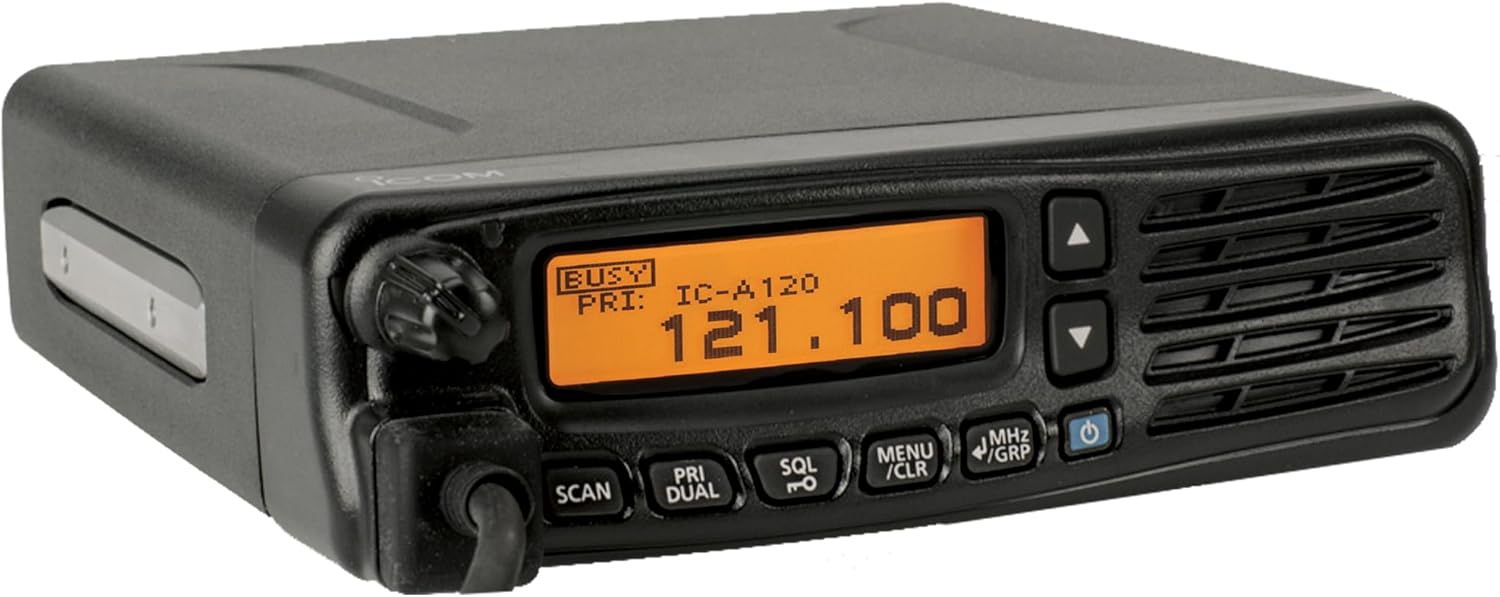
- High-Visibility LCD & Easy Controls: Features a bright dot-matrix display for clear alphanumerics and icons. Memory channels and settings can be programmed from the front panel, with optional restrictions for secure operation.
- Optional Bluetooth Connectivity: The optional UT-133A Bluetooth unit allows pairing with wireless aviation headsets. When used with the VS-3 headset, it enables side tone monitoring for clear, hands-free cockpit communication.
- Active Noise Cancelling (ANC) for Clarity: Built-in ANC filters aircraft and engine noise during both transmission and reception. The Automatic Noise Limiter (ANL) further reduces pulse-type ignition noise, ensuring cleaner audio.
- Dualwatch & On-Hook Scan: The Dualwatch function monitors both priority and working channels. The On-Hook scan function automatically initiates scanning when the hand microphone is placed on its hanger, pausing at the priority or displayed channel when removed.
- Side Tone Monitoring: With the optional OPC-871A headset adapter, pilots can monitor their own voice through the headset, even when transmitting via the hand microphone.
- Rugged IP54 Weather Resistance: The IC-A120 features a dust-protected and water-resistant (IP54) housing, ensuring reliable performance in open-air vehicles and demanding airport environments.
- Optional HM-217 Speaker Mic: An optional speaker microphone with a built-in speaker improves received audio, and its P1/P2 programmable keys provide quick access to frequently used radio functions directly from the mic.
3. پراڊڪٽ ختمview
The Icom IC-A120 is a robust aviation VHF air band transceiver designed for reliable communication. Below are images illustrating the device and its key components.

4. سيٽ اپ
4.1 پاور ڪنيڪشن
Connect the radio to a stable 12-volt DC power source. Ensure the power cable is securely attached to the radio's power input and the vehicle's power supply. Verify correct polarity to prevent damage to the unit.
4.2 اينٽينا ڪنيڪشن
Attach a suitable VHF aviation antenna to the antenna connector on the rear of the IC-A120. Use a high-quality coaxial cable and ensure all connections are tight to optimize performance and minimize signal loss.
4.3 Optional Bluetooth Unit Installation (UT-133A)
If using Bluetooth functionality, install the optional UT-133A Bluetooth unit according to its specific instructions. Once installed, you can pair compatible wireless aviation headsets with the IC-A120 for hands-free operation.
5. آپريٽنگ هدايتون
5.1 پاور آن/آف ۽ واليوم ڪنٽرول
To power on the radio, press and hold the طاقت button. To power off, repeat the action. Adjust the audio output level using the rotary حجم knob located on the front panel.
5.2 Channel Selection (Memory and VFO Modes)
The IC-A120 supports both Memory and VFO (Variable Frequency Oscillator) modes. Use the MHz/GRP button to switch between these modes. In Memory mode, use the Up/Down arrow buttons to cycle through pre-programmed channels. In VFO mode, use the Up/Down arrow buttons or the rotary knob to adjust the frequency.
5.3 Active Noise Cancelling (ANC) and Automatic Noise Limiter (ANL)
The built-in ANC system automatically reduces background noise for clearer communication. The ANL feature further minimizes pulse-type noise, such as engine ignition. These features operate automatically to enhance audio quality in noisy environments.
5.4 Dualwatch Function
کي چالو ڪريو ٻٽي واچ function by pressing the corresponding button. This allows the radio to alternately monitor a priority channel and a selected operating channel, ensuring you don't miss important transmissions.
5.5 On-Hook Scan Function
When the hand microphone is placed on its hanger, the On-Hook Scan function automatically begins scanning. Removing the microphone from the hanger will stop the scan on the priority channel or the currently displayed channel.
5.6 Side Tone Monitoring
If using the optional OPC-871A headset adapter, the side tone function allows you to monitor your own transmitted voice through the connected headset. This provides immediate feedback on your transmission quality.
6. سار سنڀال
6.1 صفائي
Regularly clean the radio's exterior with a soft, dry cloth. For stubborn dirt, use a cloth lightly dampened with water and a mild detergent. Avoid using harsh chemicals or abrasive cleaners, as these can damage the casinجي ۽ ڊسپلي.
6.2 ماحولياتي خيالات
The IC-A120 is rated IP54 for dust and water resistance. While robust, avoid exposing the radio to extreme temperatures, direct sunlight for prolonged periods, or excessive moisture. Ensure all covers and connectors are properly sealed when operating in challenging conditions.
7. مسئلا حل ڪرڻ
If you experience issues with your IC-A120, please refer to the following basic troubleshooting steps:
- طاقت ناهي: Check power cable connections and the power source. Ensure the power button is pressed correctly.
- نه آڊيو: Verify volume settings. Check headset or speaker microphone connections.
- خراب استقبال/ٽرانسميشن: Inspect antenna connection. Ensure the antenna is appropriate for the frequency band. Check for obstructions or interference.
- بلوٽوٿ ڪنيڪشن جا مسئلا: Ensure the optional UT-133A unit is correctly installed and powered. Verify the headset is in pairing mode and within range.
For more complex issues, consult a qualified service technician or contact Icom customer support.
8. وضاحتون
| تفصيل | قدر |
|---|---|
| پيداوار جي ماپ | 10.25 x 8.75 x 6 انچ |
| شيءِ جو وزن | 6.01 پائونڊ |
| شيون ماڊل نمبر | IC-A120 |
| تعدد | 118 MHz |
| ڪنيڪشن ٽيڪنالاجيز | بلوٽوٿ |
| خاص خاصيتون | وائرليس |
| رنگ | ڪارو |
| ٺاهيندڙ | Icom آمريڪا |
| تاريخ پهرين دستياب | فيبروري 19، 2015 |
| برانڊ | آئيوڪ |
| Tuner ٽيڪنالاجي | وي ايڇ ايف |
| طاقت جو ذريعو | وائرليس |
| ريڊيو بينڊ جي حمايت ڪئي وئي | وي ايڇ ايف |
| مطابقت رکندڙ ڊوائيسز | Bluetooth-فعال ڊوائيسز |
| جلدtage | 12 وولٽ |
9. وارنٽي ۽ سپورٽ
The Icom IC-A120 is covered by a manufacturer's warranty. For specific warranty details, including coverage period and terms, please refer to the warranty card included with your product or visit the official Icom America website. For technical support, service, or inquiries about accessories, please contact Icom America customer service directly.


