1. تعارف
The AJA V2Analog is a compact, high-quality mini-converter designed to convert HD/SD-SDI signals to analog component or composite video. This device is engineered for professional video workflows, providing reliable signal conversion for various applications.
Its versatility allows for complete integration into any workflow, making it a valuable asset in any video production environment.

شڪل 1: اڳيان ۽ پاسي view of the AJA V2Analog Mini-Converter, highlighting input and output ports.
2. حفاظت جي ڄاڻ
مھرباني ڪري ڊوائيس هلائڻ کان اڳ سڀ حفاظتي ھدايتون احتياط سان پڙھو. مستقبل جي حوالي لاءِ ھي دستوري رکو.
- يونٽ کي مينهن، نمي، يا انتهائي گرمي پد جي سامهون نه آڻيو.
- وڌيڪ گرم ٿيڻ کان بچڻ لاءِ مناسب وائيٽليشن کي يقيني بڻايو وڃي.
- Use only the specified power supply (5-20 VDC).
- Avoid dropping or subjecting the unit to severe impacts.
- سڀني خدمتن جو حوالو ڏيو قابل خدمت اهلڪارن ڏانهن.
3. سيٽ اپ ۽ ڪنيڪشن
Follow these steps to set up your AJA V2Analog converter:
- پاور ڪنيڪشن: Connect the appropriate power supply (5-20 VDC) to the "POWER" input on the converter.
- SDI ان پٽ: Connect your HD/SD-SDI source to the "SDI IN" BNC connector.
- اينالاگ آئوٽ: Connect the Y/G, Pb/B, and Pr/R BNC outputs to your analog component or composite display/device. Ensure correct color component matching (Y/G for Luminance/Green, Pb/B for Blue Difference, Pr/R for Red Difference).
- USB ڪنيڪشن (اختياري): For firmware updates or configuration, connect a USB cable from the "USB" port on the converter to your computer.
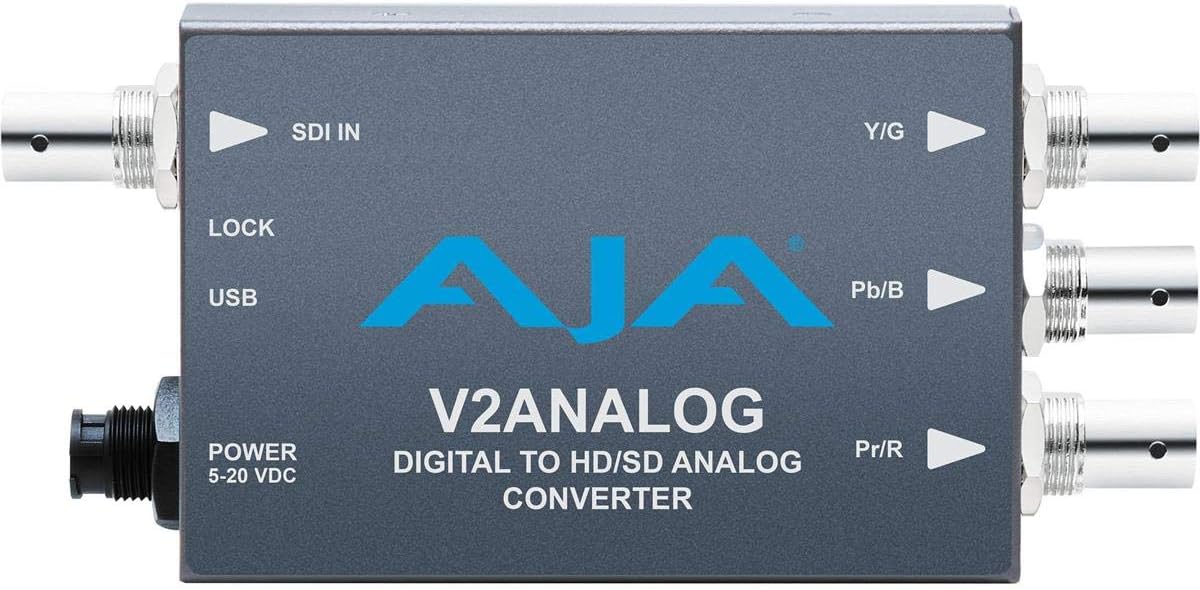
شڪل 2: مٿي view of the AJA V2Analog Mini-Converter, illustrating port labels for connection.
4. آپريٽنگ هدايتون
Once all connections are made, power on the device. The V2Analog will automatically detect the incoming SDI signal format and convert it to the appropriate analog output. The "LOCK" LED indicator will illuminate when a stable SDI signal is detected and locked.
4.1. Signal Compatibility
The V2Analog supports various HD and SD SDI formats. It is designed to convert these digital signals to standard analog component (YPbPr) or composite (CVBS) outputs.
4.2. Configuration (Advanced)
Advanced configuration options, such as output format selection or color space adjustments, may be available via AJA's Mini-Config software, accessible through the USB port. Refer to the AJA website for the latest software and detailed configuration guides.
5. سار سنڀال
The AJA V2Analog is designed for reliable operation with minimal maintenance. Follow these guidelines:
- صفائي: يونٽ جي ٻاهرين حصي کي صاف ڪرڻ لاءِ نرم، سڪل ڪپڙو استعمال ڪريو. مائع يا ايروسول ڪلينر استعمال نه ڪريو.
- فرم ويئر اپڊيٽس: Periodically check the AJA website for firmware updates. Keeping the firmware current ensures optimal performance and compatibility.
- اسٽوريج: جڏهن گهڻي عرصي تائين استعمال ۾ نه هجي، ته يونٽ کي ٿڌي، سڪل جاءِ تي، سڌي سج جي روشني ۽ انتهائي گرمي پد کان پري رکو.
6. مسئلا حل ڪرڻ
If you encounter issues with your V2Analog, refer to the following common problems and solutions:
| مسئلو | ممڪن سبب | حل |
|---|---|---|
| ڪابه وڊيو آئوٽ | No power; Incorrect SDI input; Incorrect analog output connection; No signal lock. | Check power supply; Verify SDI source is active and connected to "SDI IN"; Ensure Y/G, Pb/B, Pr/R are connected correctly to display; Check "LOCK" LED. |
| Distorted or colored video | Incorrect analog output format; Loose connections. | Ensure display is set to correct input type (component/composite); Tighten all BNC connections. |
| "LOCK" LED not illuminated | No valid SDI input signal. | Verify SDI source is active and sending a compatible signal. Check SDI cable integrity. |
If the problem persists, contact AJA Technical Support for further assistance.
7. وضاحتون
| خاصيت | تفصيل |
|---|---|
| ماڊل | V2ANALOG |
| برانڊ | AJA |
| ان پٽ | HD/SD-SDI (BNC) |
| ٻاھر | Component (Y/G, Pb/B, Pr/R BNC), Composite (selectable) |
| انٽرفيس جو قسم | USB, SDI, Component |
| طاقت | 5-20 وي ڊي سي |
| طول و عرض (L x W x H) | 7.2 x 5.7 x 4.2 انچ |
| وزن | 1.35 پائونڊ |
| يو پي سي | 091131246023 |
8. سپورٽ ۽ وارنٽي
For technical support, product registration, or warranty information, please visit the official AJA webسائيٽ تي وڃو يا انهن جي ڪسٽمر سروس ڊپارٽمينٽ سان رابطو ڪريو. مخصوص وارنٽي شرطون ۽ ضابطا علائقي ۽ خريداري جي تاريخ جي لحاظ کان مختلف ٿي سگهن ٿا.
AJA Webسائيٽ: www.aja.com


