1. تعارف
This manual provides essential information for the setup, operation, and maintenance of your Samsung T3 Portable SSD. Designed for portability and high performance, the T3 SSD offers a reliable solution for external data storage.
- پورٽبل ڊيزائن: آسان نقل و حمل لاء ٺهيل ۽ ہلڪو وزن.
- اعليٰ ڪارڪردگي: Features superfast read-write speeds of up to 450 MB/s.
- Durability & Security: Shock resistant with built-in secure encryption.
- وسيع مطابقت: Works with PC, Mac, and Android operating systems.
The Samsung T3 Portable SSD is engineered to provide fast, secure, and accessible data storage for users on the go.
2. دٻي ۾ ڇا آهي
Upon opening your Samsung T3 Portable SSD package, you should find the following items:
- Samsung Portable SSD T3 unit
- USB 3.1 ڪيبل (قسم-سي کان ٽائپ-اي)
- Quick start guide & warranty statement
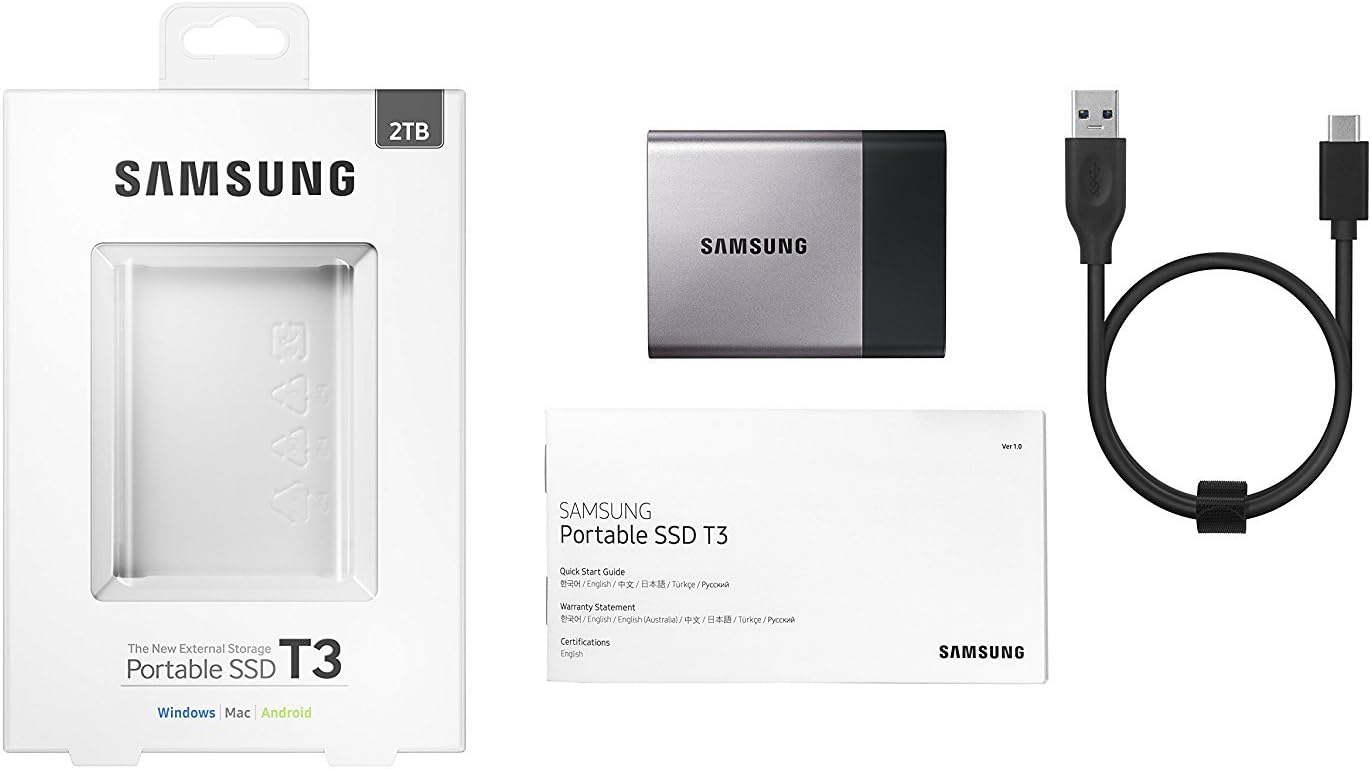
Image: Samsung T3 Portable SSD shown with its included USB-C to USB-A cable, ready for connection.

Image: The Samsung T3 Portable SSD displayed within its retail packaging, highlighting the product's presentation.
3. سيٽ اپ گائيڊ
Follow these steps to set up your Samsung T3 Portable SSD:
- ايس ايس ڊي ڳنڍيو:
Using the provided USB 3.1 Type-C to Type-A cable, connect the Type-C end to the port on the Samsung T3 SSD and the Type-A end to an available USB port on your computer (PC or Mac) or compatible Android device.

تصوير: هڪ ويجهي پاسي view of the Samsung T3 Portable SSD, clearly showing the USB-C port for cable connection.
- شروعاتي سڃاڻپ:
Your operating system should automatically detect the SSD. On Windows, it may appear as a new drive letter. On Mac, it will appear on the desktop or in Finder. For Android devices, it will typically be accessible via a file مئنيجر ايپ.
- Install Samsung Portable SSD Software (Optional but Recommended):
The T3 SSD includes a pre-loaded partition with software for managing the drive, including setting up password protection and firmware updates. It is recommended to install this software for full functionality and security features. Follow the on-screen prompts after accessing the pre-loaded partition.
- فارميٽنگ (جيڪڏهن ضروري هجي):
The drive comes pre-formatted, usually in exFAT, for broad compatibility. If you wish to optimize performance or use a different file system (e.g., NTFS for Windows, HFS+ or APFS for Mac), you can reformat the drive using your operating system's disk utility. Warning: Formatting will erase all data on the drive. Back up any important data before proceeding.
4. آپريٽنگ هدايتون
4.1 ڊيٽا جي منتقلي
منتقل ڪرڻ files to or from your Samsung T3 SSD, simply drag and drop files between your computer's storage and the T3 drive, or use copy/paste functions. The USB 3.1 interface ensures rapid data transfer speeds.

تصوير: هڪ زاويه view سامسنگ T3 پورٽيبل ايس ايس ڊي جو، شوڪasing ان جي سهڻي ڊيزائن ۽ ڪمپيڪٽ فارم فيڪٽر جي ڪري.
4.2 Security Features (Password Protection)
The Samsung T3 SSD supports AES 256-bit hardware encryption. To enable or manage password protection:
- Ensure the Samsung Portable SSD software is installed on your computer.
- سافٽ ويئر لانچ ڪريو.
- Follow the on-screen instructions to set or change your password. Once set, the drive will require the password to access its contents on any compatible device.
When password protection is active, the drive will initially appear as a small partition containing only the Samsung Portable SSD software. After entering the correct password, the main data partition will become accessible.
4.3 مطابقت
The T3 SSD is compatible with:
- Windows PCs (Windows 7 or higher)
- Mac computers (OS X Yosemite 10.10 or higher)
- Android devices (Lollipop 5.0 or higher)
Ensure your device has a compatible USB port (USB 3.1, USB 3.0, or USB 2.0). Performance may vary with older USB standards.
5. سار سنڀال
5.1 محفوظ خارج ڪرڻ
Always safely eject the Samsung T3 SSD before disconnecting it from your computer or device to prevent data corruption.
- ونڊوز: Right-click the drive icon in 'This PC' or 'File Explorer' and select 'Eject'.
- Mac: Drag the drive icon to the Trash, or click the Eject button next to the drive name in Finder.
- Android: Use the 'Unmount' or 'Eject' option in your device's storage settings or file مئنيجر
5.2 جسماني سنڀال
- ايس ايس ڊي کي صاف ۽ مٽيءَ کان پاڪ رکو. صفائي لاءِ نرم، سڪل ڪپڙو استعمال ڪريو.
- ڊرائيو کي انتهائي گرمي پد، سڌي سج جي روشني، يا وڌيڪ نمي جي سامهون رکڻ کان پاسو ڪريو.
- While shock-resistant, avoid dropping or subjecting the drive to severe impacts.
5.3 فرم ویئر تازه ڪاريون
Periodically check for firmware updates using the Samsung Portable SSD software. Updates can improve performance, stability, and security.
6. مسئلا حل ڪرڻ
If you encounter issues with your Samsung T3 Portable SSD, consider the following:
- ڊرائيو جي سڃاڻپ نه ٿي:
- پڪ ڪريو ته USB ڪيبل محفوظ طور تي SSD ۽ توهان جي ڊوائيس ٻنهي سان ڳنڍيل آهي.
- توهان جي ڪمپيوٽر تي هڪ مختلف USB پورٽ جي ڪوشش ڪريو.
- جيڪڏهن موجود هجي ته مختلف USB ڪيبل سان ٽيسٽ ڪريو.
- پنهنجو ڪمپيوٽر يا ڊوائيس ٻيهر شروع ڪريو.
- Check your operating system's Disk Management (Windows) or Disk Utility (Mac) to see if the drive is detected but uninitialized or unformatted.
- سست منتقلي جي رفتار:
- Ensure you are connected to a USB 3.0 or USB 3.1 port for optimal performance. USB 2.0 ports will result in significantly slower speeds.
- Verify that your computer's drivers for USB ports are up to date.
- ٻيون ايپليڪيشنون بند ڪريو جيڪي شايد سسٽم وسيلن کي استعمال ڪري رهيون هجن يا پس منظر جي منتقلي ڪري رهيون هجن.
- Password Issues:
- Ensure the Samsung Portable SSD software is running and you are entering the correct password.
- If you forget your password, you may need to reset the drive, which will erase all data. Refer to the Samsung Portable SSD software's help section for password reset procedures.
وڌيڪ مدد لاءِ، سرڪاري سام سنگ سپورٽ جو حوالو ڏيو. website or the detailed user manual available for download.
7. وضاحتون

تصوير: مٿي view of the Samsung T3 Portable SSD, showing the 'Portable SSD T3' branding and capacity.
| خاصيت | تفصيل |
|---|---|
| برانڊ | سامسنگ |
| سلسلو | T3 |
| ماڊل نمبر | MU-PT2T0B/AM |
| ڊجيٽل اسٽوريج جي صلاحيت | 2 ٽي بي |
| هارڊ ڊسڪ انٽرفيس | USB 3.1 |
| رابطي ٽيڪنالاجي | USB |
| هارڊ ڊسڪ جي وضاحت | سولڊ اسٽيٽ ڊرائيو |
| مطابقت رکندڙ ڊوائيسز | Desktop, Laptop, Android Devices |
| آپريٽنگ سسٽم مطابقت | ونڊوز، ميڪ او ايس، اينڊرائيڊ |
| شيءِ جو وزن | 1.8 آونس (تقريبن 51 گرام) |
| پيداوار جي ماپ (LxWxH) | 2.91 x 2.28 x 0.41 انچ (تقريبن 74 x 58 x 10.5 ملي ميٽر) |
| رنگ | Black/Titanium Gray |
| خاص خاصيتون | Portable, Shock Resistant, Secure Encryption (AES 256-bit hardware) |

Image: The back of the Samsung T3 Portable SSD, displaying the model number and other regulatory information.
8. وارنٽي ۽ سپورٽ
The Samsung T3 Portable SSD typically comes with a 3-year limited warranty. Please refer to the warranty statement included in your product packaging for specific terms and conditions.
For technical support, additional documentation, or warranty claims, please visit the official Samsung support webسائيٽ:
Always ensure you are using official Samsung resources for support to guarantee accurate and reliable information.