
پيداوار ختمview
This manual provides essential information for the proper use and maintenance of your Mars Replacement Controller for the Original Xbox system. This controller is designed to offer a familiar gaming experience, serving as a direct replacement for your existing or worn Original Xbox controllers. It features a classic layout with ten buttons, a D-pad, and two joysticks, built for durability and extended gameplay sessions.
سيٽ اپ جون هدايتون
Follow these steps to connect your new controller to your Original Xbox console:
- Locate Controller Port: Identify an available controller port on the front of your Original Xbox console. The Original Xbox typically has four controller ports.
- ڪنيڪٽ ڪنٽرولر: Align the proprietary connector of the Mars Replacement Controller with the chosen port on the console. Gently push the connector firmly into the port until it clicks into place.
- پاور آن ڪنسول: Turn on your Original Xbox console. The controller should be automatically recognized by the system.
- ٽيسٽ ڪارڪردگي: Once the console is on, test all buttons, joysticks, and the D-pad to ensure proper functionality before starting a game.
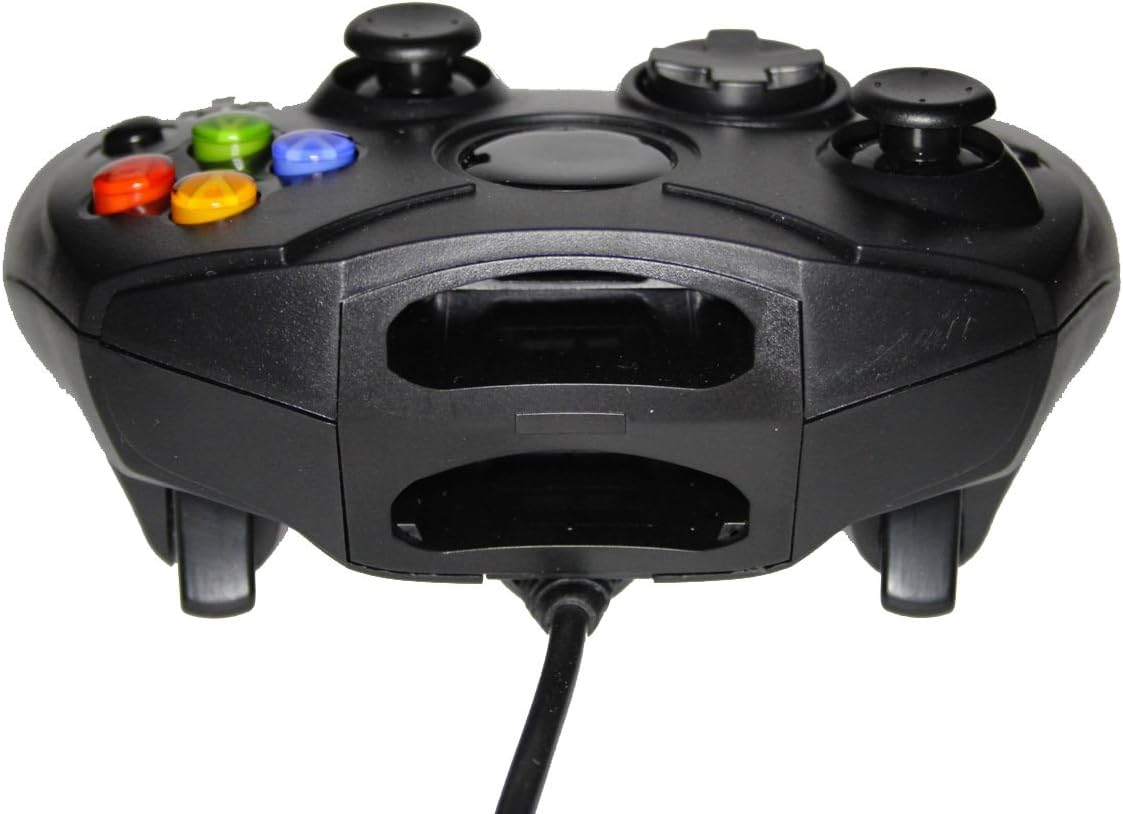
شڪل 1: سامهون view of the controller, highlighting the proprietary Xbox connector and memory card slots.
Operating Your Controller
The Mars Replacement Controller features the standard button layout for the Original Xbox, providing intuitive control for your games.

شڪل 2: مٿي view of the controller, displaying the button layout.
بٽڻ افعال:
- الف، ب، ايڪس، وائي بٽڻ: Primary action buttons, typically used for jumping, attacking, interacting, or confirming selections.
- ڊي-پيڊ (ڊائريڪشنل پيڊ): Used for precise directional input, menu navigation, or specific in-game actions.
- کاٻي ۽ ساڄي اينالاگ اسٽڪس: 360 درجا حرڪت ۽ ڪئميرا ڪنٽرول مهيا ڪريو. انهن کي دٻائڻ سان اڪثر اضافي ڪم چالو ٿي ويندا آهن (L3/R3).
- Black and White Buttons: Auxiliary action buttons, often used for secondary actions or specific game mechanics.
- شروع بٽڻ: Typically used to pause games, access in-game menus, or confirm selections.
- پوئتي بٽڻ: Often used to access maps, inventories, or return to previous menus.
- Left and Right Triggers: Analog triggers on the underside of the controller, commonly used for acceleration, braking, or firing weapons.
Specific button assignments may vary depending on the game. Refer to your game's instruction manual for detailed control schemes.
سنڀال ۽ سار سنڀال
To ensure the longevity and optimal performance of your Mars Replacement Controller, follow these care guidelines:
- صفائي: ڪنٽرولر کي باقاعدي طور تي صاف ڪرڻ لاءِ نرم، سڪل ڪپڙو استعمال ڪريو. ضدي مٽيءَ لاءِ، ٿورو ڊيampen the cloth with water or a mild, non-abrasive cleaner. Avoid excessive moisture, especially near buttons and ports.
- اسٽوريج: Store the controller in a clean, dry place away from direct sunlight, extreme temperatures, and excessive dust. Avoid wrapping the cable too tightly around the controller to prevent damage.
- سنڀالڻ: Do not drop the controller or subject it to strong impacts. Avoid pulling the cable forcefully when disconnecting it from the console; always grasp the connector itself.
- مائع جي نمائش: Keep the controller away from liquids. Spills can cause internal damage and void any potential warranty.
مشڪلاتون
جيڪڏهن توهان کي پنهنجي ڪنٽرولر سان مسئلا درپيش اچن ٿا، ته هيٺ ڏنل عام مسئلن ۽ حلن جو حوالو ڏيو:
| مسئلو | ممڪن حل |
|---|---|
| ڪنٽرولر جواب نه ڏئي رهيو آهي. |
|
| Buttons or joysticks are unresponsive or sticky. |
|
| Controller disconnects intermittently. |
|
جيڪڏهن انهن حلن جي ڪوشش ڪرڻ کان پوءِ به مسئلو برقرار رهي، مهرباني ڪري ڪسٽمر سپورٽ سان رابطو ڪريو.
ٽيڪنيڪل وضاحتون
| خاصيت | تفصيل |
|---|---|
| پيداوار جي ماپ | 7 x 5.6 x 2.4 انچ |
| شيءِ جو وزن | 3.99 اونس |
| مطابقت رکندڙ ڊوائيسز | Original Xbox Console |
| ڪنٽرولر جو قسم | گيم پيڊ |
| رابطي | Wired (Proprietary Xbox Connector) |
| رنگ | ڪارو |
| ٺاهيندڙ | Mars Devices |
وارنٽي ڄاڻ
This Mars Replacement Controller is covered by a manufacturer's warranty. For specific details regarding warranty duration, coverage, and claims procedures, please refer to the official Mars Devices webسائيٽ تي وڃو يا سڌو سنئون انهن جي ڪسٽمر سپورٽ سان رابطو ڪريو. وارنٽي جي تصديق لاءِ خريداري جو ثبوت رکو.
ڪسٽمر سپورٽ
For further assistance, technical support, or inquiries regarding your Mars Replacement Controller, please contact Mars Devices customer support. Contact information can typically be found on the product packaging or the official Mars Devices webسائيٽ.
آن لائين وسيلا: Mars Devices Store on Amazon


