1. تعارف
The Datavideo HRS-30 is a versatile portable recorder and integrated 10.1-inch monitor designed for professional field recording and playback applications. This device supports both HD and SD video equipment, accepting signals via HD/SD-SDI inputs. It is compatible with various video formats including 1080i, 720p, 576i, and 480i.
The HRS-30 offers flexible recording formats, including MPEG-II Long-GOP or intra-frame (i-frame) with 4:2:2 color sampling. Recorded files are stored in the MXF/OP1A format, ensuring compatibility with a wide range of Non-Linear Editing (NLE) systems and playout solutions. Storage is facilitated by a removable caddy, compatible with standard 2.5-inch HDD and SSD drives.
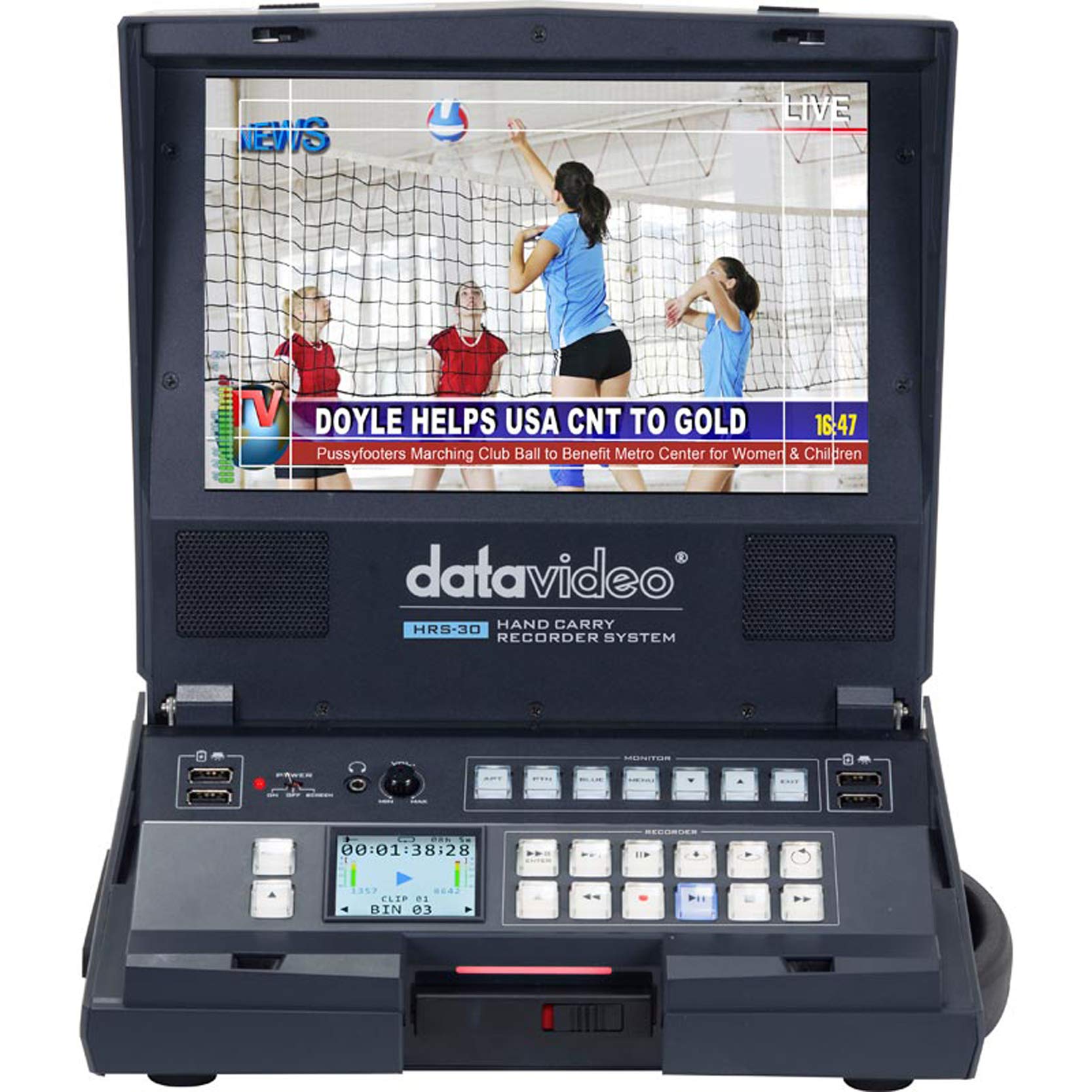
شڪل 1.1: سامهون view of the Datavideo HRS-30 Portable Recorder Monitor, showing the integrated screen and control interface.
2. حفاظت جي ڄاڻ
Please read and understand all safety instructions before operating the HRS-30. Failure to follow these instructions may result in electric shock, fire, or damage to the unit.
- طاقت جو ذريعو: صرف مخصوص پاور اڊاپٽر استعمال ڪريو ۽ وول کي يقيني بڻايوtagاي يونٽ جي گهرجن کي پورو ڪري ٿو.
- وينٽيليشن: وينٽيليشن جي سوراخن کي نه روڪيو. يونٽ جي چوڌاري مناسب هوا جي وهڪري کي يقيني بڻايو وڃي ته جيئن وڌيڪ گرم ٿيڻ کان بچي سگهجي.
- پاڻي ۽ نمي: يونٽ کي مينهن، نمي، يا پاڻي ۾ نه ٻوڙيو.
- خدمت ڪرڻ: ھن پراڊڪٽ کي پنھنجي خدمت ڪرڻ جي ڪوشش نه ڪريو. س servني خدمتن جو حوالو ڏيو قابل سروس اهلڪارن کي.
- لڳائڻ: يونٽ کي هڪ مستحڪم، هموار مٿاڇري تي رکو. ان کي سڌي سج جي روشني ۾ يا گرمي جي ذريعن جي ويجهو رکڻ کان پاسو ڪريو.
3. پيڪيج مواد
Verify that all items are present in the package. If any items are missing or damaged, contact your dealer immediately.
- Datavideo HRS-30 Portable Recorder Monitor Unit
- پاور اڊاپٽر
- Removable Caddy for 2.5" HDD/SSD
- استعمال ڪندڙ جو دستياب (ھي دستاويز)
- Additional accessories as specified by your retailer
4. سيٽ اپ
Follow these steps to set up your HRS-30 unit for operation.
4.1 Installing Storage Media
- Ensure the HRS-30 is powered off.
- Locate the removable caddy slot on the unit.
- Insert a compatible 2.5-inch HDD or SSD into the removable caddy.
- Slide the caddy with the installed drive into the HRS-30's caddy slot until it clicks securely into place.
4.2 ڳنڍڻ واري طاقت
- Connect the power adapter to the DC IN 12V port on the rear of the HRS-30.
- پاور اڊاپٽر کي مناسب برقي آئوٽليٽ ۾ لڳايو.
- Press the POWER switch on the rear panel to turn on the unit.
4.3 وڊيو ۽ آڊيو ڪنيڪشن
The HRS-30 supports various input and output connections. Refer to the rear panel diagram for port locations.
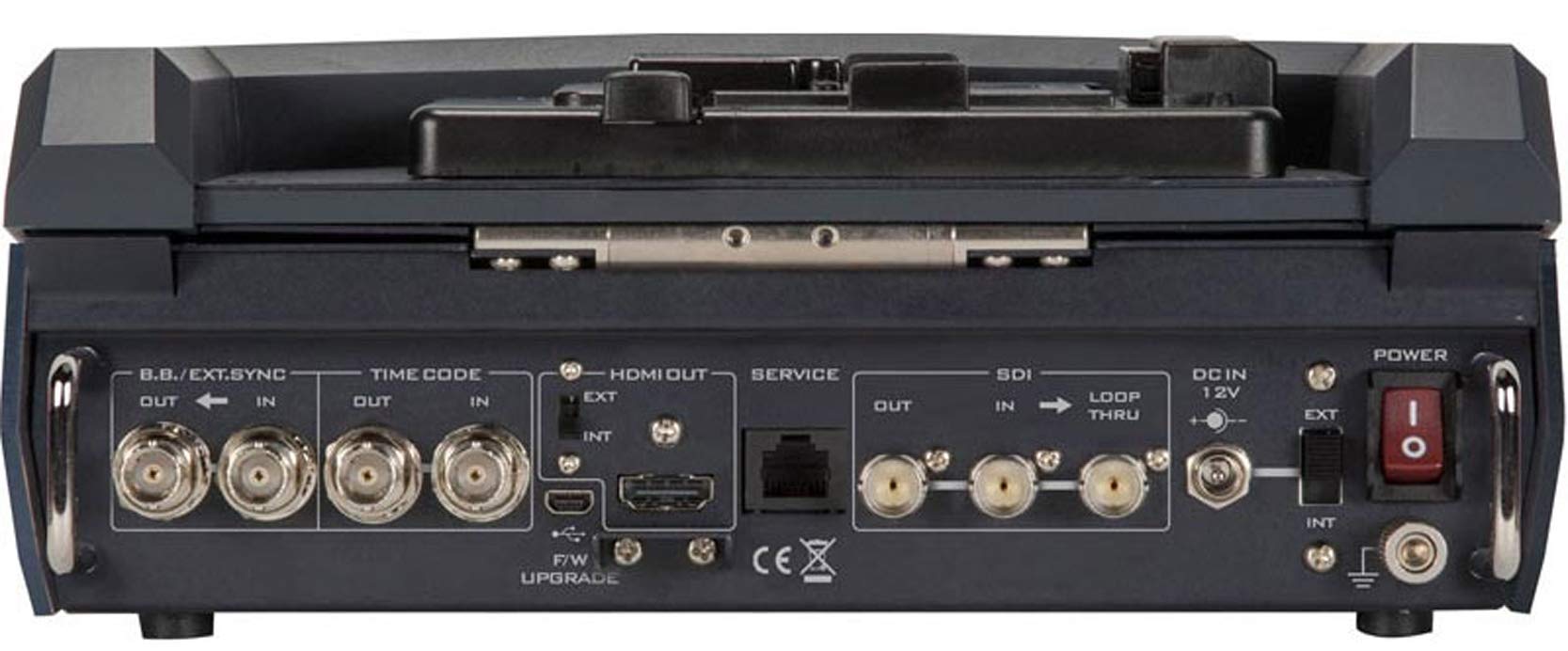
Figure 4.1: Rear panel connections of the Datavideo HRS-30, including SDI, HDMI, Timecode, and Power inputs/outputs.
- SDI ان پٽ: Connect your HD/SD-SDI video source to the SDI IN port. The unit also features an SDI LOOP THRU for connecting to another device.
- HDMI ٻاھر Connect an external monitor or display to the HDMI OUT port for video monitoring.
- ٽائيم ڪوڊ: Use the TIME CODE IN/OUT ports for external timecode synchronization.
- BB/EXT.SYNC: Connect Black Burst or external sync signals to the BB/EXT.SYNC IN/OUT ports.
- سروس پورٽ: For firmware upgrades and maintenance.
5. آپريٽنگ هدايتون
This section details the basic operation of the HRS-30 for recording and playback.
5.1 Powering On and Initial Screen
- Ensure all necessary connections are made and the storage caddy is installed.
- پوئين پينل تي پاور سوئچ کي 'آن' پوزيشن ڏانهن ڦيرايو.
- The integrated 10.1-inch monitor will display the boot-up sequence, followed by the live video input or the last recorded clip.
5.2 رڪارڊنگ وڊيو
The HRS-30 records video from HD/SD-SDI sources in various formats.
- ان پٽ چونڊيو: Use the control panel buttons to select the desired SDI input source.
- مانيٽر ان پٽ: Verify the incoming video signal on the integrated monitor.
- رڪارڊنگ شروع ڪريو: کي دٻايو آر اي سي button on the control panel to begin recording. The recording indicator will illuminate.
- رڪارڊنگ بند ڪريو: کي دٻايو اسٽاپ button to end the recording. The recording indicator will turn off.
The HRS-30 supports recording in MPEG-II Long-GOP or intra-frame (i-frame) with 4:2:2 color sampling, producing MXF/OP1A files.
5.3 پلے بیک
Toيهر ڪرڻview recorded content:
- Access Playback Mode: Use the navigation buttons to enter playback mode.
- Select Clip: Browse through your recorded clips using the navigation controls.
- پلے بیک شروع ڪريو: کي دٻايو راند ڪريو button to start playback of the selected clip.
- ڪنٽرول پلے بیک: استعمال ڪريو روڪيو, ايف ايف ڊبليو (فاسٽ فارورڊ)، ۽ REW (Rewind) buttons to control playback.
5.4 مينيو نيويگيشن
The HRS-30 features an on-screen menu system for configuring settings such as video format, recording quality, audio settings, and system preferences. Use the MENU button and directional arrows to navigate, and the ENTER button to confirm selections.
6. سار سنڀال
Proper maintenance ensures the longevity and optimal performance of your HRS-30.
- صفائي: Use a soft, dry cloth to clean the exterior of the unit. For the screen, use a specialized screen cleaning solution and a microfiber cloth. Do not use abrasive cleaners or solvents.
- اسٽوريج: When not in use, store the HRS-30 in a cool, dry place, away from direct sunlight and extreme temperatures.
- فرم ويئر اپڊيٽس: Periodically check the Datavideo website for firmware updates to ensure your unit has the latest features and bug fixes. Follow the instructions provided with the firmware update carefully.
7. مسئلا حل ڪرڻ
This section addresses common issues you might encounter with the HRS-30.
| مسئلو | ممڪن سبب | حل |
|---|---|---|
| يونٽ پاور نه آهي | No power, faulty adapter, power switch off | Check power cable connection, verify power outlet, ensure power switch is ON. |
| No video on screen | Incorrect input selected, no signal from source, faulty cable | Select correct input, check video source, replace SDI/HDMI cable. |
| رڪارڊ نٿو ٿي سگھي | No storage media, full storage, media error | Ensure caddy with drive is installed, check available storage space, format or replace drive if necessary. |
| Playback issues | ڪرپٽ file, incompatible format | Try playing another clip. Ensure recorded files خراب نه آهن. |
8. وضاحتون
Detailed technical specifications for the Datavideo HRS-30.
- ماڊل: HRS-30
- ڏيکاءَ واري اسڪرين ڊاگنل: 10 انچ / 26 سينٽ
- پيداوار جي ماپ: 10.83 x 10.24 x 3.94 انچ (27.5 x 26 x 10 سينٽي)
- شيء جو وزن: 7.92 پائونڊ (3.6 ڪلوگرام)
- وڊيو انپٽس: ايڇ ڊي/ايس ڊي-ايس ڊي آءِ
- وڊيو آئوٽ پُٽ: HDMI, SDI Loop Thru
- سپورٽ ٿيل وڊيو فارميٽ: 1080i, 720p, 576i, 480i
- رڪارڊنگ فارميٽ: MPEG-II Long-GOP, Intra-frame (i-frame) with 4:2:2 color sampلنگ
- File فارميٽ: MXF/OP1A
- اسٽوريج ميڊيا: Removable caddy for 2.5" HDD & SSD drives
- ٺاهيندڙ: ڊيٽا ويڊيو
- تاريخ پهرين دستياب: مارچ 23، 2016
9. وارنٽي ۽ سپورٽ
For warranty information and technical support, please refer to the official Datavideo website or contact your authorized Datavideo dealer. Keep your purchase receipt as proof of purchase for warranty claims.


