تعارف
This manual provides instructions for the installation and operation of your Satechi Aluminum USB-C 2.5-inch HDD/SSD Enclosure. This enclosure allows you to convert any 2.5-inch SATA hard drive (HDD) or solid-state drive (SSD) into a portable external storage device, utilizing a USB-C connection for data transfer speeds up to 10 Gbps.
پيڪيج مواد
- Satechi Aluminum USB-C 2.5-inch HDD/SSD Enclosure
- USB-C کان USB-C ڪيبل
- ميني اسڪرو ڊرائيور
- چڙهڻ اسڪرو
سيٽ اپ ۽ تنصيب
Follow these steps to install your 2.5-inch HDD or SSD into the enclosure:
- انڪلوزر کوليو: Use the provided mini screwdriver to remove the two small screws located on the side of the enclosure. Carefully slide the internal tray out from the aluminum casing.
- ڊرائيو داخل ڪريو: Align your 2.5-inch SATA HDD or SSD with the SATA connector on the internal tray. Gently push the drive into the connector until it is firmly seated.
- ڊرائيو کي محفوظ ڪريو: Use the provided mounting screws to secure the HDD/SSD to the internal tray. Ensure the drive is stable and does not move.
- انڪلوزر بند ڪريو: Carefully slide the internal tray, with the installed drive, back into the aluminum casing. Re-insert and tighten the two small screws to secure the enclosure.

Image: Enclosure disassembled, revealing the internal tray and screws.
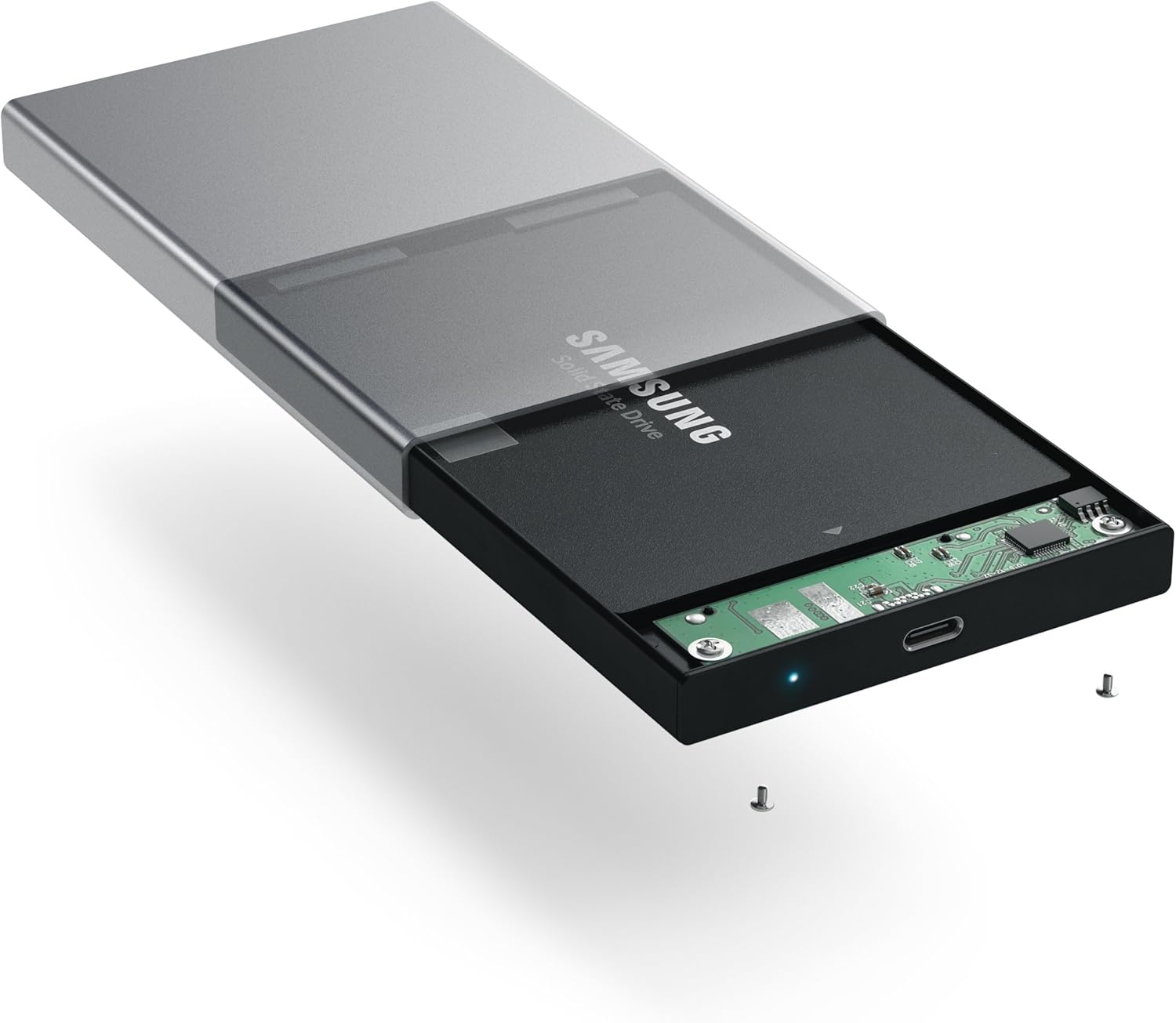
Image: Inserting a 2.5-inch SSD into the internal tray.

Image: SSD fully inserted and secured in the tray.
آپريٽنگ هدايتون
- ڪمپيوٽر سان ڳنڍيو: Use the included USB-C to USB-C cable to connect the enclosure to an available USB-C port on your computer.
- پاور اشارو: A blue LED indicator light on the enclosure will illuminate when connected and powered, indicating readiness for use. The LED will blink during data transfer activity.
- ڊرائيو تائين رسائي: Your computer should automatically detect the external drive. If it is a new drive, you may need to format it before use. Refer to your operating system's documentation for drive formatting procedures.
- ڊيٽا جي منتقلي: ڇڪيو ۽ ڇڏي ڏيو files to and from the external drive as you would with any other storage device. The enclosure supports data transfer speeds up to 10 Gbps, depending on your drive and computer's USB-C port capabilities.
- محفوظ هٽائڻ: Always safely eject the external drive from your operating system before disconnecting the cable to prevent data corruption.

Image: Enclosure connected to a laptop.

Image: Enclosure with cable connected, showing the blue LED.
سار سنڀال
- انڪوائري کي صاف ۽ مٽيءَ کان پاڪ رکو. صفائي لاءِ نرم، سڪل ڪپڙو استعمال ڪريو.
- ڊوائيس کي انتهائي گرمي پد، نمي، يا سڌي سج جي روشني کي ظاهر ڪرڻ کان بچاء.
- Do not attempt to disassemble the enclosure beyond the initial drive installation, as this may void the warranty.
مشڪلاتون
- ڊرائيو نه ملي:
- Ensure the USB-C cable is securely connected to both the enclosure and your computer.
- پنهنجي ڪمپيوٽر تي ڪنهن ٻئي USB-C پورٽ سان ڳنڍڻ جي ڪوشش ڪريو.
- Verify that the HDD/SSD is correctly seated within the enclosure's SATA connector.
- If it is a new drive, ensure it has been formatted for your operating system.
- سست منتقلي جي رفتار:
- Ensure your computer's USB-C port supports USB 3.1 Gen 2 (10 Gbps) for optimal performance.
- The performance of the drive itself (HDD vs. SSD) will impact transfer speeds.
- Consider using a high-quality, certified USB-C cable, especially if experiencing intermittent disconnections or slower-than-expected speeds.
- انڪلوزر بي ترتيب سان ڊسڪنيڪٽ ٿئي ٿو:
- This can sometimes be caused by an incompatible or low-quality USB-C cable. Try using a different, certified USB-C cable.
- Ensure your computer's power settings are not configured to turn off USB ports to save power.
وضاحتون
| ماڊل نمبر | ST-TCDEM |
| يو پي سي | 879961006242 |
| مواد | المونيم |
| موازن ڊرائيو جو قسم | 2.5 انچ SATA HDD/SSD |
| سپورٽ ٿيل ڊوائيسز جو وڌ ۾ وڌ تعداد | 1 |
| ڊيٽا جي منتقلي جي شرح | Up to 10 Gigabits Per Second (USB 3.1 Gen 2) |
| رابطي ٽيڪنالاجي | USB-C |
| شيءِ جو وزن | 6.4 آونس (181 گرام) |
| رنگ | خلائي گرين |
وارنٽي ۽ سپورٽ
For warranty information and technical support, please refer to the official Satechi webسائيٽ تي وڃو يا سڌو سنئون انهن جي ڪسٽمر سروس سان رابطو ڪريو. وارنٽي دعوائن لاءِ پنهنجي خريداري جي رسيد رکو.