1. تعارف
Thank you for choosing the CableCreation 3.5mm TRRS Headphone Extension Cable. This cable is designed to extend the reach of your 3.5mm audio devices, supporting both audio output and microphone input. Its 4-conductor (TRRS) design ensures compatibility with headsets that include a microphone, making it suitable for a wide range of applications from car stereos to laptops and smartphones. The right-angle connector provides a space-saving solution and reduces strain on the cable.
2. پراڊڪٽ ختمview
The CableCreation 3.5mm TRRS Headphone Extension Cable features a male 3.5mm TRRS connector on one end and a female 3.5mm TRRS jack on the other. The male connector is designed with a 90-degree angle for improved durability and space efficiency. The cable is constructed with TPE material and a braided exterior for flexibility and resistance to wear.

Figure 1: CableCreation 3.5mm TRRS Headphone Extension Cable.
اهم خاصيتون:
- 4-Conductor (TRRS) Design: Supports both stereo audio and microphone functions, unlike 3-conductor (TRS) cables which only support audio.
- 90-Degree Right-Angle Connector: Reduces strain on the cable and allows for connections in tight spaces.
- پائيدار تعمير: Features inner enameled wire and a TPE material jacket with a braided exterior for enhanced flexibility and longevity.
- يونيورسل مطابقت: Works with devices equipped with a 3.5mm headphone jack, including smartphones, tablets, laptops, car stereos, and speakers.

Figure 2: Comparison of 4-Conductor (TRRS) vs. 3-Conductor (TRS) functionality.

Figure 3: Right-angle design for space saving.
3. سيٽ اپ
The CableCreation 3.5mm TRRS Headphone Extension Cable is designed for simple plug-and-play operation. No software installation or external power is required.
ڪنيڪشن جا مرحلا:
- Identify the 3.5mm audio output jack on your source device (e.g., smartphone, tablet, laptop, car stereo).
- داخل ڪريو male 3.5mm TRRS connector of the extension cable into the audio output jack of your source device. Ensure it is fully inserted for a secure connection.
- Connect your headphones or headset (with microphone) to the female 3.5mm TRRS jack of the extension cable. Ensure it is also fully inserted.
- Verify that both audio playback and microphone input (if applicable) are functioning correctly.
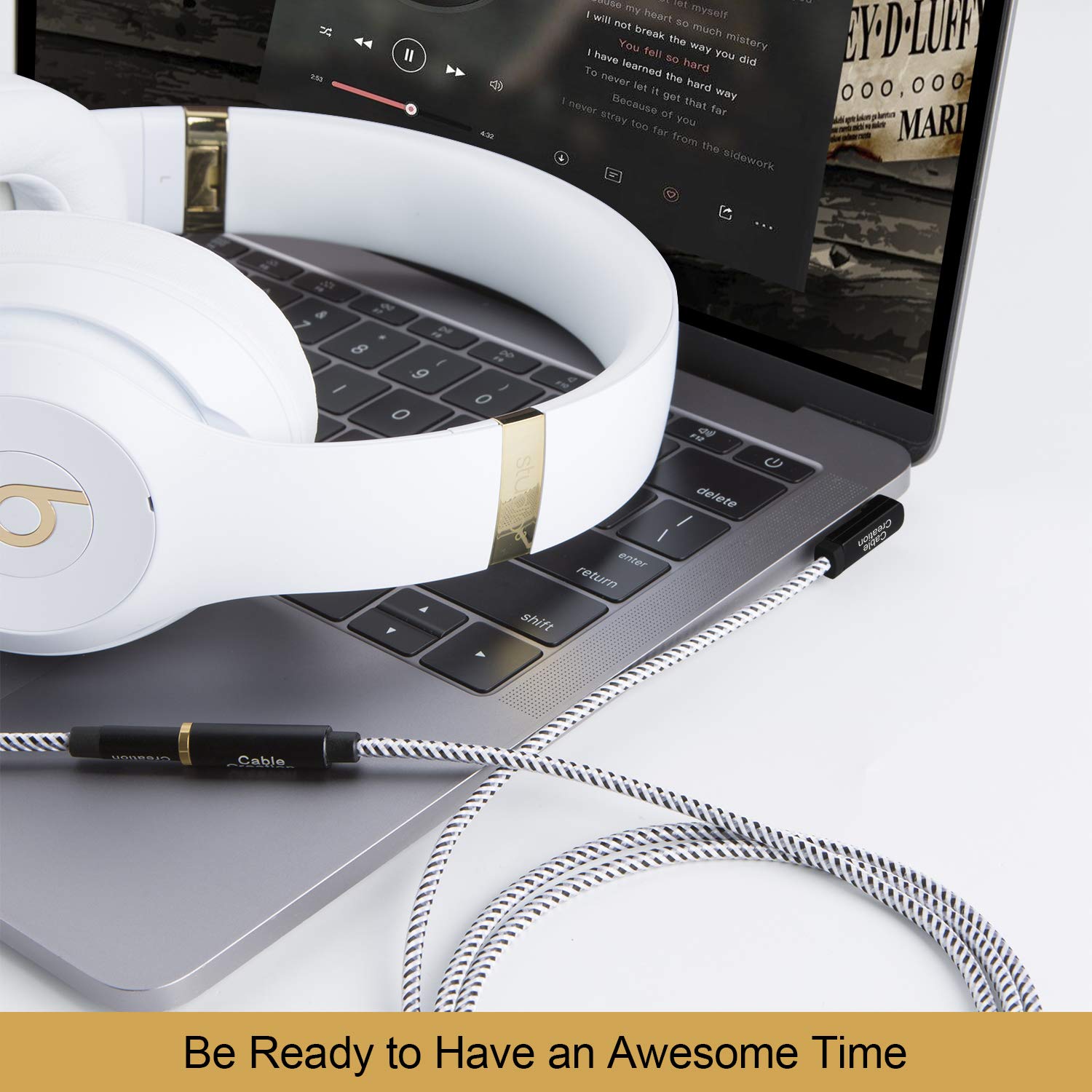
Figure 4: Connecting the extension cable to a laptop and headphones.
4. آپريٽنگ هدايتون
Once connected, the extension cable operates transparently, extending the reach of your audio connection without requiring any specific user interaction. The cable supports simultaneous audio output and microphone input, allowing for communication during calls or gaming.
استعمال جا طريقا:
- Adjust volume directly on your source device or headphones.
- Ensure the 90-degree connector is oriented to minimize cable bending and stress, especially in confined spaces.
- Avoid excessive pulling or tugging on the cable to prevent damage to the connectors or internal wiring.

Figure 5: Using the extension cable for video calls with microphone support.
5. سار سنڀال
Proper care and maintenance will prolong the life of your CableCreation extension cable.
سنڀال جون هدايتون:
- صفائي: ڪيبل ۽ ڪنيڪٽرن کي صاف ڪرڻ لاءِ نرم، سڪل ڪپڙو استعمال ڪريو. سخت ڪيميڪلز يا رگڙيندڙ مواد استعمال ڪرڻ کان پاسو ڪريو.
- اسٽوريج: Store the cable in a cool, dry place away from direct sunlight and extreme temperatures. Avoid tightly coiling the cable to prevent internal wire damage.
- سنڀالڻ: ڪيبل کي پلگ ڪرڻ يا ان پلگ ڪرڻ وقت هميشه ڪنيڪٽر هائوسنگ کي پڪڙيو، ڪيبل کي پاڻ تي ڇڪڻ جي بدران.
- جھڪڻ کان پاسو ڪريو: While the cable is flexible, repeated sharp bends, especially near the connectors, can reduce its lifespan. The 90-degree connector is designed to mitigate this at the male end.

Figure 6: Cable flexibility and bend lifespan.

Figure 7: Cable resistance to stretching and twisting.
6. مسئلا حل ڪرڻ
If you encounter issues with your CableCreation extension cable, refer to the following common problems and solutions:
| مسئلو | ممڪن سبب | حل |
|---|---|---|
| ڪوبه آڊيو آئوٽ. | Loose connection, incorrect port, device volume too low, incompatible cable (TRS instead of TRRS). | Ensure both ends of the cable are fully inserted. Check device volume settings. Confirm your headphones/headset are working directly with the source. Verify the cable is a 4-conductor TRRS type if microphone support is needed. |
| مائڪروفون ڪم نه ڪري رهيو آهي. | Loose connection, incompatible cable (TRS instead of TRRS), device microphone settings, headset issue. | Ensure all connections are secure. Confirm your headset's microphone works when connected directly to the source. Check your device's audio input/microphone settings. This cable is TRRS, ensuring microphone compatibility. |
| وقفي وقفي سان آڊيو يا جامد. | ڍلو ڪنيڪشن، خراب ڪيبل، مداخلت. | Reseat both connectors. Inspect the cable for visible damage. Test with another audio cable to rule out device issues. Avoid placing the cable near strong electromagnetic fields. |
7. وضاحتون
- ماڊل نمبر: CC0451
- ڪنيڪٽر جو قسم: 3.5mm TRRS Male to 3.5mm TRRS Female
- ڪيبل جو قسم: 4-Conductor Audio Extension Cable
- Connector Angle: 90-Degree (Male end)
- مواد: TPE jacket, braided exterior
- مطابقت رکندڙ ڊوائيسز: Headphones, Laptops, Music Players, Smartphones, Speakers, Car Stereos, Tablets
- پيداوار جي ماپ: 8.66 x 5.91 x 0.06 inches (for 3FT/0.9M variant)
- شيء جو وزن: 0.71 ounces (for 3FT/0.9M variant)
8. وارنٽي ۽ سپورٽ
CableCreation products are designed for reliability and performance. This product is typically covered by a standard manufacturer's warranty against defects in materials and workmanship. Please refer to the product packaging or the official CableCreation webمخصوص وارنٽي شرطن ۽ ضابطن لاءِ سائيٽ.
ڪسٽمر سپورٽ:
For technical assistance, warranty claims, or general inquiries, please contact CableCreation customer support through their official channels. You can often find contact information on the product packaging or by visiting the CableCreation Store on Amazon.


