تعارف
The Korg Volca Kick is an analog kick generator featuring an MS-20 resonator and a 16-step sequencer. It is designed to produce a wide range of kick drum and bass sounds, from tight, punchy kicks to deep, resonant bass, suitable for various electronic music genres. This manual provides essential information for setting up, operating, and maintaining your Volca Kick.

شڪل 1: سامهون view of the Korg Volca Kick, showcasing its controls and 16-step sequencer.
سيٽ اپ ڪريو
بجلي جي فراهمي
- بيٽريون: The Volca Kick requires 6 AA batteries for portable operation. Ensure batteries are inserted with correct polarity.
- اي سي ايڊاپٽر: For extended use, connect a compatible 9V DC center-negative AC adapter (sold separately) to the DC 9V jack.
آڊيو ڪنيڪشن
- پيداوار: Connect headphones or an audio cable from the AUDIO OUT jack to a mixer or ampوierيڪ زنده
- بلٽ ان اسپيڪر: The unit features a built-in speaker for immediate sound output without external ampificationنڻ.
Synchronization and MIDI
- Sync I/O: Use the SYNC IN and SYNC OUT jacks to synchronize with other Korg Volca series devices or compatible equipment.
- MIDI ان پٽ: Connect a MIDI cable to the MIDI IN port to control the Volca Kick from an external MIDI device or DAW.
آپريٽنگ هدايتون
Basic Controls and Sound Generation
The Volca Kick utilizes an analog kick generator based on the MS-20 filter, allowing for powerful and resonant sounds. The interface provides direct control over various parameters to shape your kick and bass sounds.
- پچ: Adjusts the fundamental frequency of the kick sound.
- موڙ: Controls the pitch envelope, creating a 'bending' effect typical of kick drums.
- وقت: Sets the duration of the pitch bend.
- Pulse Color: Modifies the timbre of the pulse oscillator.
- سطح: Adjusts the output level of the pulse oscillator.
- حملو: Controls the attack time of the ampلفافي لفافي.
- زوال: Controls the decay time of the ampلفافي لفافي.
- ڊرائيو: Adds distortion and saturation for aggressive sound shaping.
- ٽون: Adjusts the overall tonal character of the sound.

شڪل 2: زاويه view of the Korg Volca Kick, highlighting the various knobs and buttons for sound manipulation.
16-قدم سيڪوينسر
The integrated 16-step sequencer allows for intuitive pattern creation and real-time performance.
- Step Buttons: Use the 16 step buttons to program your rhythm patterns. Press a button to activate a step, press again to deactivate.
- رڪارڊ موڊ: Enter record mode to capture real-time knob movements (motion sequencing) and note inputs.
- راند/روڪ: Starts and stops the sequencer playback.
- رفتار: Adjusts the playback speed of the sequencer.
- جھلي Adds a rhythmic swing feel to your patterns.
- تلفظ: Adds emphasis to specific steps.
- Touch FX: Provides real-time effects for dynamic performance.
- فعال قدم: Allows you to skip steps in a pattern, creating variations.
- ياداشت: Save and recall your created patterns.
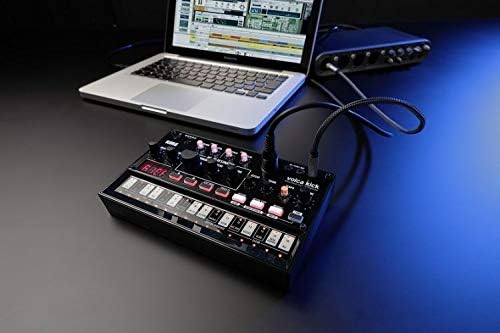
Figure 3: The Korg Volca Kick connected to a laptop, demonstrating its integration capabilities with external devices.
سار سنڀال
To ensure the longevity and optimal performance of your Korg Volca Kick, follow these maintenance guidelines:
- صفائي: يونٽ کي صاف ڪرڻ لاءِ نرم، سڪل ڪپڙو استعمال ڪريو. رگڙيندڙ صاف ڪندڙ يا محلولن کان پاسو ڪريو.
- اسٽوريج: يونٽ کي سڌي سج جي روشني، انتهائي گرمي پد ۽ تيز نمي کان پري ٿڌي، سڪل جاءِ تي ذخيرو ڪريو.
- بيٽري جي سنڀال: جيڪڏهن يونٽ ڊگهي عرصي تائين استعمال نه ڪيو ويندو ته جيئن رسي کي روڪي سگهجي ته بيٽريون هٽايو.
مشڪلاتون
If you encounter issues with your Volca Kick, refer to the following common troubleshooting steps:
- طاقت ناهي: Check battery installation and charge level. If using an AC adapter, ensure it is correctly connected and the correct voltage/polarity.
- آواز ناهي: Verify that the volume knob is turned up. Check audio cable connections and ensure external speakers/headphones are working.
- Sequencer Not Playing: Ensure the sequencer is in play mode and not paused or stopped. Check tempo settings.
- MIDI Issues: Confirm MIDI cable connection and correct MIDI channel settings on both the Volca Kick and your external device.
وضاحتون
| خاصيت | تفصيل |
|---|---|
| جسماني مواد | پلاسٽڪ |
| شيءِ جو وزن | 13.3 آونس (377 گرام) |
| پيداوار جي ماپ | 10.35 x 6.02 x 2.79 انچ |
| شيون ماڊل نمبر | VOLCAKICK |
| بيٽريون | 6 AA batteries required (Alkaline) |
| ڪنيڪٽر جو قسم | 9V DC Centre-Negative |
| ڪي بورڊ جي چاٻين جو تعداد | 16 |
| ٺاهيندڙ | Korg USA Inc. |
وارنٽي ۽ سپورٽ
وارنٽي جي معلومات ۽ ٽيڪنيڪل سپورٽ لاءِ، مھرباني ڪري سرڪاري ڪورگ جو حوالو ڏيو webسائيٽ تي وڃو يا پنھنجي مقامي ڪورگ ڊسٽريبيوٽر سان رابطو ڪريو. وارنٽي دعوائن لاءِ خريداري جو ثبوت رکو.


