1. تعارف
This manual provides comprehensive instructions for the operation and maintenance of your MIDAS DM16 16 Input Analogue Live and Studio Mixer. The DM16 is designed for both live performance and studio recording environments, featuring award-winning MIDAS microphone preamplifiers and robust construction.
Please read this manual thoroughly before operating the device to ensure proper usage and to maximize its lifespan.
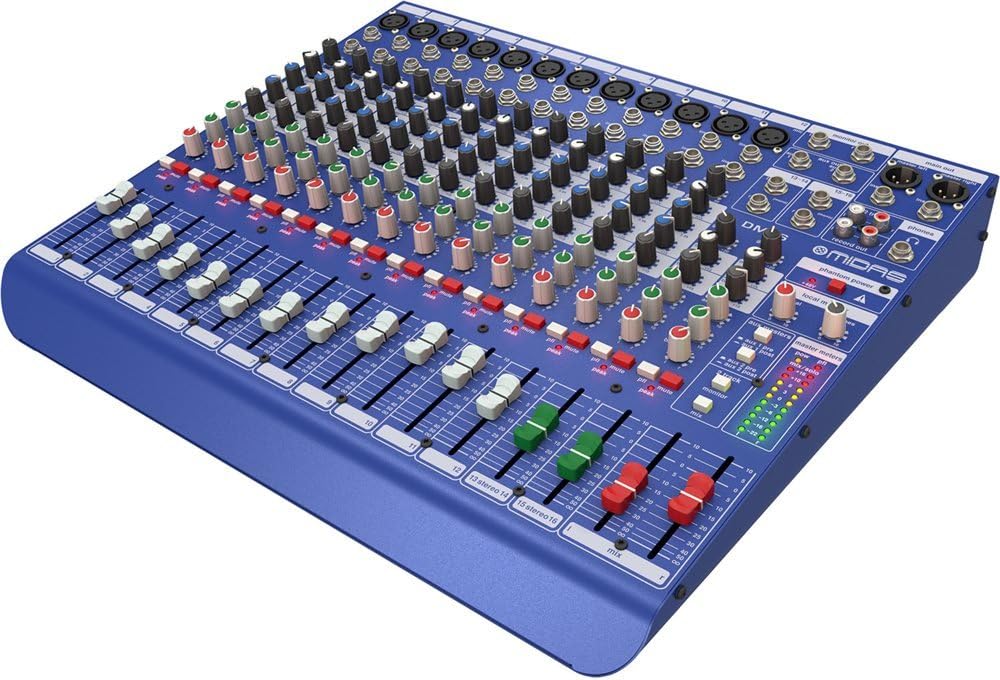
شڪل 1.1: سامهون وارو زاويه view of the MIDAS DM16 mixer.
2. سيٽ اپ
2.1 پيڪنگ ۽ چڪاس
Upon receiving your MIDAS DM16, carefully unpack the unit and inspect it for any signs of damage that may have occurred during transit. Retain the original packaging materials for future transport or storage.
دٻي ۾ شامل:
- MIDAS DM16 16-انپٽ اينالاگ لائيو ۽ اسٽوڊيو ميڪر
- پاور ڪنڊ
- استعمال ڪندڙ جو دستياب (ھي دستاويز)
2.2 پاور ڪنيڪشن
The DM16 operates on a standard AC power supply. Connect the provided power cord to the AC inlet on the rear panel of the mixer and then to a suitable power outlet. Ensure the power switch is in the 'Off' position before connecting to power.
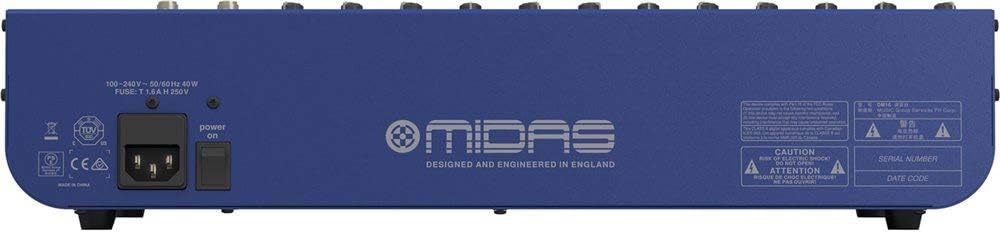
Figure 2.1: Rear panel of the MIDAS DM16 showing power input and warnings.
2.3 ان پٽ ۽ آئوٽ پٽ ڪنيڪشن
The DM16 features a variety of input and output options for connecting microphones, instruments, and other audio devices.
- مائڪروفون انپٽس: 12 mono input channels with XLR connectors for microphones. These channels feature MIDAS microphone preampجان بچائيندڙ.
- لائن انپٽس: 2 electronically-balanced stereo line input channels on 1/4" TRS connectors for instruments or line-level devices.
- مکيه نتيجا Connect to your main PA system or recording interface.
- Aux Sends: For monitor mixes or effects sends.
- هيڊ فون آئوٽ: For monitoring audio.
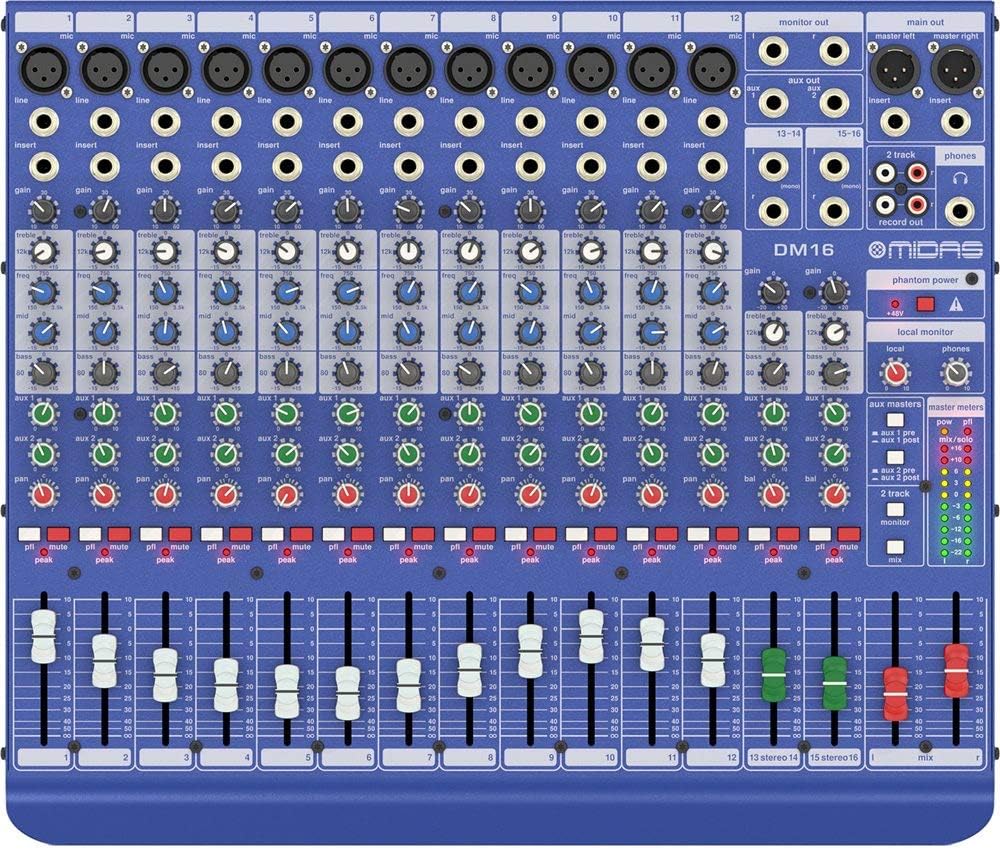
شڪل 2.2: مٿي view of the MIDAS DM16 showing all input/output connections and controls.
3. آپريٽنگ هدايتون
3.1 چينل ڪنٽرول
Each mono input channel on the DM16 features the following controls:
- حاصل ڪريو Adjusts the input sensitivity for the microphone preampوierيڪ زنده
- EQ A 3-band equalizer with a swept mid-band for precise tone shaping.

شڪل 3.1: تفصيلي view of the 3-band EQ section on a mono channel.
- آڪس 1/2: Controls the level sent to the auxiliary outputs. These can be switched pre/post fader.

Figure 3.2: Aux masters section with pre/post fader switching.
- پان: چينل جي اسٽيريو پوزيشن کي ترتيب ڏئي ٿو.
- مٽي: چينل کي خاموش ڪري ٿو.
- چوٽي LED: Indicates when the input signal is clipping.
- فادر: Controls the output level of the channel to the main mix.

Figure 3.3: Channel faders for precise level control.
3.2 فينٽم پاور
The DM16 provides +48V phantom power for condenser microphones. This is a global switch, meaning it applies to all microphone inputs simultaneously. Ensure all connections are made before activating phantom power to prevent damage to non-phantom powered devices.

Figure 3.4: Phantom power switch.
3.3 مانيٽرنگ
Use the headphone output and monitor controls to listen to the main mix or specific auxiliary sends. The monitor section includes controls for local monitor and phones output levels.

Figure 3.5: Monitor and headphone controls.
4. سار سنڀال
Proper maintenance ensures the longevity and optimal performance of your MIDAS DM16 mixer.
- صفائي: Use a soft, dry cloth to clean the exterior of the mixer. Avoid abrasive cleaners or solvents that could damage the finish or controls.
- مٽي جي حفاظت: جڏهن استعمال ۾ نه هجي ته مکسر کي ڍڪي رکو ته جيئن مٽي گڏ ٿيڻ کان بچي سگهجي، خاص طور تي فيڊرز ۽ نوبس جي چوڌاري.
- وينٽيليشن: يونٽ جي چوڌاري مناسب هوا جي وهڪري کي يقيني بڻايو وڃي ته جيئن وڌيڪ گرم ٿيڻ کان بچي سگهجي. وينٽيليشن جي سوراخن کي نه روڪيو.
- اسٽوريج: Store the mixer in a cool, dry environment away from direct sunlight and extreme temperatures.
5. مسئلا حل ڪرڻ
This section addresses common issues you might encounter with your DM16 mixer.
- طاقت ناهي:
- چيڪ ڪريو ته ڇا پاور ڪنڊ ميڪر ۽ پاور آئوٽليٽ ٻنهي سان محفوظ طور تي ڳنڍيل آهي.
- پڪ ڪريو ته پاور آئوٽ فنڪشنل آهي.
- Ensure the power switch on the rear panel is in the 'On' position.
- ڪوبه آواز آئوٽ:
- سڀ ان پٽ ۽ آئوٽ پٽ ڪيبل ڪنيڪشن چيڪ ڪريو.
- Ensure channel faders and the main mix fader are raised.
- Verify that the MUTE buttons on active channels are not engaged.
- Check the gain settings for each channel.
- Confirm that your connected speakers or monitoring system are powered on and functioning correctly.
- مسخ ٿيل آواز:
- Reduce the GAIN setting on the input channel if the PEAK LED is frequently illuminating.
- Lower the output level of the connected source device.
- ناقص ڪيبلن جي چڪاس ڪريو.
- گوڙ يا شور:
- پڪ ڪريو ته سڀئي ڪيبل صحيح طرح سان ڍڪيل ۽ سٺي حالت ۾ آهن.
- Check for ground loops; try connecting all audio equipment to the same power strip.
- آڊيو ڪيبلز کي پاور ڪيبلز کان پري رکو.
جيڪڏهن توهان کي اهڙا مسئلا درپيش اچن ٿا جيڪي هتي شامل نه آهن، ته مهرباني ڪري سپورٽ سيڪشن جو حوالو ڏيو.
6. وضاحتون
| خاصيت | تفصيل |
|---|---|
| پيداوار جو قسم | اينالاگ لائيو ۽ اسٽوڊيو ميڪر |
| چيڪ چينل | 16 (12 مونو، 2 اسٽيريو) |
| مائڪروفون پريampجان بچائيندڙ | Award-winning MIDAS preampجان بچائيندڙ |
| EQ on Mono Channels | 3-band with swept mid band |
| محصول موڪليندو آهي | 2 (with pre/post fader switching) |
| طاقت جو ذريعو | تار ٿيل برقي |
| شيءِ جو وزن | 11.02 پائونڊ (5.0 ڪلوگرام) |
| پيداوار جي ماپ (L x W x H) | 17.24 x 14.57 x 3.74 انچ (438 x 370 x 95 ملي ميٽر) |
| اصل جو ملڪ | چين |
| ماڊل نمبر | ڊي ايم 16 |
| رابطي ٽيڪنالاجي | معاون |
7. وارنٽي ۽ سپورٽ
7.1 وارنٽي ڄاڻ
Your MIDAS DM16 mixer is covered by a limited warranty against defects in materials and workmanship. Please refer to the warranty card included with your product or visit the official MIDAS webتفصيلي وارنٽي شرطن ۽ ضابطن لاءِ سائيٽ.
نوٽ: The warranty may not cover damage caused by improper use, unauthorized modifications, or natural disasters.
7.2 ڪسٽمر سپورٽ
For technical assistance, troubleshooting, or service inquiries, please contact MIDAS customer support through their official webسائيٽ يا توهان جي پراڊڪٽ دستاويزن ۾ ڏنل رابطي جي معلومات.
آن لائين وسيلا:
- Official MIDAS Webسائيٽ: www.midasconsoles.com
- Product Support Page: (Specific link if available, otherwise general webسائيٽ)
When contacting support, please have your product model number (DM16) and serial number ready.


