تعارف
The Geemarc Wake 'n' Shake Curve is an advanced alarm clock designed to provide effective wake-up solutions for individuals, including those with hearing difficulties or heavy sleepers. It combines an extra-loud alarm, a powerful vibrating shaker pad, and a bright flashing light. Additionally, it features a large digital display and a USB port for charging external devices.
پيڪيج مواد
- Geemarc Wake 'n' Shake Curve Alarm Clock
- Vibrating Shaker Pad with cable
- پاور اڊاپٽر
- استعمال ڪندڙ جو دستياب (ھي دستاويز)
پيداوار ختمview
Familiarize yourself with the various components of your Wake 'n' Shake Curve alarm clock.
سامهون View

تصوير: سامهون view of the alarm clock, showing the large red digital display, the flashing light bar at the top, and the connected vibrating shaker pad on the left.

تصوير: سامهون view of the alarm clock, demonstrating a smartphone connected to the USB charging port on the back.
مٿو View (ڪنٽرول بٽڻ)

Image: Top panel of the alarm clock, displaying the control buttons: ▼ (Down), SET, Zz ☀ (Snooze/Light), AL (Alarm), and ▲ (Up).
پاسي View (Volume/Tone Control)

تصوير: پاسي view of the alarm clock, highlighting the rotating scroll wheel used for adjusting alarm volume and tone.
ريڙهه View (بندرگاهون)
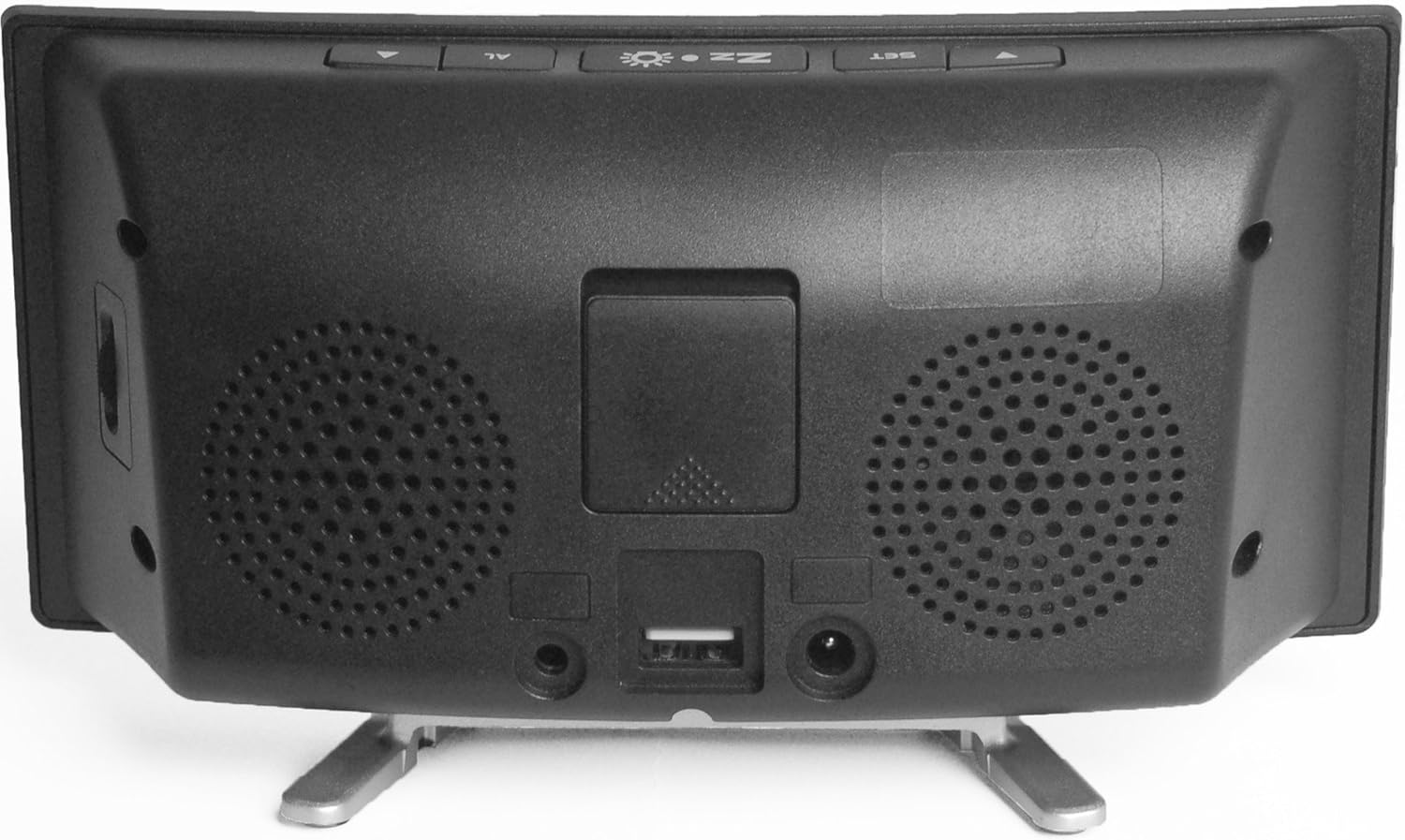
تصوير: پوئين پاسي view of the alarm clock, showing the power adapter input, the USB charging port, and the port for the vibrating shaker pad.
سيٽ اپ ڪريو
- پاور Connectنيو: Plug the provided power adapter into the DC IN port on the back of the alarm clock, then plug the adapter into a standard wall outlet. The display will illuminate.
- Connect Vibrating Pad: Insert the cable of the vibrating shaker pad into the SHAKER port on the back of the alarm clock. Place the pad under your pillow or mattress for optimal vibration.
- بيڪ اپ بيٽري انسٽال ڪريو (اختياري): توهان جي طاقت لاءtage backup, open the battery compartment on the back and insert a 9V battery (not included). This battery will maintain time settings during a power interruption but will not power the alarm functions.
آپريٽنگ هدايتون
وقت مقرر ڪرڻ
- کي دٻايو ۽ رکو سيٽ بٽڻ دٻايو جيستائين ڪلاڪ جا انگ چمڪڻ شروع نه ٿين.
- استعمال ڪريو ▲ (مٿي) يا ▼ (Down) buttons to adjust the hour.
- دٻايو سيٽ again to confirm the hour and move to the minute setting. The minute digits will flash.
- استعمال ڪريو ▲ (مٿي) يا ▼ (Down) buttons to adjust the minutes.
- دٻايو سيٽ again to confirm the minutes and exit time setting mode.
- 12-ڪلاڪ ۽ 24-ڪلاڪ فارميٽ جي وچ ۾ سوئچ ڪرڻ لاءِ، دٻايو سيٽ button once while the time is displayed (not flashing).
الارم کي ترتيب ڏيڻ
- کي دٻايو ۽ رکو AL button until the alarm hour digits begin to flash. An alarm icon will appear on the display.
- استعمال ڪريو ▲ (مٿي) يا ▼ (Down) buttons to adjust the alarm hour.
- دٻايو AL again to confirm the alarm hour and move to the alarm minute setting. The alarm minute digits will flash.
- استعمال ڪريو ▲ (مٿي) يا ▼ (Down) buttons to adjust the alarm minutes.
- دٻايو AL again to confirm the alarm minutes and exit alarm setting mode. The alarm icon will remain on the display, indicating the alarm is active.
- الارم کي غير فعال ڪرڻ لاءِ، دٻايو AL button once while the time is displayed. The alarm icon will disappear. Press AL again to reactivate.
Adjusting Alarm Volume and Tone
On the side of the alarm clock, there are rotating knobs. One controls the alarm volume, and the other controls the alarm tone frequency. Adjust these to your preferred settings. The maximum alarm volume is approximately 95dB.
Selecting Alarm Modes
The Wake 'n' Shake Curve offers four distinct alarm modes. Press the AL button repeatedly (while the alarm is active but not sounding) to cycle through the modes, indicated by icons on the display:
- صرف وائبريشن: (Shaker icon) The vibrating pad will activate.
- Alarm Sound + Vibration: (Speaker + Shaker icons) The loud alarm sound and vibrating pad will activate.
- Flashing Light + Vibration: (Light + Shaker icons) The bright flashing light and vibrating pad will activate.
- All Three (Sound + Light + Vibration): (Speaker + Light + Shaker icons) All three wake-up methods will activate simultaneously.
اسنوز فنڪشن
جڏهن الارم وڄي، وڏو دٻايو Zz ☀ (Snooze/Light) button on top of the clock to activate the snooze function. The alarm will pause and sound again after a set interval. The snooze duration is adjustable between 5 and 60 minutes. To adjust, press and hold the Zz ☀ button until the snooze time flashes, then use the ▲ (مٿي) يا ▼ (Down) buttons to set the desired duration. Press Zz ☀ ٻيهر تصديق ڪرڻ لاء.
ڊسپلي جي روشني کي ترتيب ڏيڻ
The display has three brightness levels. Press the Zz ☀ (Snooze/Light) button once (when the alarm is not sounding) to cycle through the brightness settings: High, Medium, Low.
USB چارجنگ پورٽ
A USB port is located on the back of the alarm clock. You can use this port to charge your smartphone or other USB-powered devices while the alarm clock is connected to power. This port provides standard USB charging output.
سار سنڀال
- صفائي: Use a soft, dry cloth to clean the surface of the alarm clock. Do not use liquid cleaners or abrasive materials.
- اسٽوريج: If storing the unit for an extended period, disconnect it from power and remove any backup battery. Store in a cool, dry place.
- وائبريٽنگ پيڊ: Ensure the vibrating pad cable is not kinked or damaged.
مشڪلاتون
| مسئلو | ممڪن سبب | حل |
|---|---|---|
| گھڙيال جي ڊسپلي بند آهي. | پاور ڪنيڪشن ناهي. | Ensure the power adapter is securely plugged into the clock and a working wall outlet. |
| Alarm does not sound/vibrate/flash. | Alarm is not set or deactivated. Incorrect alarm mode selected. | Verify the alarm time is set and the alarm icon is visible. Cycle through alarm modes using the AL button to select the desired wake-up method. Check alarm volume. |
| Vibrating pad not working. | Pad not connected or faulty. | Ensure the vibrating pad cable is fully inserted into the SHAKER port. Test with a different alarm mode. |
| Display shows 'PM' during AM hours. | This is a display characteristic. | The 'PM' indicator is a fixed part of the display and does not change for AM hours. The time displayed is accurate regardless of this indicator. |
| USB چارجنگ ڪم نه ڪري رهي آهي. | ڊوائيس مطابقت نه رکي ٿي يا ڪيبل خراب آهي. | Ensure the alarm clock is powered. Try a different USB cable or device to confirm functionality. |
وضاحتون
- برانڊ: گيمارڪ
- ماڊل: JWNS_CURVE
- ڊسپلي جو قسم: Digital, Large Red LED
- الارم جو مقدار: 95dB تائين
- Alarm Features: Extra Loud Alarm, Vibrating Shaker Pad, Bright Flashing Light
- اسنوز جي مدت: Adjustable (5-60 minutes)
- روشني ڏيکاري: 3 جي سطح
- طاقت جو ذريعو: تار ٿيل برقي
- بيڪ اپ بيٽري: Optional 9V (not included) for time retention during power cuts
- USB چارجنگ پورٽ: ها
- طول و عرض: تقريبن 2.2 x 7.09 x 3.74 انچ
- وزن: تقريبن 10.6 آونس (0.3 ڪلوگرام)
وارنٽي ۽ سپورٽ
For warranty information and customer support, please refer to the documentation provided at the time of purchase or contact your retailer. You may also visit the official Geemarc webوڌيڪ مدد لاء سائيٽ.


