1. تعارف
This manual provides comprehensive instructions for the installation, operation, and maintenance of your UHPPOTE 4 Channel Color Quad System Video Splitter, Model UT-XYL-440. This device is designed to process and display video feeds from up to four CCTV cameras simultaneously on a single monitor, offering various display modes and control options for effective surveillance monitoring.
2. حفاظت جي ڄاڻ
- Ensure the device is placed on a stable, flat surface to prevent accidental falls.
- ڊوائيس کي مقرر ڪيل حجم اندر هلائڻtage range (DC 12V) using the provided power adapter.
- Avoid exposing the unit to moisture, rain, or extreme temperatures. This device is intended for indoor use only.
- سي نه کوليوasing يا يونٽ کي پاڻ مرمت ڪرڻ جي ڪوشش ڪريو. سڀني سروسنگ کي قابل اهلڪارن جي حوالي ڪريو.
- يونٽ جي چوڌاري مناسب وينٽيليشن برقرار رکو ته جيئن وڌيڪ گرم ٿيڻ کان بچي سگهجي.
3. پيڪيج مواد
مھرباني ڪري تصديق ڪريو ته سڀ شيون توھان جي پيڪيج ۾ موجود آھن:
- UHPPOTE 4 Channel Color Quad System Video Splitter (UT-XYL-440)
- انفراريڊ ريموٽ ڪنٽرول
- BNC Adapters (7 pieces)
- پاور اڊاپٽر (DC 12V)

Image 3.1: UHPPOTE 4 Channel Color Quad System Video Splitter, remote control, and BNC adapters.
4. پراڊڪٽ ختمview
Familiarize yourself with the components and controls of your video splitter.
4.1. فرنٽ پينل
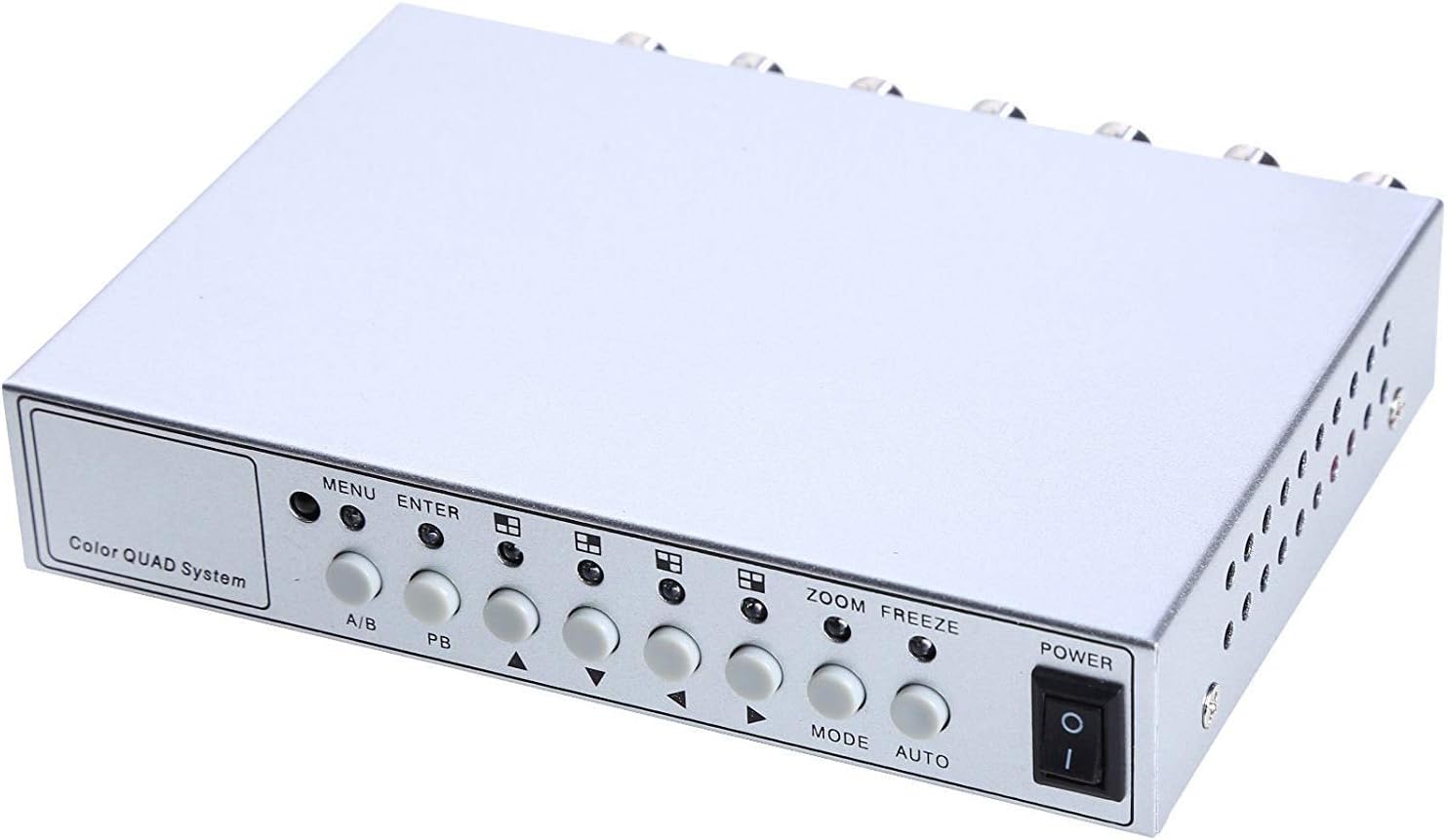
Image 4.1: Front panel controls and indicators.
- مينيو Accesses the on-screen display (OSD) menu for settings adjustment.
- داخل ٿيڻ: Confirms selections within the OSD menu.
- الف/ب: Switches between different display modes or channels.
- PB: Playback control (if connected to a VCR).
- هدايتي تير (مٿي/هيٺ/کاٻي/ساڄي): Navigate through menu options and adjust values.
- وڏو: Activates the digital zoom function.
- فريج: Freezes the current video frame.
- طرفن: Cycles through various display modes (Quad, Full Screen, PIP, Dual Split).
- اوٽو: Activates the auto-sequence display mode.
- طاقت: يونٽ لاءِ آن/آف سوئچ.
4.2. ريئر پينل

Image 4.2: Rear panel video input/output ports and power input.
- VIDEO 1-4: BNC inputs for connecting up to four CCTV cameras.
- VCR IN: BNC input for connecting a VCR or other recording device.
- VCR OUT: BNC output for connecting to a VCR or other recording device.
- مانيٽر: BNC output for connecting to a display monitor.
- ڊي سي 12V: Power input jack for the DC 12V power adapter.
4.3. ريموٽ ڪنٽرول

Image 4.3: Infrared remote control for convenient operation.
The remote control provides convenient access to all functions, mirroring the front panel controls and offering direct channel selection.
5. سيٽ اپ
Follow these steps to set up your UHPPOTE Video Splitter:
- ڪئميرا ڳنڍيو: Connect your CCTV cameras to the وڊيو 1, وڊيو 2, وڊيو 3، ۽ وڊيو 4 BNC input ports on the rear panel. Ensure secure connections.
- مانيٽر ڳنڍيو: Connect your display monitor to the MONITOR BNC output port on the rear panel.
- Connect VCR (Optional): If you wish to record video, connect the VCR IN ۽ VCR OUT BNC ports to your VCR or recording device.
- پاور Connectنيو: Insert the DC 12V power adapter into the ڊي سي 12V input jack on the rear panel, then plug the adapter into a standard electrical outlet.
- پاور آن: کي دٻايو پاور يونٽ کي آن ڪرڻ لاءِ فرنٽ پينل يا ريموٽ ڪنٽرول تي بٽڻ.
6. آپريٽنگ هدايتون
6.1. پاور آن/آف
کي دٻايو پاور button on the front panel or the remote control to switch the unit on or off.
6.2. ڊسپلي موڊس
The unit supports various display configurations. Use the موڊ button on the front panel or remote to cycle through them:
- QUAD Split Mode: Displays all four camera feeds simultaneously in a four-way split screen.
- مڪمل اسڪرين موڊ: Displays a single camera feed in full screen. Use the directional arrows or number buttons (1-4) on the remote to select the desired camera.
- PIP (Picture-in-Picture) Mode: Displays one main camera feed with a smaller window of another camera feed. The position of the PIP window can often be adjusted via the menu.
- Dual Split Mode: Displays two camera feeds simultaneously (e.g., side-by-side or top-bottom).
- Auto Sequence Mode: Automatically cycles through full-screen views of each connected camera. Activate using the آٽو سامهون واري پينل يا ريموٽ تي بٽڻ.
6.3. مينيو نيويگيشن ۽ سيٽنگون
To access and adjust system settings:
- کي دٻايو مينيو button on the front panel or remote control. The On-Screen Display (OSD) menu will appear.
- استعمال ڪريو مٿي / هيٺ directional arrows to navigate between menu options.
- دٻايو داخل ڪريو ڪو آپشن چونڊڻ يا ذيلي مينيو داخل ڪرڻ لاءِ.
- استعمال ڪريو کاٻي / ساڄي directional arrows to adjust values (e.g., brightness, contrast) or change settings.
- دٻايو مينيو ٻيهر مينيو مان نڪرڻ لاءِ.
اهم سيٽنگون:
- وڊيو ايڊجسٽمينٽ: Adjust Brightness, Contrast, Saturation, Hue, and Sharpness for optimal image quality.
- سسٽم فارميٽ: Select between NTSC (for North America, Japan, etc.) or PAL (for Europe, Asia, etc.) based on your region's video standard. Incorrect selection can lead to distorted or black and white images.
- Overlay Information: Configure display of Camera Title, Real Time and Date, and Alarm/Loss/Motion messages.
- Event Report: Review event logs and configure buzzer/relay output settings.
6.4. زوم فنڪشن
In full-screen mode, press the زوم button on the front panel or remote to activate digital zoom. Use the directional arrows to select the area to zoom in on.
6.5. Freeze Function
کي دٻايو منجهيل (FRZ) button on the front panel or remote to pause the current video frame. Press it again to resume live video.
7. سار سنڀال
- صفائي: يونٽ جي ٻاهرين حصي کي صاف ڪرڻ لاءِ نرم، سڪل ڪپڙو استعمال ڪريو. مائع يا ايروسول ڪلينر استعمال نه ڪريو.
- وينٽيليشن: Ensure the ventilation holes are not obstructed to prevent overheating.
- اسٽوريج: جيڪڏهن يونٽ کي گهڻي عرصي تائين ذخيرو ڪري رهيا آهيو، ته ان کي بجلي کان ڌار ڪريو ۽ ٿڌي، سڪل جاءِ تي ذخيرو ڪريو.
8. مسئلا حل ڪرڻ
| مسئلو | ممڪن سبب | حل |
|---|---|---|
| مانيٽر تي ڪو به وڊيو سگنل ناهي |
|
|
| Distorted, black & white, or rolling image |
|
|
| ريموٽ ڪنٽرول ڪم نه ڪري رهيو آهي |
|
|
| Constant buzzing sound |
|
|
9. وضاحتون
| خاصيت | تفصيل |
|---|---|
| ماڊل نمبر | UT-XYL-440 |
| وڊيو انپٽس | 4 BNC (for cameras), 1 BNC (VCR In) |
| وڊيو آئوٽ | 1 BNC (Monitor), 1 BNC (VCR Out) |
| وڊيو قرارداد | 720x480 (NTSC 60Hz), 720x576 (PAL 50Hz) |
| ڊسپلي موڊس | Quad Split, Full Screen, PIP, Dual Split, Auto Sequence |
| تصويري ترتيب | چمڪ ، برعڪس ، سنترپت ، رنگ ، تيز |
| خاص افعال | Freeze Function, Zoom Function, Video Loss Detection, Motion Detection |
| بجلي جي فراهمي | ڊي سي 12V |
| شيءِ جو وزن | 13.4 آونس (تقريبن 380 گرام) |
| پيڪيج جي ماپ | 8.54 x 6.06 x 2.4 انچ (تقريبن 21.7 x 15.4 x 6.1 سينٽي ميٽر) |
| ريموٽ بيٽري | 1 x CR2 battery (required) |
10. وارنٽي ۽ سپورٽ
UHPPOTE products are designed for reliability and performance. For warranty information, technical support, or service inquiries, please refer to the contact information provided with your purchase or visit the official UHPPOTE website. Please have your model number (UT-XYL-440) available when contacting support.


